当前位置:网站首页>Unity technical manual - particle foundation main module attributes - upper
Unity technical manual - particle foundation main module attributes - upper
2022-06-25 22:57:00 【Hua Weiyun】
This article is about 5.3 Thousand characters , Novice reading needs 14 minute , Review needs 3 minute 【 Collect at any time, no longer get lost 】
About author
as everyone knows , Life is a long process , constantly overcome difficulties , Constantly reflect on the process of progress . In this process, there will be a lot of questions and thoughts about life , So I decided to put my thinking , Share all your experiences and stories , To find resonance !!!
Focus on Android/Unity And various game development skills , as well as Share various resources ( Website 、 Tools 、 material 、 Source code 、 Games etc. )
If you need anything, welcome me , Communication groups make learning No longer alone .

Premise
This is what Xiao Kong insisted on writing Unity Novice series , Welcome to taste .
Novice (√√√)
bosses (√)
The particle section is a series of articles , And the introduction was very detailed , Suggest Collection .
Practice process
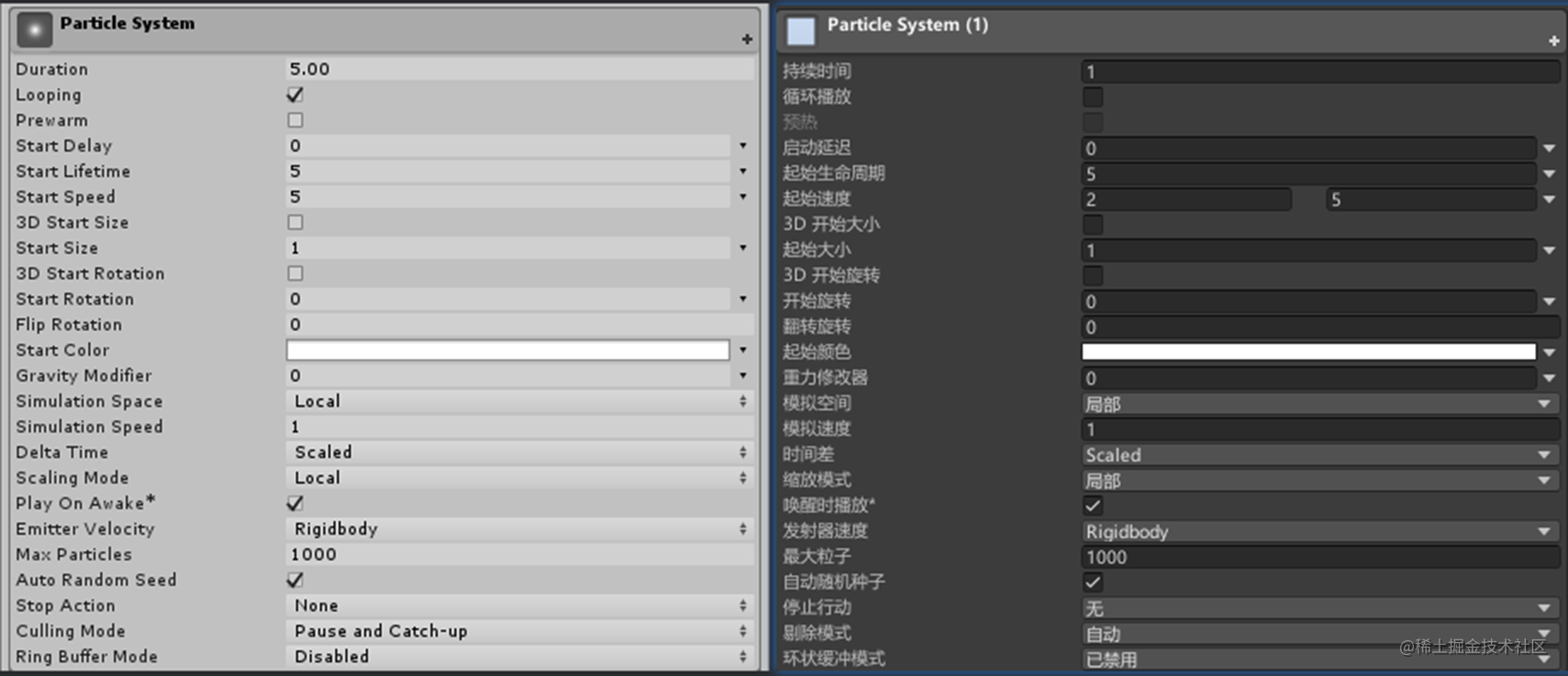
Particle basis (Particle System) Main module properties
Duration- The duration of the : Represents the of particles launch Length of time , If I check that Looping attribute , This value will have no effect , Whatever the duration 2 second 3 second 4 Seconds or seconds , It's all a cycle, that is, it's always launched .
Looping- Cyclic launch cycle 【Duration】: Indicates that the current particle is in 【Duration The duration of the 】 After the launch time in the attribute is over, restart and keep repeating .
Prewarm- preheating : Only Looping Effective at startup , If you don't check it, the particles will be displayed from nothing by default when you run the project , From the periodic Start state perform Looping, If you check the , Running the project will directly see the particles , That is, from a period of End state perform Looping.
Start Delay- Start delay : If not for 0, The particles start emitting after a specified delay of seconds , It can be a constant , It can also be a random value . If 【Prewarm- preheating 】 Activate , This value is not available .
Start Lifetime- Start life cycle : The length of time a particle exists after it is emitted , In seconds , When they arrive, they die , All can be a constant , Each can also be a random value .
Start Speed- Initial speed : It can be a constant , Each can also have a random different value .
3D Start Size- Control particle size : If you check the , Can be controlled separately x Axis y Axis z The size of the shaft , Each particle magnifies , The default is 1, When you operate, you find x and y It has an intuitive effect ,z Modification cannot be seen by naked eyes , In fact, most particle effects are 2D We just need x and y,z Use... In special cases , I remember mesh In the model
Start Size- The initial size of the particle : and 【3D Start Size】 identical , This is 2D Of ,x and y Scale proportionally ,【3D Start Size】 yes xyz Can scale different values .【Start Size】 and 【3D Start Size】 Mutually exclusive .
3D Start Rotation-3D rotate : After activation , Controllable xyz Different rotation values , By default, no effect can be seen , When your particles are irregular (3D Mesh particles ) You can see it with the naked eye .
Start Rotation-2D rotate :2D The rotation angle of the plane , A positive number is clockwise rotation , A negative number is a counterclockwise rotation , It can be an interval random value , and 【3D Start Rotation】 Properties are mutually exclusive .
Flip Rotation- Flip and rotate : Input 0 to 1 Between the value of the , The larger the value, the more you flip ,1 Represents flipping all , give an example 【Start Rotation】 Attribute rotates the particle clockwise 60 degree , If 【Flip Rotation】 by 0.5, Then change the particle system to produce half of all particles 60 degree , Half of it is -60 degree , If it is 1, Then all particles are -60 Degree of rotation . This attribute also applies to 【3D Start Rotation】.
Start Color- Initial color : Set the starting color of each particle , It can be a fixed color or a random number of colors , It can be a random color with a gradient interval , It can also be a random color with multiple gradient intervals .
Gravity Modifier - Gravity modifier : The value is 0 Turn off particle gravity , If it's not zero , Calculation method of particle gravity 【 Enter the number multiplied by Edit > Project Settings > Gravity Set the value of the ( Default Y The axis is -9.8)】. example Gravity Modifier The value is 2, Then the particle's gravity is 2*(-9.8)=-19.6.
Simulation Space- Simulation space : Controls whether the moving position of particles is relative to the parent layout or to the world . There are three optional values ( Local - The world - Customize ). Local represents when you move a particle system object , All the particles of the object will move at the same time , The world represents when you move a particle system object , The emitted particles remain in the coordinate position in the scene world , New particles will be emitted at the position you moved . Custom you can create a belt Transform Of GameObject, Move the entire particle system , The generated particles will be customized Transform When the reference fits the coordinates . For example, fire trajectory movement has Mars emission ,Simulation Space choice ( The world ) More appropriate .
Simulation Speed- Simulation speed : Zoom adjusts the playback speed of the entire particle system . The attribute value is multiplied by 【Start Speed】 The attribute value is the final velocity of the particle .
Delta Time- Incremental time : There are two options Scaled and Unscaled, choice Scaled Then use Edit>Project Settings>Time The value in ,Unscaled The representative is not under his control , In the game scene, it is used by default Scaled, In the suspension scenario, for example, round based suspension ,RPG Pause the pop-up character attribute package and other windows, such as particle effect , Use Unscaled.
Scaling Mode- Zoom mode : Three values are available for selection Hierarchy-Local-Shape. The default is Local, Scaling is the particle size of the particle system , If the particle system Position All for 0 With parent , Scaling the parent has no effect , If the particle system Position It's not for 0 And has a parent , Scaling the parent only affects the position of the particle system , Does not affect individual particle sizes .
If 【Scaling Mode】 The choice is Hierarchy, The particle system scales and Local identical , If the parent is scaled, it is displayed in Local Based on the function of , It also scales the individual particle sizes of the particle system .
If 【Scaling Mode】 The choice is Shape, With or without a parent , Scale yourself or scale the parent , Does not affect the size of individual particles , Only particle position or particle distance is affected .
other
author : Xiaokong and Xiaozhi Xiaokong
Reprint note - Be sure to indicate the source :https://zhima.blog.csdn.net/
This Taoist friend, please Step back ️, I watch you Extraordinary bearing , There is a king's domineering spirit in his speech , There will be a great achievement in the future !!! There is give the thumbs-up Collection Today I tell you , Have you ordered it , Your success in the future ️, I don't take a penny , If it doesn't work ️, Or come back to me .
边栏推荐
- Unity技术手册 - 生命周期旋转RotationOverLifetime-速度旋转RotationBySpeed-及外力
- What is 5g? What can 5g do? What will 5g bring in the future?
- 2022-2028 global DC linear variable differential transformer (LVDT) industry survey and trend analysis report
- 2022-2028 global proton exchange membrane hydrogen electrolyzer industry survey and trend analysis report
- Lecture 14 of the Blue Bridge Cup -- number theory [example]
- Flutter 網絡請求封裝之Dio(Cookie管理、添加攔截器、下載文件、异常處理、取消請求等)
- 聊聊Adapter模式
- Raspberry PI (bullseye) replacement method of Alibaba cloud source
- 2022-2028 global variable frequency compressor technology industry research and trend analysis report
- Analysis report on demand and investment forecast of global and Chinese flame retardant hydraulic oil market from 2022 to 2028
猜你喜欢

2022-2028 global TFT touch screen industry research and trend analysis report

Talk about adapter mode
使用EAST ocr遇到的坑解决方法(编译lanms)

2022爱分析· IT运维厂商全景报告
2022-2028 global selective laser sintering service industry research and trend analysis report

Oracle - 基本入门
[invitation letter] on March 4, the platform enabled digital intelligence Innovation -- UFIDA BiP PAAS cloud platform IUAP digital intelligence hundred cities forum · Jinan Station
![Lecture 14 of the Blue Bridge Cup -- number theory [exercises]](/img/96/0971909c8bf25820c2d4f520bb83fb.jpg)
Lecture 14 of the Blue Bridge Cup -- number theory [exercises]

Yyds dry goods inventory CEPH installation visual dashboard

Ribbon core ⼼ source code analysis
![[invitation letter] on March 4, the platform enabled digital intelligence Innovation -- UFIDA BiP PAAS cloud platform IUAP digital intelligence hundred cities forum · Jinan Station](/img/99/802b45296a96e866e9d16fa7017d31)
随机推荐
在线CRUDhasone关联查询报错Unabletouseinternalvariable:List
EVC, VVC, lcevc test: how about the performance of the latest MPEG codec?
TLog 助力盘古框架实现微服务链路日志追踪
Zhihu Gaozan: what ability is important, but most people don't have it?
HotSpot JVM 「01」类加载、链接和初始化
Three layer architecture + routing experiment
ES7/ES9 -- 新特性与正则
Facing the "industry, University and research" gap in AI talent training, how can shengteng AI enrich the black land of industrial talents?
哪些PHP开源作品值得关注
c语言与数据库的创建使用
What should it personnel over 35 years old do if they are laid off by the company one day?
华为云SRE确定性运维专刊(第一期)
2022-2028 global SiC igniter industry research and trend analysis report
2022-2028 global TFT LCD touch screen industry research and trend analysis report
2022-2028 global RBI platform industry research and trend analysis report
2022-2028 global carbon fiber unidirectional tape industry research and trend analysis report
Does jQuery cache any selectors- Does jQuery do any kind of caching of “selectors”?
Basic concepts of processor scheduling
Report on development status and prospects of global and Chinese coating industry strategic planning proposal 2022-2028
How to design a complex business system? From the understanding of domain design, cloud native, micro service, and middle platform