当前位置:网站首页>微信小程序轮播图怎么自定义光标位置
微信小程序轮播图怎么自定义光标位置
2022-06-24 18:50:00 【亿速云】
微信小程序轮播图怎么自定义光标位置
本篇内容介绍了“微信小程序轮播图怎么自定义光标位置”的有关知识,在实际案例的操作过程中,不少人都会遇到这样的困境,接下来就让小编带领大家学习一下如何处理这些情况吧!希望大家仔细阅读,能够学有所成!
如图
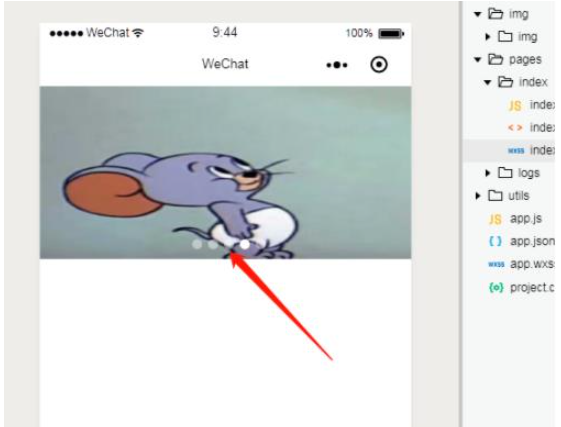
轮播图的光标可以用定位来改变上下左右的位置
wxml:
<!--start banner --><swiper class='home-swiper' autoplay='true' bindchange='changDot' interval='4000'> <!-- 设置自动播放,切换间隔时间--> <swiper-item wx:for="{{slider}}" wx:for-index="index" wx:key="slider"> <image src='{{item.img}}'></image> </swiper-item></swiper><!-- 轮播图光标 --><view class="dots"> <block wx:for="{{slider}}" wx:key="slider"> <view class="dot {{index == swiperCurrent?'actives':''}}"></view> </block></view><!-- end banner -->wxss:
/* 轮播图图片尺寸 */ .home-swiper { width: 100%; height: 350rpx; position: relative;} .home-swiper image { width: 100%; height: 100%;} /* 轮播图指示点 */ .dots { display: flex; flex-direction: row; position: absolute; top: 311rpx; width: 100%; height: 50rpx; justify-content: center;} .dots .dot { width: 20rpx; height: 20rpx; /* background-color: #333; */ /* border: 1rpx solid #e8672e; */ margin-left: 12rpx; background: #fff; border-radius: 20rpx; /* transform: all 0.6; */ opacity: 0.44;} /* 调用的css效果 */ .dots .actives { background-color: #fff; opacity: 1;}js:
Page({ /** * 页面的初始数据 */ data: { swiperCurrent: 0, slider :[ {'img':'/img/img/1.jpg'}, { 'img': '/img/img/1.jpg' }, { 'img': '/img/img/1.jpg' }, { 'img': '/img/img/1.jpg' }, { 'img': '/img/img/1.jpg' } ] }, // 轮播图下标 changDot(e) { this.setData({ swiperCurrent: e.detail.current }); }, /** * 生命周期函数--监听页面加载 */ onLoad: function(options) { }, /** * 生命周期函数--监听页面初次渲染完成 */ onReady: function() { }, /** * 生命周期函数--监听页面显示 */ onShow: function() { }, /** * 生命周期函数--监听页面隐藏 */ onHide: function() { }, /** * 生命周期函数--监听页面卸载 */ onUnload: function() { }, /** * 页面相关事件处理函数--监听用户下拉动作 */ onPullDownRefresh: function() { }, /** * 页面上拉触底事件的处理函数 */ onReachBottom: function() { }, /** * 用户点击右上角分享 */ onShareAppMessage: function() { }})“微信小程序轮播图怎么自定义光标位置”的内容就介绍到这里了,感谢大家的阅读。如果想了解更多行业相关的知识可以关注亿速云网站,小编将为大家输出更多高质量的实用文章!
边栏推荐
- JDBC writes Chinese garbled code to the database
- 实时渲染:实时、离线、云渲染、混合渲染的区别
- Interpreting harmonyos application and service ecology
- Volcano devient l'ordonnanceur de lots par défaut Spark
- UnityShader 世界坐标不随模型变化
- The verifiable certificate of geoscience remote sensing industry
- Navigator object
- Necessary fault handling system for enterprise network administrator
- Apifox与其他接口开发工具的博弈
- System design idea of time traceability
猜你喜欢
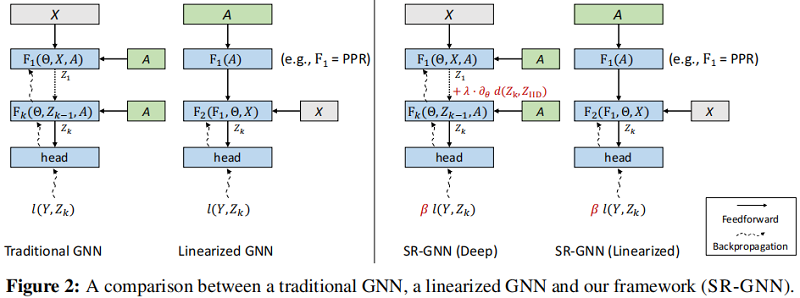
Sr-gnn shift robot gnns: overlapping the limitations of localized graph training data
论文解读(SR-GNN)《Shift-Robust GNNs: Overcoming the Limitations of Localized Graph Training Data》
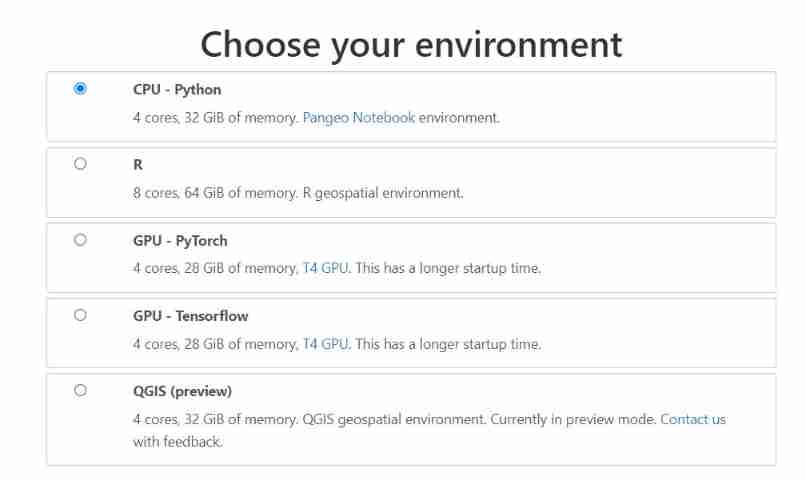
Microsoft planetary computer (MPC) platform introduction, registration and comparison

three.js创建的基础框架

【Leetcode】旋转系列(数组、矩阵、链表、函数、字符串)

Microservice system design -- data model and system architecture design

Conception de systèmes de micro - services - construction de sous - services

Air pollution gas satellite data download tutorial

Do you have all the basic embedded knowledge points that novices often ignore?

Introduction and tutorial of SAS planet software
随机推荐
网络安全审查办公室对知网启动网络安全审查
Volcano成Spark默认batch调度器
The sharp sword of API management -- eolink
JS local storage
Interprétation de la thèse (SR - gnn) Shift Robust GNNS: Overcoming the Limits of Localized Graph Training Data
Dataworks development ODPs SQL development production environment automatic completion of ProjectName
论文解读(SR-GNN)《Shift-Robust GNNs: Overcoming the Limitations of Localized Graph Training Data》
【Leetcode】旋转系列(数组、矩阵、链表、函数、字符串)
How to perform power regression in R
优维低代码:构件渲染子构件
NFT pledge liquidity mining system development technology
DOM (document object model)
请问一下2.2.0版本支持动态新增mysql同步表吗
Introduction to alos satellite
制造业项目MDM主数据项目实施心得
Nokov motion capture system makes it possible for multi field cooperative UAV to build independently
JS string method
上位机与MES对接的几种方式
Starring V6 platform development take out point process
Freeswitch使用originate转dialplan