当前位置:网站首页>NPM common commands
NPM common commands
2022-06-29 09:05:00 【CamilleZJ】
npm The full name is Node Package Manager, It's with NodeJS Package management and distribution tools installed together , It's very convenient for JavaScript Developers download 、 install 、 Upload and manage installed packages .( install node You can use it )
Package.json Attribute specification
name - Package name .
version - Version number of the package .
description - Package description .
homepage - Bao's official website url .
author - The name of the author of the bag .
contributors - Name of other contributors to the package .
dependencies - Dependency package list . If the dependency package is not installed ,npm Will automatically install the dependency package in node_module Under the table of contents .
repository - The type of place where the package code is stored , It can be git or svn,git Can be found in Github On .
main - main Field specifies the main entry file of the program ,require('moduleName') It will load the file . The default value of this field is... Under the module root directory index.js.
keywords - keyword
bugs:bug Submit the address
license: certificate
scripts: Script
dependencies: Production environment dependent package
devDependencies: Packages since the local development environment
among name and version Is a must , And when the package is released name Is the only one. , If you have already published a document with the same name, you can no longer publish it , A library with the same name can only be updated
Semantic version number It is divided into X.Y.Z Three place , They represent the major version number 、 Minor version number and patch version number . When the code changes , The version number is updated according to the following principles .
- If it's just a fix bug, You need to update Z position .
- If it's new , But downward compatible , You need to update Y position .
- If there's a big change , Down incompatibility , You need to update X position .
npx
npm from 5.2 version , Added npx command .
Node Bring their own npm modular , So you can use it directly npx command . In case it doesn't work , You have to install it manually .
npm install -g npxCall the module installed by the project
npx The main problem to be solved , Is to call the module installed inside the project . such as , Test tools are installed inside the project Mocha.
npm install -D mocha Generally speaking , call Mocha , Only in project scripts and package.json Of scripts In the field , If you want to call from the command line , It has to be like this .
#  Execute in the root directory of the project
node-modules/.bin/mocha --version
npx To solve this problem , Make the modules installed inside the project more convenient to use , Just call it like this .
npx mocha --versionnpx It's very simple , When it's running , Will arrive node_modules/.bin Path and environment variables $PATH Inside , Check if the command exists .-- There is no need to install in the call first
because npx Will check the environment variables $PATH, So system commands can also be called .
#  Equate to  ls
npx ls
Be careful ,Bash The built-in command is not in $PATH Inside , So it can't be used . such as ,cd yes Bash command , So you can't use npx cd.
One 、npm version management
View version
npm -vAn updated version
$ sudo npm install npm -g
/usr/local/bin/npm -> /usr/local/lib/node_modules/npm/bin/npm-cli.js
[email protected] /usr/local/lib/node_modules/npm


// Window  The system can use the following command :
npm install npm -g
Two 、 initialization 、 lookup 、 install 、 to update 、 uninstall 、 Release Node modular
Local installation
- 1. Put the installation package in ./node_modules Next ( function npm The directory where the command is located ), without node_modules Catalog , Will be executed in the current npm Command directory to generate node_modules Catalog .
- 2. Can pass require() To introduce locally installed packages .
Global installation
- 1. Put the installation package in /usr/local Next or you node Installation directory .
- 2. It can be used directly in the command line .
If you want to have both functions , You need to install it or use it in two places npm link.
Short command description :
- -g: Global installation (global),-g or --global, Do not set up local installation (local)
- --save: or -S, Installation package information will be added to package.json Medium dependencies( Dependence of production stage )
- --save-dev: or D, Installation package information will be added to package.json Medium devDependencies( Development phase dependencies , That is, the dependencies that will not be used after the launch )
- -i:install
1、 Project initialization
npm init // Some information will be entered or selected according to the prompt , To perfect package.json Field information in
npm init -y  // Default generation package.json, No user is required to select or enter
init The project will generate package.json file
2、 install (i)
npm install [<package_name>][@<version>] [-g] [--save][-dev]

eg:
npm install gulp
npm install gulp -g
npm install [email protected]
npm install gulp --save  or  npm install gulp -S
npm install gulp --save-dev  or  npm install gulp -D

// Multiple can be installed at one time :npm install  modular 1  modular 2  modular n --save
install After the project, there will be node_modules Folder
Check out the module ( package ) Information about :@version, If you don't know, you can npm View the package information on the official website or directly command to view
npm info <package_name>3、 to update (up, upgrade)
npm update [<package_name>][@<version>] [-g] [--save][-dev]4、 uninstall (remove、rm、r, un、unlink)
npm uninstall [<package_name>][@<version>] [-g] [--save][-dev]5、 Search for (s、se、find)
Use this function to find the modules we need and their related module information ( Package name 、 describe 、 author 、 Update time 、 Latest version number 、 Key words and so on ), Here is the grammar :
npm search [<package_name>][@<version>] [-g] [--save][-dev]6、 Release
// Log in or sign up for , You need to enter a user name 、 password
npm adduser

// Release
npm publish [<package_name>]

// Undo a published version
npm unpublish <package_name>@<version>
Be careful : In general use npm Will modify the image , Because it's a foreign website , Download will be slow , But the image should be changed back when logging in , Otherwise, it will fail to log in
3、 ... and 、 View module information
1、 All modules installed
npm list/ls/la/ll [-g]

eg:
npm list
npm list -g --depth 0
2、 Module installation path
npm root [-g] // Global or local
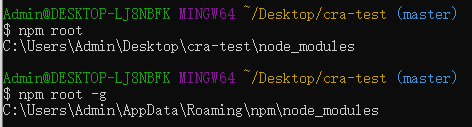
3、 Module information ( name 、 Version number 、 Dependency relationship 、Repo)
npm view <package_name> [package.json Properties in ]

4、 The browser jumps to the official document
npm docs <package_name>

eg: npm docs jquery // The browser automatically opens the official website document page
Four 、Config command
1、 change npm Global installation path
npm config set prefix < route >2、 change npm Mirror source
1) Use configuration :
npm config set registry <URL>

// Set the source of Taobao :
npm config set registry https://registry.npm.taobao.org
// Set back to the original source :
npm config set registry https://registry.npmjs.org
2) Use cnpm:
// Install first cnpm Tools
$ npm install -g cnpm --registry= Image source address
// Use cnpm Instead of npm
$ cnpm install  Module name
3) Use nrm( recommend ):
//1. Install first nrm Tools
$ npm install -g nrm

//2. View currently available mirror sources
$ nrm ls

//3. Switch npm Source
$ nrm use  Image source name
5、 ... and 、 Other common commands
1、 help
npm help //  help
npm -h //  Quick search for the details of a command syntax
2、 Verify cache
npm cache clean

// Force clear cache
npm cache clean -f  or  npm cache clean --force
3、 Clear cache
// Verify the validity and integrity of the cached data , Clean up garbage data
npm cache verify
4、Script
npm run <command>

eg: npm run start
npm run And then package.json in "script" Properties
"script": {
    " command ": " Execute code ",
    ...
}
边栏推荐
- Let you know today that the passing rate of the PMP Exam is 97%, is it believable
- 二手交易平台碳减排,有了评估标准
- Verilog expression
- Verilog equivalent operator
- 成员内部类、静态内部类、局部内部类
- Intelligent hardware EVT DVT PVT mp
- 闭关修炼(二十四)浅入了解跨域问题
- Leetcode (142) - circular linked list II
- 2022年7月产品经理认证招生简章(NPDP)
- js for in循环 for of循环的区别以及用法
猜你喜欢

微信小程序判断url的文件格式

2022年7月产品经理认证招生简章(NPDP)

2022第六季完美童模 合肥赛区 决赛圆满落幕
La finale de la zone de compétition Hefei de la sixième saison 2022 a été couronnée de succès.
npm常用命令

航芯开发板&调试器

Unity C # e-learning (12) -- protobuf generation protocol

Debug H5 page -vconsole

2022 Season 6 perfect children's model Haikou competition area trial successfully concluded

Let you know today that the passing rate of the PMP Exam is 97%, is it believable
随机推荐
Analysis of c voice endpoint detection (VAD) implementation process
DevOps到底是什么意思?
打印服务IP设置方案
操作系统产品密钥查看方法
CDGA|交通行业做好数字化转型的核心是什么?
微信小程序wx.navigateBack返回上一页携带参数
MySQL row column conversion example
闭关修炼(二十二)session和cookie原理
Product manager certification enrollment brochure (NPDP) in July 2022
今天让你知道PMP考试通过率达97%,可信不可信
闭关修炼(二十五)基础web安全
微信小程序用户拒绝授权地理位置信息再次调起授权窗口
io流的总结
首次触电,原来你是这样的龙蜥社区 | 龙蜥开发者说第8期
uniapp引入组件不生效解决方法
微信小程序分享页面,分享到朋友圈
MYSQL行转列例子
“国防七校”之一西工大遭境外网络攻击
The difference and usage of JS for in loop and for of loop
单例模式的理解