当前位置:网站首页>[wechat applet] project practice - lottery application
[wechat applet] project practice - lottery application
2022-07-27 18:57:00 【InfoQ】
- Complete the necessary basic knowledge of wechat applet development in the previous chapter , From the beginning of this chapter, you can enter the complete application development . Many large applications are mainly through App To achieve , The definition of wechat applet is mainly the application of tools , The purpose is to use and go . The lottery application fully conforms to this feature , So this chapter will implement a lottery type applet .
- UI Use of components
- Use of forms
- The local store
1. The project starts
- Add lottery items and content items
- Delete the lottery items and their content items
- draw
- The local store
- Input verification
- User interaction tips
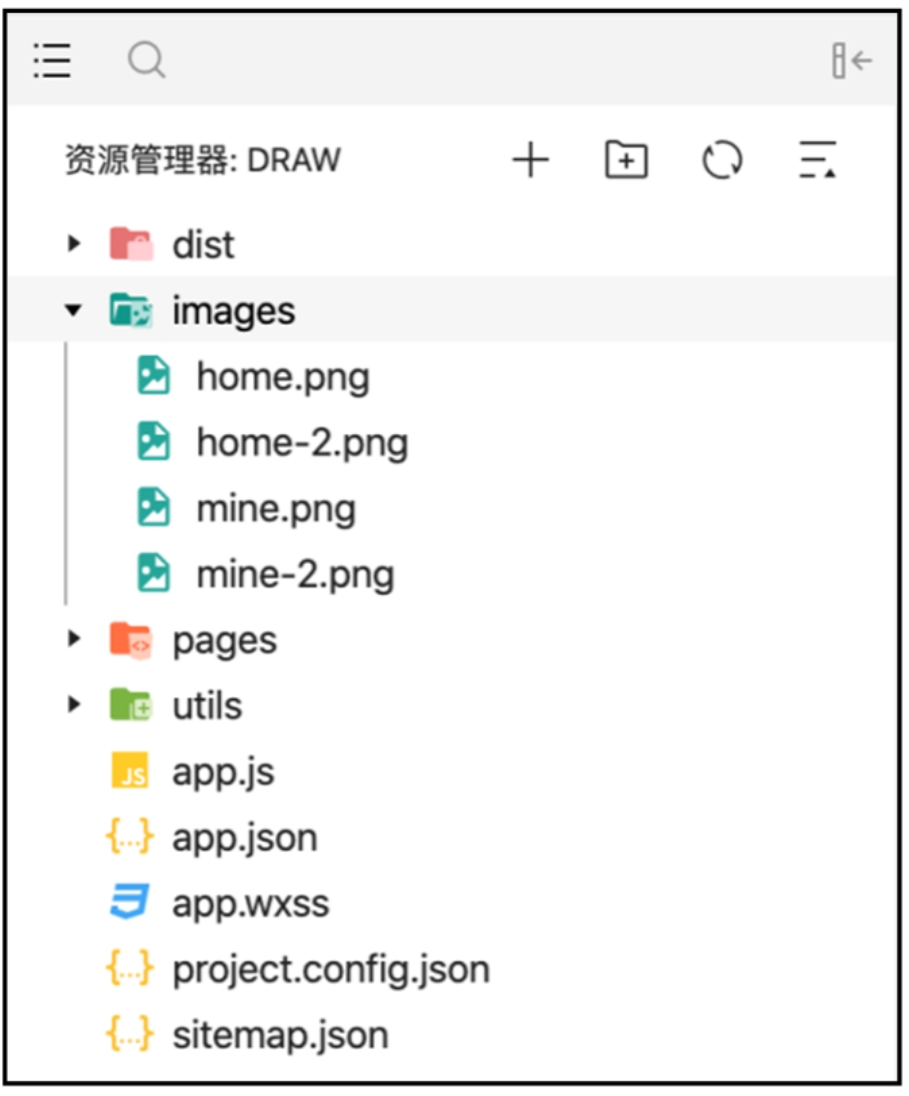
app.jshome、mine、edit-item、draw-viewapp.json、app.wxss// app.json
·..
"tabBar":{
"selectedColor":"#2C8BEF""list": [
{
"selectedIconPath":"images/home2.png","iconPath":"images/home.png","pagePath":"pages/home/home","text":" home page "},{
"selectedIconPath":"images/mine2.png","iconPath":"images/mine.png","pagePath":"pages/mine/mine","text":" my "
}]
},
·..
// app.wxss page {
background-color: #EFEFEF;

2. Project development
2.1 Homepage development
// home.json
"navigationBarTitleText":" home page ""usingComponents":
{
"i-button":"/dist/button/index",
"i-cell-group":"/dist/cell-group/i ndex","i-cell":"/dist/cell/index",
"i-modal":"/dist/modal/index"
}
// home.wxml
<i-button type="primary" bind:click="addItem"> Add options </i-button>
<i-cell-group><i-cell
wx:for="{{listData}}" wx:for-item="item" wx:key="item"
data-item="{{item}}" title="{{item}}" bindtap="draw"
bindlongpress="delete" is-link></i-cell></i-cell-group>
<i-modal title=" Delete confirmation " visible="{{ visible }}" actions="{{ actions }}" bind:click="realDelete">
<view> Cannot recover after deletion </view></i-modal>
// home.js
// pages/home/home.js
Page({ data:{
listData:[],
currentItem:'' actions: [{
name:' Cancel '},
name:' Delete ',
color:'#ed3f14', loading:false}
],
visible:false},
onShow: function () {
this.setData({
listData:wx.getStorageSync('homeList')})},
// Plus options addItem() {
wx.navigateTo({
url:'../edit-item/edit-item',
},
// Enter the lottery page draw(e){
wx.navigateTo({
url:'../draw-view/draw-view?item='+ e.currentTarget.dataset.item
},
// Delete sub option popup delete(e){
console.log(e) this.setData({
visible: true,
currentItem: e.currentTarget.dataset.item});
// Delete sub options
realDelete({detail}){
if (detail.index=== 1) {
var newArray=[];
for (const item of this.data.listData){
if (item!=this.data.currentItem){ newArray.push(item);
}
}
this.setData({
listData: newArray
1
wx.setStorageSync('homeList',this.data.listData)
wx.removeStoraqeSync(this.data.currentItem) wx.showToast({
title:' Delete successful ',
1)
this.setData({
visible: false
!({
})
2.2 New page development
// edit-item.json{
"navigationBarTitleText":" Options ","usingComponents":{
"i-panel":"/dist/panel/index","i-input":"/dist/input/index","i-button":"/dist/button/index"
/
// edit-item.wxml
<i-panel title="{{title}}">
<i-input
value="{{itemName}!"
placeholder=" Please enter the option "
bind:change="changeItem"/></i-panel>
<i-button bind:click="submit" type="primary"> Submit </i-button>
// edit-item.js
// pages/edit-item/edit-item.js Page({
data:{
title:' Add options ',
saveKey:'homeList', itemName:''
},
onLoad:function (options){ if (options.item){ this.setData({
title:' add to "'+options.item+'" Sub options for ', saveKey:options.item})}
},
changeItem(e){ this.setData({
itemName: e.detail.detail.value})
},
// Submit
submit() {
if (this.data.itemName.length===0) { wx.showToast({
title:' Content too short ', icon:'none'})
} else if (this.data.itemName.length >10){ wx.showToast({
title:' The content is too long ', icon:'none'})
}else {
var items;
var key= this.data.saveKey; if (wx.getStorageSync(key)) {
items=wx.getstorageSync(key); for (const key of items) {
if (key== this.data.itemName){ wx.showToast({ title:' Already exists ', icon:'none'})
returni
}
}else {
items = [];
items.push(this.data.itemName);
wx.setStorageSync(key,items); wx.showToast({
title:' Saved successfully ',})
setTimeout(() => {
wx.navigateBack()},1000)
}})


2.3 Lottery page development
// draw-view.json
"navigationBarTitleText":" draw ","usingComponents":{
"i-button":"/dist/button/index"
"i-cell-group":"/dist/cell-group/index","i-cell":"/dist/cell/index","i-modal":"/dist/modal/index"
// draw-view.wxml
<i-button type="primary" bind:click="addItem"> Add sub options </i-button><i-button type="success" bind:click="draw"> draw </i-button>
<i-cell-group><i-cell
wx:for="{{listData}}" wx:for-item="item" wx:key="item"
data-item="{{item}}" title="{{item}}"
bindlongpress="delete"></i-cell></i-cell-group>
<i-modal title=" Delete confirmation "visible="{{ visible }}" actions="{{ actions }}"
bind:click="realDelete">
<view> Cannot recover after deletion </view></i-modal>
// draw-view.js
//pages/draw-view/draw-view.js Page({
data:{
listData:[], lastItem:''
currentItem:'', actions:[{
name:' Cancel '},
name:' Delete ',
color:'#ed3f14', loading:false}
],
visible:false},
onLoad:function(options){
this.setData({
lastItem: options.item
wx.setNavigationBarTitle({
title: options.item,})},
onShow:function() {
this.setData({
listData:wx.getStorageSync(this.data.lastItem)})},
// Add sub options addItem() {
wx.navigateTo({
url:'../edit-item/edit-item?item='+ this.data.lastitem
})},
// draw draw(){
if (this.data.listData.length == 0) { wx.showToast({
title:' No data ', icon:'none'})
} else {
const randomNumber=this.getRandomNumber(0,
this.data.listData.length);
wx.showToast({
title:this.data.listData[randomNumber]})
},
// Get random numbers
getRandomNumber(begin,end){
return Math.floor(Math.random() * (end-begin))+ beging},
// Delete sub option popup delete(e){
this.setData({
visible: true,
currentItem: e.currentTarget.dataset.item
});
},
// Delete sub options
realDelete({detail}) {
if (detail.index=== 1) {
var newArray=[];
for (const item of this.data.listData){
if (item!= this.data.currentItem){
newArray.push(item);
)}
this.setData({
listData: newArray})
wx.setStorageSync(this.data.lastItem,this.data.listData); wx.showToast({
title:' Delete successful ',})}
this.setData({
visible:false});}
})

2.4 My page development
// mine.json{
"navigationBarTitleText":" my ",
"usingComponents":{
"i-card":"/dist/card/index"
"i-button":"/dist/button/index"
"i-cell-group":"/dist/cell-group/index""i-cell":"/dist/cell/index","i-modal":"/dist/modal/index"
// mine.wxml
<view class="view-margin">
<i-card
title="{{userInfo.nickName}}"
extra="{{userInfo.country}}"
thumb="{{userInfo.avatarUrl}}">
<!-- <view slot="content"> user name : Zhang San </view> --></i-card>
</view>
<view class="view-margin"><i-cell-group><i-cell
title=" Empty data "
bindtap="clearData" is-link></i-cell><i-cell
title=" Feedback "
bindtap="callBack" is-link></i-cell></i-cell-group></view>
<i-button
wx:if="{{userInfo.nickName==' Not logged in '}}" type="primary"
open-type="getUserInfo"
bind:getuserinfo="login"> Sign in </i-button>
<i-button
wx:if="{{userInfo.nickName!=' Not logged in '}}" type="error"
bind:click="logout"> Log out </i-button>
<i-modal
title=" Empty confirm "
visible="{{ visible }}" bind:ok="delete"
bind:cancel="cancel">
<view> You cannot recover after emptying </view></i-modal>
// mine.wxss.view-margin{
margin-top:16px;}
// mine.js Page({
data:{
userInfo:{
nickName:' Not logged in ', country:'-',
avatarUrl:'https://i.loli.net/2017/08/21/599a521472424.jpg
visible:false
onLoad(options){
if (wx.getStorageSync('userInfo')){ this.setData({
userInfo: wx.getStorageSync('userInfo')
})
},
clearData(){
this.setData({ visible:true
},
delete() {
const array=wx.getstorageSync('homeList') for (const item of array) {
wx.removeStorageSync(item)}
wx.removeStorageSync('homeList') this.setData({ visible:false
cancel() {
this.setData({ visible:false})},
login(e){
if (e.detail.userInfo){
this.setData({
userInfo: e.detail.userInfo})
wx.setStorageSync('userInfo',e.detail.userInfo)} else {
wx.showToast({
title:' Login failed ', icon:'none'})
}
},
logout() {
wx.removeStorageSync('userInfo'y this.setData({
userInfo:{
nickName:' Not logged in ', country: '-',
avatarUrl:"https://i.loli.net/2017/08/21/599a521472424.ipq
}
})}})


3. Summary
边栏推荐
- 飞机大战碰撞检测
- PyGame aircraft war game background implementation
- Filebeat.yml configuration file about the configuration of multiple services
- Mini washing machine touch chip dlt8ma12ts Jericho
- What should I do if MySQL master-slave replication data is inconsistent?
- Use mobaxtermto establish a two-tier springboard connection
- npm 基本使用
- JDBC MySQL 02 data access and Dao mode
- LeetCode 刷题 第三天
- ridis命令笔记
猜你喜欢

全自动吸奶器芯片-DLTAP703SD

MySQL 04 高级查询(二)

Uni app form submit button send request

Product name fuzzy search:

Intelligent insomnia therapeutic instrument product dlt8p68sa Jericho
Full automatic breast pump chip dltap703sd

JDBC-MySql 01 JDBC操作MySql(增删改查)

USB充电式暖手宝芯片-DLTAP602SC-杰力科创

MySQL 03 advanced query (I)

LeetCode 刷题 第二天
随机推荐
Leetcode brushes questions the next day
Interceptor拦截器
Baidu map eagle eye track service
MongoDB
V-bind and V-for
Interviewer: what do you think is your biggest weakness?
多功能无线遥控艾灸仪芯片-DLTAP703SD
What should I do if MySQL master-slave replication data is inconsistent?
兆骑科创海内外引进高层次人才,创新创业项目对接
LED带风扇护眼学习台灯触摸芯片-DLT8S12A
Bathroom with demister vanity mirror touch chip-dlt8t10s
js实现简易表单验证与全选功能
Uni app traversal array rendering data vertical rendering
C file and folder input / output stream code
Order submission
【微信小程序】项目实战—抽签应用
npm的身份证和依赖
Aircraft battle with enemy aircraft
Led learning eye protection table lamp touch chip-dlt8t10s-jericho
express get/post/delete...请求