当前位置:网站首页>Devtools implementation principle and performance analysis practice
Devtools implementation principle and performance analysis practice
2022-06-28 07:03:00 【Vivo Internet technology】
One 、 introduction
from 2008 year Google Release the first version of Chrome after , Whole Web The development field seems to be injected with fresh blood , Gradually broken IE The era of a dominant family .Chrome and Firefox yes W3C Web A staunch supporter of standards , As the market share of these two open source browsers gradually increases , Ushered in the spring of developers . This ushered in a new division of labor —— Front end engineer frontend-engineer, Front end engineers promote Web The application boom , Powerful debugging tools are essential .Google On the basis of open source, we launched DevTools, Widely praised by web developers , Then it also promoted Chrome Success in business .
This paper analyzes Chrome Of DevTools Technology realization of , Especially in the implementation part of the browser kernel , To show the secrets behind this development tool loved by thousands of developers . This article is suitable for front-end developers 、 Interested in developing Hybrid Apply debugging tools or rewrite webdriver Realize to Chrome or WebView Control application engineer .
notes : All code analysis in this article , be based on Android Chromium 87.0.4280.141 Version analysis . Because my team is mainly engaged in Android Platform Blink Kernel development , Therefore, the analysis process mainly focuses on the mobile terminal , Other platforms are just the difference of data path , The implementation principle is not different .
Two 、 History of Web debugging tools
2006 Years ago , This belongs to IE Time , stay IE Written by the times JavaScript Debugging means of code , Mainly by window.alert() Or output the debugging information to the web page to analyze the logic bug. This hard debug The means of , No less than the bottom development of the system , Often a small problem takes a whole day , Development efficiency is very low .
2006 year 1 month ,Apple Of WebKit The team released the first version of Web Inspector, The function of this version is relatively simple , You can only view DOM Inheritance of nodes , Which nodes are applied CSS The rules of . However, this version has laid the prototype of Web debugging tool for many years to come , It's epoch-making .

WebKit The team's iteration speed is very fast ,2006 year 6 In June, a heavyweight feature was released ,JavaScript Breakpoint debugging function , At this time, we already have the prototype of developer artifact .
At the same time, the open source camp has a Firefox Plug in for Firebug, Focus on Web Development debugging , Laid the foundation for modern DevTools Of Web UI Layout . Earlier versions supported JavaScript Debugging of ,CSS Box Visual display of model , Support HTTP Archive Performance analysis and other excellent features , Later, DevTools Refer to the function and product positioning of this plug-in .2016 year Firebug Integrate to Firefox Built in debugging tools ,2017 year Firebug Stop updating , The next generation of artifact comes to an end .
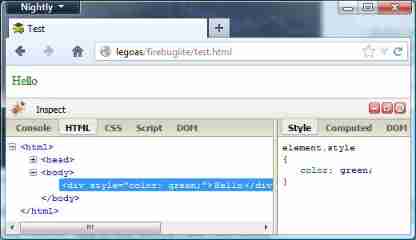
At this time, there is a fierce role in the open source industry Google The team , be based on WebKit Join browser development , To launch the Chrome With 「 Security 、 Fast 、 A more stable 」 Attracted a lot IT Geek attention , At the same time, developer tools , Google Absorb the excellent functions of various debugging tools , Launched today's protagonist DevTools.
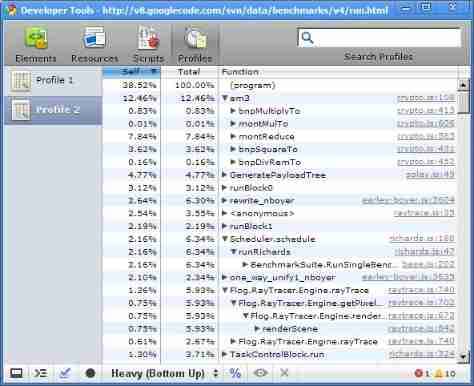
Earlier versions now look a little crude , But this is a work more than ten years ago . Support DOM + CSS see , View resource load analysis , Script debugging and performance debugging . Now commonly used in development DevTools The function of , These are the basic functions .
In that era DevTools, Basically following Firebug The function of , It's just the difference in the way of interaction .2007 year Steve Jobs Released the first generation iPhone mobile phone ,Google We have launched Android mobile phone , The development of the Internet has come to the era of mobile Internet .DevTools At this point, we begin to surpass similar tools , Support remote real machine debugging .Chrome It's a multiprocess architecture ,DOM and JavaScript Is running in a child process , therefore DevTools The underlying implementation of , It is completely different from similar products .Chrome Our architects will DevTools The implementation architecture is adjusted to client-server Pattern , This architecture makes remote real machine debugging possible . In order to facilitate network data transmission ,Chrome Designed a set of data encapsulation protocol Chrome DevTools Protocal(CDP), For the next few years , The adjustment of this architecture shines brightly in the open source world .
yan Dahl be based on Chromium Of JavaScript virtual machine V8 Designed Node.js,Node.js The launch of the made JavaScript This kind of Web Scripting language out of the browser , Open the server programming 、 Desktop programming can use JavaScript The new situation of language . Depending on DevTools Of client-server Architecture and Node.js The number of developers is increasing ,DevTools Also quickly out of the circle ,Chrome Team in 2016 Support for Node.js Debugging of .DevTools From a Web Debugging tools , Evolved into JavaScript An important member of ecology , Help more developers develop more excellent code .Node.js Our ecology is inseparable from DevTools , Such as desktop development framework Electron、 Developer favorite editor Visual Studio Code 、 Front end architecture Vue.js、Facebook Open source Android Performance analysis tool Stetho etc. .
3、 ... and 、DevTools framework
DevTools yes client-server framework ,client It's user operated Web UI Interface , Be responsible for receiving user operation instructions , Then send the operation instructions to the browser kernel or Node.js Intermediate processing , And display the processing result data in Web UI On .server Started two types of services , A kind of HTTP service ; Another kind WebSocket service .
HTTP The service provides kernel information query capability . For example, get the kernel version 、 Get the list of debug pages 、 Start or close debugging .
WebSocket Services provide the ability to communicate real data with the kernel , be responsible for Web UI Distribution and processing of all operation instructions passed , And send the results back to Web UI To display .
The figure below shows Android DevTools The overall architecture diagram , From the left, developers pass Web UI Operation command initiated by , How to operate the command step by step , To the phone Browser Core(Browser Core function Chrome Application of browser kernel , such as Chrome browser 、Android WebView、NodeJs Application etc. ) The process of execution in .

Android The platform is cleverly used ADB forward Ability , It's solved PC Upper WebUI And Android In the cell phone Chrome Kernel connection problem . It is easy to realize the ability of remote debugging , Don't underestimate this realization , This will greatly improve the efficiency of front-end developers . Because the working environment of front-end developers , At present, it is basically in PC (Windows、Mac、Linux Collectively referred to as PC) Next , Through the realization of remote debugging ability , Let the development of mobile terminal realize what you see is what you get .
It is Chrome The team is based on network communication , As DevTools Underlying communication framework , For later Web The development team laid the foundation for a hundred flowers to bloom .TCP/IP It's the foundation of the Internet , No language or platform does not support TCP/IP Of .DevTools The selection TCP/IP Differences between platforms or systems are directly erased .
Chrome DevTools Protocol( abbreviation CDP) The launch of this set of open protocols , Once again will be DevTools The implementation of the , Truly cross platform .CDP The essence is a group of JSON Format data encapsulation protocol ,JSON Is a lightweight text exchange protocol , It can be parsed by any platform and any language . Because of this , Officially recommended support CDP There are nearly ten language libraries .Google Officially recommended Node.js edition Puppeteer , adopt Puppeteer Complete realization of CDP agreement , by Chrome The way of kernel communication is the same , Then the open source world successively launched several language versions of CDP Use library for . About CDP agreement , We'll talk more about... In a later chapter .

Chrome Architects through a high degree of abstraction , take DevTools The underlying architecture of is abstracted into TCP/IP and CDP Two parts , Laid down DevTools Cross platform and cross terminal capabilities . That year WebSocket The implementation scheme of is still in the draft stage ,Chrome Architects boldly adopt WebSocket The main protocol part of the debugging protocol is realized . Now it seems , Real time screenshots of pages used by developers , The interface displayed in the remote web page can be observed in real time , This real-time performance is based on WebSocket To provide . I also admire Chrome Architect's vision and design aura , It is their excellent ability , Bring web developers to new heights .

Four 、DevTools Communication protocol
Chrome DevTools Protocol( abbreviation CDP) This agreement consists of two parts HTTP and WebSocket,DevTools Of Web UI Send the control command to the browser kernel , The control command 、 Parameters and return values , It's all through CDP To encapsulate . When sending a command , from Web UI After packaging , adopt WebSocket To the browser kernel . After receiving the feedback result from the browser kernel , Then unpack according to the agreement , Distributed to the Web UI.

To analyze Web UI And Android Browser kernel communication process , You need to prepare the environment .
4.1 Environmental preparation
In order to access the data in the kernel , The browser kernel needs to be turned on DevTools Server ,PC Chrome and Android Chrome / WebView The opening mode of is slightly different .
PC Chrome Startup time , Add a startup parameter -remote-debugging-port=9222 , such DevTools Server Will listen on the local port , Can be directed to http://localhost:9222 launch HTTP / WebSocket request , Can get DevTools Data in .
about Android Chrome And WebView Slightly different , because WebView Debugging is not enabled by default , It needs to be opened manually on the client , To start Server.
// Android 4.4  above  WebView  To really use  Blink  kernel , Therefore, this version and above systems are required .
if (Build.VERSION.SDK_INT >= Build.VERSION_CODES.KITKAT) {

    WebView.setWebContentsDebuggingEnabled(true);
}
here Android Chrome / WebView It has been activated in the mobile phone Server, But in order to PC You can access , Need to use ADB The port forwarding capability of the tool .
ADB  Port forwarding
 You can use  forward  Command to set any port forwarding , Forward requests on a specific host port to other ports on the device . The following example sets the host port  6100  To the device port  7100  Forwarding :

adb forward tcp:6100 tcp:7100

 adopt  forward  You can get through to  PC  And  Android  The network between devices accesses each other
Android Chrome / WebView Use unix domain socket The establishment of a Server End , this socket The connector of is :
chrome_devtools_remote and webview_devtools_remote_ Respectively chrome and WebView The connector for .WebView The connection may be used by different applications WebView, So the process is adopted ID(PID) As a suffix to distinguish .
adb shell cat /proc/net/unix | grep "devtools_remote"
0000000000000000: 00000002 00000000 00010000 0001 01 528176 @chrome_devtools_remote
0000000000000000: 00000002 00000000 00010000 0001 01 276394 @webview_devtools_remote_23119
adopt ADB forward , take PC And Android Device access , Execute the following command :
#  stay  PC  Listen on  9222  port , Yes  localhost:9222  Your request will be forwarded to  android  On the device  webview_devtools_remote_23119  On
adb forward tcp:9222 localabstract:webview_devtools_remote_23119
thus , You can go to PC through 9222 To visit Android The debugging page in the device .
4.2 HTTP Protocol analysis
4.2.1 Get kernel version information
#  Use  curl  Tools ,GET http://localhost:9222/json/version
curl http://localhost:9222/json/version
{

   "Android-Package": "com.vivo.browser",
   "Browser": "Chrome/87.0.4280.141",
   "Protocol-Version": "1.3",
   "User-Agent": "Mozilla/5.0 (Linux; Android 8.1.0; vivo X20Plus A Build/OPM1.171019.011; wv) AppleWebKit/537.36 (KHTML, like Gecko) Version/4.0 Chrome/87.0.4280.141 Mobile Safari/537.36",
   "V8-Version": "8.7.220.31",
   "WebKit-Version": "537.36 (@9f05d1d9ee7483a73e9fe91ddcb8274ebcec9d7f)",
   "webSocketDebuggerUrl": "ws://localhost:9222/devtools/browser"
}
Return value from above , You can get the following information :
Android-Package, Use WebView The package name of the app .
Browser, The version number of the kernel .
Protocol-Version, by CDP Agreement version of , The current version is 1.3, from 1.0 Start , also 1.1、1.2 etc. .
User-Agent, Browser's UA Information .
V8-Version, What is used JavaScript Engine version number .
WebKit-Version, because Blink The kernel is based on WebKit 537.36 Version development , So there will be this version information .
webSocketDebuggerUrl, This is a WebSocket Debugging of URL.
4.2.2 Get a list of debuggable pages
#  Use  curl  Tools ,GET http://localhost:9222/json/list
curl http://localhost:9222/json/list
[ {

   "description": "{\"attached\":true,\"empty\":false,\"height\":1812,\"never_attached\":false,\"screenX\":0,\"screenY\":72,\"visible\":true,\"width\":1080}",
   "devtoolsFrontendUrl": "https://chrome-devtools-frontend.appspot.com/serve_rev/@9f05d1d9ee7483a73e9fe91ddcb8274ebcec9d7f/inspector.html?ws=localhost:9222/devtools/page/B86E67DEA526D5EEE83A170B1F62A72C",
   "faviconUrl": "https://mat1.gtimg.com/www/mobi/2017/image/logo/v0/192.png",
   "id": "B86E67DEA526D5EEE83A170B1F62A72C",
   "title": " Tencent network -QQ.COM",
   "type": "page",
   "url": "https://xw.qq.com/#news",
   "webSocketDebuggerUrl": "ws://localhost:9222/devtools/page/B86E67DEA526D5EEE83A170B1F62A72C"
}, {

   "description": "{\"attached\":false,\"empty\":true,\"never_attached\":true,\"screenX\":0,\"screenY\":0,\"visible\":true}",
   "devtoolsFrontendUrl": "https://chrome-devtools-frontend.appspot.com/serve_rev/@9f05d1d9ee7483a73e9fe91ddcb8274ebcec9d7f/inspector.html?ws=localhost:9222/devtools/page/3F9E05905F1919D563DF01BAEC64D2E4",
   "id": "3F9E05905F1919D563DF01BAEC64D2E4",
   "title": "about:blank",
   "type": "page",
   "url": "about:blank",
   "webSocketDebuggerUrl": "ws://localhost:9222/devtools/page/3F9E05905F1919D563DF01BAEC64D2E4"
} ]
Returned a JSON Array of , Each debug page occupies a data element , The return value above shows that , In the author's environment vivo The browser opens two pages , One https://xw.qq.com/#news and about:blank.
description, It's a JSON object , Display the status information of the current page . For example, page width 、 high 、 The offset on the screen ,WebView Whether they have been attached To view Yes , Only attach Page on , Will be shown , Whether it can be debugged .
devtoolsFrontendUrl, This value is a URL, Just for daily use DevTools Of WebUI Control panel address , This is a Web APP After a visit , Will cache a copy in the browser . This page is hosted in an address that cannot be accessed normally in China , Therefore, it often appears that the panel cannot be opened , And the white screen .Chrome When the browser is packaged, it will have a built-in copy that matches the current kernel WebUI edition , therefore Chrome You can directly debug your own page .
id, This is randomly generated for each open page GUID value , Used to generate WebSocket link , To distinguish different pages .
title, Open the title of the page , Corresponding web page head Medium title Label content .
type, Type of page , There are mainly the following categories page、iframe、worker as well as service_worker etc. .
URL, Currently open page URL.
webSocketDebuggerUrl, This parameter is WebSocket Connected URL.
HTTP The protocol has several other subcommands , such as protocol、new、activate etc. , Mainly page control class , I'm not going to introduce it .
4.2.3 WebSocket Protocol analysis
WebSocket The agreement consists of four parts : Domain 、Method 、 Event and Type .
1)Domain, Namespace , similar C++/Java Namespace or package name in , Used to split different commands . Used to divide many subcommands into classes , It is convenient for users to call , And prevent Method Conflict of the same name . With 1.3 Version of CDP agreement , It is divided into 15 individual Domain.
Browser: Used to manage browser objects .
Debugger: For debugging JavaScript The classification of , Like breakpoints 、 Call stack, etc .
DOM: all DOM Node operations are here Domain Next ,DOM Node modification , Traversal, etc .
DOMDebugger: management DOM Node debugging Domain,DevTools Modify the breakpoint in the node , Through this group Domain Provided in Method Accomplished .
Emulation: This is a set of environment simulators ,DevTools Modify equipment dimensions in 、UserAgent Wait for this Domain Realization .
Input: A collection of event distribution methods .
IO: I/O Stream operation set .
Log: Log control Method aggregate .
Network: Browser network communication data , Maybe through this Domain Capture .
Page: be based on Blink Medium Page operation Method aggregate , For example, refresh , open URL.
Performance: Integrated performance analysis Method.
Profiler: Sampling analyzer Method Integrated here Domain Next .
Runtime: And JavaScript communication Method Integrated into this Domain Next , Such as execution JavaScript Code .
Security: Safe operation , Such as certificate error .
Target: DevTools Some control classes connected Method Here it is Domain Next .
2)Method, Method name , Every Domain There will be a group of Method, It indicates the specific functions of operating the browser kernel . There are three parts : name 、 Parameters and Return value . And C++/Java The method description is consistent in .
name :Debugger.setBreakpointByUrl;
Parameters :lineNumber integer [,url string,urlRegex string,scriptHash string,columnNumber integer,condition string ];
Return value :breakpointId BreakpointId,actualLocation Location.
// Debugger.setBreakpointByUrl  To kernel , Take the following parameters
{

   "lineNumber":1,
   "url":"snippet:///Script%20snippet%20%231",
   "columnNumber":0,
   "condition":""
}

//  You will receive the return value of the kernel , Return breakpoint success information
{

   "breakpointId":"1:1:0:snippet:///Script%20snippet%20%231",
   "locations":[]
}
3)Event, Notification event , Web pages will have a lot of status notifications , Need to sync to WebUI Or other control terminals .Event Is used to notify these events . such as DOM When properties change , Will receive Dom.attributeModified event ; take JavaScript When passed to the kernel for execution , Will receive a message from the kernel Debugger.scriptParsed Events and parameters , The parameters are as follows :
{

   "scriptId":"238",
   "url":"",
   "startLine":0,
   "startColumn":0,
   "endLine":0,
   "embedderName":"",
   "endColumn":7,
   "endLine":0,
   "executionContextAuxData":{

      "isDefault":true,
      "type":"default",
      "frameId":"2059AA1A2C1A535CF4C480DC01E7FDEC"
   },
   "frameId":"2059AA1A2C1A535CF4C480DC01E7FDEC",
   "isDefault":true,
   "type":"default",
   "executionContextId":5,
   "hasSourceURL":false,
   "hash":"035a9e1738252e22523ed8f1c52d9dbf81abe278",
   "isLiveEdit":false,
   "isModule":false,
   "length":7,
   "scriptId":"238",
   "scriptLanguage":"JavaScript",
   "sourceMapURL":"",
   "startColumn":0,
   "startLine":0,
   "url":""
}
4)Type, yes Method or Event Complex data types that pass parameters , These types correspond to objects in the kernel . such as DOM.Node The type corresponds to Blink Medium DOM node . The main attributes are as follows :
nodeId: NodeId It's also Type, node id, According to this value, the corresponding node can be found in the kernel .
parentId: NodeId It's also Type, Parent node id .
nodeType: integer, Node type .
nodeName: string, The name of the node .
nodeValue:string, Node content .
children: array, Array of child nodes .
attributes: array, Array of node attributes adopt Node On these properties , It can be DOM The nodes of the tree are described in terms of memory usage .DevTools Of Web UI in Element panel , It is through DOM.getDocument Method Put a tree DOM The tree shows .
adopt CDP This way of organizing data , The kernel can pass commands , You can also receive kernel status notifications (Event). adopt CDP You can let the browser do anything , And the information you get is far better than using Chrome More graphical interfaces . therefore , Google Introduction Chrome Headless edition , Widely used in web automated testing 、 Web crawlers and web sandboxes .
When debugging the mobile browser , You can see the viewed screen on the mobile device in real time , How does this work ?
Actually , Just one screenshot after another Page.screencastFrame Event will base64 Send the pictures back to Web UI The display in the .

from Page.screencastFrame The notification event brings back pictures and description information (Meta data):
{

   "data":"/9j/4AAQSkZJRgABAQAAAQABAAD/2wBDAAYEBQYFBAYGBQYHBw...",
   "metadata":{

      "deviceHeight":604,
      "deviceWidth":360,
      "offsetTop":60,
      "pageScaleFactor":1,
      "scrollOffsetX":0,
      "scrollOffsetY":832.6666870117188,
      "timestamp":1631018056.565802
   },
   "sessionId":2
}
By describing information , The information of this picture can be displayed in WebUI On . A screenshot is close to 1M Size , because DevTools Take advantage of WebSocket The characteristics of two-way long links , So the display is extremely smooth and clear .
4.3 DevTools Kernel Implementation
Above chapters , Introduced from Web From the perspective of developers , Pass the operation command to the mobile terminal Browser Core A whole process of , as well as CDP Relevant contents of communication protocol . This section focuses on Browser Core The implementation process in , Let's first introduce DevTools Implement... In the browser kernel , Later, I will choose JavaScript How to pass from string to V8 Execute the process , Expand to introduce in detail , The implementation scheme of this behavior .
4.3.1 Introduction to kernel architecture
DevTools To start a Web Server As a starting point , Then send the calling command to the corresponding processing module , The overall architecture is as follows :

DevTools The kernel is generally divided into four layers :
Server layer , It is used to receive operation requests from external networks .
Agent layer , about Server Request from the layer , To take apart , Depending on the type of operation , Then distribute it to different Agent To deal with it .
Session layer ,Session The business modules are abstracted in different layers . After that Session After the layer , Will enter different business modules , It can reach V8, Blink etc. .
The business layer , Is the specific function module , such as V8 modular , Mainly responsible for JavaScript Support of commissioning related capabilities .
Server Layer by DevToolsManager This singleton object is used to manage , Because it is a singleton, there will only be one in a process Manger object , This prevents multiple... From being created repeatedly , Cause state disorder .
4.3.2 Web Server Data receiving entry
Server All requests received will be distributed to DevToolsHttpHandler class , This is responsible for the network Client Send the data request response and send the processing result back to the network Client, This class has two important methods OnJsonRequest and OnWebSocketMessage , Separately for processing HTTP The protocol and WebSocket agreement .
void DevToolsHttpHandler::OnJsonRequest(
    int connection_id,
    const net::HttpServerRequestInfo& info) {

  //  Query kernel version information
  if (command == "version") {

    base::DictionaryValue version;
    version.SetString("Protocol-Version",
                      DevToolsAgentHost::GetProtocolVersion());
    // ...
    SendJson(connection_id, net::HTTP_OK, &version, std::string());
    return;
  }
  //  Get the protocols supported by the kernel
  if (command == "protocol") {

    DecompressAndSendJsonProtocol(connection_id);
    return;
  }
  //  Get debuggable page
  if (command == "list") {

    DevToolsManager* manager = DevToolsManager::GetInstance();
    DevToolsAgentHost::List list =
        manager->delegate() ? manager->delegate()->RemoteDebuggingTargets()
                            : DevToolsAgentHost::GetOrCreateAll();
    RespondToJsonList(connection_id, info.GetHeaderValue("host"),
                      std::move(list));
    return;
  }
  //  Start a new debug
  if (command == "new") {

    // ...
    std::string host = info.GetHeaderValue("host");
    std::unique_ptr<base::DictionaryValue> dictionary(
        SerializeDescriptor(agent_host, host));
    SendJson(connection_id, net::HTTP_OK, dictionary.get(), std::string());
    return;
  }
  //  Activate or disable a debug
  if (command == "activate" || command == "close") {

   // ...
  SendJson(connection_id, net::HTTP_NOT_FOUND, nullptr,
           "Unknown command: " + command);
}

void DevToolsHttpHandler::OnWebSocketRequest(
    int connection_id,
    const net::HttpServerRequestInfo& request) {

  //  Create debug  Agent
  if (base::StartsWith(request.path, browser_guid_,
                       base::CompareCase::SENSITIVE)) {

    scoped_refptr<DevToolsAgentHost> browser_agent =
        DevToolsAgentHost::CreateForBrowser(
            thread_->task_runner(),
            base::BindRepeating(&DevToolsSocketFactory::CreateForTethering,
                                base::Unretained(socket_factory_.get())));
    connection_to_client_[connection_id] =
        std::make_unique<DevToolsAgentHostClientImpl>(
            thread_->task_runner(), server_wrapper_.get(), connection_id,
            browser_agent);
    AcceptWebSocket(connection_id, request);
    return;
  }

  connection_to_client_[connection_id] =
      std::make_unique<DevToolsAgentHostClientImpl>(
          thread_->task_runner(), server_wrapper_.get(), connection_id, agent);
    // Accept websocket
  AcceptWebSocket(connection_id, request);
}

// WebSocket  Data receiving interface , all  WebUI  All requests are distributed through this interface
void DevToolsHttpHandler::OnWebSocketMessage(int connection_id,
                                             std::string data) {

  auto it = connection_to_client_.find(connection_id);
  if (it != connection_to_client_.end()) {

    it->second->OnMessage(base::as_bytes(base::make_span(data)));
  }
}
DevToolsHttpHandler::OnJsonRequest Used in the response HTTP request , Used to query kernel status , Like the kernel version 、 Current support agreement , The full agreement content will be returned , It is convenient for developers to adapt the corresponding support .
DevToolsHttpHandler::OnWebSocketRequest Used to receive WebSocket The connection of , According to this method, different Agent Object was created .
DevToolsHttpHandler::OnWebSocketMessage All debugging request data , Through this interface Client Distribute to different Agent Up .
Server When the layer data responds, it achieves the ability of data receiving and distribution through the above three interfaces .
4.3.3 JavaScript Execution process
V8 JavaScript The engine is used to interpret and execute JavaScript Script , At the same time, you can also go through DevTools Receive scripts passed from outside , Script in the current web page Context perform , So you can go through JavaScript To manipulate web behavior , For example, modify DOM Node properties .CDP The implementation is designed in JavaScript Interface Runtime.evaluate , The parameters of the citation method are as follows :
{

    allowUnsafeEvalBlockedByCSP: false,
    awaitPromise: false,
    contextId: 14,
    expression: "alert('hi');",
    generatePreview: true,
    includeCommandLineAPI: true,
    objectGroup: "console",
    replMode: true,
    returnByValue: false,
    silent: false
}
among , The most important parameter is expression , This is a string Parameters of type , Used to store the script content to be executed . The above example will pop up a page with hi Of alert Confirmation box .
V8 There is a special module in ,V8RuntimeAgentImpl Used to support CDP in Runtime This Domain, Of course, there are V8DebuggerAgentImpl Is used to support Debug This Domain The concrete realization of .V8RuntimeAgentImpl in evaluate Method , It is used to be responsible for receiving DevTools Execution request from .
void V8RuntimeAgentImpl::evaluate(
    const String16& expression, Maybe<String16> objectGroup,
    Maybe<bool> includeCommandLineAPI, Maybe<bool> silent,
    Maybe<int> executionContextId, Maybe<bool> returnByValue,
    Maybe<bool> generatePreview, Maybe<bool> userGesture,
    Maybe<bool> maybeAwaitPromise, Maybe<bool> throwOnSideEffect,
    Maybe<double> timeout, Maybe<bool> disableBreaks, Maybe<bool> maybeReplMode,
    Maybe<bool> allowUnsafeEvalBlockedByCSP,
    std::unique_ptr<EvaluateCallback> callback);
V8RuntimeAgentImpl::evaluate Will start a microtasks To execute the script , It will eventually arrive at v8::internal::Execution::Call in ,Execution The module will be responsible for parsing the script and compiling it into bytecode , Finally, it is scheduled to run in the virtual machine .

The execution process is shown in the figure above ,Web UI Issue the string to execute the script ,WebSocket Of OnWebSocketMessage Will receive this command , And then through DevToolsSession Layer by layer V8 distribution . because Chrome It's a multiprocess architecture , It is divided into Browser The process and Render process , Through between IPC communicate . The left side of the figure above is Browser End to end execution process , The right side is Render End to end execution process .
Render Terminal DevToolsSession::DispatchProtocolCommand Is an important distribution interface , So send it to V8 or Blink Control command , Will pass through this interface . Then the control command will be sent to V8RuntimeAgentImpl, According to different command functions , Dispatch to different functional modules for processing .
4.4 Web performance tuning
4.4.1 Introduction to performance analysis panel
DevTools Provide a set of powerful performance analysis tools , The Internet 、JavaScript debugging 、 Rendering 、 Memory and standard support detection . Let's introduce Performance Some functions of performance analysis in the panel . The main interface is divided into these blocks :
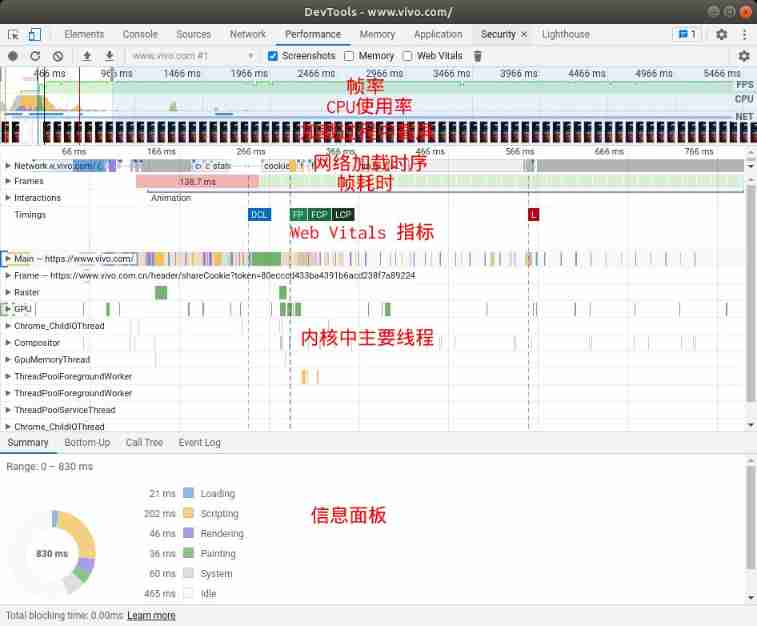
1) Frame rate (FPS): Linear shows how to do Performance period , The frame rate of web page rendering .
2)CPU Usage rate :CPU Occupancy chart
3) Screenshot during loading : Regularly collected the performance of web page screenshots
4) Network loading timing : Show the loading order and time-consuming of network resources
5) Frame time (Frames): Shows how long it takes to render each frame , Red indicates that there are time-consuming frames .
6)Web Vitals indicators :Google Recommend a set of performance experience indicators , I'll give you a detailed introduction .
7) The main threads in the kernel : There are multiple threads in the browser kernel, each with its own division of labor , When a time-consuming frame appears , These threads need to be checked , Which thread is taking time . It is mainly divided into these :
Main, This is a Blink The main thread , Responsible for web page layout 、 analysis 、JavaScript Execution, etc .
Raster, Rasterizing threads , Used to convert rendered objects to Bitmap.
GPU, Hardware accelerates rendering threads , take Texture Draw on the screen .
Chrome_ChildIOThread, Responsible for network resources , File operations .
Compositor, Composite thread , Responsible for rendering all layers , Synthesize them together and rasterize them .
ThreadPoolForegoundWorker,Worker Worker pool for .
8) Information panel : Used to show the details of the selection module , Several indicators mean :
Loading: Network requests and HTML Analytical time consuming .
Scripting:JavaSript analysis 、 compile 、 Execute... In a virtual machine , as well as GC Time consuming .
Rendering:Blink Typesetting and rendering are time-consuming .
Painting: Drawing takes time , It mainly includes drawing 、 synthesis 、 Picture decoding and on-screen .
System and Idle: It is the system scheduling and idle time-consuming .
4.4.2 General idea of performance analysis
The basic idea of performance analysis starts with the problem , Common performance problems of web pages , The author mainly encountered these situations .
The required resources were not requested back in time . Troubleshoot server problems , Resource request initiated too late ? Too many resources ?
Too many layers of web pages , Lead to Rendering and Painting drawn-out .
Too much memory , The page is too complex 、 There are many and large resources 、JavaScript The life cycle of large resources is too long .
There are many animations and they are not removed after disappearing .JavaScript A new round of animations 、CSS Animation 、 Picture resources with animation , such as GIF, SVG、WebP etc. .
Unreasonable event listening . Event listening is too much and may be touched by high frequency , For example, node changes 、Move Events, etc. .
in general , Whether it's web performance optimization or Native Program optimization , As long as these two resources are well coordinated :CPU + Memory . Just dig out the problem , Performance problems will be solved , The mining of problem points, in addition to source code level review ,DevTools Can help .
For the general scenario summarized above , utilize DevTools Performance analysis capability , First look at the whole Profile chart .
Whether the order and duration of network requests are reasonable ;
Main Thread Whether the long-term task is reasonable .

from Network The order in which the resource request is initiated is observed by the module , Whether there are long and time-consuming tasks , Blocking the first screen display resource loading , If you don't guarantee the timely loading of the required , It will be white for a long time .
When the resource problem is ready , You need to check which long-time tasks to perform . To look at first Main Thread Medium Long task, such as , The image above Long task Namely Scripting For a long time . adopt Bottom-Up / CallTree Check the specific time consuming points , Optimize accordingly .
When checking specific optimization points , There's a little trick . Usually the development environment is in PC Simulation on the Internet , When the version goes out , To expose problems . Due to the fragmentation of mobile devices , Many users' devices , Performance may not be good . How to optimize the performance of such low configuration machines in the development environment ?DevTools The simulation of current limiting is provided , The network system can be limited to 2G/3G,CPU Deceleration .

There's a... In the upper right corner “ Set up ”, Expand the configuration item , You can see Network and CPU Current limiting options , Select and record again Profile.
above-mentioned , There are too many layers of web pages , It greatly affects the rendering performance of web pages .“ Number of page layers ” What does that mean ? at present , Browser rendering engine in order to improve the performance of web page rendering , When drawing, the web page will be layered . The good thing is , Redraw only the modified layer , If there is no change in the content of other layers , There is no need to redraw , Directly take the last drawing result , So as to improve the rendering efficiency . Different WEB The strategy of engine layering is different , Usually ordinary web pages 、CSS Animation 、Canvas、WebGL、Fix Labels, etc. are divided into one layer . Layering will improve rendering efficiency , But it also brings memory overhead , This will affect performance .DevTools Can you analyze the number of web pages ? Sure , Above “ Set up ” There is an option “Enable advanced paint instrumentation(slow)” Enable it , Do a performance recording again .

stay “ Information panel ” One more. “Layers” label , After selecting, you will see the page hierarchy . If stratification does not exist, it is unreasonable , You can try to adjust the way , Merge layers , So as to improve the performance .
4.4.3 Web Vitals
Web Vitals yes Google Launched a set of Web A measure of performance and experience . The original measurement strategy was basically based on “ Acronym ” and “ First screen ” To measure , But from the perspective of users and technology optimization , These two indicators have one problem or another . therefore , Google Launched Web Vitals standard , And with DevTools Cooperate , Facilitate developers in the development stage , Just recognize Web Performance problems of . Because standards have been developing with the times , Constantly changing , Developers have been chasing the changes of indicators, which is a little unbearable , Fortunately Google Express clearly , At present, there are three indicators , It won't change in a short time , I don't know how long this short time is .
The first indicator :Largest Contentful Paint (LCP), Large area covered with time points ,2.5 Within seconds is excellent . Mainly refers to a large area of text 、 The picture is displayed , Even if you reach LCP.

The second indicator :First Input Delay(FID), The point in time when an external input event can be responded to for the first time ,100 ms Excellent in calculation . This indicator is from the perspective of users , achieve FID The timing of the , It means that users can operate the web page .

The third indicator :Cumulative Layout Shift(CLS), Typesetting jump index ,0.1 For excellence . During web page loading , If there are arranged elements , If you find a large area of movement , This indicator will be very high . For example, in the web page img The label does not set width and height , When the image is loaded , Arrange the version according to the actual size of the picture . This will trigger a page rearrangement , From the perspective of users, the web page is pushed down by an image height as a whole ,Google Think the experience is bad .

LCP / FID / CLS These three indicators , In essence, it is the performance measurement index of web pages from the perspective of users , Developers can see what level these three indicators of their works belong to .
5、 ... and 、 The importance of tools in ecological construction

( The data come from statcounter.com)
Chrome With its excellent product features , Security 、 Fast and stable , Won the favor of a large number of users . From above StatCounter statistics , It can be seen that Chrome Has become a big brother in the absolute browser industry , Take business success for granted . however Chrome In open source and the establishment of Ecology ,DevTools It can be described as the first achievement .Google adopt DevTools Beyond the characteristics of competitive products , Attracted a large number of front-end developers , go to Chrome Develop your own products under . Early ecological products were Chrome plug-in unit ,Chrome Store Its success can be seen from the number of plug-ins in .
When Node.js The advent of ,DevTools First support Node.js Debugging tools for , To promote the Node.js The popularity of . then DevTools Depending on the Node.js Get out of the circle quickly . On the other hand , The open source world is beginning to feed back DevTools project , At present, we support CDP There are as many open source solutions to the agreement as 10 Several languages , The commonly used languages basically support . This field is still developing rapidly , We look forward to better development in this field .
DevTools Web UI Has gone from Chromium Independent from the warehouse , You can be alone Clone Come down and carry out secondary development ,Web UI This time is limited to , No implementation principle analysis . Actually ,Web UI Also a very good Web APP, It is very suitable for front-end developers to study deeply .
What we learn from excellent open source projects is not only code implementation and Architecture , You can also learn something of a higher dimension , Such as product thinking and tool thinking , And put it into your own project . Review the development process of Web debugging , From one paragraph JavaScript plug-in unit , How it evolved into today's front-end development ecology , There are many points worth learning .
6、 ... and 、 Conclusion
The author's team has been committed to Chromium Research and learning of kernel , Based on its derivative products , Serve our ecological users , Provide them with a high-quality online experience . meanwhile , We hatched Web Browsing Services , It also provides powerful support for ecological applications 、 Fast 、 The stability of the Web Service capability, . If you are interested in Web Research on underlying technology , Welcome to join us , Grow together with a group of like-minded little partners , At the same time, it can also serve 100 million users .
7、 ... and 、 reference
[1] Google Chrome
[3] 10 years of Speed in Chrome
[4] Chrome DevTools
[5] Chrome DevTools Protocol protocol
[6] Web Vitals
author :vivo Internet browser kernel team -Li Qingmei
边栏推荐
- VM332 WAService. js:2 Error: _ vm. Changetabs is not a function
- What is a consistent hash? What scenarios can it be applied to?
- [digital statistics DP] counting problem
- Techo Day 腾讯技术开放日,6月28日线上等你!
- [C#][转载]furion框架地址和教程地址
- 调接口事件API常用事件方法
- Trie string statistics
- Freeswitch sets the maximum call duration
- 力扣515.在每棵树行中找最大值
- Compile configuration in file
猜你喜欢

Freeswitch uses origin to dialplan

Recommend 10 popular jupyter notebook plug-ins to make you fly efficiently

Floating and positioning

MySQL installation steps - Linux configuration file JDK installation (II)

Libuv框架echo-server.c源码详解(TCP部分)

Boost the rising point | yolov5 combined with alpha IOU

MySQL installation steps - installing MySQL on Linux (3)

Rn7302 three-phase electric quantity detection (based on STM32 single chip microcomputer)

【C语言】详解 C 语言获取数组长度

VM332 WAService. js:2 Error: _ vm. Changetabs is not a function
随机推荐
JS of learning notes -- split(), replace(), join()
[c #] [reprint]furion frame address and tutorial address
Call interface event API common event methods
Hungry for a long time, the brain will enter the "power saving mode"! Your senses are weakened and you can't see clearly
实时数据库 - 笔记
What if the applet page is set to 100% height or left blank?
[rust daily] May 24, 2020 rush, rocket, Mun, caspin
Jinshan cloud team shared | 5000 words to understand how Presto matches with alluxio
浮动与定位
Deleting MySQL under Linux
Libuv framework echo server C source code explanation (TCP part)
什么是一致性哈希?可以应用在哪些场景?
Reinforcement learning - grid world
微信小程序分页功能,下拉刷新功能,直接干货拿来就用
pytorch RNN 学习笔记
Build your jmeter+jenkins+ant
自律挑战30天
Mise en œuvre de l'actionneur asynchrone d'exécution à partir de zéro
C language tutorial
我的MVVM开源项目《出行防疫App》已发布