当前位置:网站首页>Example description and case of ansible playbook automated cluster server management
Example description and case of ansible playbook automated cluster server management
2022-06-24 16:52:00 【eisc】
[[email protected] ~]# cat 1.txt
  Mission
#  Case study
# cat a1.yml
---
- hosts: eisc                 #  representative eisc The grouped host is executed ,all  It's all the hosts
  remote_user: root     # With root execute
  tasks:
    - name:  Check the disk
      shell: df -h; echo " --------------------------------------------------------------"; free -m; echo " start-up  ansible  write file " >> ansible.txt; date
      register: disk
                                    #  perform  shell  The statement command cannot start with echo  sentence , Otherwise, the following statements will not be executed if they are printed directly
    - name:  process
      command: ps -u root
      register: ps
    - debug: msg="{{disk.stdout,ps.stdout}}"
                                    #  Read the results after execution
    - local_action: copy content={{disk.stdout,ps.stdout}} dest=/root/aplaybook.txt
                                    #  Write the result information to the file
#  explain
cat playbook.yml
---                                           # Fixed format
- hosts: 192.168.1.31              # Define the host or host group that needs to be executed
  remote_user: root                # Remote users
  vars:                                     # Defining variables
    http_port: 8088                 # Variable
  tasks:                                   # Define a task
    - name: create new file          # Define the name of the task
      file: name=/tmp/playtest.txt state=touch   # Call module , Specific things to do
    - name: install package
      yum: name=httpd
    - name: config httpd
      template: src=./httpd.conf dest=/etc/httpd/conf/httpd.conf
      notify:                              # trigger , What to do when the condition is triggered , coordination handlers Use
        - restart apache            # Need to reference handlers Name
    - name: copy index.html
      copy: src=/var/www/html/index.html dest=/var/www/html/index.html
    - name: start httpd
      service: name=httpd state=started
  handlers:                            #notify The defined trigger executes the corresponding processing action
    - name: restart apache
                                             # To work with notify The definition is the same
      service: name=httpd state=restarted
                                            # Trigger the action to be performed
#  Related links
centos  install  ansible  Cluster management application :https://www.eisc.cn/index.php?c=read&id=484&page=1
边栏推荐
- During JMeter pressure measurement, time_ The number of requests does not go up due to many waits. The problem is solved
- [tke] nodelocaldnschache is used in IPVS forwarding mode
- Go kit microservice integrates Promtheus to solve monitoring alarm problems
- [go] concurrent programming channel
- [play with Tencent cloud] & lt; trtc-room> Applet component usage
- How important is it to document the project? I was chosen by the top 100 up leaders and stood up again
- How do HPE servers make RAID5 arrays? Teach you step by step today!
- Private domain defense in the cotton Era
- Applet - use of template
- Object store signature generation
猜你喜欢
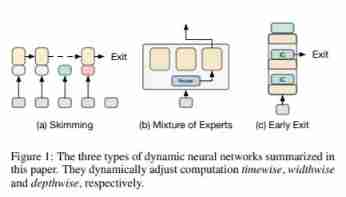
A survey on dynamic neural networks for natural language processing, University of California

Applet wxss

Ui- first lesson

Ps\ai and other design software pondering notes
![[go] concurrent programming channel](/img/6a/d62678467bbc6dfb6a50ae42bacc96.jpg)
[go] concurrent programming channel

A survey of training on graphs: taxonomy, methods, and Applications

Applet - use of template

A survey on model compression for natural language processing (NLP model compression overview)

Cognition and difference of service number, subscription number, applet and enterprise number (enterprise wechat)
![[leetcode108] convert an ordered array into a binary search tree (medium order traversal)](/img/e1/0fac59a531040d74fd7531e2840eb5.jpg)
[leetcode108] convert an ordered array into a binary search tree (medium order traversal)
随机推荐
Tencent blue whale Zhiyun community version v6.0.3 was officially released together with the container management platform!
Nonholonomic constrained robot
Collect tke logs through daemonset CRD
What is a reptile
The mystery of redis data migration capacity
Mathematics in machine learning -- point estimation (IV): maximum posteriori probability (map)
Tencent blue whale container management platform was officially released!
Introduction to koa (II) building the koa program
中金证券靠谱吗?是否合法?开股票账户安全吗?
MySQL learning -- table structure of SQL test questions
What is a server
Daily algorithm & interview questions, 28 days of special training in large factories - the 15th day (string)
TVP experts talk about geese factory middleware: innovating forward and meeting the future
zblog判断某个插件是否安装启用的内置函数代码
A solution for building live video based on open source real-time audio and video webrtc architecture
06. Tencent cloud IOT device side learning - Introduction to basic functions
Saying "Dharma" Today: the little "secret" of paramter and localparam
A survey on model compression for natural language processing (NLP model compression overview)
Comparison of jmeter/k6/locust pressure measuring tools (not completed yet)
What is Ethernet