当前位置:网站首页>Ps\ai and other design software pondering notes
Ps\ai and other design software pondering notes
2022-06-24 16:18:00 【Old love senior】
Some knowledge points about design software that I have pondered and sorted out in my daily study
0、 Decolor ctrl+shift+u
1、 Merge layers
ctrl+e Merge ( Next to this layer ) The original layer is not preserved
2、 Merge layers , Keep original layer
Ctrl+shift+e Merge visible layers ( My computer doesn't work , do not know why ) The original layer is not preserved
3、 Stamp
ctrl+shift+alt+e Stamp the visible layer The original layer will be preserved
4、ps My little eyes
Press alt Key and then press the small eye on the layer , Other layer small eyes will disappear , Do it the same way , Other small eyes will appear
5、 What is resolution
Resolution is the number of pixels contained in a unit length , It's usually in pixels / Inch (ppi), Such as 72ppi Indicates that each inch contains 72 Pixels . The resolution determines the bit The degree of detail in the drawing , Usually , The higher the resolution , The more pixels there are , The clearer the image .
6、 reverse Ctrl+shift+i
7、ctrl+i The difference between inverse and inverse
(http://www.360doc.com/content/17/0224/23/6932394_631799407.shtml)
8、PS There are several commonly used layer shortcuts :
 Move the current layer to the top  【Ctrl】+【Shift】+【]】
 Move the current layer to the bottom  【Ctrl】+【Shift】+【[】
 Move the current layer down one level  【Ctrl】+【[】
 Move the current layer up one level  【Ctrl】+【]】
( To ) Activate the next layer  【Alt】+【[】
 Activate the previous layer  【Alt】+【]】
 Activate the bottom layer  【Shift】+【Alt】+【[】
 Activate the top layer  【Shift】+【Alt】+【]】
9、 Triple bond +n New layer
10、ps How gradient effects stack ? It seems that it can only be used once ?
It can .
What you said can only be used once , Because there is no transparent area , It's just covered .
There are many ways .
On the gradient toolbar , There is the word "transparent area" , Just check .( Fill in a layer )
You can also use layers to overlay gradients 、
Be flexible in the use of constituencies , Create a new layer and gradient it , This can achieve multi-layer gradient effect , And you can also use transparency for it 、 Filling degree , Layer overlay style . And each layer of gradient changes , Will not affect other layers . It is very convenient .
11、 Shortcut key
Ctrl+alt+G Clip mask
Ctrl+u Hue 、 saturation
Ctrl+l Color scale
Ctrl+m curve
12、 Safe color
It is to make the color seen on your screen the same as that seen by the netizens on your web page , It can also be said that their display screen restores the color you want them to see .
Not the color in the safe range , In your opinion , There will be a difference in color when you get to someone else's monitor .
Sometimes you can match the colors , But in others it may be ugly , To make the .
13、 Please consult us when making printing design CMYK still use RGB The design is then converted to CMYK?
It depends on the direction of the picture , You can build it first rgb file , View — Proof setting , Look at... At work cmyk Check whether , With this tick , It can basically ensure the color accuracy after switching to mode , such , You can use filters and other applications , After the design, it finally turns to cmyk Pattern , And see the color .. Common general design , It is not necessary to use multiple filters , Direct construction 4 Color mode document ..
(1)ps Select... Before printing rgb Mode resolution 300ppi( The resolution is chosen first )—— Menu bar view —— Sample settings —— Choose a job CMYK—— When exporting photos, change the image mode to CMYK Pattern —— If you want to make changes, first put rgb The pictures in mode are saved for later modification , A copy of , This one is changed to CMYK export jpg Show the format to the boss ( Just remember to change the picture mode to CMYK Just go ).
(2)AI When making posters, first create rgb Color mode resolution 300ppi—— Choose a job CMYK—— export jpg You can To reset Color mode and resolution .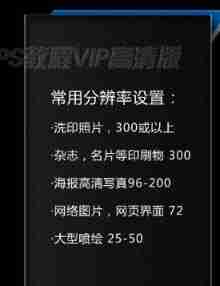
CMYK What can't be used ?
- The sharpen 、camera raw Filter 、 Lens correction 、 Vanishing point 、3D、 video
- Oil painting under style
- Lighting effect under rendering 、 Lens halo
14、 Brush blending mode
https://wenku.baidu.com/view/fe6b474a2e3f5727a5e96266.html
15、TIFF、TGE、psd Support channel ,JPEG Support path
passageway : Yes 256 A place
alpha passageway : Record selection ( Record the constituency and the feathered constituency )—— The plane is not commonly used but is opened in the video alpha The channel removes the background
Color channel : Color information

16、 How to convert a normal layer , Convert to background layer ?
Layers —— newly build —— Background layer ( The normal layer becomes the background layer )
17、 Hollowing out options
Concrete example
shallow : Dig to the layer group
deep : Background layer 
18、 The opacity \ fill
The opacity : The layer becomes lighter or disappears
fill : The layer becomes lighter or disappears , Will keep his layer style , You can usually do some special effects with padding , For example, the external light .
19、PS The image size of


20、AI Blending options for
AI Blending options for
Comprehensive analysis AI Blending options for
21、 The difference between compound paths and intersections
The difference between compound paths and intersections
22、 Extract line draft
high pass + threshold
23、 Change the shortcut key again AI/ID/PS/CDR
AI The shortcut key for changing again is Ctrl+D,ID It's also Ctrl+D,PS The transformation shortcut key for is Shift+Ctrl+Alt+T,CDR The shortcut key for changing again is Shift+Ctrl+Alt+T. yes Photoshop Shortcuts defined to improve drawing speed , It uses one or a few simple letters instead of common commands , So that we do not have to remember many long commands .
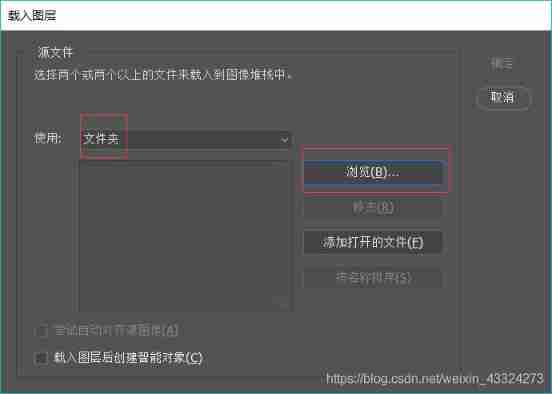
24、 Drag pictures into layers in batches

边栏推荐
- [download attached] installation and simple use of Chinese version of awvs
- Transpose convolution explanation
- 国泰君安期货安全么?期货开户怎么开?期货手续费怎么降低?
- @There is a free copyright protection service for enterprises in Dawan District
- How does the effective date of SAP PP ECM affect the work order?
- Cap: multiple attention mechanism, interesting fine-grained classification scheme | AAAI 2021
- Implement Domain Driven Design - use ABP framework - domain logic & application logic
- Greenplum role-based fine-grained permission control
- Some experiences of K project: global template highlights
- ThinkPHP 漏洞利用工具
猜你喜欢

Using oasis to develop a hop by hop (I) -- Scene Building

B. Terry sequence (thinking + greed) codeforces round 665 (Div. 2)

【云原生 | Kubernetes篇】Kubernetes基础入门(三)

存在安全隐患 部分冒险家混动版将召回

构建Go命令行程序工具链
Some adventurer hybrid versions with potential safety hazards will be recalled

Siggraph 2022 | truly restore the hand muscles. This time, the digital human hands have bones, muscles and skin

我与“Apifox”的网络情缘

微信公众号调试与Natapp环境搭建
Wechat official account debugging and natapp environment building
随机推荐
微信公众号调试与Natapp环境搭建
对深度可分离卷积、分组卷积、扩张卷积、转置卷积(反卷积)的理解
Leetcode notes of Google boss | necessary for school recruitment!
【prometheus】1. Monitoring overview
Join in ABAP CDs
Kubernetes characteristic research: sidecar containers
基于STM32的MD5校验
Software test [high frequency] interview questions sorted out by staying up late (latest in 2022)
[download attached] installation and simple use of Chinese version of awvs
Global and Chinese market of inverted syrup 2022-2028: Research Report on technology, participants, trends, market size and share
sql 多表更新数据非常慢
Global and Chinese markets of Leyte coin exchange 2022-2028: Research Report on technology, participants, trends, market size and share
Istio FAQ: sidecar startup sequence
Global and Chinese market of insect proof clothing 2022-2028: Research Report on technology, participants, trends, market size and share
炒期货在哪里开户最正规安全?怎么期货开户?
Understanding of deep separable convolution, block convolution, extended convolution, transposed convolution (deconvolution)
Global and Chinese markets of stainless steel barbecue ovens 2022-2028: Research Report on technology, participants, trends, market size and share
Golang+redis reentrant lock
Enterprise security attack surface analysis tool
Pytorch 转置卷积