当前位置:网站首页>ESP8266(ESP-12F) 第三方库使用 -- SparkFun_APDS9960 (手势识别)
ESP8266(ESP-12F) 第三方库使用 -- SparkFun_APDS9960 (手势识别)
2022-07-27 05:39:00 【GenCoder】
前段时间测试 ESP8266 + APDS9960 做手势识别,利用库函数demo测试方法不对没做成功,换成Arduino UNO来完成APDS9960的手势识别实验,最近为了用回ESP8266又开始填坑!
ESP8266 + APDS9960
ADPS9960 3.3RGB红外手势传感器
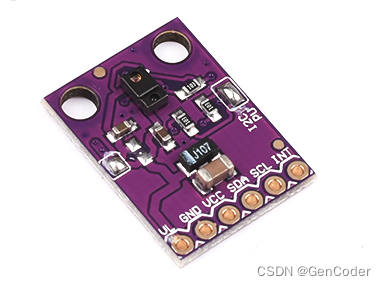
- APDS-9960
具有先进的手势检测、接近检测和数字环境光感应功能,是一款采用单个 8 引脚封装的数字 RGB、环境光、近程和手势传感器装置。该装置具有与 I2C 兼容的接口,为红色、绿色、蓝色、透明 (RGBC),近程和手势感测配有红外 LED。RGB 和环境光感测功能可在多种光条件下以及通过多种减振材料包括深色玻璃的情况下,检测出光强度。此外,集成 UV-IR 遮光滤光片可实现精准的环境光和相关色温感测。
- 内部结构图

- 特征
光学模块中的 RGBC 光传感器和带红外 LED 的近程和手势检测器
微型封装尺寸:3.94(长)x 2.36(宽)x 1.35(高)毫米
I2C 接口与专用中断引脚兼容
深色玻璃后运作的高灵敏度
RGBC 光感测,带有集成 UV-IR 遮光滤光片
几何排列的 RGBC 二极管可提供统一的角度响应
校准至 100 毫米检测距离,无需客户的最终产品校准
四个独立的二极管可感应不同的方向
配有可见光遮光滤光片的近程和手势感测
受专利保护的屏蔽设计,将近程串扰将至最低
集成光学透镜,校准红外 LED 光束并提升光电二极管的灵敏度。
低功耗:睡眠模式功率为 1.0 微安典型值
- 手势检测
APDS-9960是一款集成 ALS、红外 LED 和接近检测器的光学模块和环境亮度感测 (ALS, Ambient Light Sensing)的环境亮度传感器,使用双光二极管来近似 0.01 lux 照度近似人眼的视觉反应,带有上限和下限阈值的可编程中断功能,高达16位分辨率,即使在深色玻璃后也能高灵活运作,接近传感器经过完全调校可进行100毫米物体检测,免除终端设备和次组件的工厂校准需求。环境光动态范围也从之前大10K lux增大到30K lux,太阳光校准大增至50K lux,大大提升了灵敏度并避免了强光干扰。可以在大1.0mm的Air Gap下精准工作,不用做外部隔离处理,极大的方便了客户的结构设计。其等待状态功耗 - 90µA 典型值,睡眠模式功率 - 2.2µA 典型值,更能节省能源;高达 400kHz (I²C 快速模式)专用中断引脚,提供 I²C 接口兼容,可以适应所有手机硬件平台和接口电压,全集成方案,方便结构和电路设计。
这是一个 RGB和手势传感器模块,小接口板具有内置APDS-9960芯片,提供环境光与颜色测量,接近检测和非接触手势检测。有了这个RGB和手势感应器,你就可以控制一台计算机,单片机,机器人,它比你的手一个简单的刷卡功能强大的多!实际上,该手势传感器APDS-9960在三星Galaxy S5中使用。该APDS-9960是一个极小的传感器,内置紫外线和红外线阻隔滤镜,四个单独的二极管具有对不同方向的敏感度(如上图),以及一个I2C兼容接口。为了使用方便,设计出了以下引脚:VL(可选功率IR LED),GND(地),VCC(电源,APDS-9960传感器),SDA(I2C数据),SCL(时钟I2C)和INT(中断)。每个APDS-9960还具有4至8英寸(10至20cm)的检测范围。
硬件接线
APDS9960传感器需要使用3.3V稳压电源和3.3V的I2C通信,使用5V电源和I2C时需要进行电压转换,否则可能损坏APDS9960,ESP8266(ESP-12F)的引脚定义如下,其中D1、D2可复用为I2C功能(D1/SCL、D2/SDA)。
使用APDS9960传感器做手势识别实验需要连接5个引脚,分别是VCC、GND、SDA、SCL、INT(中断)
| ESP8266(ESP-12F) | APDS9960传感器 |
|---|---|
| 3.3V | VCC |
| GND | GND |
| D2 | SDA |
| D1 | SCL |
| D4-D8(D0、D1、D2、D3不可用)任一引脚 | INT |
注意
D0引脚只能作为普通IO引脚的读写使用,不支持中断、PWM、I2C等特殊功能
D1、D2在手势识别中做I2C通讯,不能同时作为中断引脚使用
D3引脚为烧录固件及系统运行所用引脚,因此不可做中断引脚使用
APDS9960库下载及编程
菜单栏 项目→加载库→管理库... 打开库管理器,关键词APDS9960搜索相关库,下载 SparkFun APDS9960 库
SparkFun APDS9960 库 可以直接在UNO板上连接 APDS9960烧写运行(中断引脚2),库的手势识别示例代码如下,成功检测到手势产生中断后串口打印手势方向
#include <Wire.h>
#include <SparkFun_APDS9960.h>

// Pins
#define APDS9960_INT 2 // Needs to be an interrupt pin

// Constants

// Global Variables
SparkFun_APDS9960 apds = SparkFun_APDS9960();
int isr_flag = 0;

void setup() {


  // Set interrupt pin as input
  pinMode(APDS9960_INT, INPUT);

  // Initialize Serial port
  Serial.begin(9600);
  Serial.println();
  Serial.println(F("--------------------------------"));
  Serial.println(F("SparkFun APDS-9960 - GestureTest"));
  Serial.println(F("--------------------------------"));

  // Initialize interrupt service routine
  attachInterrupt(0, interruptRoutine, FALLING);

  // Initialize APDS-9960 (configure I2C and initial values)
  if ( apds.init() ) {

    Serial.println(F("APDS-9960 initialization complete"));
  } else {

    Serial.println(F("Something went wrong during APDS-9960 init!"));
  }

  // Start running the APDS-9960 gesture sensor engine
  if ( apds.enableGestureSensor(true) ) {

    Serial.println(F("Gesture sensor is now running"));
  } else {

    Serial.println(F("Something went wrong during gesture sensor init!"));
  }
}

void loop() {

  if( isr_flag == 1 ) {

    detachInterrupt(0);
    handleGesture();
    isr_flag = 0;
    attachInterrupt(0, interruptRoutine, FALLING);
  }
}

void interruptRoutine() {

  isr_flag = 1;
}

void handleGesture() {

    if ( apds.isGestureAvailable() ) {

    switch ( apds.readGesture() ) {

      case DIR_UP:
        Serial.println("UP");
        break;
      case DIR_DOWN:
        Serial.println("DOWN");
        break;
      case DIR_LEFT:
        Serial.println("LEFT");
        break;
      case DIR_RIGHT:
        Serial.println("RIGHT");
        break;
      case DIR_NEAR:
        Serial.println("NEAR");
        break;
      case DIR_FAR:
        Serial.println("FAR");
        break;
      default:
        Serial.println("NONE");
    }
  }
}
使用ESP8266做APDS9960 手势识别时需要修改代码,连接的中断引脚定义,D4-D8连接哪个引脚就直接写哪个,中断号不清楚的话使用 digitalPinToInterrupt 函数解决
// Pins
#define APDS9960_INT D4 // Needs to be an interrupt pin
...
// Initialize interrupt service routine
attachInterrupt(digitalPinToInterrupt(D4), interruptRoutine, FALLING);
...
void loop() {

  if( isr_flag == 1 ) {

    detachInterrupt(digitalPinToInterrupt(D4));
    handleGesture();
    isr_flag = 0;
    attachInterrupt(digitalPinToInterrupt(D4), interruptRoutine, FALLING);
  }
}
在中断服务函数添加 IRAM_ATTR 属性,否则串口会不断的打印堆栈信息和一直重启!!相信我你不会想遇到这种问题
IRAM_ATTR void interruptRoutine() {

  isr_flag = 1;
}
修改demo后烧写到ESP8266,打开串口看输出
在demo中主要用到几个库函数
- init()
功能:配置I2C通信和初始化寄存器默认值
返回:成功返回 true,失败返回 false
bool SparkFun_APDS9960::init()
{

    uint8_t id;

    /* Initialize I2C */
    Wire.begin();

    /* Read ID register and check against known values for APDS-9960 */
    if( !wireReadDataByte(APDS9960_ID, id) ) {

        return false;
    }
    if( !(id == APDS9960_ID_1 || id == APDS9960_ID_2) ) {

        return false;
    }

    /* Set ENABLE register to 0 (disable all features) */
    if( !setMode(ALL, OFF) ) {

        return false;
    }

    /* Set default values for ambient light and proximity registers */
    if( !wireWriteDataByte(APDS9960_ATIME, DEFAULT_ATIME) ) {

        return false;
    }
    if( !wireWriteDataByte(APDS9960_WTIME, DEFAULT_WTIME) ) {

        return false;
    }
    if( !wireWriteDataByte(APDS9960_PPULSE, DEFAULT_PROX_PPULSE) ) {

        return false;
    }
    if( !wireWriteDataByte(APDS9960_POFFSET_UR, DEFAULT_POFFSET_UR) ) {

        return false;
    }
    if( !wireWriteDataByte(APDS9960_POFFSET_DL, DEFAULT_POFFSET_DL) ) {

        return false;
    }
    if( !wireWriteDataByte(APDS9960_CONFIG1, DEFAULT_CONFIG1) ) {

        return false;
    }
    if( !setLEDDrive(DEFAULT_LDRIVE) ) {

        return false;
    }
    if( !setProximityGain(DEFAULT_PGAIN) ) {

        return false;
    }
    if( !setAmbientLightGain(DEFAULT_AGAIN) ) {

        return false;
    }
    if( !setProxIntLowThresh(DEFAULT_PILT) ) {

        return false;
    }
    if( !setProxIntHighThresh(DEFAULT_PIHT) ) {

        return false;
    }
    if( !setLightIntLowThreshold(DEFAULT_AILT) ) {

        return false;
    }
    if( !setLightIntHighThreshold(DEFAULT_AIHT) ) {

        return false;
    }
    if( !wireWriteDataByte(APDS9960_PERS, DEFAULT_PERS) ) {

        return false;
    }
    if( !wireWriteDataByte(APDS9960_CONFIG2, DEFAULT_CONFIG2) ) {

        return false;
    }
    if( !wireWriteDataByte(APDS9960_CONFIG3, DEFAULT_CONFIG3) ) {

        return false;
    }

    /* Set default values for gesture sense registers */
    if( !setGestureEnterThresh(DEFAULT_GPENTH) ) {

        return false;
    }
    if( !setGestureExitThresh(DEFAULT_GEXTH) ) {

        return false;
    }
    if( !wireWriteDataByte(APDS9960_GCONF1, DEFAULT_GCONF1) ) {

        return false;
    }
    if( !setGestureGain(DEFAULT_GGAIN) ) {

        return false;
    }
    if( !setGestureLEDDrive(DEFAULT_GLDRIVE) ) {

        return false;
    }
    if( !setGestureWaitTime(DEFAULT_GWTIME) ) {

        return false;
    }
    if( !wireWriteDataByte(APDS9960_GOFFSET_U, DEFAULT_GOFFSET) ) {

        return false;
    }
    if( !wireWriteDataByte(APDS9960_GOFFSET_D, DEFAULT_GOFFSET) ) {

        return false;
    }
    if( !wireWriteDataByte(APDS9960_GOFFSET_L, DEFAULT_GOFFSET) ) {

        return false;
    }
    if( !wireWriteDataByte(APDS9960_GOFFSET_R, DEFAULT_GOFFSET) ) {

        return false;
    }
    if( !wireWriteDataByte(APDS9960_GPULSE, DEFAULT_GPULSE) ) {

        return false;
    }
    if( !wireWriteDataByte(APDS9960_GCONF3, DEFAULT_GCONF3) ) {

        return false;
    }
    if( !setGestureIntEnable(DEFAULT_GIEN) ) {

        return false;
    }

    return true;
}
- enableGestureSensor()
功能:使能手势识别传感器并运行
返回:成功返回 true,失败返回 false
bool SparkFun_APDS9960::enableGestureSensor(bool interrupts)
{


    /* Enable gesture mode Set ENABLE to 0 (power off) Set WTIME to 0xFF Set AUX to LED_BOOST_300 Enable PON, WEN, PEN, GEN in ENABLE */
    resetGestureParameters();
    if( !wireWriteDataByte(APDS9960_WTIME, 0xFF) ) {

        return false;
    }
    if( !wireWriteDataByte(APDS9960_PPULSE, DEFAULT_GESTURE_PPULSE) ) {

        return false;
    }
    if( !setLEDBoost(LED_BOOST_300) ) {

        return false;
    }
    if( interrupts ) {

        if( !setGestureIntEnable(1) ) {

            return false;
        }
    } else {

        if( !setGestureIntEnable(0) ) {

            return false;
        }
    }
    if( !setGestureMode(1) ) {

        return false;
    }
    if( !enablePower() ){

        return false;
    }
    if( !setMode(WAIT, 1) ) {

        return false;
    }
    if( !setMode(PROXIMITY, 1) ) {

        return false;
    }
    if( !setMode(GESTURE, 1) ) {

        return false;
    }

    return true;
}
- isGestureAvailable()
功能:确定是否得到有效的手势
返回:手势有效(可读)返回true,手势无效(不可读)返回false
bool SparkFun_APDS9960::isGestureAvailable()
{

    uint8_t val;

    /* Read value from GSTATUS register */
    if( !wireReadDataByte(APDS9960_GSTATUS, val) ) {

        return ERROR;
    }

    /* Shift and mask out GVALID bit */
    val &= APDS9960_GVALID;

    /* Return true/false based on GVALID bit */
    if( val == 1) {

        return true;
    } else {

        return false;
    }
}
- readGesture()
功能:处理手势识别并返回最佳猜测手势
int SparkFun_APDS9960::readGesture()
{

    uint8_t fifo_level = 0;
    uint8_t bytes_read = 0;
    uint8_t fifo_data[128];
    uint8_t gstatus;
    int motion;
    int i;

    /* Make sure that power and gesture is on and data is valid */
    if( !isGestureAvailable() || !(getMode() & 0b01000001) ) {

        return DIR_NONE;
    }

    /* Keep looping as long as gesture data is valid */
    while(1) {


        /* Wait some time to collect next batch of FIFO data */
        delay(FIFO_PAUSE_TIME);

        /* Get the contents of the STATUS register. Is data still valid? */
        if( !wireReadDataByte(APDS9960_GSTATUS, gstatus) ) {

            return ERROR;
        }

        /* If we have valid data, read in FIFO */
        if( (gstatus & APDS9960_GVALID) == APDS9960_GVALID ) {


            /* Read the current FIFO level */
            if( !wireReadDataByte(APDS9960_GFLVL, fifo_level) ) {

                return ERROR;
            }

#if DEBUG
            Serial.print("FIFO Level: ");
            Serial.println(fifo_level);
#endif

            /* If there's stuff in the FIFO, read it into our data block */
            if( fifo_level > 0) {

                bytes_read = wireReadDataBlock(  APDS9960_GFIFO_U,
                                                (uint8_t*)fifo_data,
                                                (fifo_level * 4) );
                if( bytes_read == -1 ) {

                    return ERROR;
                }
#if DEBUG
                Serial.print("FIFO Dump: ");
                for ( i = 0; i < bytes_read; i++ ) {

                    Serial.print(fifo_data[i]);
                    Serial.print(" ");
                }
                Serial.println();
#endif

                /* If at least 1 set of data, sort the data into U/D/L/R */
                if( bytes_read >= 4 ) {

                    for( i = 0; i < bytes_read; i += 4 ) {

                        gesture_data_.u_data[gesture_data_.index] = \
                                                            fifo_data[i + 0];
                        gesture_data_.d_data[gesture_data_.index] = \
                                                            fifo_data[i + 1];
                        gesture_data_.l_data[gesture_data_.index] = \
                                                            fifo_data[i + 2];
                        gesture_data_.r_data[gesture_data_.index] = \
                                                            fifo_data[i + 3];
                        gesture_data_.index++;
                        gesture_data_.total_gestures++;
                    }

#if DEBUG
                Serial.print("Up Data: ");
                for ( i = 0; i < gesture_data_.total_gestures; i++ ) {

                    Serial.print(gesture_data_.u_data[i]);
                    Serial.print(" ");
                }
                Serial.println();
#endif

                    /* Filter and process gesture data. Decode near/far state */
                    if( processGestureData() ) {

                        if( decodeGesture() ) {

                            //***TODO: U-Turn Gestures
#if DEBUG
                            //Serial.println(gesture_motion_);
#endif
                        }
                    }

                    /* Reset data */
                    gesture_data_.index = 0;
                    gesture_data_.total_gestures = 0;
                }
            }
        } else {


            /* Determine best guessed gesture and clean up */
            delay(FIFO_PAUSE_TIME);
            decodeGesture();
            motion = gesture_motion_;
#if DEBUG
            Serial.print("END: ");
            Serial.println(gesture_motion_);
#endif
            resetGestureParameters();
            return motion;
        }
    }
}
返回:返回手势所对应的数字
/* Direction definitions */
enum {

  DIR_NONE,
  DIR_LEFT,
  DIR_RIGHT,
  DIR_UP,
  DIR_DOWN,
  DIR_NEAR,
  DIR_FAR,
  DIR_ALL
};
边栏推荐
- 基于SSM音乐网站管理系统
- Dsgan degenerate network
- Iotdb C client release 0.13.0.7
- How to delete or replace the loading style of easyplayer streaming media player?
- Student achievement management system based on SSM
- 客户案例 | 聚焦流程体验,助银行企业APP迭代
- Bert and RESNET can also be trained on mobile phones?!
- AI: play games in your spare time - earn it a small goal - [Alibaba security × ICDM 2022] large scale e-commerce map of risk commodity inspection competition
- Consideration on how the covariance of Kalman filter affects the tracking effect of deepsort
- Analysis of online and offline integration mode of o2o E-commerce
猜你喜欢

DNA modified noble metal nanoparticles | DNA modified gold nanoparticles (scientific research level)

Disk management and file system

Student status management system based on SSM

DNA科研实验应用|环糊精修饰核酸CD-RNA/DNA|环糊精核酸探针/量子点核酸探针

How can chrome quickly transfer a group of web pages (tabs) to another device (computer)

Basic statement of MySQL (1) - add, delete, modify and query

newest! SASAC releases new measures for digital transformation of state-owned enterprises

Analysis of pix2pix principle

Li Hongyi 2020 deep learning and human language processing dlhlp conditional generation by RNN and attention-p22

New features of ES6 (2)
随机推荐
EasyCVR平台播放设备录像时,拖动时间轴播放无效是什么原因?
TS learning (VIII): classes in TS
Matlab drawing (ultra detailed)
Neural network parameter initialization
deepsort源码解读(五)
deepsort源码解读(一)
Auto encoder (AE), denoising auto encoder (DAE), variable auto encoder (VAE) differences
MangoDB
Talk about multimodality of fire
Basic statement of MySQL (1) - add, delete, modify and query
仿真模型简单介绍
强网杯2021 pwn 赛题解析——babypwn
What is the reason why dragging the timeline is invalid when playing device videos on the easycvr platform?
R2live code learning record (3): radar feature extraction
The vscode run command reported an error: the mark "&" is not a valid statement separator in this version.
Event capture and bubbling - what is the difference between them?
最新!国资委发布国有企业数字化转型新举措
Fix the problem that the paging data is not displayed when searching the easycvr device management list page
Introduction to the official functions of easyrecovery14 data recovery software
Bert and RESNET can also be trained on mobile phones?!