当前位置:网站首页>Fix the problem that the paging data is not displayed when searching the easycvr device management list page
Fix the problem that the paging data is not displayed when searching the easycvr device management list page
2022-07-27 06:53:00 【EasyCVR】
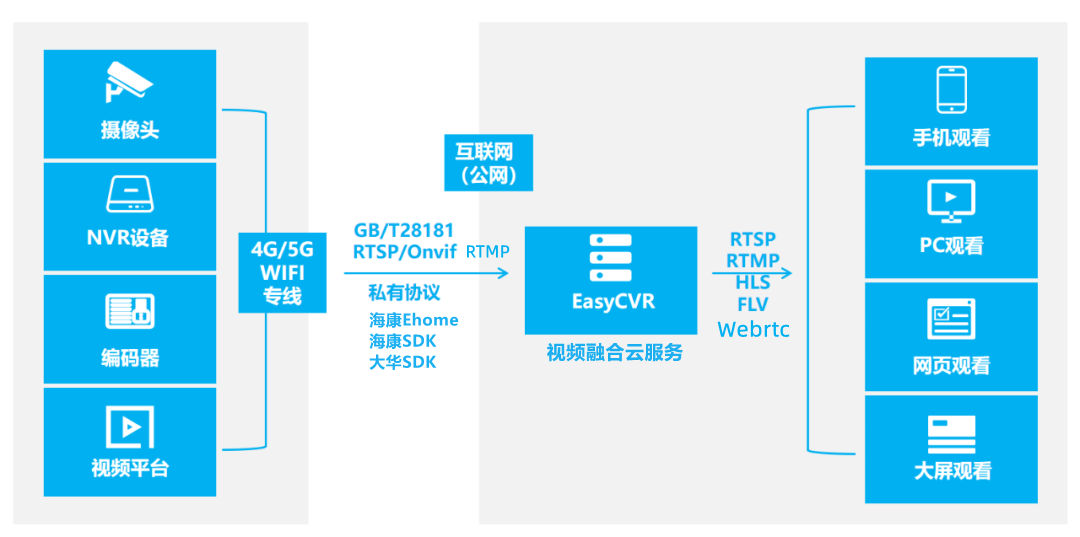
EasyCVR Support massive video aggregation management , It can provide live video surveillance 、 Cloud video 、 Cloud storage 、 Video retrieval and review 、 Intelligent alarm 、 Platform cascading 、 Intelligent analysis and other video services . The platform supports the equipment to pass the national standard GB28181、RTMP、RTSP/Onvif、 The sea, SDK、 Dahua SDK、Ehome Wait for protocol access , External distribution RTSP、RTMP、FLV、HLS、WebRTC Video streams of the same format .
There's user feedback , stay EasyCVR Device management list page , When searching for devices , Paging data is not displayed .

Technicians immediately checked the situation . It is found that , There is an error in the total number returned by the backend interface , This leads to the above problems .
It can be solved through the following methods :
When the search criteria is passed in at the current end , The backend queries the corresponding number of devices , And then it goes back to the front end . The reference codes are as follows :
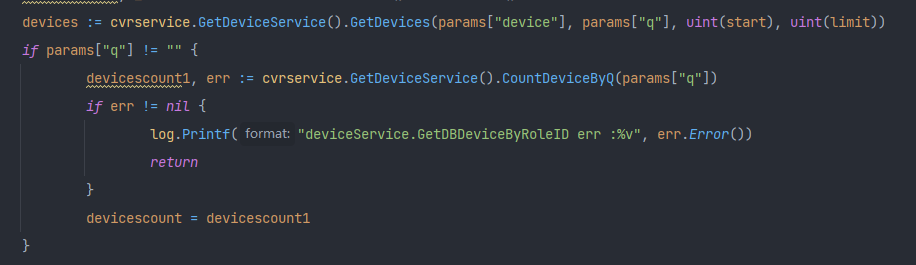
devicescount, _ := cvrservice.GetDeviceService().CountDevice()
	devices := cvrservice.GetDeviceService().GetDevices(params["device"], params["q"], uint(start), uint(limit))
	if params["q"] != "" {
		devicescount1, err := cvrservice.GetDeviceService().CountDeviceByQ(params["q"])
		if err != nil {
			log.Printf("deviceService.GetDBDeviceByRoleID err :%v", err.Error())
			return
		}
		devicescount = devicescount1
	}
Query the front end again after modification , At this time, the number of devices and paging display have returned to normal .

EasyCVR Simple deployment 、 High compatibility , The platform adopts distributed deployment , It can provide unified API Interface , Connect devices 、 Connect data 、 Connect applications , Facilitate the rapid integration of third-party platforms . The platform has a wide range of application scenarios , There are a large number of landing applications offline , Including smart factory 、 Smart campus 、 Smart construction site 、 Smart storage 、 Intelligent water conservancy 、 Intelligent fire fighting and so on , Interested users can go to the demonstration platform for experience or deployment testing .
边栏推荐
- Soul持续发力社交渠道赴港上市,“Soul式社交”凭什么火出圈?
- 系统安全与应用
- Sunflower popularizes Science in an all-round way to avoid loopholes for your remote control equipment in time
- goLang的一个跨域问题
- Publish a building segmentation database with a resolution of 0.22m
- darknet-yolov3、yolo-fastect使用rtx30系显卡cuda环境在win10平台编译与训练的相关问题
- RAID详解与配置
- Open source WebGIS related knowledge
- Linux Installation and uninstallation of MySQL
- After adding a camera (camera) to the UAV in gazebo, the UAV cannot take off
猜你喜欢
Project training experience 1

Express框架

Linux安装Redis操作

账号管理与权限

Many of the world's top 500 enterprises gathered at the second digital Expo, and the digital industry curtain is about to open!

Redis fast learning

Iptables firewall

FTP服务简介与配置

Soul submitted an application for listing in Hong Kong stocks, accelerating the diversified and scene based layout of social gathering places

NFS introduction and configuration
随机推荐
Add virtual network card and configure OP route in win10
Express框架
Numpy array and image conversion
Record of pychart running jupyter notebook in virtual environment
Brief introduction of chip, memory and its key indicators I
客户案例 | 聚焦流程体验,助银行企业APP迭代
NAT(网络地址转换)
gin-vue-admin 使用docker容器中的数据库
向日葵教大家如何防范拒绝服务攻击漏洞?
Shell programming specification and redirection and pipeline operation
Ftx.us launched stock and ETF trading services to make trading more transparent
向日葵:遇到电脑漏洞别担心,了解清楚再判断向日葵:遇到电脑漏洞别担心,了解清楚再判断向日葵:遇到电脑漏洞别担心,了解清楚再判断向日葵:遇到电脑漏洞别担心,了解清楚再判断向日葵:遇到电脑漏洞别担心,了解
Tips - completely delete the files on the USB flash drive
关于在Gazebo中给无人机添加相机(摄像头)之后,无人机无法起飞
Shell -- custom variables and assignments
numpy数组和图片互转
PXE efficient batch network installation
FTX US launched FTX stocks, striding forward to the mainstream financial industry
Summary of frequently asked questions in the interview [summarized after painstaking work all night]
Log in to Alibaba cloud server with a key