当前位置:网站首页>canvas绘图——如何把图形放置画布中心
canvas绘图——如何把图形放置画布中心
2022-06-11 03:06:00 【~ climber ~】
案例:使用canvas在页面中绘制一个红色的正方形
1、插入canvas元素
<body>
    <canvas width="512" height="512"></canvas>
</body>
需要注意的地方:canvas元素的width和height 指的是画布的宽高,此属性为画布宽高。而css 属性的宽高,是响应canvas 在页面上呈现的大小,即样式宽高。
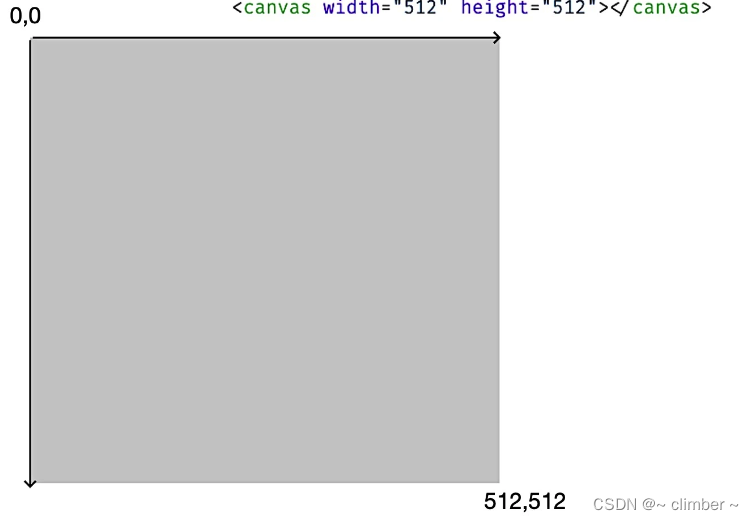
2、canvas的坐标系
3、使用canvas绘制几何图形
// 获取camvas上下文
const canvas = document.querySelector('canvas');
// 获取2d上下文
const context = canvas.getContext('2d');
//在画布中心点绘制绘制100*100的正方形,因为左上角的坐标系是(0,0),右下角是canvas的画布坐标,
//(canvas.width,canvas.hegiht ),因此中心点的坐标就是(context.rect(0.5*canvas.width, // 0.5*canvas.hegiht, 100, 100)

const rectSize = [100, 100];
context.fillStyle = 'red';
context.beginPath();
context.rect(0.5 * canvas.width, 0.5 * canvas.height, ...rectSize);
context.fill();
效果如下:

可以看到,小正方形并没有在画布的中心,原因是,设置坐标点的时候,将参数x和y 设置成画布宽高的一半。而rect 指令的x、y 的值,表示的是,要绘制出的矩形的左上角坐标而不是中心点的坐标。解决方案;
方法一:重新计算rect的x、y参数,等于画布的宽高的一半分别减去矩形自身宽高的一半,代码如下:
context.rect(0.5 * (canvas.width - rectSize[0]), 0.5 * (canvas.height - rectSize[1]), ...rectSize);方法二:给画布设置平移变化,在进行绘制,代码如下:
context.translate(-0.5 * rectSize[0], -0.5 * rectSize[1]);
两种方法对比:
第一种方法:操作简单,易理解,弊端:如果是不规则图形,就会很麻烦
第二种方法:对canvas画布的整体做一个平移操作,这样,只需获取中心点与左上角的偏移,然后对画布设置translate变换就可以,不需要再去改变图形的顶点位置。不过,这样操作会导致改变画布的状态,因此要把画布状态恢复回来。
恢复画布的方法,第一种方向平移,代码如下:
// 平移
context.translate(-0.5 * rectSize[0], -0.5 * rectSize[1]);

... 执行绘制

// 恢复
context.translate(0.5 * rectSize[0], 0.5 * rectSize[1]);
第二种方法:canvas 上下文提供了save和restore 方法,可以暂存和恢复画布的某个时刻的状态。save指令,不仅可以保存当前的translate状态,还可以保存其他信息,比如,fillstyle等,而restore指令则可以将状态指令恢复成成save前的指令。代码如下:
context.save(); // 暂存状态
// 平移
context.translate(-0.5 * rectSize[0], -0.5 * rectSize[1]);

... 执行绘制

context.restore(); // 恢复状态边栏推荐
- Application of the remote acquisition IOT gateway of the Bashir trough flowmeter in open channel flow monitoring
- Correct posture of cocoscreator's native secondary development
- Pyqt5:qlineedit control code
- Help you distinguish GNU, GCC, GCC and G++
- DNS Optimization Practice of APP network optimization
- sonarqube平台基础使用
- Hough transform of image
- Longest increasing subsequence
- Shell reads files by line
- Solr initialization failure: requesthandler INIT failure
猜你喜欢

In June, 2022, China Database ranking: tidb made a comeback to win the crown, and Dameng was dormant and won the flowers in May
Cygwin reports an error child_ info_ fork::abort: XXX. dll: Loaded to different address: parent(XXX) != child(XXX)
计算机视觉(AI)面试大全

. Net module and assembly - NET Module vs Assembly

WinDbg-虚拟机-双机调试-驱动文件的调试

單片機通信數據延遲問題排查

ASLR

配置用命令行编译的环境-MSVC

Demand and Prospect of 3D GIS Industry

TCP/IP
随机推荐
postgresql源码学习(21)—— 故障恢复②-事务日志初始化
HQChart实战教程55-欧易网K线面积图
. Net module and assembly - NET Module vs Assembly
Artalk | how to build a domestic hyperfusion evolutionary base with minimum investment?
Location data fusion Table 3
Android P SoftAP start process
How should Xiaobai start the Amazon self support evaluation?
[long time series prediction] aotoformer code detailed [3] model overall architecture analysis
Windows10 installing keras
数据库唯一索引和普通索引的区别?
Multivalued mapping: arraylistmultimap and hashmultimap
iQOO 8实测上手体验:王者归来,从不高调
DNS Optimization Practice of APP network optimization
intXX_ T and int_ fastXX_ T what is the difference- What is the difference between intXX_ t and int_ fastXX_ t?
TimeHelper
File compositor
cv. Houghcircles: Circular Hough transform opencv
window10安装keras
怎样确保消息的可靠性投递?
Ora-00392 ora-00312 error handling