当前位置:网站首页>Correct posture of cocoscreator's native secondary development
Correct posture of cocoscreator's native secondary development
2022-06-11 02:58:00 【Mr feather】
development environment
**
「cocos creator 3.4.2」 「Android Studio Bumblebee | 2021.1.1 Patch 3」 「ndk r21」
Preface
This article mainly introduces based on Cocos Creator 3.4.2 Of android The original secondary development process and JSB Conduct Android Layer and cocos ts/js The process of layer calling each other . Provide some references for the development partners .
This paper introduces the background and analysis process , If you only need a conclusion, please jump to 「“ Access to the process ”」 Title .
Click the card above or scan the QR code at the end of the text to follow the official account , The background to reply ”「3.x Android demo」“ obtain demo Source code
background
*Recently, a game under development has entered Android sdk Access related work , This kind of work is relatively simple , According to past experience, it should be free of obstacles ——「“ There must be no need to work overtime tonight ! You can date Xiaohua !”」
*
But after building the Android project , It is found that the structure is the same as before jsb-link There's a big difference , It is different from the previous project directory structure .
「 I was in a panic : I won't have to work overtime ?」
Some students in the search forum have seriously posted posts, but they still haven't been solved ( The date of the question is 3 month 17 Japan ), The problem is mainly summarized as : I don't know the process of Android secondary development , I don't know which project to open , How to modify a file , The post is as follows : 【 Help post 】 Please ask about the use of Cocos Creator Conduct Android The right posture for native development
The analysis process
Look through the official documents
Build directory document links 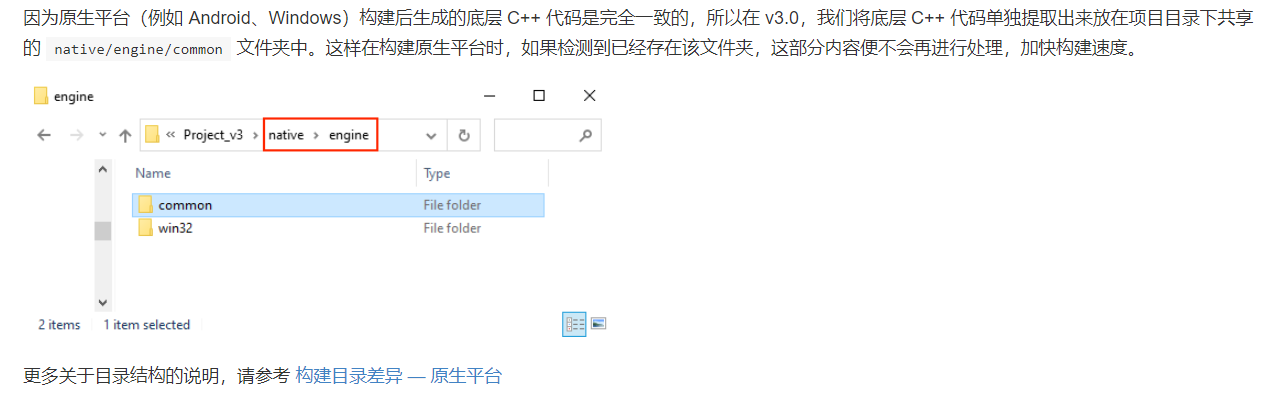

Link to secondary development documents 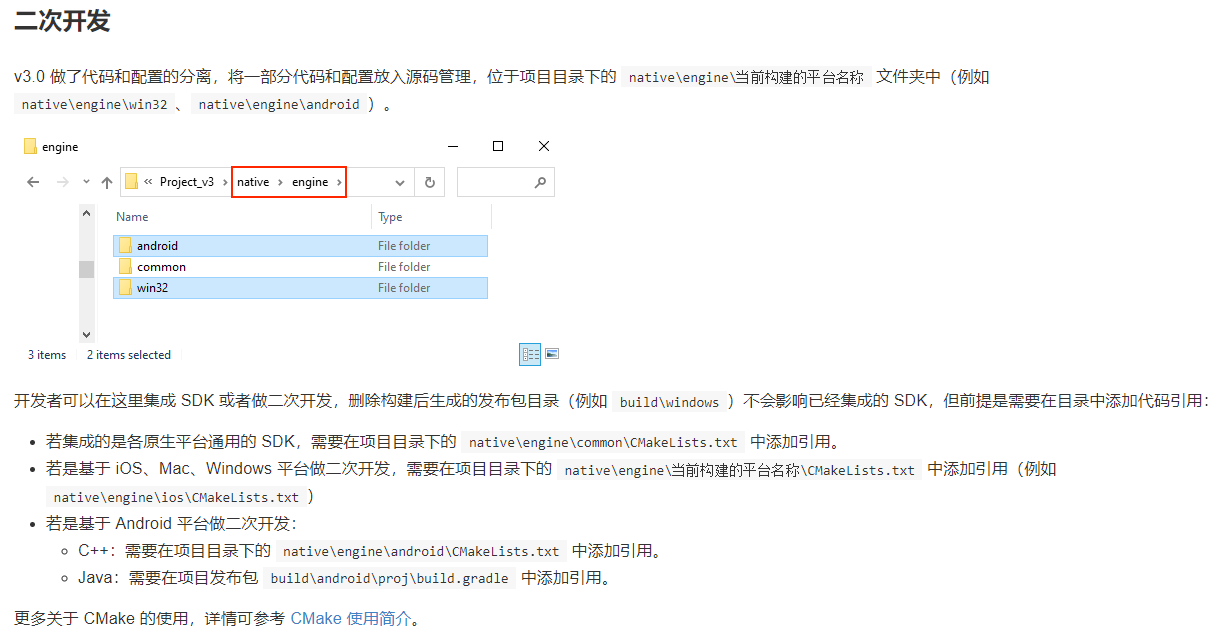
matters needing attention 
View local files
「/build/android/proj Catalog 」
see /build/android/proj Not found AppActitivy.java Wait for the documents , But exist build.gradle And other Android related documents Use Android Studio Open Directory , 「 You can successfully open and compile 」
「native Catalog 」
see /native/engine/android/app Catalog , There is AndroidMainfest.xml,build.gradle Wait for the documents .
see /native/engine/android/app/com/cocos/game, You can see that there is AppActitivy.java It is found that the above is the familiar Android project directory structure ,
Use Android Studio Open Directory ,「 Report errors 」

Follow the document , Use Android Studio open 「build/android/proj」, Found that the above AndroidMainfest.xml,build.gradle, as well as /native/engine/android/app/com/cocos/game/Appactivity, At this time, just switch the display mode to 「Android」 that will do

After switching, you can see the relevant native files

adopt android studio Use in windows Explorer opens AppActivty.java You can find AppActivity.java be located 「native」/engine/android/app/src/com/cocos/game Directory
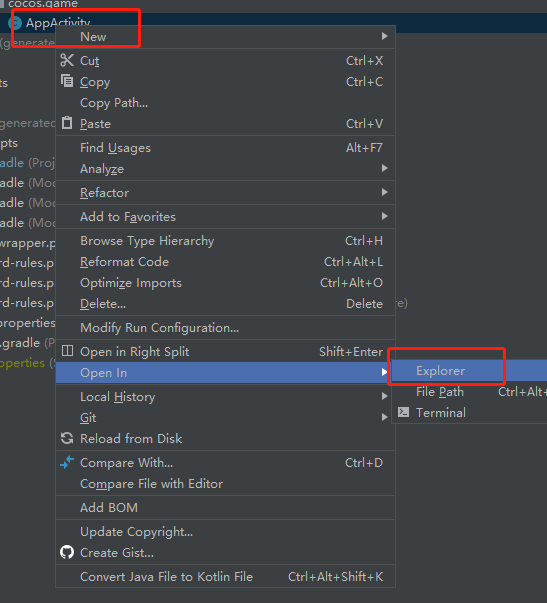

summary : stay build/android/proj Use as Development , The effective documents are located at native/engine/android in , Yes native The directory does version management , At the same time, it is necessary to remove native Under the build Catalog ( The compilation process generates content temporarily ). build/android The directory is creator Configured service Content , Change with the project , No separate version management is required .
Access to the process
Talking Data Complete access example
Next, let's say TalkingData Sdk For example , Introduce the complete secondary development process of Android native project . Download it sdk Open after sdk file : tdsdk Access to the document , Refer to the documentation for access .
1. Build Android natively in the editor , Please refer to the official documentation for options related to construction , This part of the introduction is more detailed
file : Package and publish to the native platform

2. After building , It can be seen in the project directory native、build/android Two directories


3. Use Android Studio open build/android/proj And switch to Android display mode
4. according to sdk Access documents for access
1. Import sdk
**
stay native/engine/android/app/ New under the directory libs Catalog ( Can be found in android studio Pass through show in explore Use windows Explorer opens , Automatically jump to this directory ),

stay \native\engine\android\app Create libs Catalog , Copy sdk Medium aar Wait for the file to arrive libs Next , And in app module Of build.gradle Add dependency to 
Notice here libs Of the directory aar/jar The file is not talkingdata Access... In the document 「TalkingdataSDK.jar」, It is 「SaaS_TalkingDataSDK_Android_V5.0.3.jar」( download sdk File name provided when ), In connection with other sdk There are often such details in , Care should be taken to avoid being trapped ,「 It leads to overtime and delays the appointment with xiaohua 」.
2. Configure obfuscation rules
**
open app module Belongs to proguard-rules.pro Add confusion rules

In the same way as above, configure permissions according to document requirements

sdk initialization , Interface implementation, etc , The content is similar , I won't go into details . Key code is provided here , For details, please pay attention to the official account at the end of the article , The background to reply 「“3.x Android demo”」 obtain demo Source code
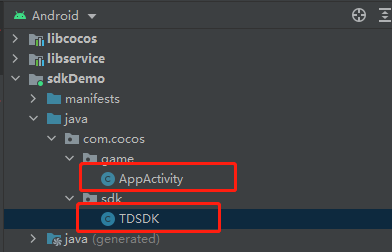 TDSDK.java
package com.cocos.sdk;

import android.util.Log;

import com.cocos.game.AppActivity;
import com.cocos.lib.CocosHelper;
import com.cocos.lib.CocosJavascriptJavaBridge;
import com.tendcloud.tenddata.TalkingDataProfile;
import com.tendcloud.tenddata.TalkingDataProfileType;
import com.tendcloud.tenddata.TalkingDataSDK;

public class TDSDK {
    static String AppID = "xxxxxxxxx";
    static String Chanel = "test_channel";

    static  TDSDK s_self = null;

    public static TDSDK getInstance(){
        if (s_self == null){
            s_self  = new TDSDK();
        }
        return  s_self;
    }

    public void init(){
        TalkingDataSDK.init(AppActivity.getContext(),AppID,Chanel, "");
    }

    public static void onResgister(String accountId){
        if (accountId==""){
            accountId = TalkingDataSDK.getDeviceId(AppActivity.getContext());
        }
        TalkingDataProfile profile = TalkingDataProfile.createProfile();
        profile.setName("");
        profile.setType(TalkingDataProfileType.ANONYMOUS);
        TalkingDataSDK.onRegister(accountId, profile,"");
    }

    public static String js2JavaTest(String str1, String str2){
        Log.d("TDSDK", String.format( "js2JavaTest Success param1:%s param2: %s",str1, str2));
        if (s_self!= null) s_self.java2js();
        return "Java Test Success";
    }
    public void java2js(){
        CocosHelper.runOnGameThread (new Runnable() {
            @Override
            public void run() {
                String str1 = "param3";
                String str2 = "param4";

                String funcStr = String.format("window.tdsdk.java2js('%s','%s')",str1,str2);
                Log.d("-----------------------", "Start Java2Js");
                CocosJavascriptJavaBridge.evalString(funcStr);
                Log.d("----------------------", "End Java2Js");
            }
        });
    }
}
Appactivity.java, It is suggested that you can simply understand android The execution timing and mechanism of each life cycle function .
 @Override
    protected void onCreate(Bundle savedInstanceState) {
        super.onCreate(savedInstanceState);
        // DO OTHER INITIALIZATION BELOW
        SDKWrapper.shared().init(this);
        TDSDK.getInstance().init();
    }
**
After the access is completed, you can directly go to as(android studio, Hereinafter unified abbreviation as) Package in , apk Path is generated :android-001\proj\build\sdkDemo\outputs\apk
android-001 For in creator The architecture task name of the build interface
**
It can also be in ccc Click generate in the build tool to package . apk Path is generated :\build\android-001\publish android-001 For in creator The architecture task name of the build interface
**
If it does js Layer code modification , You also need to carry out engineering construction through the editor's construction process , Then generate , Make the code effective . According to the engine design ,native After directory generation , Building again will skip this part of the build , Avoid affecting what has been developed android sdk、native C++ And other native customized content , It is also suggested that 「 take native Directory add git/svn version control 」.
Package test , The successful running , The activation device can be received in the background , Be accomplished !!!
JS/TS And Android Method intermodulation
「Android After the layer is connected , You need to achieve java And ts Intermodulation of .」
**
Official documents : 1. Java Reflection
Generalization :ts call java:jsb.reflection.callStaticMethod java call ts, Use evalString, 「 Notice the... In the sample code evalString The single and double quotation marks of parameters in the function are used , Avoid error .」
Example :
cocos creator ts Code :
    const classPath = "com/cocos/sdk/TDSDK";
@ccclass('tdsdk')
export class tdsdk {
    private static _instance = null;
    static getInstance(): tdsdk {
        if (tdsdk._instance == null) {
            tdsdk._instance = new tdsdk();
        }
        return tdsdk._instance;
    }
    //js call Java
    js2Java() {
        if (JSB) {
            log("********************start js2Java param1: title param2: content********************");
            let res = jsb.reflection.callStaticMethod(classPath, "js2JavaTest", "(Ljava/lang/String;Ljava/lang/String;)Ljava/lang/String;", "title", "content");
            log(" Return value ", res);
            log("********************end js2Java param1: title param2: content********************");
        }
    }
    //java call js
    java2js(param1: string, param2: string) {
        if (!JSB) {
        }
        log("java2js success param3: %s param4:%s ", param1, param2);
    }
}

window.tdsdk = tdsdk.getInstance();
Note that the code ends with tdsdk Hang on window On , And in cocos creator Root creation .d.ts File pair tdsdk Make a global statement ( The file name is optional , Don't conflict with what you already have ) It is convenient for code prompt when calling elsewhere (「 Elegance never goes out of style 」)  global.d.ts:
import { tdsdk } from "./assets/script/tdsdk";
declare global {
    interface Window {
        tdsdk: tdsdk
    }
}
Java Code
public static String js2JavaTest(String str1, String str2){
        Log.d("TDSDK", String.format( "js2JavaTest Success param1:%s param2: %s",str1, str2));
        if (s_self!= null) s_self.java2js();
        return "Java Test Success";
    }
    public void java2js(){
        CocosHelper.runOnGameThread (new Runnable() {
            @Override
            public void run() {
                String str1 = "param3";
                String str2 = "param4";

                String funcStr = String.format("window.tdsdk.java2js('%s','%s')",str1,str2);
                Log.d("-----------------------", "Start Java2Js");
                CocosJavascriptJavaBridge.evalString(funcStr);
                Log.d("----------------------", "End Java2Js");
            }
        });
    }
Pay attention to java call js Code , If you need to operate ui, Please call... In the specified thread (「runOnGameThread」), Avoid collapse , Here, the specification is established to uniformly call in the specified thread
Running results 
**
More advanced intermodulation , Please observe 「 Tencent online technology blog of the Ministry of Education 」 Automatic binding scheme article for , It mainly introduces C++ And js Intermodulation :
summary
The above introduction completes sdk Access and java、ts Related usage of intermodulation , After mastering it, you should be able to complete most Android sdk The connection of the is working .「 Feather is going to date Xiaohua .」
more
*. Simple performance optimization ( One ): Starting from knowledge and method
. Declare a custom data array on the editor
. Inclusion optimization guidelines
be based on creator3.0 Of 3D change
Fast implementation 3d Parabola drawing
of odd shape - Irregular button implementation
*
Have you lost your skills today ?
More welcome, WeChat official account


边栏推荐
猜你喜欢

Flat data to tree and tree data flattening

Necessity for banks to choose electronic bidding procurement

弄懂了采矿业与碳中和的逻辑,就读懂了矿区无人驾驶的千亿市场

CPT 102_ LEC 15

Go语言之Go 快速入门篇(一):第一个 Go 程序

Three special data types, day3 and redis (geographic location, cardinality statistics and bitmap scene usage)

CPT 102_ LEC 17
![[resolved] how to fix another update in progress WordPress upgrade error](/img/b1/7b9945c1a623c20288f0d232cbb0c4.jpg)
[resolved] how to fix another update in progress WordPress upgrade error

Android P SoftAP start process

Link list of high frequency written interview question brushing summary (distribution explanation & code annotation)
随机推荐
20220610 Friday
求MySQL先按大于等于当前时间升序排序,再按小于当前时间降序排序
net core天马行空系列-可用于依赖注入的,数据库表和c#实体类互相转换的接口实现
Introduction to the functions of today's headline search webmaster platform (portal)
ROS基础 - 使用 launch 文件(一) - 批量启动多个ROS节点
Google Gmail mailbox marks all unread messages as read at once
[big guy show] aiops in the eyes of Borui data, choosing the right track and the right people
反射三种方式
Rs232/rs485 to 4G DTU uploading temperature and humidity sensor data based on Modbus protocol to remote TCP server
【长时间序列预测】Aotoformer 代码详解之[3]模型整体架构分析
Niuke: two numbers that only appear once in the array
The two request sessionids of the same user are inconsistent ----- record the problem
Helm deploy traifik ingress
Determine whether a string of numbers is the result of a quick sort
CPT 102_ LEC 15
CPT 102_LEC 17
【冒泡排序的实现】
Graphacademy course explanation: Fundamentals of neo4j graph data science
【斐波那契数列】
那些笑着离开“北上广”的人,为何最后都哭了?