当前位置:网站首页>如何制作专属的VS Code主题
如何制作专属的VS Code主题
2022-07-01 06:58:00 【CamphorBloom】
1、color的工作原理。
使用快捷键 Ctrl+Shift+P, 输入 Open settings, 选择非default的settings.json文件点击:

尝试添加以下配置:
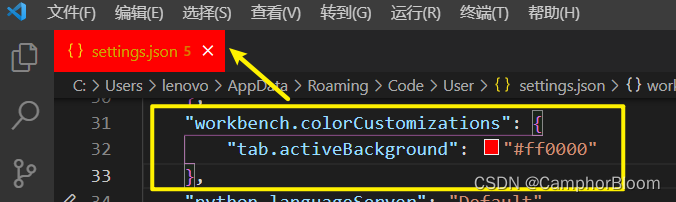
可以看到tab.activeBackground这个属性将当前使用文件的标签背景渲染为红色了。
其余相关配置参考:Visual Studio Code User and Workspace Settings
里面有上百种颜色方案,这既让人兴奋又不知所措。
2、color用途分类
这些颜色属性大致可以分为两大类:

- 应用颜色 (程序本身颜色)包括标题栏、选项卡、菜单、滚动栏、一般性文本等。
- 符号颜色 (如代码高亮)。
3、*使用VS Code扩展生成器
方便我们之后发布在VS Code 主题市场,需要它的扩展/自定义模板文件。
https://github.com/microsoft/vscode-generator-code
https://www.npmjs.com/package/generator-code
参考以上文档,下载依赖:
npm install -g yo generator-code全局安装方便日后管理。
启动生成器:
yo code
你需要回答几个必要的问题,使用方向键+enter选择即可(后面蓝字是填写内容)。

回答完毕,它将在本地初始化一个git 仓库(文件名为第三个选项所填内容)。
4、编辑xxx--color-theme.json
当然打开文件,你会发现这有600来行,如果死脑筋的话,可能明天就要埋了。难道要一个一个看着改吗?这里有个小技巧!——使用Theme Debugger来预览颜色效果。

它会弹出一个新窗口,一旦做了任何改动,重启debugger就能看到效果了。

另外还有个问题,我们如何知道一个属性和作用范围是映射到theme的那一地方呢?(一些关键字的替换也是不知道的)
第二个技巧就是命令面板开启Token and Scopes Inspector,如下:

鼠标悬浮在selector上,弹出相关信息(语种,类型,前景色,背景色,对比度,文本匹配范围)


这里添加了一个属性,发现Extension Development Host 对应的窗口边框变成了定义的颜色。
逐一遍历属性并修改是很头疼的,毕竟谁也不想做费时又费力的事。
在线主题颜色生成器:VS Code Theme Color Generator - Coder Coder
按照个人喜好设计,最后将定义好的theme json文件复制粘贴就好了。如果你不知道怎样选取颜色,推荐到 Coolors - The super fast color palettes generator!上找找灵感,或者到 Image to Colors Palette Generator - Extract Colors from Image寻找合适的视觉体验。
5、发布主题

- 登录Microsoft Azure DevOps。
- 创建一个组织。
- 注册你的主题扩展。
- 发布
- 在社交媒体上吹嘘它(·...·)

填写好相关信息,点击Continue。
经过验证后,定向到个人仪表板界面:

点击用户头像旁边的User settings,选择Personal access tokens(用于身份认证)。
点击 +New Token,按以下信息填入(不懂的自行百度吧):


别忘了拷贝你的token哦!!!
导航至https://marketplace.visualstudio.com/manage/createpublisher?managePageRedirect=true

只需要填写Basic information即可:
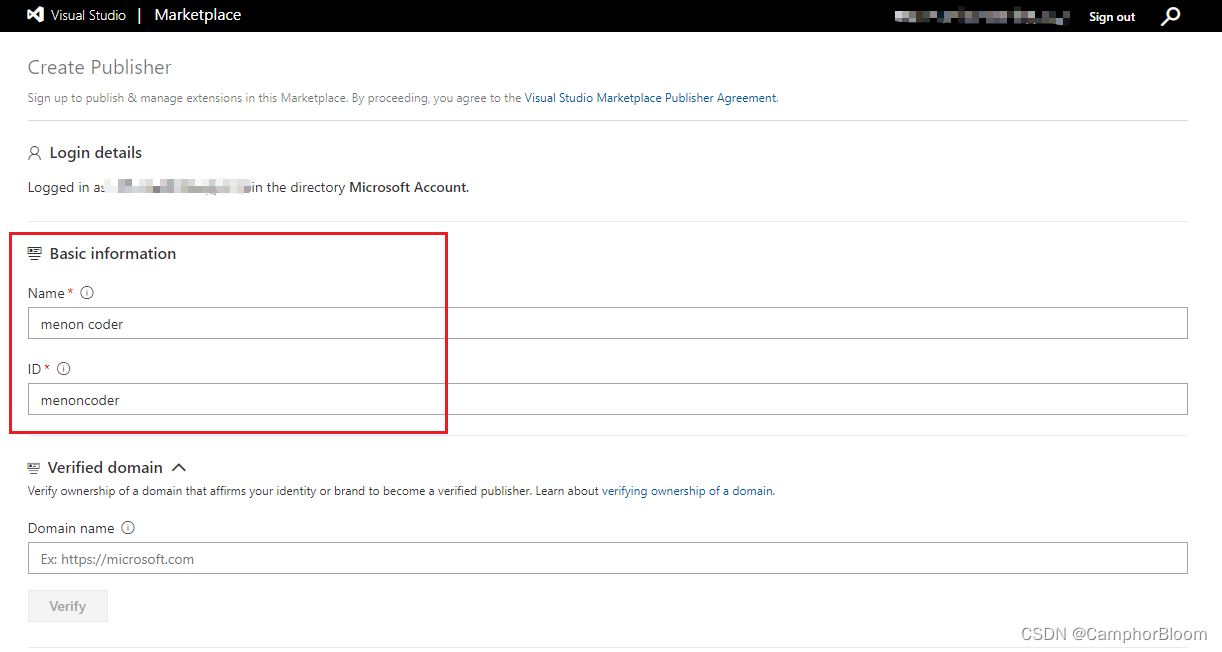
点击Create(可能需要验证)。
回到主题扩展文件中,完善package.json中的消息:

以及自定义好README.md文件内容。
万事俱备,只差最后一哆嗦了。
参考官网: Publishing Extensions | Visual Studio Code ExtensionAPI
vsce,“Visual Studio Code Extensions”的缩写,是一个用于打包、发布和管理 VS Code 扩展的命令行工具。
安装vsce命令:
npm install -g vsce以Publisher身份登录:
vsce login <YourPublisherName> 
随后要求你输入token进行验证。

打包为一个xxx.vsix文件( 输出在根目录):
vsce package
发布命令:
vsce publish
大功告成!!!
在vscode market, Manager Publisher & Extensions中查看:

在marketplace.visualstudio中展示的详情:Menon Dark - Visual Studio Marketplace

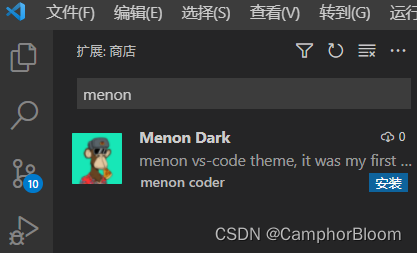
以上就是我开发vscode主题扩展的初体验,如果喜欢的话,可以试试这个主题哦!
参考资料:
边栏推荐
- [lingo] find the minimum connection diagram of seven cities to minimize the price of natural gas pipelines
- TDB中多个model情况下使用fuseki查询
- [matlab] solve nonlinear programming
- [lingo] find the shortest path problem of undirected graph
- Solve the problem that the class defined in meta-inf.services cannot be read
- Problem: officeexception: failed to start and connect (III)
- How to use SCI hub
- How to use Alibaba vector font files through CDN
- DC-4 target
- Pourquoi tant de gens sont - ils devenus des gestionnaires de produits? Quelles sont les perspectives de développement des gestionnaires de produits?
猜你喜欢





随机推荐
MySQL constraint learning notes
[matlab] solve nonlinear programming
问题解决:OfficeException: failed to start and connect(一)
Why are so many people turning to product managers? What is the development prospect of product manager?
AI视频智能平台EasyCVR设备录像出现无法播放现象的问题修复
Esp32 esp-idf ADC monitors battery voltage (with correction)
ctfshow-web355,356(SSRF)
ctfhub-端口扫描(SSRF)
Solve the problem of "unexpected status code 503 service unavailable" when kaniko pushes the image to harbor
WiFi settings for raspberry Pie 4
Product learning (II) - competitive product analysis
【计网】(一) 集线器、网桥、交换机、路由器等概念
為什麼這麼多人轉行產品經理?產品經理發展前景如何?
[Tikhonov] image super-resolution reconstruction based on Tikhonov regularization
Is it reliable to open an account on the compass with your mobile phone? Is there any potential safety hazard
node中引入模块的原理
如何通过cdn方式使用阿里巴巴矢量图字体文件
自动化测试平台(十三):接口自动化框架与平台对比及应用场景分析及设计思路分享
解决kaniko push镜像到harbor时报错(代理导致):unexpected status code 503 Service Unavailable
Stored procedure learning notes