当前位置:网站首页>JMeter learning notes 2 - brief introduction to graphical interface
JMeter learning notes 2 - brief introduction to graphical interface
2022-07-01 04:00:00 【51CTO】
Cut the crap and give it to those who work directly :
One 、 Open and run JMeter, appear UI Interface . As shown below :

The toolbar : Icon collection of common operations , Yes New( newly build ), Template( Templates ) ,Save( preservation ),Start( Start ) ,Stop( stop it ) etc.
The left panel : Two options :Test Plan( test plan ) and WorkBench( The workbench ).
Test Plan, Test plan means , Many test cases can be written inside , Related operations and settings of test cases , This is the main function .
WorkBench, It means workbench , It's like PyCharm perhaps Eclipse Project save path in .
Right side panel : It mainly refers to some detailed setting options , The content on the right is linked and changed according to the selection of the left panel . Now you only need to know that this is an area for setting parameters in detail .
The Chinese version is shown in the figure below

Two 、 A brief introduction to the interface
Observe JMeter Interface ,JMeter It is mainly divided into four areas , From top to bottom and from left to right , You can call them separately : menu bar , The toolbar , The left panel , Right detailed configuration panel .
menu bar :File( file ), Edit( edit ), Search( lookup ), Run( function ), Option( Options ), Help( help ) These six menus
1. File( file ): As shown in the figure below
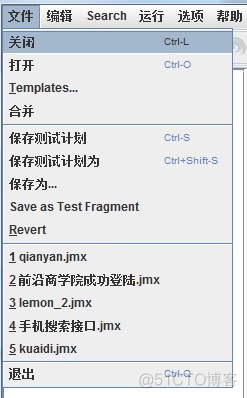
close : Close the currently open JMX file .
open : Open one JMX file .
Templates Templates : Guide the use of commonly used functions . There are mainly Recording( Recording )、JDBC Load Test(JDBC The load test )、webserver Testing, etc. , It is divided into basic steps and detailed screenshots . If you click the user link , Will link to apache jmeter See the detailed steps and screenshot instructions on the website .

Merge : Will be more than one JMX Merge into one .
Save test plan : Save only the test plan The content added in the workbench will not be saved .
Save the test plan as : Save the test plan as .
Save as : You can save the workbench and test plan or test case as JMX Note the location of the save as point , Which content is stored .
save as Test fragment:( Save as a test fragment ), Only thread groups 、 test plan 、 The workbench cannot Save as a test fragment .
Revert:( Restore ), Will now be jmx Restore to the saved JMX
2. edit :

Only part of the introduction
Duplicate( Copy ): Directly copy a selected object to the current menu .
Reset Gui( Reset Gui): Reset the... Of the selected object GUI Content .
Save Node( node ) As Image: Configure the menu GUI Save as picture .
Save Screen( The screen ) As Image: Will the whole jmeter Save the interface as a picture .
Toggle: Be similar to java The meaning of setting breakpoints in .
3. Search for :

Search: Search all matching items in the configuration , Successful matching is displayed in red .
Reset Search:( Reset search ), Clear search results . hold Search The result of the red box is marked as cancel .
4. function :

start-up : Start running the test plan
Start no pauses: Start running test plan without pause 1, Timers can be ignored 2, It runs faster at restart ???? What's the meaning of this? ?
Remote start / stop it : Specify a remote agent( agent ) function / Stop the test plan .
Remote all start / stop it : Let all remote agent function / Stop test .
stop it : Stop executing the test plan .
close : Close the test plan .
Remote( long-range ) Shutdown: Close a specified remote agent.
Remote Shutdown All: Turn off all remote agent.
Remote exit : Specify a remote agent Exit execution .
Remote exit all : All remote agent Exit execution .
eliminate : Clear the execution result of the selection menu .
Clear all : Clear the execution results of all menus .
5. Options :

Function Assistant dialog : When writing scripts , Use the function assistant to help generate the specified code .
appearance : jmeter Interface style . Show different jmeter Interface style . As shown in the figure below :

Toolbar: Tool options , Select to display common toolbar shortcut buttons .
Log Viewer: Log viewer , When selected, you can view the operation log at the bottom right . As shown in the figure below

SSL Manager : Import external SSL Manager , For better management of certificates , JMeter Proxy server does not support logging SSL(https). As shown in the figure below :
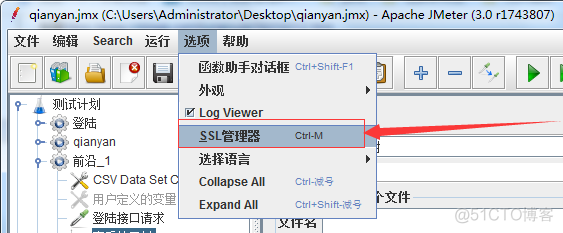

Choice language : Select the language of the interface , Currently supports Chinese 、 english 、 French 、 German, etc . Many Chinese versions are not fully translated , You can use the English version directly .

Collapse All: Expand all menus .
Expand All: Collapse all menus
6. help :
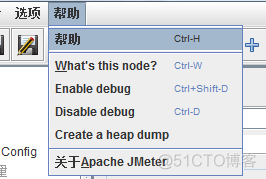
What’s this node?: Display the meaning of a menu when the mouse is on it .
Enable debug: Open the debug .
Disable debug: Cancel debugging .
Create a heap dump: Create heap dump . This is how to create JVM Crash heap dump . This file can be used as heap analysis tool ( Such as JHAT), To determine the root cause for analysis .
边栏推荐
- 409. 最长回文串
- 定了!2022京东全球科技探索者大会之京东云峰会7月13日北京见
- 多次跳槽后,月薪等于老同事的年薪
- [TA frost wolf \u may- hundred people plan] 1.3 secret of texture
- Qt开发经验小技巧226-230
- NFT:使用 EIP-2981 開啟 NFT 版稅之旅
- Spock单元测试框架介绍及在美团优选的实践___第一章
- Appium automation test foundation -- supplement: c/s architecture and b/s architecture description
- 389. find a difference
- 小程序中自定义组件
猜你喜欢




随机推荐
有效的 @SuppressWarnings 警告名称
72. 编辑距离
[reach out to Party welfare] developer reload system sequence
【无标题】
[ta- frost wolf \u may- hundred people plan] 1.1 rendering pipeline
166. fractions to decimals
【EI检索】2022年第六届材料工程与先进制造技术国际会议(MEAMT 2022)重要信息会议网址:www.meamt.org会议时间:2022年9月23-25日召开地点:中国南京截稿时间:2
Spock单元测试框架介绍及在美团优选的实践___第一章
[TA frost wolf \u may- hundred people plan] 2.4 traditional empirical lighting model
【EI会议】2022年第三届纳米材料与纳米技术国际会议(NanoMT 2022)
盘点华为云GaussDB(for Redis)六大秒级能力
[shortcut key]
不同性能测试工具的并发模式
Jeecgboot output log, how to use @slf4j
It's settled! 2022 JD cloud summit of JD global technology Explorer conference see you in Beijing on July 13
DO280管理应用部署--RC
使用scroll-view实现滑块视图可能遇到的问题及其解决方法
小程序中自定义组件
【TA-霜狼_may-《百人计划》】1.4 PC手机图形API介绍
【EI会议】2022年国际土木与海洋工程联合会议(JCCME 2022)