当前位置:网站首页>小程序中自定义组件
小程序中自定义组件
2022-07-01 03:49:00 【richest_qi】
文章目录
小程序项目
代码涉及的主要文件有:
- app.json
- pages/index/index.wxml
- pages/index/index.wxss
- pages/index/index.js

app.json
{

  "pages": [
    "pages/index/index"
  ],
  "window": {

    "navigationBarBackgroundColor": "#971a22",
    "navigationBarTitleText": "首页",
    "navigationBarTextStyle": "white"
  },
  "style": "v2",
  "sitemapLocation": "sitemap.json"
}
pages/index/index.wxml
<view class="indexContainer">
  <view class="recommendSongContainer">
    <view class="header">
      <view class="title">推荐歌单</view>
      <view>
        <text class="desc">邂逅你的真爱歌单</text>
        <text class="btn">></text>
      </view>
    </view>
    <scroll-view class="recommendSongList" enable-flex scroll-x>
      <view class="recommendItem" wx:for="{
     {list}}" wx:key="id">
        <image src="{
     {item.picUrl}}"></image>
        <view class="name">{
   {item.title}}</view>
      </view>
    </scroll-view>
  </view>
  <view class="newSongContainer">
    <view class="header">
      <view class="title">新歌速递</view>
      <view>
        <text class="desc">更多鲜乐更多快落</text>
        <text class="btn">></text>
      </view>
    </view>
  </view>
  <view class="newDiscContainer">
    <view class="header">
      <view class="title">新碟上架</view>
      <view>
        <text class="desc">魔力新碟好听到爆</text>
        <text class="btn">></text>
      </view>
    </view>
  </view>
  <view class="screamSongContainer">
    <view class="header">
      <view class="title">尖叫新歌榜</view>
      <view>
        <text class="desc">潮人必听热门新单</text>
        <text class="btn">></text>
      </view>
    </view>
  </view>
</view>
pages/index/index.wxss
.indexContainer{

  padding: 0 20rpx;
}
.header{

  display: flex;
  justify-content: space-between;
  align-items: center;
  margin: 20rpx 0;
}
.header .title{

  font-weight: bold;
}
.header .desc{

  font-size: 24rpx;
  color: #333;
  padding: 0 20rpx;
}
.header .btn{

  font-size: 24rpx;
  padding: 0 10rpx;
  background: #eee;
  color: #888;
  border-radius: 6rpx;
}
.recommendSongList{

  display: flex;
  height: 280rpx;
}
.recommendSongList image{

  width: 200rpx;
  height: 200rpx;
  border-radius: 10rpx;
  margin-right: 10rpx;
}
.recommendSongList .name{

  font-size: 26rpx;
  display: -webkit-box;
  overflow: hidden;
  text-overflow:ellipsis;
  -webkit-box-orient: vertical;
  -webkit-line-clamp: 2;
}
pages/index/index.js
Page({

  data:{

    list:[]
  },
  onLoad(){

    this.getDataFromServer();
  },
  getDataFromServer(){

    const result = [
      {
    id: 494479726, picUrl: "https://p2.music.126.net/58ox3zVEmosSrdLaKj6x5w==/109951162827155600.jpg", title: "后摇MV | 原来后摇也能视觉化"},
      {
    id: 135595185, picUrl: "https://p2.music.126.net/11ZHf0G9FQzWNi-8sFzCmw==/109951164541050373.jpg", title: "Acid Jazz酸爵士—爵士乐中的“酸性”融合"},
      {
    id: 114846926, picUrl: "https://p2.music.126.net/GTf1b1G2dAs1SleurIfcJg==/3399689953594431.jpg", title: "歌名后缀大科普"},
      {
    id: 113780871, picUrl: "https://p2.music.126.net/qxUWSKhrd1UWME8oAYTMFQ==/109951164497486331.jpg", title: "「Cool Jazz」冷爵士让你全身心放松"},
      {
    id: 2962407224, picUrl: "https://p2.music.126.net/NW1GEN3sruiLpT4AZrdDFw==/109951165669533032.jpg", title: "『英伦女声』遗世而独立的不列颠玫瑰"},
      {
    id: 2107922801, picUrl: "https://p2.music.126.net/b--QkIcFfdxz_DryW55ZfA==/109951163165101034.jpg", title: "声光美学 I 经典电影中的古典配乐集"},
      {
    id: 78669437, picUrl: "https://p2.music.126.net/AfN_yyi-fQe8POTMKJFjAA==/7957165650297535.jpg", title: "美剧中的神级插曲"},
      {
    id: 3116763088, picUrl: "https://p2.music.126.net/MSom1XSXqt5K9ArZlJ29CQ==/109951164608648583.jpg", title: "音乐的力量 I 文艺复兴时期的世俗情歌"},
      {
    id: 101354498, picUrl: "https://p2.music.126.net/dmj9iqz8MsD_sCd1xBF0WA==/7918682744429845.jpg", title: "时尚运动•必备节奏"}
    ]
    this.setData({
    list:result})
  }
})
自定义组件

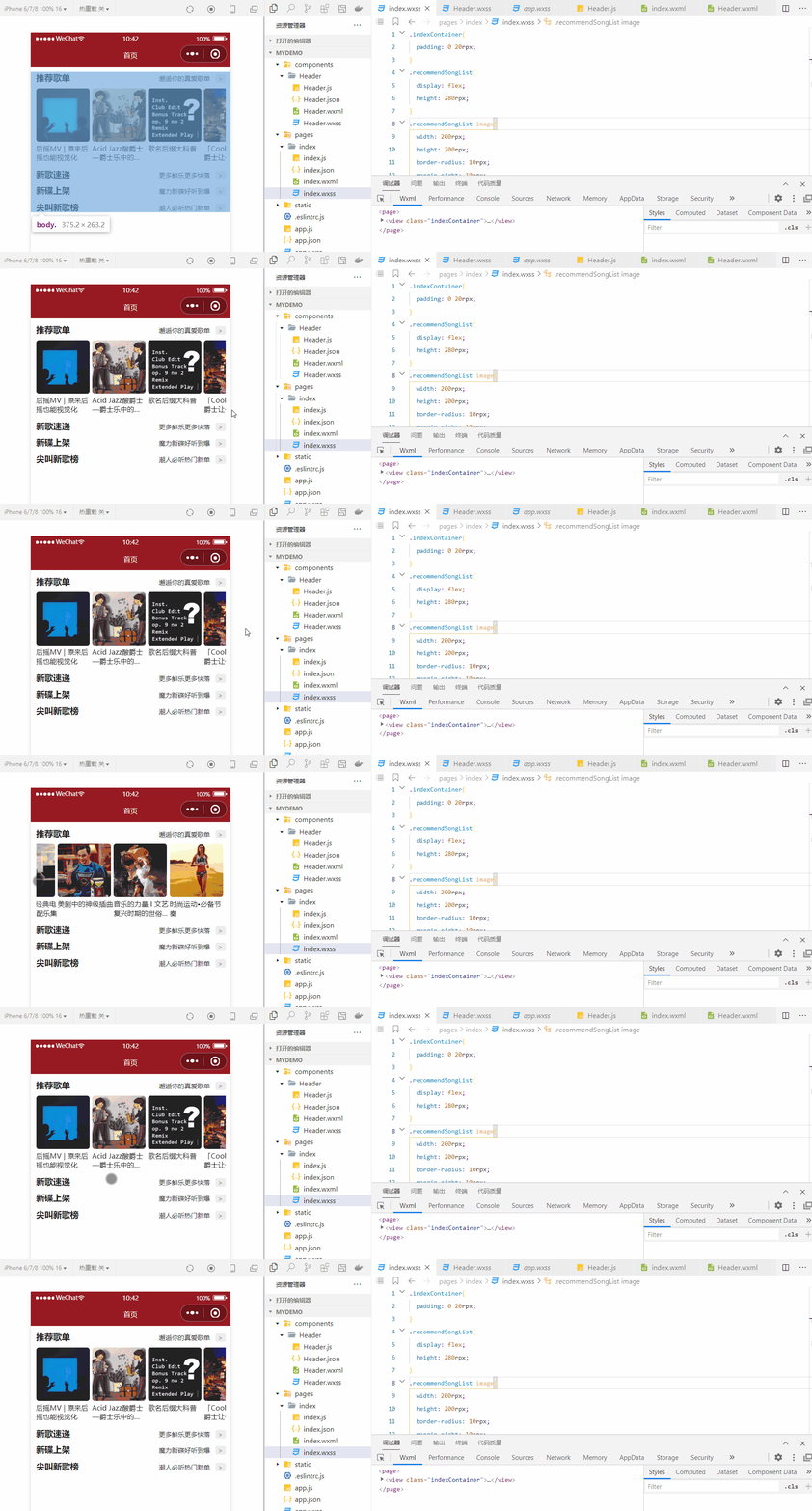
项目根目录下新建文件夹:components,components下新建文件夹:Header,Header下新建Component,自动生成文件: Header.wxml、Header.wxss、Header.js和Header.json。
代码变更涉及的文件有:
- components/Header/Header.wxml
- components/Header/Header.wxss
- components/Header/Header.js
- pages/index/index.json
- pages/index/index.wxml
- pages/index/index.wxss
components/Header/Header.wxml
<view class="header">
  <view class="title">{
   {title}}</view>
  <view>
    <text class="desc">{
   {desc}}</text>
    <text class="btn">></text>
  </view>
</view>
components/Header/Header.wxss
.header{

  display: flex;
  justify-content: space-between;
  align-items: center;
  margin: 20rpx 0;
}
.header .title{

  font-weight: bold;
}
.header .desc{

  font-size: 24rpx;
  color: #333;
  padding: 0 20rpx;
}
.header .btn{

  font-size: 24rpx;
  padding: 0 10rpx;
  background: #eee;
  color: #888;
  border-radius: 6rpx;
}
components/Header/Header.js
Component({

  properties: {

    title:{

      type:String,
      value:"默认标题"
    },
    desc:{

      type:String,
      value:"默认描述"
    }
  },
  data: {


  },
  methods: {


  }
})
pages/index/index.json
{

  "usingComponents": {

    "Header":"/components/Header/Header"
  }
}
pages/index/index.wxml
<view class="indexContainer">
  <view class="recommendSongContainer">
    <Header title="推荐歌单" desc="邂逅你的真爱歌单"/>
    <scroll-view class="recommendSongList" enable-flex scroll-x>
      <view class="recommendItem" wx:for="{
     {list}}" wx:key="id">
        <image src="{
     {item.picUrl}}"></image>
        <view class="name">{
   {item.title}}</view>
      </view>
    </scroll-view>
  </view>
  <view class="newSongContainer">
    <Header title="新歌速递" desc="更多鲜乐更多快落"/>
  </view>
  <view class="newDiscContainer">
    <Header title="新碟上架" desc="魔力新碟好听到爆"/>
  </view>
  <view class="screamSongContainer">
    <Header title="尖叫新歌榜" desc="潮人必听热门新单"/>
  </view>
</view>
pages/index/index.wxss
.indexContainer{

  padding: 0 20rpx;
}
.recommendSongList{

  display: flex;
  height: 280rpx;
}
.recommendSongList image{

  width: 200rpx;
  height: 200rpx;
  border-radius: 10rpx;
  margin-right: 10rpx;
}
.recommendSongList .name{

  font-size: 26rpx;
  display: -webkit-box;
  overflow: hidden;
  text-overflow:ellipsis;
  -webkit-box-orient: vertical;
  -webkit-line-clamp: 2;
}
小结
创建自定义组件
微信小程序中使用 Component() 实现自定义组件,它接收一个对象作为参数,该对象包含多个属性,其中,常用的有:
properties,组件的对外属性,相当于vue或react中的props。类型是Object Map,非必填。如
properties: {

  title:{

    type:String, //属性的类型,必填
    value:"默认标题" //属性的初始值,非必填
  }
}
data,组件自己内部的数据。类型是Object,非必填。methods,组件的方法。
使用自定义组件
使用自定义组件前,首先要在页面json文件中进行引用声明,如下所示,这样,页面的wxml中就可以像使用基础组件一样使用自定义组件。
{

  "usingComponents": {

    "Header":"/components/Header/Header"
  }
}
相关链接
边栏推荐
- [reach out to Party welfare] developer reload system sequence
- [TA frost wolf \u may- hundred talents plan] 1.2.3 MVP matrix operation
- 6. zigzag transformation
- 318. Maximum word length product
- 熊市下的Coinbase:亏损、裁员、股价暴跌
- JMeter login failure, extracting login token, and obtaining token problem solving
- [TA frost wolf \u may- hundred people plan] 2.4 traditional empirical lighting model
- 【TA-霜狼_may-《百人计划》】1.2.2 矩阵计算
- Grid system in bootstrap
- Sort linked list (merge sort)
猜你喜欢

Huawei simulator ENSP - hcip - Hybrid Experiment 2
![Online public network security case nanny level tutorial [reaching out for Party welfare]](/img/66/d9c848a7888e547b7cb28d84aabc24.png)
Online public network security case nanny level tutorial [reaching out for Party welfare]

TS type gymnastics: illustrating a complex advanced type
![[TA frost wolf \u may- hundred talents plan] 1.2.3 MVP matrix operation](/img/4e/8cf60bc816441967c04f97c64685a1.png)
[TA frost wolf \u may- hundred talents plan] 1.2.3 MVP matrix operation

Why can't you find the corresponding function by clicking go to definiton (super easy has a diagram)

AfxMessageBox和MessageBox的用法

Grid system in bootstrap

这可能是你进腾讯最后的机会了..

线程常用方法与守护线程

SEM of C language_ Tvariable type
随机推荐
318. Maximum word length product
[TA frost wolf _may - "hundred people plan"] 1.4 introduction to PC mobile phone graphics API
浏览器顶部loading(来自知乎)
访问阿里云存储的图片URL实现在网页直接预览略缩图而不直接下载
Random seed torch in deep learning manual_ seed(number)、torch. cuda. manual_ seed(number)
京东智能客服言犀意图体系搭建和意图识别技术介绍
242. valid Letter heteronyms
165. compare version numbers
166. fractions to decimals
【TA-霜狼_may-《百人计划》】1.2.1 向量基础
Volley parsing data shows networking failure
“目标检测“+“视觉理解“实现对输入图像的理解
[JPCs publication] the Third International Conference on control theory and application in 2022 (icocta 2022)
LeetCode 1380. Lucky number in matrix
bootsrap中的栅格系统
程序员女友给我做了一个疲劳驾驶检测
409. 最长回文串
Unity之三维空间多点箭头导航
208. implement trie (prefix tree)
187. 重复的DNA序列