当前位置:网站首页>net stop/start mysql80 access denied
net stop/start mysql80 access denied
2022-08-01 08:25:00 【time Friend】
Enter cmd in the lower left corner of the computer to open the command panel,On the premise of closing the database, enter net start mysql80, and it shows that access is denied and access error.
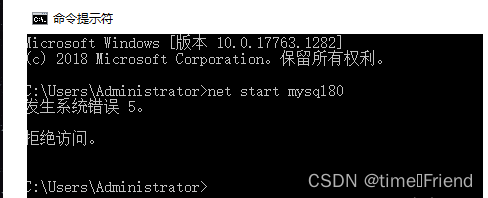
The reason may be that the cmd version is too low, so when opening cmd, some additional operations are required.
The specific operations are as follows:
Enter cmd in the lower left corner of the computer, then press and hold shift+ctrl+enter at the same time to enter the command prompt interface as an administrator.
If you need to start mysql, enter net start mysql80, you can see the corresponding prompt.
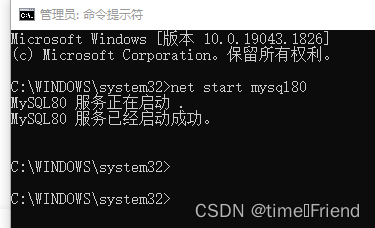
If you need to stop mysql, enter net stop mysql80, you can see the corresponding prompt.

Foreword:
After the MySQL installation is complete, you need to start the service process, otherwise the client cannot connect to the database.In the previous configuration process, MySQL has been installed as a Windows service. When Windows starts, the MySQL service will also start along with it. However, sometimes it is necessary to manually control the start and stop of the MySQL service, which can be achieved in two ways.
1. Through Windows Service Manager
Start the MySQL service You can check whether the MySQL service is enabled through the Windows service manager. First, click the "Start" menu, select the "Run" command in the pop-up menu, open the "Run" dialog box and enter the services.msc command,Click the "OK" button to open the Windows Service Manager, as shown in Figure 1-26.

As can be seen from Figure 1-26, the MySQL service is not started. At this time, you can directly double-click the MySQL service item to open the properties dialog box, and click the "Start" button to modify the status of the service, as shown in Figure 1-27 shown.

There is an option for startup type in Figure 1-27, there are three types of options to choose from, as follows.
(1) Automatic: Services that are usually closely related to the system must be set to automatic, and it will be started with the system.
(2) Manual: The service will not be started with the system and will not be activated until needed.
(3) Disabled: The service will no longer start, even when it is needed, unless modified to the above two types.For the above three situations, beginners can choose according to their actual needs. It is recommended to choose "automatic" or "manual" here.
2. Start MySQL service through DOS command
Starting the MySQL service can be started not only through Windows Service Manager, but also through DOS commands.The specific command to start the MySQL service through the DOS command is as follows:
net start mysql
After executing the above command, the displayed result is shown in Figure 1-28.


If it prompts "The service name is invalid", check the name of the Mysql service installed locally, and check it:
Computer - Right Click - Manage - Services and Applications - Services
Find the Mysql service name.

My local Mysql service name is Mysql55.
The startup command is: net start mysql55

边栏推荐
猜你喜欢

SaaS安全认证综合指南

【数据集】各类绝缘子、鸟巢及防震锤数据集汇总
华为深度学习课程第六、七章

【Unity3D】相机
![[Tear AHB-APB Bridge by hand]~ Why aren't the lower two bits of the AHB address bus used to represent the address?](/img/fb/c95c5857024db001638cd484c5e78f.png)
[Tear AHB-APB Bridge by hand]~ Why aren't the lower two bits of the AHB address bus used to represent the address?
VSCode 快捷键及通用插件推荐

Redis middleware (from building to refuse pit)
Chapter 9 of Huawei Deep Learning Course - Convolutional Neural Network and Case Practice
Chapters 6 and 7 of Huawei Deep Learning Course

HoloView--live data
随机推荐
国内外最顶级的8大plm项目管理系统
【手撕AHB-APB Bridge】~ AHB地址总线的低两位为什么不用来表示地址呢?
SAP ABAP ALV+SMARTFORS 表分页 报表打印程序
Leetcode - 6135: the longest part of the figure
Chapters 6 and 7 of Huawei Deep Learning Course
PHP获取时间戳后写数据库的一个问题
Do I need to introduce any dependencies to write data to clickhouse using flinksql?
pytest接口自动化测试框架 | parametrize叠加使用
leetcode-6132:使数组中所有元素都等于零
Case practice --- Resnet classic convolutional neural network (Mindspore)
sql server, FULL模式, dbcc shrinkfile(2,1) 不能收缩事务日志,还是原来的大小,是为什么?
GO error handling
372. 超级次方
ogg同步oracle到mysql,字段里面可能有需要转义的字符,怎么配置转义?
[Tear AHB-APB Bridge by hand]~ Why aren't the lower two bits of the AHB address bus used to represent the address?
Gethostbyname \ getaddrinfo DNS domain name IP address is not safe
flink sql-client,怎么处理源端与目标增加端,sql-client包括映射表与JOB如
network basic learning
Leicester Weekly 304 6135. The longest ring in the picture Inward base ring tree
正则表达式符号