当前位置:网站首页>小程序更多的手势事件(左右滑动、放大缩小、双击、长按)
小程序更多的手势事件(左右滑动、放大缩小、双击、长按)
2022-08-01 07:10:00 【大橘为重¨】
前言
- 微信小程序提供的原生事件有:触摸开始(bindtouchstart)、移动触摸点(bindtouchmove)、触摸结束(bindtouchend)以及长按事件(bindlongtap)和单击事件(bindtap)。通过以上原生事件可设计制作衍生出更多的手势事件;
- 文章记录小程序中组件 “左右滑动、放大缩小、双击” 事件的配置;
- “长按” 事件通过原生事件即可配置
一、组件事件的设置
<view class="new-event-test" bindtouchstart="myTouchStart" bindtouchmove="myTouchMove" bindtouchend="myTouchEnd" bindlongtap="myLongTap" bindtap="myTap">
</view>
二、左右滑动事件
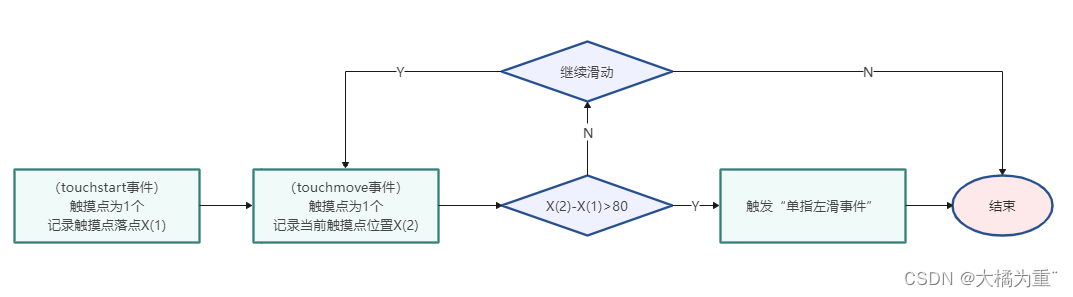
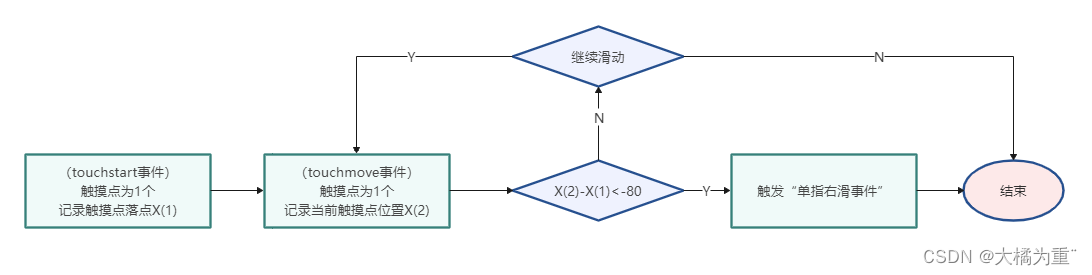
- 涉及原生事件有 “bindtouchstart”、“bindtouchmove”
1、流程图
- 左事件流程图:
- 右事件流程图:
2、代码示例
变量记录:
let startPoint = 0, //记录滑动的初始位置
let slipFlag = false, //定义 滑动事件 节流阀, 防止一次滑动触发多次滑动事件
bindtouchstart事件:
myTouchStart(e) {

    // ---------------------记录滑动事件信息---------------------
    //开启滑动事件
    slipFlag = true
    //记录触摸点的坐标信息
    startPoint = e.touches[0]
    //---------------------记录滑动事件信息end---------------------
},
bindtouchmove事件:
myTouchMove(e) {

    // ----------------监听手势左右滑事件----------------
    if (((startPoint.clientX - e.touches[e.touches.length - 1].clientX) > 80) && slipFlag) {

        console.log("左滑事件");
        slipFlag = false
        return
    } else if (((startPoint.clientX - e.touches[e.touches.length - 1].clientX) < -80) && slipFlag) {

        console.log("右滑事件");
        slipFlag = false
        return
    }
    // ----------------监听手势左右滑事件end----------------
},
三、放大缩小事件
- 涉及原生事件有 “bindtouchstart”、“bindtouchmove”、“bindtouchend”
1、流程图
放大事件流程图:

右事件流程图:

2、代码示例
变量记录:
let zoomFlag = false, //定义 缩放事件 节流阀,防止一次缩放触发两次缩放事件
let distance = 0, //记录手指移动距离
let scale = 1, //定义初始化的页面缩放大小
let newScale = 0, //记录新的页面缩放大小
bindtouchstart事件:
myTouchStart(e) {

    //---------------------记录缩放事件信息---------------------
    // 当两根手指放上去的时候,将距离(distance)初始化。
    let xMove = e.touches[1].clientX - e.touches[0].clientX;
    let yMove = e.touches[1].clientY - e.touches[0].clientY;
    //计算开始触发两个手指坐标的距离
    distance = Math.sqrt(xMove * xMove + yMove * yMove);
    //---------------------记录缩放事件信息end---------------------
},
bindtouchmove事件:
myTouchMove(e) {

    // ----------------监听手势缩小放大事件----------------
    // 单手指缩放不做任何操作
    if (e.touches.length != 1) {

        //双手指运动 x移动后的坐标和y移动后的坐标
        let xMove = e.touches[1].clientX - e.touches[0].clientX;
        let yMove = e.touches[1].clientY - e.touches[0].clientY;
        //双手指运动新的 ditance
        let newDistance = Math.sqrt(xMove * xMove + yMove * yMove);
        //计算移动的过程中实际移动了多少的距离
        let distanceDiff = newDistance - distance;
        newScale = scale + 0.005 * distanceDiff
        // 打开缩放监听
		zoomFlag = true
        return
    }
    // ----------------监听手势缩小放大事件end----------------
},
bindtouchend事件:
myTouchEnd() {

    if (zoomFlag) {

        if (newScale > 1.3) {

            console.log("放大了");
        } else if (newScale < 0.7) {

            console.log("缩小了");
        }
        // 关闭缩放监听
        zoomFlag = false
    }
},
四、双击事件
- 涉及原生事件有 “bindtap”
1、流程图
- 双击事件流程图:

2、代码示例
变量记录:
let lastTapTime = 0, //记录上一次点击时间
bindtap事件:
myTap(e) {

    // 监听双击事件
    let curTime = e.timeStamp
    if (lastTapTime > 0) {

        if (curTime - lastTapTime < 300) {

            console.log("双击屏幕事件");
        }
    }
    lastTapTime = curTime
提示:文章到此结束,文章仅为个人学习记录,若有不足还请大家指出。
边栏推荐
- Json对象和Json字符串的区别
- 阿里云李飞飞:中国云数据库在很多主流技术创新上已经领先国外
- Matlab simulink particle swarm optimization fuzzy pid control motor pump
- 升级为重量级锁,锁重入会导致锁释放?
- rhcsa 第四天
- How to use Photoshop to composite star trail photos, post-processing method of night sky star trail photos
- How JS works
- 从零开始—仿牛客网讨论社区项目(一)
- "By sharing" northwestern university life service | | bytes a second interview on three sides by HR
- Three aspects of Ali: How to solve the problem of MQ message loss, duplication and backlog?
猜你喜欢




随机推荐
电磁兼容简明教程(6)测试项目
Dart exception details
LeetCode 415:字符串相加
爬虫框架 Scrapy 详解
Datagrip error "The specified database userpassword combination is rejected..."Solutions
POJ2421道路建设题解
Xiaobai's 0 Basic Tutorial SQL: An Overview of Relational Databases 02
Dart 异常详解
Offer brush questions - 1
从零开始—仿牛客网讨论社区项目(一)
声音信号处理基频检测和时频分析
I have three degrees, and I have five faces. I was "confessed" by the interviewer, and I got an offer of 33*15.
Go 支持 OOP: 用 struct 代替 class
根据指定区域内容生成图片并进行分享总结
Generate pictures based on the content of the specified area and share them with a summary
Json对象和Json字符串的区别
C语言学习概览(二)
MVVM project development (commodity management system 1)
mysql中添加字段的相关问题
牛客刷SQL---2