当前位置:网站首页>Nat网络地址转换实验
Nat网络地址转换实验
2022-07-26 22:48:00 【愤愤的卷毛】
实验要求:
使用Nat网络地址转换完成下图中所有的要求

第一步:子网划分,ip地址规划
本实验网段差异较大,所以我们在左边类似企业内网的网段直接使用192.168.1.0/24网段。右边的isp网段我们使用试验所给1.1.10/24网段。

第二步:配置各端口ip,配置缺省路由,实现通路
我们首先分别进入r1,r2配置各个接口的ip地址。
r1的ip配置:
[r1-GigabitEthernet0/0/0]ip address 192.168.1.1 24
[r1-GigabitEthernet0/0/1]ip address 12.1.1.1 24[r1]ip route-static 0.0.0.0 0 12.1.1.2 缺省路由
r2的ip配置:
[r2-GigabitEthernet0/0/0]ip address 12.1.1.2 24
[r2-GigabitEthernet0/0/1]ip address 1.1.1.1 24[r2]ip route-static 0.0.0.0 0 12.1.1.1 缺省路由
使用dnsp分配地址
[r1]ip pool a
[r1-ip-pool-a]network 192.168.1.0 ma 24 创建池塘的范围
[r1-ip-pool-a]gateway-list 192.168.1.1 写入网关
[r1-ip-pool-a]dns-list 114.114.114.114 8.8.8.8 写入域名服务器
[r1]dhcp enable 打开dhcp服务
Info: The operation may take a few seconds. Please wait for a moment.done.
[r1-GigabitEthernet0/0/0]dhcp select global进入g0/0/0接口打开dhcp服务
[r1-GigabitEthernet0/0/1]dhcp select global
进入g0/0/1接口打开dhcp服务
在配置完成之后我们可以查看路由表来检查是否出现错误
查看路由表:[r1]display ip routing-table
r1路由表:

r2路由表:

第三步:进入边界路由器,在边界路由器上配置nat地址转换
[r1]acl 2000
[r1-acl-basic-2000]rule permit source 192.168.1.0 0.0.0.255[r1-GigabitEthernet0/0/1]nat outbound 2000
公网所在接口;acl2000列表中关注的私有ip地址,通过该接口转出时,其源ip地址修改为该接口公有ip
第四步:加入http服务器和dns服务器配置ip地址,网关地址,域名服务器地址
在http上和dns服务器上手动配置上所在网段的ip地址因为我们上述的子网划分所以我们给各个服务器上所配置如下:
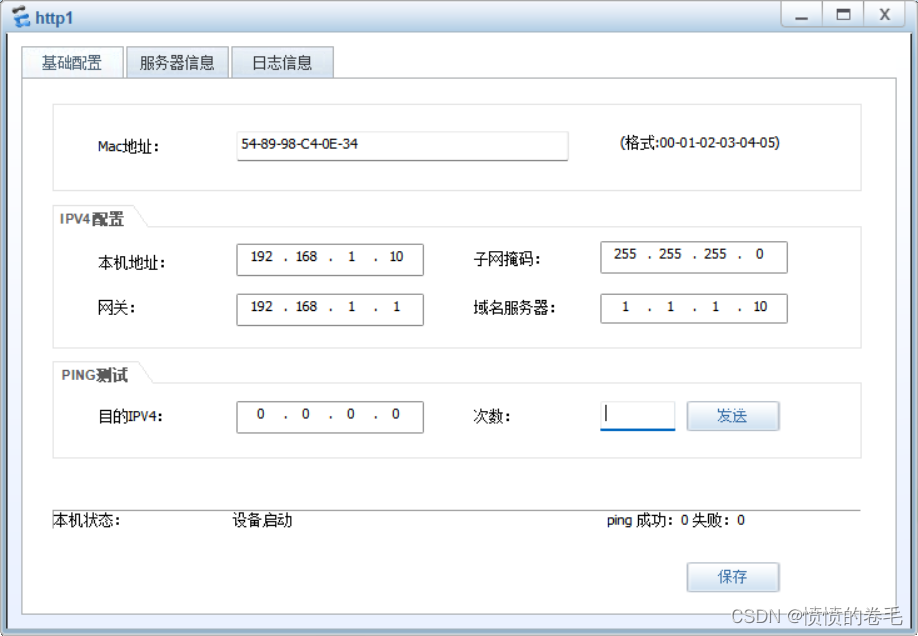


在配置完http与dns服务器后我们需要进入边界路由器的流量回来的接口更改流量所要回到192.168.1.0/24 网段的端口号,来确保右边isp内的pc能够成功访问我们企业内网的http服务器。
[r1-GigabitEthernet0/0/1]nat server protocol tcp global current-interface 80 ins
ide 192.168.1.10 80外部访问该接口ip-12.1.1.1且目标端口号为80时,将被修改为192.168.1.10目标端口80;
Warning:The port 80 is well-known port. If you continue it may cause function fa
ilure.
Are you sure to continue?[Y/N]:y 确认流量进入端口
[r1-GigabitEthernet0/0/1]nat server protocol tcp global current-interface 80 ins
ide 192.168.1.20 80外部访问该接口ip-12.1.1.1且目标端口号为80时,将被修改为192.168.1.20目标端口80;
Warning:The port 80 is well-known port. If you continue it may cause function fa
ilure.
Are you sure to continue?[Y/N]:y 确认修改流量进入端口
Info: The NAT in the network has existed.
Already existing configuration will be covered with current configure. [Y/N]:
y
第五步:测试
在上述所又配置完成之后我们可以开始测试,
我们使用pc1来pingpc2检查是否可以通,在使用client访问左边的两个http服务器检查是否能够访问。


在测试之后可以出现上面三幅图之后则证明实验所有要求完成,实验成功。
边栏推荐
猜你喜欢

Connect mysql detailed graphic operations in ECs docker (all)

TIM输出比较——PWM

科学计算库 —— Numpy

Codeforce problem 908 D. new year and arbitrary arrangement (probability DP)

NAT(网络地址转化协议)

ACM模式输入输出练习

Flink1.13.6详细部署方式

Is index reproduction text generation image is score quantitative experiment whole process reproduction inception score quantitative evaluation experiment step on the pit and avoid the pit process

left join 、inner join 、right join区别

【mysql】mysql启动关闭命令以及一些报错解决问题
随机推荐
Unity Huatuo hot update environment installation and sample project
静态路由基础配置(IP地址的规划、静态路由的配置),实现全网可达。
Tinyint type map is received and returned as Boolean
7.13 蔚来提前批笔试
Difference between fat AP and thin AP & advantages and disadvantages of networking
分库与分表
Beyond hidden display ellipsis
OGeek Meetup第一期,携手CubeFS火热来袭
最新C语言入门与进阶 -史上最全最详细的C语言教程!! 第一节-总览C语言概括
Specify that SQL only supports select syntax
Introduction to network - Introduction to home networking & basic network knowledge
7.16 多益网络笔试
行,表,页,共享,排他,悲观,乐观,死锁
2022年T2I文本生成图像 中文期刊论文速览-1(ECAGAN:基于通道注意力机制的文本生成图像方法+CAE-GAN:基于Transformer交叉注意力的文本生成图像技术)
三种能有效融合文本和图像信息的方法——特征拼接、跨模态注意、条件批量归一化
关于编程的自我介绍和规划
初识C语言(1)
[FPGA tutorial case 28] one of DDS direct digital frequency synthesizers based on FPGA -- principle introduction
Enumerated valueof() method stepping on the pit
left join 、inner join 、right join区别