当前位置:网站首页>WAN technology experiment
WAN technology experiment
2022-07-27 02:14:00 【Angry curls】
According to Wan ( Two layer packaging ) Technology to complete the configuration of the experiment in the figure below

Catalog
First step : Divide network segments
The second step : Conduct ip Address configuration
The third step : Conduct ar1,ar2,ar3,ar4 Static routing of , Default routing configuration
Step four : establish vpn Realization ar1,ar3,ar4 Direct connection on virtual link
Step seven : Carry out the authentication of three serial interfaces
First step : Divide network segments
As shown in the figure below, we can mark the network segments we have divided near the ports to facilitate our configuration IP Address

The second step : Conduct ip Address configuration
We need to access all routers and pc Configure what you need IP Address ;
The following figure shows what is needed for the above experiment ip Address configuration :
r1:

r2:

r3:

r4:

The third step : Conduct ar1,ar2,ar3,ar4 Static routing of , Default routing configuration
We need to ar1-ar4 The default route configuration of static route is completed
The following is ar1,ar3,ar4 The required routing configuration
r1:ip route-static 0.0.0.0 0.0.0.0 12.1.1.2
r3:ip route-static 0.0.0.0 0.0.0.0 23.1.1.2
r4:ip route-static 0.0.0.0 0.0.0.0 24.1.1.2
Step four : establish vpn Realization ar1,ar3,ar4 Direct connection on virtual link
We used nbma Network type Multipoint gre technology We let ar1 Become a central site ,ar2,ar3 The following configurations are available for branch sites
ar1:
interface Tunnel0/0/0 establish tunnel mouth
ip address 10.1.1.1 255.255.255.0 Configure interface ip Address
tunnel-protocol gre p2mp First modify the interface mode to multipoint GRE
source 12.1.1.1 Redefine the public source IP Address
nhrp entry multicast dynamic Local become NHRP center , At the same time Pseudo broadcast
nhrp network-id 100 The default is 0 Number , All nodes in the network segment tunnel The interface must be the same domain
ar3:
interface Tunnel0/0/0
ip address 10.1.1.2 255.255.255.0
tunnel-protocol gre p2mp
source Serial 4/0/2 Branch site ip The address is not fixed
nhrp network-id 100
nhrp entry 10.1.1.1 12.1.1.1 register The branch needs to register with the central site
ar4:
interface Tunnel0/0/0
ip address 10.1.1.3 255.255.255.0
tunnel-protocol gre p2mp
source Serial 4/0/0 Branch site ip The address is not fixed
nhrp network-id 100
nhrp entry 10.1.1.1 12.1.1.1 register The branch needs to register with the central site
After the establishment We can enter ar1 Router go ping Two virtual interfaces are created to verify whether the establishment is successful
Step five : stay pc Used on network segment rip Dynamic routing realizes the routing between various network segments
stay ar1,ar3,ar4 After the virtual link between them completes the direct connection, we also need to connect their pc Network segments are connected, so we use dynamic routing on each router rip To automatically get the route between them
The required configuration is as follows :
ar1:
[r1]rip
[r1-rip-1]version 2
[r1-rip-1]network 10.0.0.0
[r1-rip-1]network 192.168.1.0
ar3:
[r1]rip
[r1-rip-1]version 2
[r1-rip-1]network 10.0.0.0
[r1-rip-1]network 192.168.2.0
ar4:
[r1]rip
[r1-rip-1]version 2
[r1-rip-1]network 10.0.0.0
[r1-rip-1]network 192.168.3.0
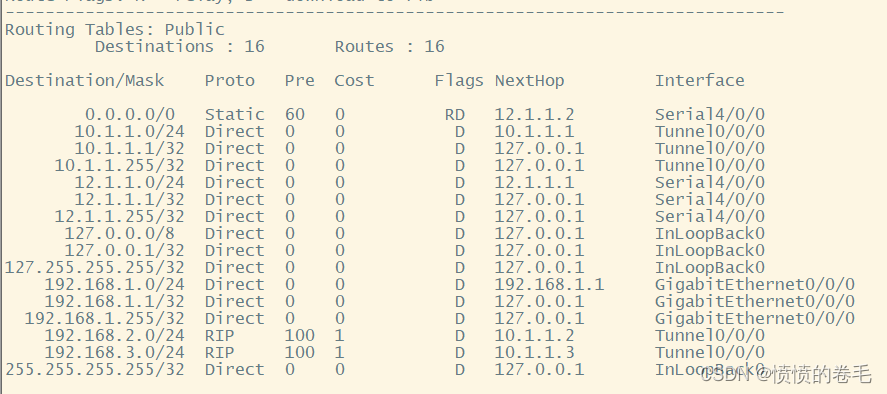
After completing the above configuration, we can check the routing table to see whether we have learned these routes
ar1,ar3,ar4 The routing table is as follows :
ar1:
ar3:

ar4:
Be careful !!! We are using rip Protocol to learn virtual network routing. When we enter the virtual interface, we need to cancel rip Horizontal segmentation in the agreement
The configuration is as follows :
[r1-Tunnel0/0/0]undo rip split-horizon
Step six : Use nat Network address translation technology to achieve various pc Segment pair ar2 as well as ar2 Access to loopback interface
We need to get into ar2 To establish loopback interface configuration ip Address
Configuration command :
[r2]interface LoopBack 0
[r2-LoopBack0]ip address 2.2.2.2 24
stay ar1,ar3,ar4 Upper use acl,nat Technology realizes the conversion from private address to public address, and realizes the smooth access to the external public network
Configuration command :
ar1:
[r1]acl 2000
[r1-acl-basic-2000]rule permit source 192.168.1.0 0.255.255.255
[r1]int g0/0/2
[r1-Serial0/0/2]nat outbound 2000
ar3:
[r3]acl 2000
[r3-acl-basic-2000]rule permit source 192.168.2.0 0.255.255.255
[r3]int g0/0/2
[r3-Serial0/0/2]nat outbound 2000
ar4:
[r4]acl 2000
[r4-acl-basic-2000]rule permit source 192.168.3.0 0.255.255.255
[r4]int g0/0/2
[r4-Serial0/0/2]nat outbound 2000
Carries out an nat After the address translation, we can go pingar2 Loopback interface 2.2.2.2 Test success
Step seven : Carry out the authentication of three serial interfaces
After completing the communication of the whole network, we will authenticate
stay ar1 And ar2 Configuration between
ar1:
[r1]interface s4/0/0
[r1-Serial4/0/0]link-protocol hdlc
ar2:
[r1]interface s4/0/0
[r1-Serial4/0/0]link-protocol hdlc
stay ar3 And ar2 Configuration between
ar3:
[r5]interface s4/0/0
[r5-Serial4/0/0]ppp pap local-user wutianyi password cipher 123456
ar2:
[r2]aaa
[r2-aaa]local-user wutianyi privilege level 15 password cipher 123456
[r2-aaa]local-user wutianyi service-type ppp
[r2]interface s4/0/1
[r2-Serial4/0/1]ppp authentication-mode pap
stay ar4 And ar2 Configuration between
ar4:
[r4]int s4/0/0
[r4-Serial4/0/0]ppp chap password cipher 123456
[r4-Serial4/0/0]ppp chap user wutianyi
ar2:
[r2]aaa
[r2-aaa]local-user wutianyi privilege level 15 password cipher 123456
[r2-aaa]local-user wutianyi service-type ppp
[r2-aaa]q
[r2]interface s3/0/1
[r2-Serial3/0/1]ppp authentication-mode chap
!!! Note that after all interfaces are authenticated, we need to reopen the interface to form a path
Step eight : test
After all the above configurations, we finished , The experimental requirements of each item , We can use it at this time ar1 Come on pingar2 Loop back and ar3,ar4 Observe whether the connected network segment is a path. As shown in the figure below, we have completed the experiment
ping Loopback 2.2.2.2

ping 192.168.2.2

ping 192.168.3.2

边栏推荐
- HCIA静态路由基础模拟实验
- 2022 latest Tiktok live broadcast monitoring (II) streaming media download in live broadcast room
- Unity Huatuo example project source code analysis and inspiration
- FID index reproduction step on the pit to avoid the pit text generation image FID quantitative experiment whole process reproduction (FR é Chet inception distance) quantitative evaluation experiment s
- [daily question] 565. Array nesting
- Text to image论文精读GR-GAN:逐步细化文本到图像生成 GRADUAL REFINEMENT TEXT-TO-IMAGE GENERATION
- 详解文本生成图像的仿射变换模块(Affine Transformation)和条件批量标准化(CBN)
- [详解C语言]一文带你认识C语言,让你醍醐灌顶
- 2022 open source work of the latest text generated image research (papers with code)
- 【mysql】mysql启动关闭命令以及一些报错解决问题
猜你喜欢

2022最新直播监控24小时监控(三)直播间弹幕解析

ACM mode input and output exercise

HCIA静态路由综合实验

力扣获取第二大的成绩

第五讲—按键控制LED

静态路由基础配置(IP地址的规划、静态路由的配置),实现全网可达。

Solution: various error reporting and pit stepping and pit avoiding records encountered in the alchemist cultivation plan pytoch+deeplearning (III)
7.7 SHEIN希音笔试

解决方案:炼丹师养成计划 Pytorch+DeepLearning遇见的各种报错与踩坑避坑记录(二)
![[translation] explicit and implicit batch in tensorrt](/img/17/3f00697d53ff43cd881960849da5f7.png)
[translation] explicit and implicit batch in tensorrt
随机推荐
STM32 HAL库串口(UART/USART)调试经验(一)——串口通信基础知识+HAL库代码理解
定时器中断实验
事务数据库及其四特性,原理,隔离级别,脏读,幻读,不可重复读?
通过对射式红外传感器计次实验讲解EXTI中断
[FPGA tutorial case 28] one of DDS direct digital frequency synthesizers based on FPGA -- principle introduction
6.29 众安暑期测开实习一面
[MySQL] MySQL startup and shutdown commands and some error reports to solve problems
count(*)为什么很慢
Ospf基础配置应用( 综合实验: 干涉选举 缺省路由 区域汇总 认证--接口认证)
2022 open source work of the latest text generated image research (papers with code)
Unity Huatuo example project source code analysis and inspiration
DF-GAN实验复现——复现DFGAN详细步骤 及使用MobaXtem实现远程端口到本机端口的转发查看Tensorboard
Text to image论文精读RAT-GAN:文本到图像合成中的递归仿射变换 Recurrent Affine Transformation for Text-to-image Synthesis
VLAN原理简述、具体实验配置
第五讲—按键控制LED
Autojs learning - realize the display of date and lunar time
ensp中的简单静态路由
Introduction to network - Introduction to home networking & basic network knowledge
Specify that SQL only supports select syntax
6.30联发科笔试