当前位置:网站首页>Quick apply custom progress bar
Quick apply custom progress bar
2022-07-27 09:32:00 【Mr_ Tony】
One 、 Preface
Although there is a progress bar in the early application framework , But you can't set the height and the background image of the slider . So here you need to customize , Because there is no encapsulation , Subsequent demand changes require changing the source code . The effect is as follows , The maximum value of this progress bar is 14, The minimum value is 0. The length of each advance is 1, Sliding is smooth :

Two 、 Related codes
<!--  This is a custom slide Slider -->

<template>
  <div class="wrapper" id="slider-root" @touchStart="touchHandlerRootStart">
    <stack class="slider-container" ><!-- Lay out in layers , At the bottom is a sliding bar , The top is the slider -->
      <div class="slider-bg">
        <div class="slider-progress" style="{
        {
        sliderProgressStyle()}}"></div>
      </div>
      <div @touchStart="touchHandlerStart" @touchMove="touchHandlerMove" class="slider-block" style="{
        {
        handlerStyle()}}"></div>
    </stack>
  </div>
</template>

<script> const blockOffset = 40 // The offset value when the slider is clicked , This value is the width of the slider  const halfBlock = blockOffset / 2 // Half the slider width  const maxWidth = 600// This value is the width of the progress bar ,  Due to component   Temporarily unable to obtain the background width when displaying , Therefore, this value cannot be adaptive , Only fixed values can be written  const minWidth = 0 const total = 15 // The overall progress is 15 ,  Because from 0 Start , So here is 14 const stepWidth = maxWidth / total // The width of each portion  let lastEmitProcess = -1; // Last sent progress  export default {
       data: {
       title: "Hello World. Quickapp Component.", percent: "0" }, props: [], onInit() {
       }, onShow() {
       }, sliderProgressStyle(){
       let baseStyle = {
       width: this.percent + 'px' } return baseStyle; }, handlerStyle() {
       let blockX = this.percent - halfBlock if(blockX < 0){
       blockX = 0 } if(blockX > maxWidth - halfBlock){
       blockX = maxWidth - halfBlock } // console.log("YM---> Sliding progress -blockX", blockX) let baseStyle = {
       marginLeft: blockX + 'px' } return baseStyle; }, touchHandlerStart(event){
       // console.log("YM-->touchHandlerStart", event, stepWidth) }, touchHandlerMove(event){
       let touchFirstElement = event.touches[0] // The first touch event  let clientX = Math.floor(touchFirstElement.clientX) // Current distance  let tempPercent = clientX - 62 if(tempPercent >= maxWidth - 16){
       tempPercent = maxWidth - 16 } if(tempPercent <= minWidth){
       tempPercent = minWidth } // console.log("YM-->touchHandlerMove", event, clientX) // this.fixTouchEvent(tempPercent) this.percent = tempPercent let realPercent = Math.floor(tempPercent / stepWidth) if(lastEmitProcess != realPercent){
       lastEmitProcess = realPercent this.$emit('onChange', lastEmitProcess) } }, } </script>

<style lang="less"> .wrapper {
       width: 100%; height: 20px; flex-direction: column; justify-content: center; align-items: center; } .title {
       text-align: center; color: #212121; } .slider-container {
       display: flex; align-items: center; .slider-bg {
       height: 8px; width: 300px; background-color: #fff; border-radius: 4px; .slider-progress {
       background-color: #4a6aff; width: 100px; height: 8px; border-radius: 4px ; } } .slider-block {
       height: 18px; width: 18px; margin-left: 300px; background-color: #4A6AFF; border: 2px solid #FFFFFF; border-radius: 9px ; } } </style>
Usage mode
<import name="ym-slider" src="../ym-slider/index.ux"></import>
<ym-slider @on-change="onChangeProgress"></ym-slider>
<script> export default {
       onChangeProgress(e) {
       let tempProgress = e.detail console.log(" Current progress :",tempProgress) }, } </script>
边栏推荐
- Nut weather
- [C language - zero foundation lesson 11] rotate the pointer of the big turntable
- Function anti chattering throttling
- 七月集训(第23天) —— 字典树
- ES6 new - function part
- 2022 software test interview questions 200 big factory interview true questions brushed to get 10K positions
- 【CTF】ciscn_2019_es_2
- 七月集訓(第07天) —— 哈希表
- 网易笔试之解救小易——曼哈顿距离的典型应用
- Common operations of BOM and compatible writing methods for obtaining page / window height, width and scrolling
猜你喜欢

Sentry 2 orbital data download

NCCL (NVIDIA Collective Communications Library)

Run uni app project in hbuilder wechat applet

645. Wrong set
![[wechat applet] lunar calendar and Gregorian calendar are mutually converted](/img/6e/ad01756f8da54901a64c5323e4b747.png)
[wechat applet] lunar calendar and Gregorian calendar are mutually converted
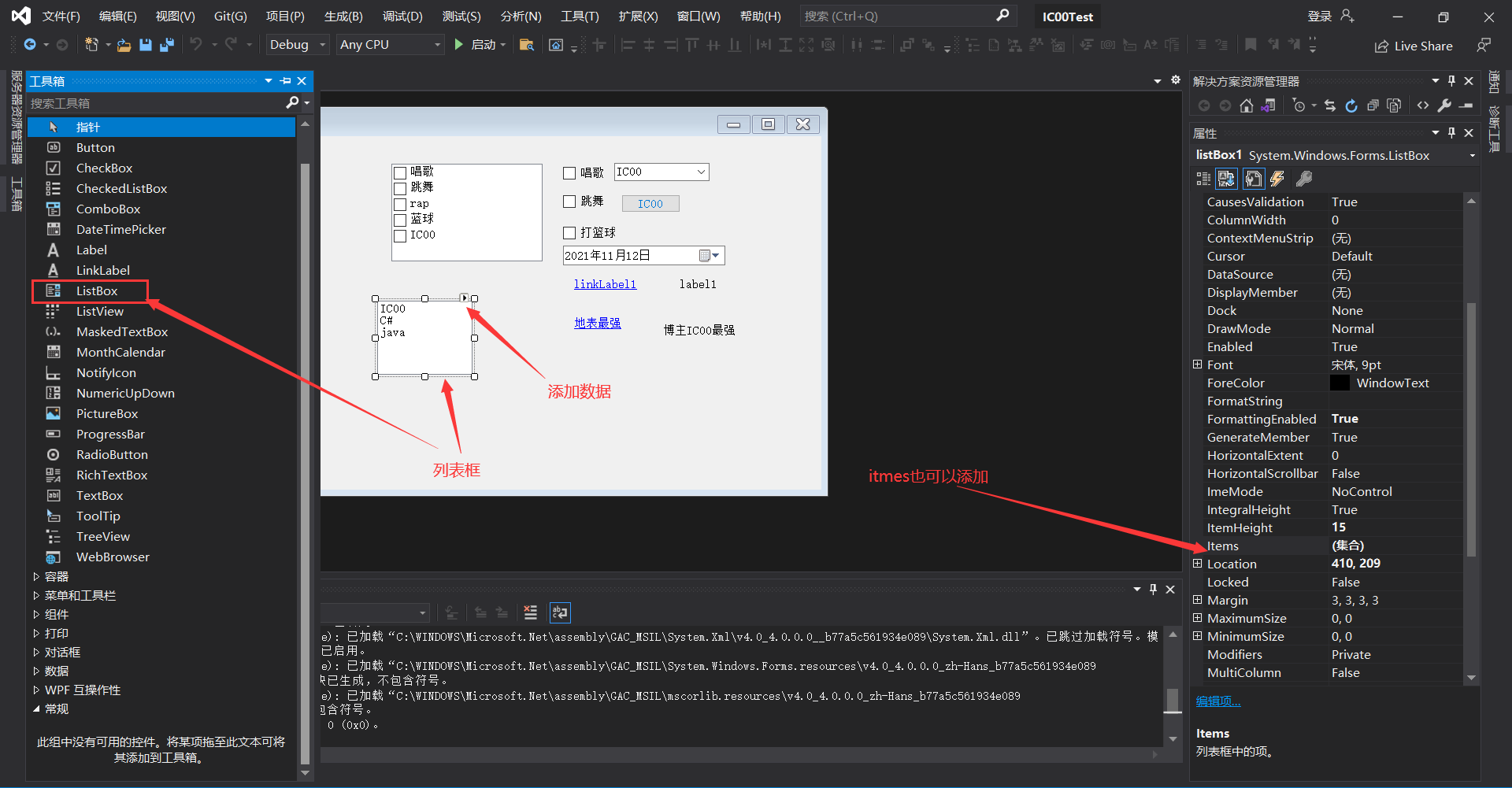
Explanation of common basic controls for C # form application (suitable for Mengxin)

Monitoring artifact: Prometheus easy to get started, really fragrant!

Nacos做注册中心使用
![[Wuhan University of technology] information sharing for the preliminary and second examinations of postgraduate entrance examination](/img/15/298ea6f7367741e1e085007c498e51.jpg)
[Wuhan University of technology] information sharing for the preliminary and second examinations of postgraduate entrance examination

IDL 6S lookup table
随机推荐
ESP8266-Arduino编程实例-PWM
Interviewer: what is scaffolding? Why do you need scaffolding? What are the commonly used scaffolds?
BGP的社团属性
Qt中发送信号时参数为结构体或者自定义的类怎么办?
6S parameters
Community attribute of BGP
七月集训(第14天) —— 栈
What if the parameters in QT are structs or custom classes when sending signals?
基于ArkUI eTS开发的坚果食谱(NutRecipes
七月集训(第11天) —— 矩阵
【CTF】ciscn_ 2019_ es_ two
[C language - zero foundation _ study _ review _ lesson 4] data types and operations
Thermal renewal and its principle
Eureka 延迟注册的一个坑
Antdesign a-modal user-defined instruction realizes dragging and zooming in and out
全排列递归思路整理
Analog library function
Two tips in arkui framework
Save Xiaoyi from Netease written test -- a typical application of Manhattan distance
NCCL (NVIDIA Collective Communications Library)