当前位置:网站首页>Redis Subscription and Redis Stream
Redis Subscription and Redis Stream
2022-08-02 01:55:00 【Chon-Wang】
# 前言
点我查看 - Redis 基本知识,Come and review
一、Redis 发布订阅
Redis发布订阅是一种消息通信模式Contains three subjects:发布者(PUB)、订阅者(SUB)、频道(channel)
A simple example of the relationship between the three: 我(订阅者) 在
CSDN关注(订阅) 了 CSDNOfficial blog account(频道),当 CSDN官方博客(发布者) when sending a tweet,我(订阅者) 就可以收到 CSDNOfficial blog account 的消息提醒.
RedisClients can subscribe to any number of channels.消息无法持久化,出现
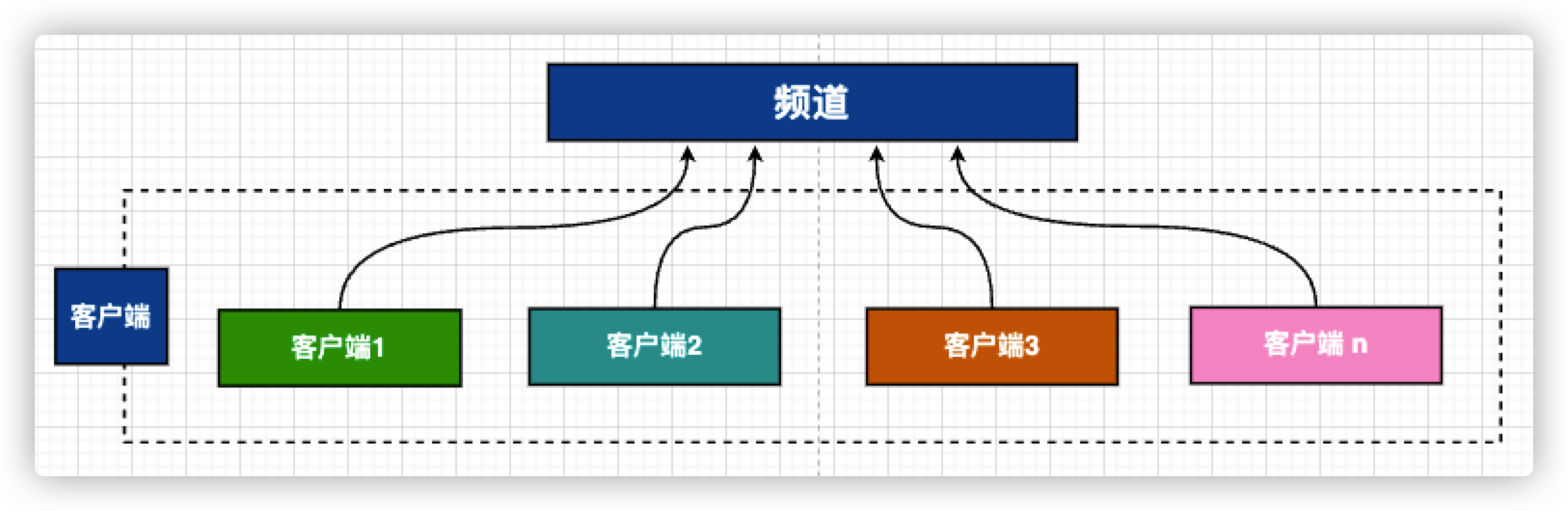
Redis宕机、network disconnection, etc,Message could not be savedSubscription diagram
A channel can be subscribed by multiple clients
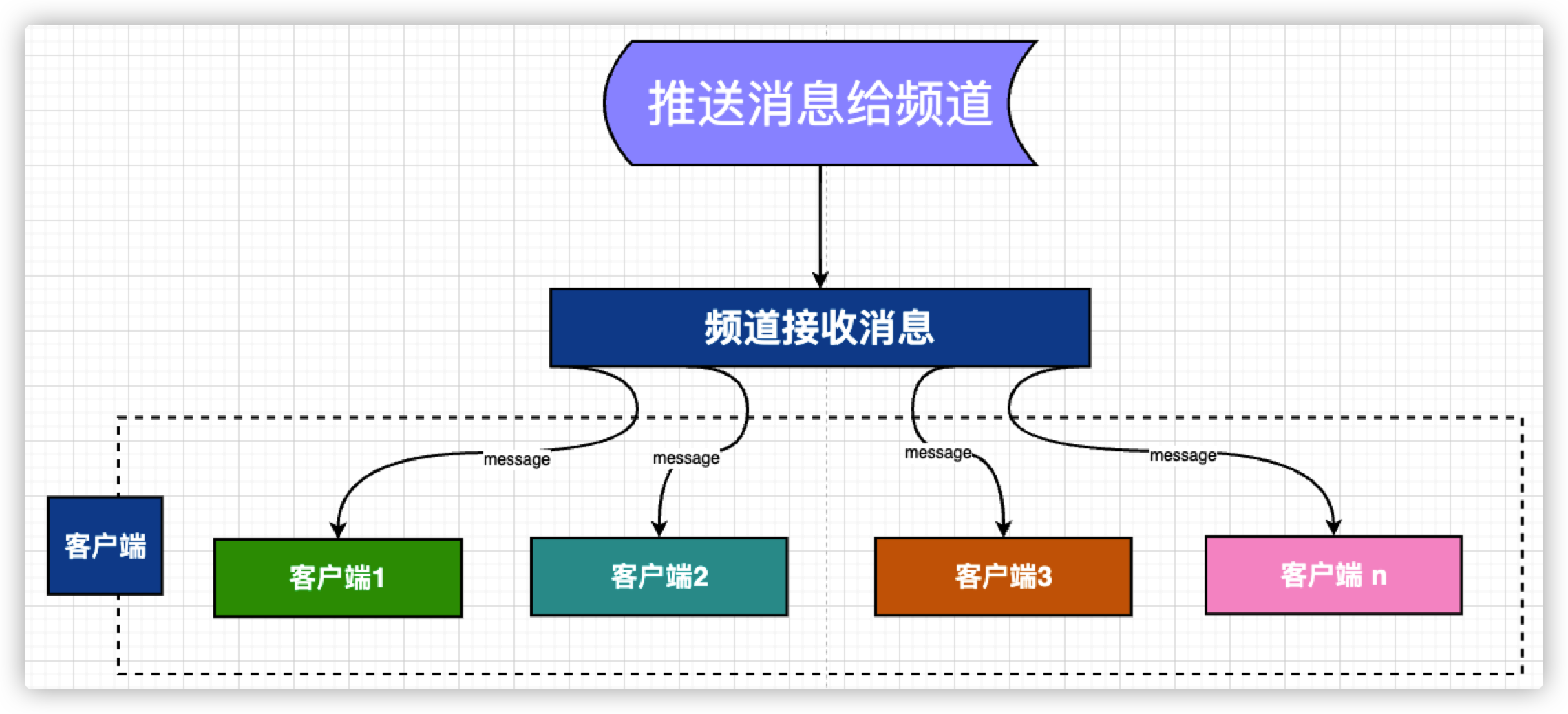
Message push flow chart
1.1 常用命令
# 1. 订阅一个或多个符合给定模式的频道
	# 格式: 频道名称
	psubscribe test* # 订阅以 test 开头的所有频道
	psubscribe te?t # 订阅 tezt 或 teat 等 所有频道
	psubscribe te[sa]t # 订阅 test 或 teat 频道,其他的不支持

# 2. Unsubscribe from all channels subscribed with the given mode
	# 格式: punsubscribe 频道名称
	punsubscribe channel

# 3. Subscribe to single or multiple channels
	# 格式: subscribe 频道名称1 频道名称2 [频道名称n]
	subscribe testChannel1 testChannel2

# 4. 发送消息到指定频道
	# 格式: publish 频道名称 消息内容
	publish testChannel1 'Hello CSDN'

# 5. 退订指定频道
	# 格式: unsubscribe 频道名称
	unsubscribe testChannel1
1.2 演示视频
Click me to see the demo video
二、Redis Stream
Redis Stream主要用于 消息队列(MQ,Message Queue),是Redis 5.0新增的数据结构.Redis StreamData persistence and master-slave replication can be implemented.Redis Stream是一个消息链表,每个消息都有唯一的id和 内容
2.1 Common commands for message queues
常用命令:
xadd、xdel、xlen、xrange、xrevrange、xread、xtrim、xinfo stream、xinfo groups
# 1. 添加消息到队列末尾
	# 格式: xadd 队列名 消息ID field1 value1 [field... value...]
	# If the queue name does not exist, it will be created automatically
	# 消息ID 可自定义,But make sure to increment 或 * On behalf of the system automatically generated
	xadd testStream * user_id 10 user_name Chon
	xadd testStream * user_id 11 user_name Leslie

    xadd testStream1 * tag_id 1 tag_name Redis
    xadd testStream1 * tag_id 2 tag_name PHP
    xadd testStream1 * tag_id 3 tag_name Linux
    xadd testStream1 * tag_id 4 tag_name MySQL
    xadd testStream1 * tag_id 5 tag_name Vue

# 2. 删除消息 - 根据 消息ID 删除
	# 格式: xdel 队列名 消息ID [消息ID...]
	xdel testStream 1658995835554-0 # 改成自己的 消息ID

# 3. Get the total number of messages in the message queue
	# 格式xlen 队列名
	xlen testStream1

# 4. Get all queue messages
	# 格式: xrange 队列名 开始消息ID值 结束消息ID值 [count 数量]
	# 开始值: - 表示最小值
	# 结束值: + 表示最大值
	xrange testStream - + # 获取所有消息
	xrange testStream - + count 3 # 获取 3 条消息

# 5. 获取队列消息 - 反转获取,It's the last to be the first,The second to last becomes the second,哈哈
	# 格式: xrevrange 队列名 结束消息ID值 开始消息ID值 [count 数量]
	# 结束值: + 表示最大值
	# 开始值: - 表示最小值
	xrevrange testStream + - # Get all reversed messages
	xrevrange testStream + - count 3 # 获取 3 A reversed message

# 6. 获取队列消息 - in a blocking or non-blocking manner
	# 格式: xread [count 数量] [block 阻塞毫秒数] streams 队列名 [队列名...] 开始消息ID值 结束消息ID值
	# count 可选
	# block 可选,Blocking milliseconds is not set,则默认 非阻塞方式
	# 0 0 表示获取全部
	# 测试之前,Add some more data to the queue
	xread count 1 streams testStream testStream1 0 0
	xread count 1 block 1000 streams testStream testStream1 0 0 # 阻塞 1000 毫秒

# 7. crop message - 限制长度
	# 格式: xtrim 队列名 maxlen|minid [=|~] 操作值 [LIMIT count]
	# 当使用 maxlen 时,操作值为 The final number of message queues reserved,Advanced delete first
	# 当使用 minid 时,操作值为 消息ID值,删除小于 消息ID值 的消息
	xtrim testStream1 maxlen 3 # Delete first,只保留 3 message content
	xtrim testStream1 minid 1658999744682-0 # 删除 消息ID 小于 1658999744682-0 的消息

# 8. 获取队列信息
	# 格式: xinfo stream 队列名
	xinfo stream testStream1

# 9. 获取 队列 在 所在组 中的信息
	# 格式: xinfo groups 队列名
	xinfo groups testStream1
2.2 Common commands for consumer groups
Common consumer group commands:
xgroup create、xgroup createconsumer、xreadgroup、xgroup setid、xgroup delconsumer、xgroup destroy、xgroup help
# 1. 创建消费者组
	# 格式: xgroup create 队列名 分组名 id|$ [mkstream]
	# id: 有两种表示:
		# Indicates the acquisition range,使用 开始消息ID值 结束消息ID值
		# 表示从头获取,使用 0
	# $: $ 表示从尾部开始,All messages in the current queue are ignored
	# mkstream: Indicates that the message queue will be created automatically if it does not exist
	xgroup create testStream Group0 $ mkstream # 创建新 testStream0 messages are queued and put into groups
	xgroup create testStream1 Group1 0 # Get all messages into a group

# 2. Create a user - 创建 消息队列 在 消费组 中的使用者
	# 格式: xgroup createconsumer 队列名 组名 使用者名
	xgroup createconsumer testStream1 Group1 Chon

# 3. 获取列表消息 - from the consumer group
	# 格式: xreadgroup group 分组名 使用者名 [count 数量] [block 阻塞毫秒数] streams 队列名 >
	xreadgroup group Group1 Chon count 10 streams testStream1 >

# 4. Refetch list messages - from the consumer group
	# 格式: xgroup setid 队列名 分组名 id
	# id: 有两种表示:
		# Indicates to get the starting value,使用 开始消息ID值,greater than this value will be obtained
		# 表示从头获取,使用 0
	# Must be a group that has been stored before
	xgroup setid testStream1 Group1 0 # Get all messages into a group
	xgroup setid testStream1 Group1 1659003269075-0 # 将 消息id Queue messages larger than the given value are put into the group

# 5. 删除使用者 - 删除 消息队列 在 消费组 中的使用者
	xgroup delconsumer testStream1 Group1 Chon

# 6. 删除消费者组
	# 格式: xgroup destroy 队列名 组名
	xgroup destroy testStream1 Group1

# 7. See grouping command help
	xgroup help
点我查看 - Redis 基本知识,Come and review
边栏推荐
- Anti-oversold and high concurrent deduction scheme for e-commerce inventory system
- 安全(2)
- kubernetes之服务发现
- 有效进行自动化测试,这几个软件测试工具一定要收藏好!!!
- Flex layout in detail
- "Introduction to Natural Language Processing Practice" Question Answering Robot Based on Knowledge Graph
- Day116.尚医通:预约挂号详情 ※
- YGG 公会发展计划第 1 季总结
- Record the pits where an error occurs when an array is converted to a collection, and try to use an array of packaging types for conversion
- 『网易实习』周记(一)
猜你喜欢
【Brush the title】Family robbery
Constructor of typescript35-class

The Paddle Open Source Community Quarterly Report is here, everything you want to know is here

哈希表
Use flex-wrap to wrap lines in flex layout

Rust P2P Network Application Combat-1 P2P Network Core Concepts and Ping Program

LeetCode刷题日记:LCP 03.机器人大冒险

去经营企业吧
Pytorch seq2seq model architecture to achieve English translation tasks

Day116.尚医通:预约挂号详情 ※
随机推荐
feign异常传递的两种方式 fallbackfactory和全局处理 获取服务端自定义异常
Multi-Party Threshold Private Set Intersection with Sublinear Communication-2021:解读
Pytorch seq2seq model architecture to achieve English translation tasks
秒懂大模型 | 3步搞定AI写摘要
Shell Beginners Final Chapter
雇用WordPress开发人员:4个实用的方法
使用百度EasyDL实现厂区工人抽烟行为识别
typescript31-any类型
Kubernetes — Calico
3. Bean scope and life cycle
fastjson详解
HSDC和独立生成树相关
Flex layout in detail
typescript37-class的构造函数实例方法继承(extends)
typescript29-枚举类型的特点和原理
Local storage in Kubernetes
typescript34-class的基本使用
S/4中究竟有多少个模块,你对这些模块了解多少
3 Month Tester Readme: 4 Important Skills That Impacted My Career
Reflex WMS中阶系列7:已经完成拣货尚未Load的HD如果要取消拣货,该如何处理?