当前位置:网站首页>How to configure DDR3 of dm8148
How to configure DDR3 of dm8148
2022-06-28 07:36:00 【youbin2013】
1 The preparation of the instruments
- Need to download two excel form , One is based on DDR3 Chip model calculation DM8148 Of DDR3 Table of timing parameters of the controller , One is based on PCB Board wiring CK trace Length vs DQS trace Length DDR3 Table of physical offset parameters of the controller .
DM814x-DDR-Controller-Register-Configuration-spreadsheet-v1.0.xls( Timing Table );
RatioSeed_TI814x.xls( Physical parameter table );
- Need to download a calculation DDR3 Of physical offset parameters .out file , stay A8 Run this executable on the core , Parameters calculated from the table , Fill in the console at run time , You can generate DDR3 Controller physical offset parameters ;
DDR3_SlaveRatio_ByteWiseSearch_TI814x.out;
- Need to download one .get file , Used to configure the runtime DDR3 Peripheral parameters ;
TI814x_ddr3_0.gel
- You need to download the solidified DM8148 Of uboot file ;
2 Configuration steps
- open RatioSeed_TI814x.xls form , Input DDR3 The running clock and PCB Upper CK trance and DQS trance The length of the line , Will get WR DQS、RD DQS、RD DQS GATE( Used in subsequent .out Input parameters for file operation ) Three parameters , Pictured 1 Shown .

chart 1, Physical parameter calculation
- open DM814x-DDR-Controller-Register-Configuration-spreadsheet-v1.0.xls form , stay DRAM Enter the corresponding... In the column DDR3 Timing parameters corresponding to the model , Pictured 2 Shown , And then switch to DDR Controller Registers, Fill in the white space with your choice DDR3 The parameter value corresponding to the chip .
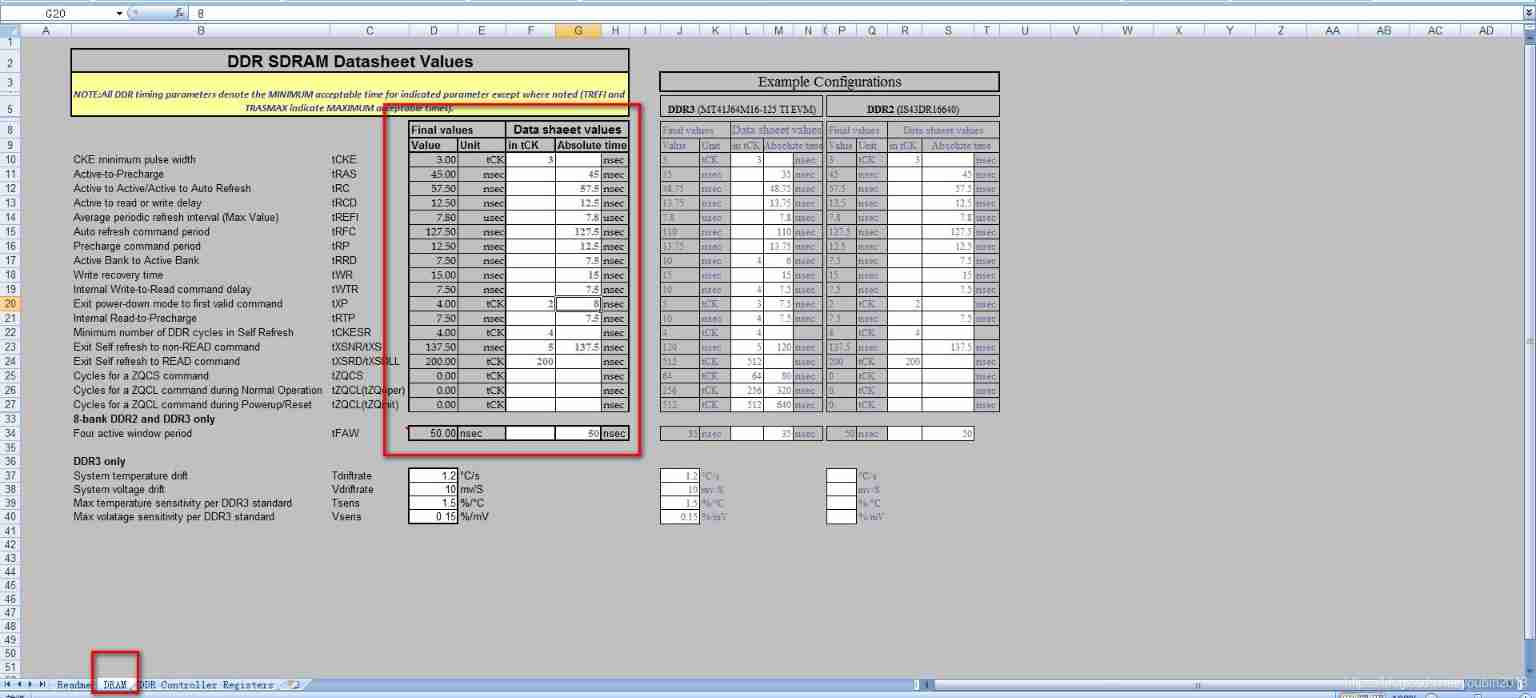
chart 2 DRAM Parameter configuration
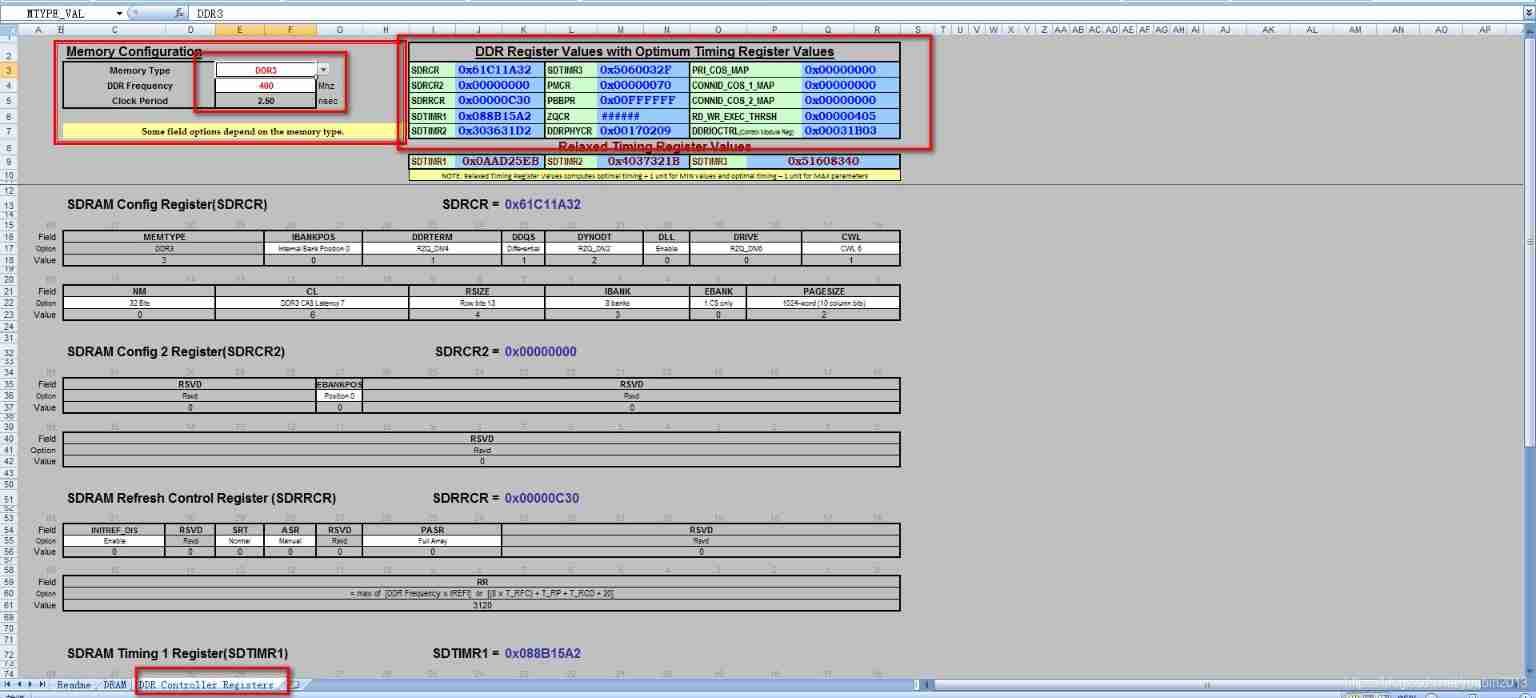
chart 3 DDR Controller Registers Parameter configuration
- Pass step 2 The resulting register value , modify GEL file , Change the newly generated register value to GEL The location of the corresponding register value in the file , Pictured 4 Shown , open gel file , find //DDR3 400 MHz - CL=6,CWL=5 The location of , Note the original default value , Change the values in the table to the corresponding positions :
DDR3_EMIF_TIM1_DEFINE_400->SDTIMR1
DDR3_EMIF_TIM2_DEFINE_400-> SDTIMR2
DDR3_EMIF_TIM3_DEFINE_400-> SDTIMR3
DDR3_EMIF_REF_CTRL_DEFINE2_400->SDRRCR
DDR3_EMIF_SDRAM_CONFIG_DEFINE_400->SDRCR
DDR3_EMIF_DDRPHYCR_DEFINE_400->DDRPHYCR

chart 4 GEL File modification
- After revising gel After saving , Save location cannot have Chinese path , Then open the ccs5.5, Click the file tab in the toolbar , Create a new linked file , Pictured 5 Shown .
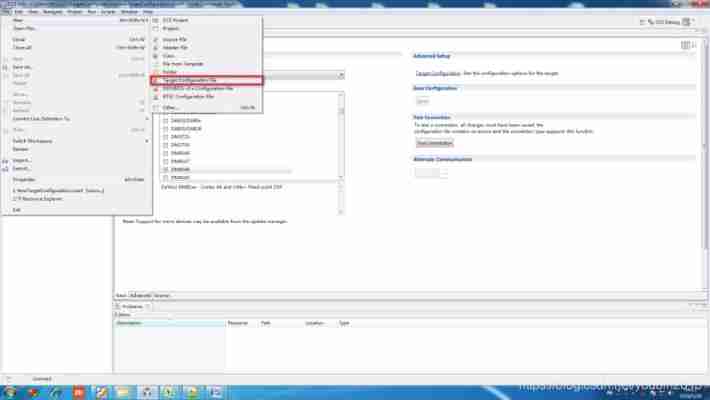
chart 5 New link file
- Configure the value of the linked file , According to the indoor simulator model and DM8148 The chip model is selected in the link file XDS560V2 edition USB Emulators and DM8148 platform , Pictured 6 Shown .

chart 6 Configure link file
- Connect the emulator cable , Power up the target board , Click the green little crawler button , Get into debug Pattern , choice A8 Processor core , Right click , choice connect target, take CCS Connect to the target board , Pictured 7 Shown .

chart 7 Link target board
- After connecting , Click on the toolbar tools tab , Select from the drop-down menu GEL Files, The middle box on the right will appear GEL Files File box , Pictured 8 Shown .

chart 8 open GEL File box
- stay GEL Right click the blank space in the file box , Select Load... From the drop-down menu GEL file , The file selection box pops up , Select the previous step 3 Modified GEL file , Pictured 9 Shown .

chart 9 load GEL file
- GEL After loading , In the toolbar, click Scripts tab , Click... In the drop-down menu TI814x DDR Configuration Under the DDR3_EMIF1_400MHz_Config, Initialize the basic DDR3 Timing parameters , Pictured 10 Shown .

chart 10 initialization DDR3 Timing parameters
- Script initialization DDR3 after , Click on View tab , Select from the drop-down menu Registers, At this time, the register configuration information table... Will appear in the upper right corner , Pictured 11 Shown .

chart 11 Open the register configuration information table
- Open the configuration information table , It opens at Core Registers Register configuration , find CPSR register , stay M The bit field of is filled with 10011(0x13), Pictured 12 Shown .

chart 12 To configure CPSR register
- Good configuration CPSR After the register , Click... In the tab Tools, Select from the drop-down menu ARM Adranced Feathers, open ARM Configuration box , Pictured 13 Shown .

chart 13 open ARM Configuration box
- stay ARM Adranced Feathers Box NEON Enabled, Can make NEON function , Pictured 14 Shown .
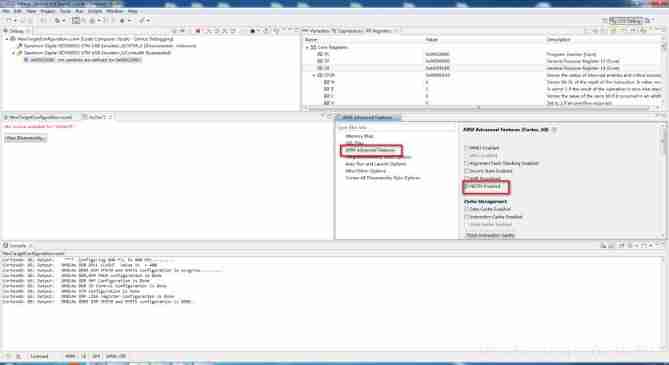
chart 14 Can make NEON function
- Choose good ARM After function , Click on Run tab , Select from the drop-down menu Load Options , Click on Load Program.., Choose what you have prepared .out file , Pictured 15 Shown .
DDR3_SlaveRatio_ByteWiseSearch_TI814x.out

chart 15 load .out file
- After loading the executable file , Click the run button , Start running program , Pictured 16 Shown .

chart 16 Run the program
- After starting the program , stay Console Prompt for input parameters will appear in the console box , The first parameter is to select the first EMIF Interface DDR3 The configuration parameter of is the second EMIF Interface DDR3 Configuration parameters ; The second parameter is step 1 In the table RD DQS GATE The numerical ; The third parameter is step 1 In the table RD DQS The numerical ; The fourth parameter is step 1 In the table WR DQS The numerical ; The fifth parameter indicates the name of the file where the file is saved ; Press enter every time you enter a parameter , Pictured 17 Shown .

chart 17 Input parameters
- After entering all the parameters , Wait for a while , Then, the required configuration will be generated DDR3 Physical offset parameter value table of the controller , A file will be generated in the corresponding location to save these configurations , Pictured 18 Shown .
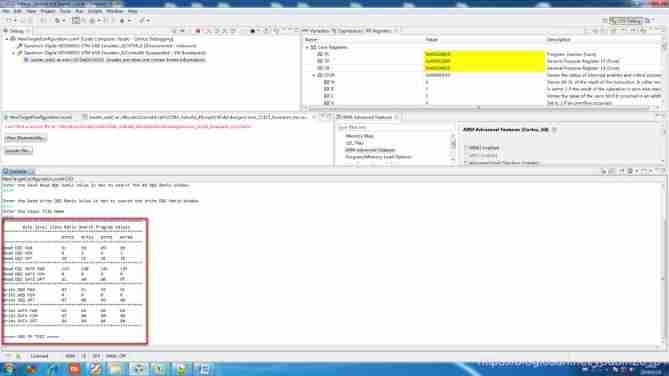
chart 18 Output results
- After generating the results , Need to be DDR3 Parameters written to Uboot In file , stay Uboot Found in folder arch-ti81xx Folder (uboot\arch\arm\include\asm\arch-ti81xx), file found ddr_defs_ti814x.h, Will step 2 Result values and steps in 17 The result values generated in are modified to this file , Pictured 19 And graph 20 Shown , chart 19 Modify timing parameters , chart 20 Modify physical offset parameters .
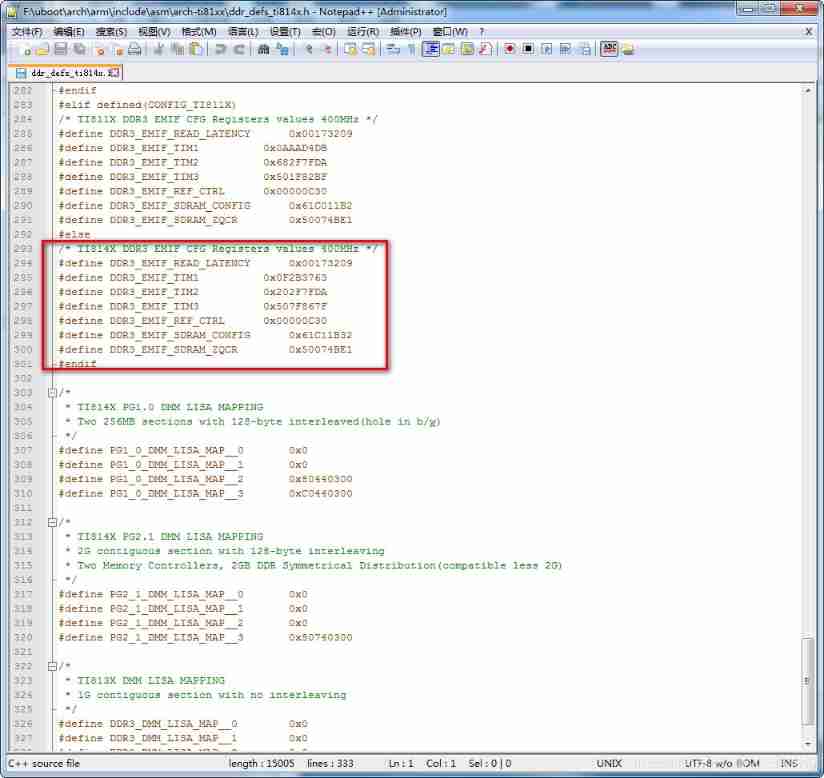
chart 19 Modify the timing parameters to Uboot

chart 20 Modify the physical offset parameters to Uboot
边栏推荐
猜你喜欢

Source code analysis of kubernetes' process of deleting pod

HTTP Caching Protocol practice

Section 5: zynq interrupt
Cloud native (to be updated)
Design and implementation of spark offline development framework

Leetcode+ 66 - 70 high precision, two sub topics

MySQL installation steps - how to create a virtual machine under Linux (1)

Static resource compression reduces bandwidth pressure and increases access speed

Evolution of vivo push platform architecture

本周二晚19:00战码先锋第8期直播丨如何多方位参与OpenHarmony开源贡献
随机推荐
安全培训是员工最大的福利!2022新员工入职安全培训全员篇
Reading notes - MySQL technology l act: InnoDB storage engine (version 2)
Llvm and clang
Top 25 most popular articles on vivo Internet technology in 2021
Code submission specification
异或的应用。(提取出数字中最右侧的1,面试中经常用的到)
HJ删除字符串中出现次数最少的字符
Solving the longest palindrome substring by dynamic programming
linux下修改mysql用户名root
Kubernetes cluster lossless upgrade practice
剑指Offer||:链表(简单)
7-2 芬兰木棋 结构体排序
ABAP skill tree
R and RGL draw 3D knots
The practice of traffic and data isolation in vivo Reviews
推荐系统系列精讲(第五讲): 排序模型的调优实践
"Three routines" of digital collection market
es6箭头函数中return的用法
7-2 Finnish wooden chess structure Sorting
Redis one master multi slave cluster setup