当前位置:网站首页>【云原生 | Kubernetes篇】深入了解Deployment(八)
【云原生 | Kubernetes篇】深入了解Deployment(八)
2022-06-30 11:31:00 【Lanson】
深入了解Deployment
一、什么是Deployment
一个 Deployment 为 Pods 和 ReplicaSets 提供声明式的更新能力。
你负责描述 Deployment 中的 _目标状态_,而 Deployment 控制器(Controller) 以受控速率更改实际状态, 使其变为期望状态;控制循环。 for(){ xxx controller.spec()}
不要管理 Deployment 所拥有的 ReplicaSet
我们部署一个应用一般不直接写Pod,而是部署一个Deployment
Deploy编写规约 Deployments | Kubernetes
二、Deployment创建
基本格式
.metadata.name指定deploy名字replicas指定副本数量selector指定匹配的Pod模板。template声明一个Pod模板
编写一个Deployment的yaml 赋予Pod自愈和故障转移能力
在检查集群中的 Deployment 时,所显示的字段有:
NAME列出了集群中 Deployment 的名称。READY显示应用程序的可用的 副本 数。显示的模式是“就绪个数/期望个数”。UP-TO-DATE显示为了达到期望状态已经更新的副本数。AVAILABLE显示应用可供用户使用的副本数。AGE显示应用程序运行的时间。
ReplicaSet 输出中包含以下字段:
NAME列出名字空间中 ReplicaSet 的名称;DESIRED显示应用的期望副本个数,即在创建 Deployment 时所定义的值。 此为期望状态;CURRENT显示当前运行状态中的副本个数;READY显示应用中有多少副本可以为用户提供服务;AGE显示应用已经运行的时间长度。注意:ReplicaSet 的名称始终被格式化为
[Deployment名称]-[随机字符串]。 其中的随机字符串是使用 pod-template-hash 作为种子随机生成的。
一个Deploy产生三个
Deployment资源
replicaset资源
Pod资源
Deployment控制RS,RS控制Pod的副本数 ReplicaSet: 只提供了副本数量的控制功能 Deployment: 每部署一个新版本就会创建一个新的副本集,利用他记录状态,回滚也是直接让指定的rs生效
三、Deployment 更新机制
仅当 Deployment Pod 模板(即
.spec.template)发生改变时,例如模板的标签或容器镜像被更新, 才会触发 Deployment 上线。 其他更新(如对 Deployment 执行扩缩容的操作)不会触发上线动作。上线动作 原理: 创建新的rs,准备就绪后,替换旧的rs(此时不会删除,因为**
revisionHistoryLimit** 指定了保留几个版本)常用的kubectl 命令
################更新#################################
#kubectl  set image  deployment资源名  容器名=镜像名
kubectl set image deployment.apps/nginx-deployment php-redis=tomcat:8 --record
## yaml提取可更新的关键所有字段计算的hash。
web---- /hello
postman   aservice- /hello

#或者直接修改定义也行
kubectl edit deployment.v1.apps/nginx-deployment
#查看状态
kubectl rollout status deployment.v1.apps/nginx-deployment

################查看历史并回滚####################################
#查看更新历史-看看我们设置的历史总记录数是否生效了
kubectl rollout history deployment.v1.apps/nginx-deployment
#回滚
kubectl rollout undo deployment.v1.apps/nginx-deployment --to-revision=2

###############累计更新##############
#暂停记录版本
kubectl rollout pause deployment.v1.apps/nginx-deployment
#多次更新操作。
##比如更新了资源限制
kubectl set resources deployment.v1.apps/nginx-deployment -c=nginx --limits=cpu=200m,memory=512Mi
##比如更新了镜像版本
kubectl set image deployment.apps/nginx-deployment php-redis=tomcat:8
##在继续操作多次
##看看历史版本有没有记录变化
kubectl rollout history deployment.v1.apps/nginx-deployment
#让多次累计生效
kubectl rollout resume deployment.v1.apps/nginx-deployment
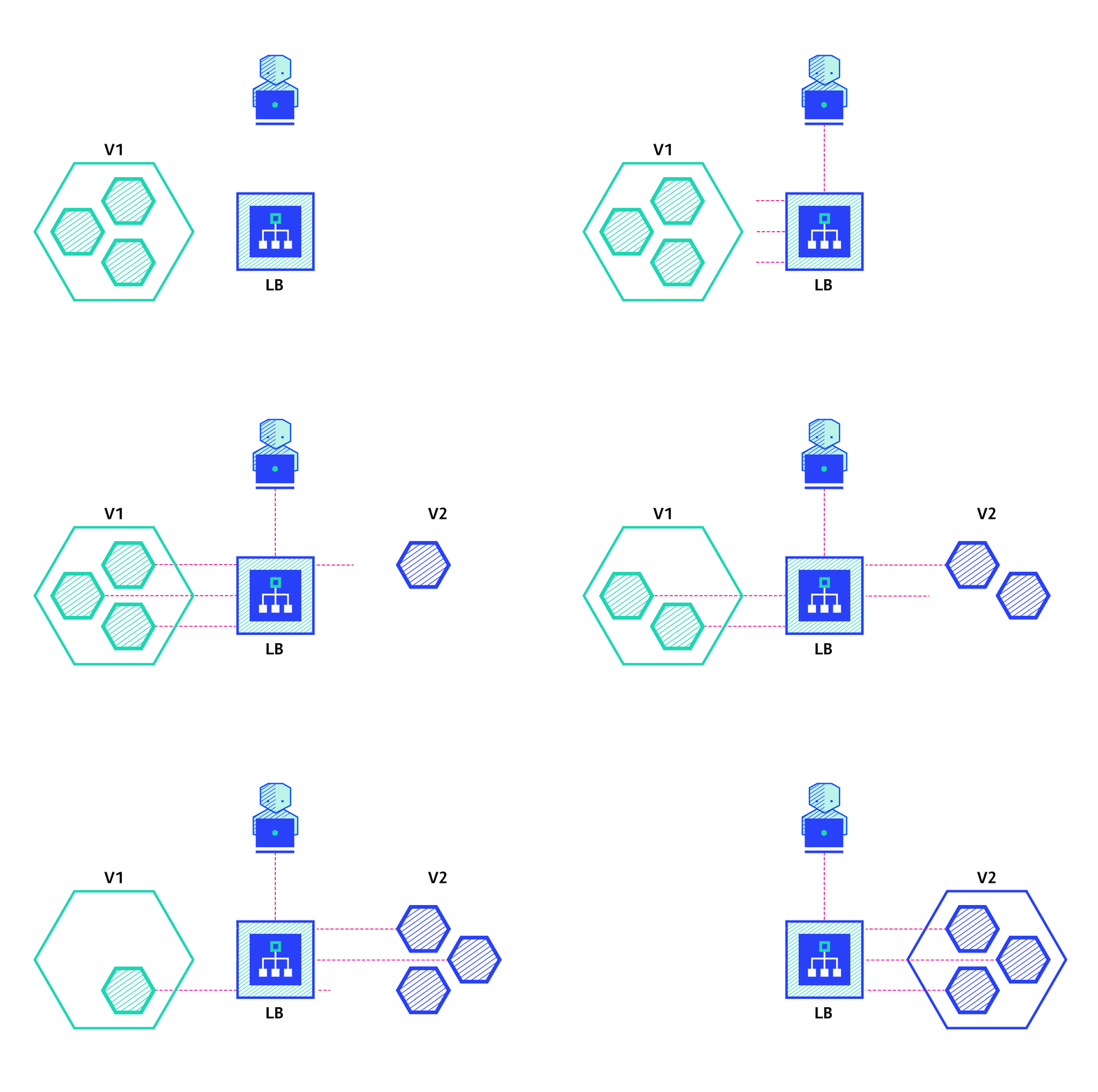
1、比例缩放(Proportional Scaling)
maxSurge(最大增量):除当前数量外还要添加多少个实例。
maxUnavailable(最大不可用量):滚动更新过程中的不可用实例数。
2、HPA(动态扩缩容)
实战:HorizontalPodAutoscaler 演练 | Kubernetes

2.1、需要先安装metrics-server
2.2、安装步骤
apiVersion: v1
kind: ServiceAccount
metadata:
  labels:
    k8s-app: metrics-server
  name: metrics-server
  namespace: kube-system
---
apiVersion: rbac.authorization.k8s.io/v1
kind: ClusterRole
metadata:
  labels:
    k8s-app: metrics-server
    rbac.authorization.k8s.io/aggregate-to-admin: "true"
    rbac.authorization.k8s.io/aggregate-to-edit: "true"
    rbac.authorization.k8s.io/aggregate-to-view: "true"
  name: system:aggregated-metrics-reader
rules:
- apiGroups:
  - metrics.k8s.io
  resources:
  - pods
  - nodes
  verbs:
  - get
  - list
  - watch
---
apiVersion: rbac.authorization.k8s.io/v1
kind: ClusterRole
metadata:
  labels:
    k8s-app: metrics-server
  name: system:metrics-server
rules:
- apiGroups:
  - ""
  resources:
  - pods
  - nodes
  - nodes/stats
  - namespaces
  - configmaps
  verbs:
  - get
  - list
  - watch
---
apiVersion: rbac.authorization.k8s.io/v1
kind: RoleBinding
metadata:
  labels:
    k8s-app: metrics-server
  name: metrics-server-auth-reader
  namespace: kube-system
roleRef:
  apiGroup: rbac.authorization.k8s.io
  kind: Role
  name: extension-apiserver-authentication-reader
subjects:
- kind: ServiceAccount
  name: metrics-server
  namespace: kube-system
---
apiVersion: rbac.authorization.k8s.io/v1
kind: ClusterRoleBinding
metadata:
  labels:
    k8s-app: metrics-server
  name: metrics-server:system:auth-delegator
roleRef:
  apiGroup: rbac.authorization.k8s.io
  kind: ClusterRole
  name: system:auth-delegator
subjects:
- kind: ServiceAccount
  name: metrics-server
  namespace: kube-system
---
apiVersion: rbac.authorization.k8s.io/v1
kind: ClusterRoleBinding
metadata:
  labels:
    k8s-app: metrics-server
  name: system:metrics-server
roleRef:
  apiGroup: rbac.authorization.k8s.io
  kind: ClusterRole
  name: system:metrics-server
subjects:
- kind: ServiceAccount
  name: metrics-server
  namespace: kube-system
---
apiVersion: v1
kind: Service
metadata:
  labels:
    k8s-app: metrics-server
  name: metrics-server
  namespace: kube-system
spec:
  ports:
  - name: https
    port: 443
    protocol: TCP
    targetPort: https
  selector:
    k8s-app: metrics-server
---
apiVersion: apps/v1
kind: Deployment
metadata:
  labels:
    k8s-app: metrics-server
  name: metrics-server
  namespace: kube-system
spec:
  selector:
    matchLabels:
      k8s-app: metrics-server
  strategy:
    rollingUpdate:
      maxUnavailable: 0
  template:
    metadata:
      labels:
        k8s-app: metrics-server
    spec:
      containers:
      - args:
        - --cert-dir=/tmp
        - --kubelet-insecure-tls
        - --secure-port=4443
        - --kubelet-preferred-address-types=InternalIP,ExternalIP,Hostname
        - --kubelet-use-node-status-port
        image: registry.cn-hangzhou.aliyuncs.com/lanson_k8s_images/metrics-server:v0.4.3
        imagePullPolicy: IfNotPresent
        livenessProbe:
          failureThreshold: 3
          httpGet:
            path: /livez
            port: https
            scheme: HTTPS
          periodSeconds: 10
        name: metrics-server
        ports:
        - containerPort: 4443
          name: https
          protocol: TCP
        readinessProbe:
          failureThreshold: 3
          httpGet:
            path: /readyz
            port: https
            scheme: HTTPS
          periodSeconds: 10
        securityContext:
          readOnlyRootFilesystem: true
          runAsNonRoot: true
          runAsUser: 1000
        volumeMounts:
        - mountPath: /tmp
          name: tmp-dir
      nodeSelector:
        kubernetes.io/os: linux
      priorityClassName: system-cluster-critical
      serviceAccountName: metrics-server
      volumes:
      - emptyDir: {}
        name: tmp-dir
---
apiVersion: apiregistration.k8s.io/v1
kind: APIService
metadata:
  labels:
    k8s-app: metrics-server
  name: v1beta1.metrics.k8s.io
spec:
  group: metrics.k8s.io
  groupPriorityMinimum: 100
  insecureSkipTLSVerify: true
  service:
    name: metrics-server
    namespace: kube-system
  version: v1beta1
  versionPriority: 100
kubectl apply 即可
全部runnning 用
kubectl top nodes --use-protocol-buffers
kubectl top pods --use-protocol-buffers
2.3、配置hpa测试
### 测试镜像 registry.cn-hangzhou.aliyuncs.com/lanson_k8s_images/php-hpa:latest

##应用的yaml已经做好
apiVersion: v1
kind: Service
metadata:
  name: php-apache
spec:
  ports:
  - port: 80
    protocol: TCP
    targetPort: 80
  selector:
    run: php-apache
---
apiVersion: apps/v1
kind: Deployment
metadata:
  labels:
    run: php-apache
  name: php-apache
spec:
  replicas: 1
  selector:
    matchLabels:
      run: php-apache
  template:
    metadata:
      creationTimestamp: null
      labels:
        run: php-apache
    spec:
      containers:
      - image: registry.cn-hangzhou.aliyuncs.com/lanson_k8s_images/php-hpa:latest
        name: php-apache
        ports:
        - containerPort: 80
        resources:
          requests:
            cpu: 200m

##hpa配置 hpa.yaml
apiVersion: autoscaling/v1
kind: HorizontalPodAutoscaler
metadata:
  name: php-apache
spec:
  maxReplicas: 10
  minReplicas: 1
  scaleTargetRef:
    apiVersion: apps/v1
    kind: Deployment
    name: php-apache
  targetCPUUtilizationPercentage: 50

#3、进行压力测试
kubectl run -i --tty load-generator --image=busybox /bin/sh

#回车然后敲下面的命令
 kubectl run -i --tty load-generator --rm --image=busybox --restart=Never -- /bin/sh -c "while sleep 0.01; do wget -q -O- http://php-apache; done"
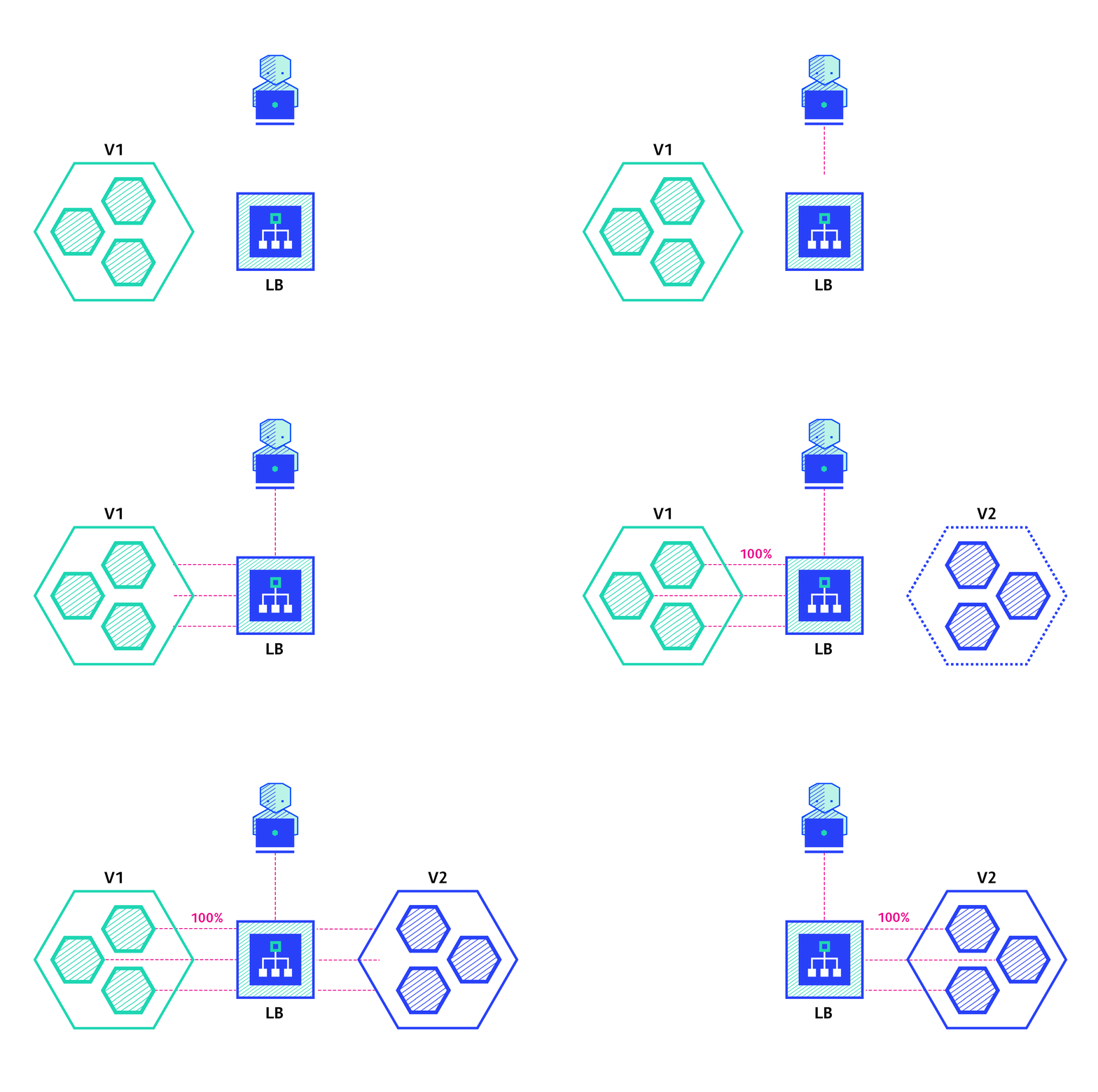
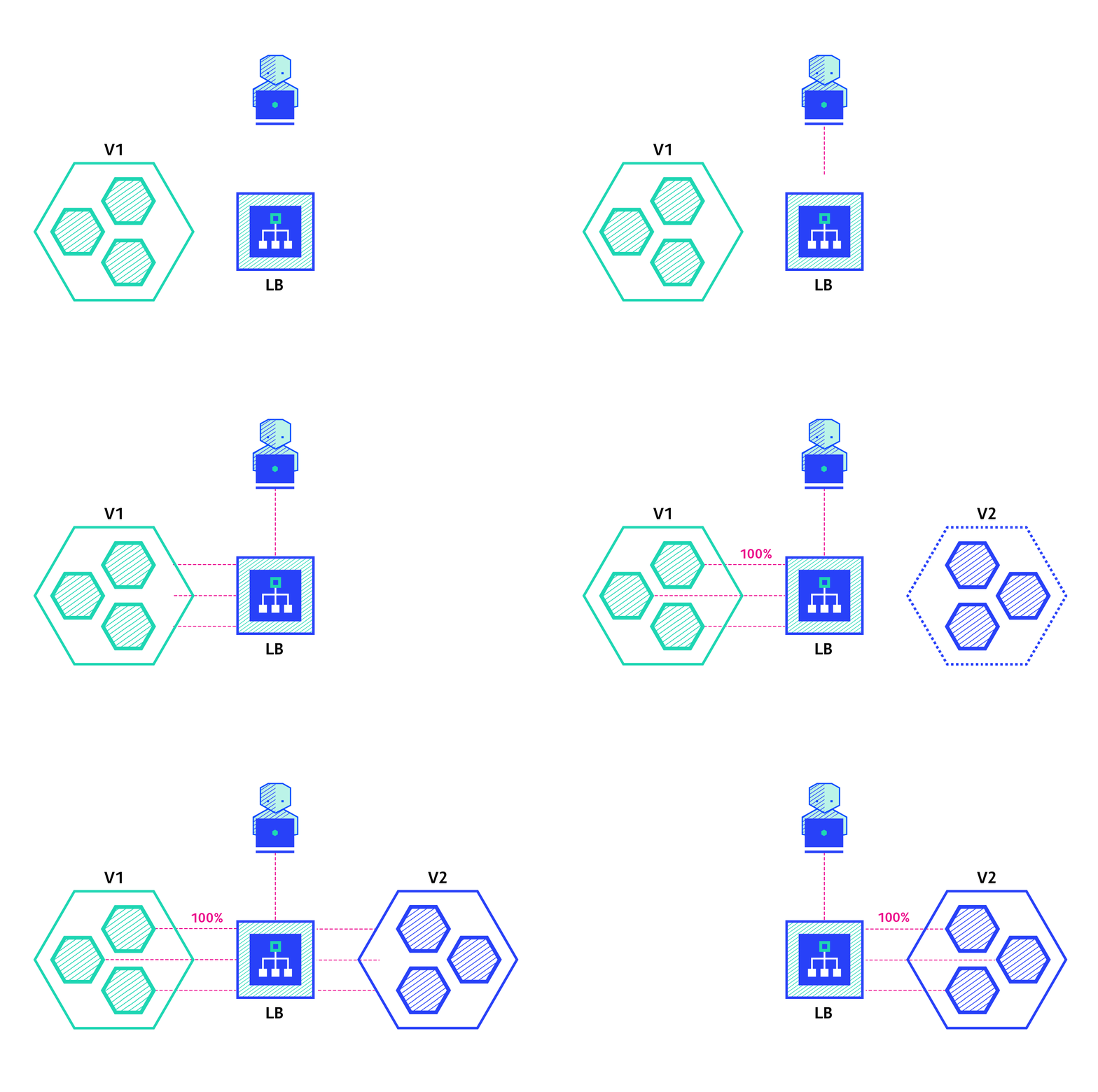
3、Canary(金丝雀部署)
3.1、蓝绿部署VS金丝雀部署
蓝绿部署
金丝雀部署
3.2、金丝雀的简单测试
使用这个镜像测试registry.cn-hangzhou.aliyuncs.com/lanson_k8s_images/nginx-test这个镜像docker run 的时候 -e msg=aaaa,访问这个nginx页面就是看到aaaa
步骤原理
准备一个Service,负载均衡Pod
准备版本v1的deploy,准备版本v2的deploy
4、Deployment状态与排错
边栏推荐
- Speech recognition - Fundamentals (I): introduction [speech to text]
- CVPR 2022 | 大幅减少零样本学习所需人工标注,马普所和北邮提出富含视觉信息的类别语义嵌入...
- YOLOv5导出onnx遇到的坑
- Lucene全文检索工具包学习笔记总结
- 【重温经典C语言】~c语言中%x、%c、%d、%x等等等、c语言取地址符&的作用、C语言中的 联合体
- 数字化不是试出来,而是蹚出来的|行知数字中国 × 富士康史喆
- wallys/3 × 3 MIMO 802.11ac Mini PCIe Wi-Fi Module, QCA9880, 2,4GHz / 5GHzDesigned for Enterprise
- Re understand oauth2.0 protocol for joint login
- Database connection pool Druid
- Introduction to China Mobile oneos development board
猜你喜欢

Handler source code analysis

CVPR 2022 | greatly reduce the manual annotation required for zero sample learning. Mapu and Beiyou proposed category semantic embedding rich in visual information

Database connection pool Druid

据说用了这个,老板连夜把测试开了

wallys/600VX – 2 × 2 MIMO 802.11ac Mini PCIe Wi-Fi Module, Dual Band, 2,4GHz / 5GHz QCA 9880

win10 R包安装报错:没有安装在arch=i386
wallys/600VX – 2×2 MIMO 802.11ac Mini PCIe Wi-Fi Module, Dual Band, 2,4GHz / 5GHz QCA 9880

HMS Core音频编辑服务3D音频技术,助力打造沉浸式听觉盛宴
数据库连接池 druid

OpenMLDB Meetup No.4 会议纪要
随机推荐
【模式识别大作业】
EMC surge
It is said that with this, the boss opened the test overnight
Goto statement jump uninitialized variable: c2362
What is a wechat applet that will open the door of the applet
脚本中如何'优雅'避免MySQL登录提示信息
Automatic database growth
R语言ggplot2可视化:使用ggplot2可视化散点图、使用scale_color_viridis_d函数指定数据点的配色方案
Is the golden cycle of domestic databases coming?
数据库 自动增长
Stm32f407zgt6 uses SDIO mode to drive SD card
10 reasons for system performance failure
线下门店为什么要做新零售?
“\“id\“ contains an invalid value“
If it is not listed again, Kuangshi technology will not be able to endure
论文解读(AGC)《Attributed Graph Clustering via Adaptive Graph Convolution》
shell第一个命令结果传入第二个命令删除
Multiparty Cardinality Testing for Threshold Private Set-2021:解读
QT embeds the sub QT program window into the current program
基于视觉的机器人抓取:从物体定位、物体姿态估计到平行抓取器抓取估计