当前位置:网站首页>[wechat applet] collaboration and publishing data binding
[wechat applet] collaboration and publishing data binding
2022-06-21 20:22:00 【Xiaobai who loves programming】
Catalog
Collaborative work and release - Applet member management
1. Two aspects of member management
2. Permissions corresponding to different project members
3. Developer's permission description
4. Add project members and experience members
Collaborative work and release - The version of the applet
1. Different versions in the software development process
Collaborative work and release - Published online
1. The overall steps of launching the applet
3. View the uploaded version in the background
6. Promotion based on small program code
Collaborative work and release - Operational data
1. There are two ways to view applet operation data
WXML Template syntax - Data binding
1. Basic principles of data binding
2. stay data Define the data of the page in
3. Mustache The format of grammar
4. Mustache Application scenario of Syntax
Collaborative work and release - Applet member management
1. Two aspects of member management
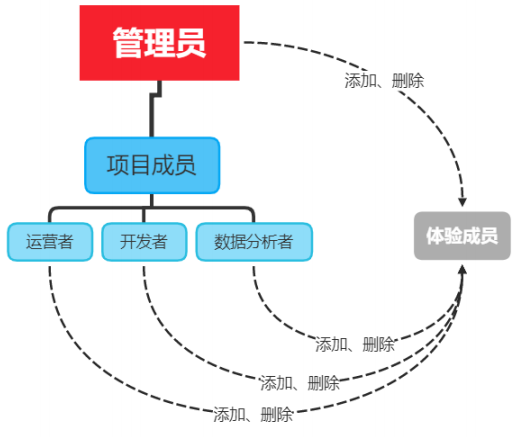
2. Permissions corresponding to different project members
| jurisdiction | The operator | developer | Data Analyst |
Developer rights | √ | ||
Experience authority | √ | √ | √ |
Sign in | √ | √ | √ |
Data analysis | √ | ||
Wechat payment | √ | ||
Extension | √ | ||
Development management | √ | ||
Development and setup | √ | ||
Temporarily Out of Service | √ | ||
The official account No. | √ | ||
Tencent cloud management | √ | ||
Widget plugin | √ | ||
Game operation management | √ |
3. developer Permission description of
4. add to Members of the project and Experience members


Collaborative work and release - The version of the applet
1. Different versions in the software development process
2. The version of the applet
Version stage | explain |
Development version | Use developer tools , You can upload the code to the development version . The development version only keeps the latest uploaded code of each person . Click submit for review , The code can be submitted for review . The development version can be deleted , It does not affect the code of the online version and the version under review . |
Experience version | You can select a development version as the experience version , And choose an experience version . |
Version under review | There can only be one copy of the code under review . The audit results can be published online , You can also resubmit for approval directly , Overwrite the original approved version . |
Online version | The version of the code used by all users online , The version code is updated after the new version code is released . |
Collaborative work and release - Published online
1. The overall steps of launching the applet
2. Upload code
① Click... In the toolbar at the top of the developer tool “ Upload ” Button


3. View the uploaded version in the background

4. Submit audit
5. Release

6. Promotion based on small program code
Collaborative work and release - Operational data
1. There are two ways to view applet operation data
WXML Template syntax - Data binding
1. Basic principles of data binding
2. stay data Define the data of the page in
This is the default index page :

// index.js
//  Get application instance
const app = getApp()

Page({
  data: {
    motto: 'Hello World',
    userInfo: {},
    hasUserInfo: false,
    canIUse: wx.canIUse('button.open-type.getUserInfo'),
    canIUseGetUserProfile: false,
    canIUseOpenData: wx.canIUse('open-data.type.userAvatarUrl') && wx.canIUse('open-data.type.userNickName') //  To try to get user information, change to false
  },
  //  Event handler
  bindViewTap() {
    wx.navigateTo({
      url: '../logs/logs'
    })
  },
  onLoad() {
    if (wx.getUserProfile) {
      this.setData({
        canIUseGetUserProfile: true
      })
    }
  },
  getUserProfile(e) {
    //  Recommended wx.getUserProfile Get user information , Every time the developer obtains the user's personal information through the interface, the user needs to confirm , Developers keep the nicknames of avatars that users fill in quickly , Avoid repeated pop ups
    wx.getUserProfile({
      desc: ' Display user information ', //  Declare the purpose of obtaining the user's personal information , The follow-up will be shown in the pop-up window , Please fill in carefully
      success: (res) => {
        console.log(res)
        this.setData({
          userInfo: res.userInfo,
          hasUserInfo: true
        })
      }
    })
  },
  getUserInfo(e) {
    //  It is not recommended to use getUserInfo Get user information , Estimated from 2021 year 4 month 13 The date of ,getUserInfo Pop ups will no longer pop up , And directly return the anonymous user's personal information
    console.log(e)
    this.setData({
      userInfo: e.detail.userInfo,
      hasUserInfo: true
    })
  }
})

Create a new page , open js file


Page({

  data: {
    word:" Content "
  }

})
3. Mustache The format of grammar
4. Mustache Application scenario of Syntax
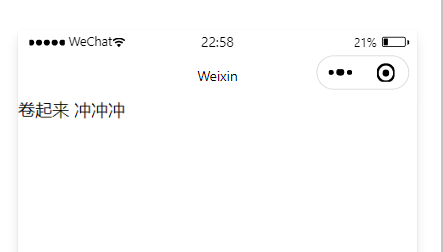
WXML:
<view>{
            {word}}</view>
WXSS:
Page({

  data: {
    word:" Roll up   To rush "
  }

})
effect :
<image src="{
            {image}}" mode="widthFix"></image>
WXSS:
Page({

  data: {

    image:"/image/a.jpg"
  }

})
effect :

Page({

  data: {

   randomNum:Math.random()*100
  }

})<view>{
{randomNum>=50 ? ' Greater than or equal to 50':' Less than 50'}}</view>
The generated random number is :97.50952738069331>50

Arithmetic operations
The data of the page is as follows :
Page({

  data: {

   randomNum:Math.random().toFixed(2)
  }
})
The structure of the page is as follows :
<view>{
             {randomNum*100}}</view>
边栏推荐
- How MySQL sums columns
- Jupyter Notebook启动方式及相关问题
- Is there any difference between MySQL and Oracle
- RecycleView拖动效果
- 范畴(Category)
- RecycleView懒加载失效问题(二)
- How to query the maximum ID value in MySQL
- 贪吃蛇游戏项目完整版
- 大魚吃小魚小遊戲完整版
- Selected articles of the research paper | interpretation of the trend of McKinsey's China's Digital Innovation future
猜你喜欢


随机推荐
[icml2022] ctrlformer: learn the transferable state representation of visual control through the transformer
mysql如何查询第几条数据
研报精选 | 麦肯锡《中国数字创新未来》趋势解读
汇编语言贪吃蛇、俄罗斯方块双任务设计实现详解(二)——贪吃蛇详细设计
Simple use of JS
HMS core machine learning service ID card identification function to achieve efficient information entry
2022-06-20
[complete course of time series prediction] take temperature prediction as an example to illustrate the composition of the paper and the construction of pytorch code pipeline
【干货知识】Redis:从应用到底层,一文帮你搞定
InfluxDB优化配置项
Flink-connector-mysql-cdc-2.2.0, the full snapshot generation phase, is based on the table
What statements are added to MySQL
1157 Anniversary
《跟老卫学 HarmonyOS 开发》:以父之名·码力全开!写段HarmonyOS祝父亲节
Flink CDC MongoDB Connector 的实现原理和使用实践
Comment MySQL additionne les colonnes
大鱼吃小鱼小游戏完整版
mysql如何查询最大id值
mysql有没有触发器
Leetcode personal question solution (Sword finger offer 21-25) 21 Adjust the array order so that odd numbers precede even numbers, 22 The penultimate node in the linked list, 24 Reverse linked list, 2