当前位置:网站首页>Unity shader learning (I) understanding the basic structure of unity shader
Unity shader learning (I) understanding the basic structure of unity shader
2022-06-27 11:18:00 【ToDoNothing】
I'm going to learn it seriously recently Unity Of Shader, It will be used in future projects , Although it is said to use other people's shader Very comfortable , But no matter how easy it is to use, it is also someone else's , I can't understand , So you have to understand it yourself . Let's get to know each other today shader Structure , And I am right. unity shader Simple understanding of rendering .
1. Simple understanding of the computer rendering process
First of all, learn shader, You must understand the rendering process of the computer , Here I recommend you to Baidu yourself , The following references :
Unity Technical art
Computer rendering process
Simple understanding of the computer rendering process
Conceptually, we generally divide the rendering process of a computer into several stages :
1. Application stage : Mainly from CPU Process light 、 Data such as models , Entity data forming point, line and plane .
2. Geometric stage : Processing point, line and plane information .
3. Grating stage : Add texture 、 Color, etc. .
( Be careful : The above stage is to simplify the process , The actual operation is more complicated )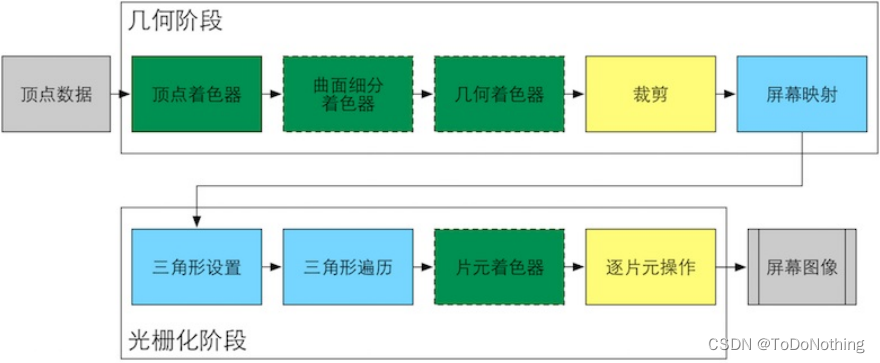
2. know Unity Shader Structure
open Unity, Create a shader , You can see that the default shader is standard pbr shader Rendering mode 
So let's create another one shader, Right click the mouse 》Shader》 Choose any one , Here we choose the one without light Unlit Shader, Create the following :
Double-click to open shader, What I'm using here is VScode To write Shader,Unity Of Shader It uses shaderlab Language , Encapsulate the underlying interface , Just call it directly , Compatible with all platforms .
Shader "Unlit/shader1"
{

    Properties
    {

        _MainTex ("Texture", 2D) = "white" {
    }
    }
    SubShader
    {

        Tags {
     "RenderType"="Opaque" }
        LOD 100

        Pass
        {

            CGPROGRAM
            #pragma vertex vert
            #pragma fragment frag
            // make fog work
            #pragma multi_compile_fog

            #include "UnityCG.cginc"

            struct appdata
            {

                float4 vertex : POSITION;
                float2 uv : TEXCOORD0;
            };

            struct v2f
            {

                float2 uv : TEXCOORD0;
                UNITY_FOG_COORDS(1)
                float4 vertex : SV_POSITION;
            };

            sampler2D _MainTex;
            float4 _MainTex_ST;

            v2f vert (appdata v)
            {

                v2f o;
                o.vertex = UnityObjectToClipPos(v.vertex);
                o.uv = TRANSFORM_TEX(v.uv, _MainTex);
                UNITY_TRANSFER_FOG(o,o.vertex);
                return o;
            }

            fixed4 frag (v2f i) : SV_Target
            {

                // sample the texture
                fixed4 col = tex2D(_MainTex, i.uv);
                // apply fog
                UNITY_APPLY_FOG(i.fogCoord, col);
                return col;
            }
            ENDCG
        }
    }
}
The top one is Shader Naming operations for , Don't care
Shader "Unlit/shader1"
And then there was Properties block , Here are the predefined parameter variables , Can pass Unity Panel adjustment
  Properties
    {

        _MainTex ("Texture", 2D) = "white" {
    }
    }
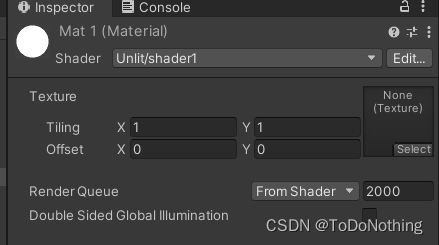
The main form of definition is
_Name (“Display Name”,Type) = Default Value
Type Types include :
Color Color
Int Integers
Float Floating point numbers
Vector Four dimensional number
2D texture
3D texture
Cube Cubic texture
SubShader List of similar renderings , You can provide a variety of image quality options for rendering
Tags: Set up special rendering methods , For example, for transparent objects 、 Rendering of translucent objects
LOD: Set the detail control of rendering , Processing refers to the processing of equipment performance , You can leave it at that
  SubShader
    {

        Tags {
     "RenderType"="Opaque" }
        LOD 100
Pass block , All the rendering is done here , from CGPROGRAM Start ,ENDCG end
Generally speaking , There can be multiple Pass
      Pass
        {

        CGPROGRAM
        ENDCG

		}
#pragma vertex/fragment name They are the naming of vertex shader and slice shader respectively
Vertex shaders and slice shaders are defined , We need to deal with this ,
See the comments in the code for details
     CGPROGRAM
            #pragma vertex vert
            #pragma fragment frag
            // introduce UnityCG
            #include "UnityCG.cginc"

            struct appdata
            {

                float4 vertex : POSITION;
                float2 uv : TEXCOORD0;
            };

            struct v2f
            {

                float2 uv : TEXCOORD0;
                UNITY_FOG_COORDS(1)
                float4 vertex : SV_POSITION;
            };

            sampler2D _MainTex;
            float4 _MainTex_ST;
			// Vertex shader processing in the geometric phase , You need to input the data of an application stage appdata, That is, point, line, surface and other information
			// Process after input , Returns the data used by a slice shader v2f
            v2f vert (appdata v)
            {

                v2f o;
                o.vertex = UnityObjectToClipPos(v.vertex);
                o.uv = TRANSFORM_TEX(v.uv, _MainTex);
                UNITY_TRANSFER_FOG(o,o.vertex);
                return o;
            }
			// Grating stage , Enter a structure that needs rasterization v2f, Return color information
            fixed4 frag (v2f i) : SV_Target
            {

                // sample the texture
                fixed4 col = tex2D(_MainTex, i.uv);
                // apply fog
                UNITY_APPLY_FOG(i.fogCoord, col);
                return col;
            }
            ENDCG
The above stage , In summary :
vert Processed the information of points
frag Process the point information and output the color
I don't want to know the details , In the next section, let's write our own code
边栏推荐
- 进程间通信详解
- 杰理之添加定时器中断【篇】
- Oracle multi table query
- 15+城市道路要素分割应用,用这一个分割模型就够了!
- Co jump
- 【TcaplusDB知识库】TcaplusDB单据受理-建表审批介绍
- Jerry's serial port communication serial port receiving IO needs to set digital function [chapter]
- NAACL 2022 | TAMT:通过下游任务无关掩码训练搜索可迁移的BERT子网络
- Red envelope rain: a wonderful encounter between redis and Lua
- 21: Chapter 3: develop pass service: 4: further improve [send SMS, interface]; (in [send SMS, interface], call Alibaba cloud SMS service and redis service; a design idea: basecontroller;)
猜你喜欢

Red envelope rain: a wonderful encounter between redis and Lua

Redis distributed lock 15 ask, what have you mastered?
0基础了解电商系统如何对接支付渠道

杰理之串口通信 串口接收IO需要设置数字功能【篇】

Code for structural design of proe/creo household appliances - electric frying pan
0 basic understanding of how e-commerce systems connect with payment channels

The wonderful use of 0 length array in C language
QStyle实现自绘界面项目实战(一)
![[tcapulusdb knowledge base] Introduction to tmonitor background one click installation (I)](/img/0a/3eae294b335c120c4aabd05e4230c3.png)
[tcapulusdb knowledge base] Introduction to tmonitor background one click installation (I)

如何在 Methodot 中部署 JupyterLab?
随机推荐
[tcapulusdb knowledge base] Introduction to new models of tcapulusdb
Deep learning in finance in cross sectional sectional predictions for random forests
杰理之IO 口中断使用注意事项【篇】
[tcapulusdb knowledge base] Introduction to tcapulusdb data import
[tcapulusdb knowledge base] Introduction to tmonitor background one click installation (I)
QStyle实现自绘界面项目实战(一)
如何在 Methodot 中部署 JupyterLab?
Summary of qstype class usage (III)
After Jerry's sleep, the regular wake-up system continues to run without resetting [chapter]
Precautions for use of IO interface interrupt of Jerry [chapter]
20 jeunes Pi recrutés par l'Institut de microbiologie de l'Académie chinoise des sciences, 2 millions de frais d'établissement et 10 millions de fonds de démarrage (à long terme)
Redis distributed lock 15 ask, what have you mastered?
【TcaplusDB知识库】TcaplusDB OMS业务人员权限介绍
一篇抄十篇,CVPR Oral被指大量抄袭
Privacy computing fat offline prediction
[tcapulusdb knowledge base] tcapulusdb doc acceptance - transaction execution introduction
【TcaplusDB知识库】TcaplusDB单据受理-建表审批介绍
[methodot topic] what kind of low code platform is more suitable for developers?
[tcapulusdb knowledge base] Introduction to tmonitor stand-alone installation guidelines (II)
What basic functions are required for live e-commerce application development? What is the future development prospect?