当前位置:网站首页>uni-app学习(二)
uni-app学习(二)
2022-07-26 22:37:00 【安城倾目】
uni-app生命周期
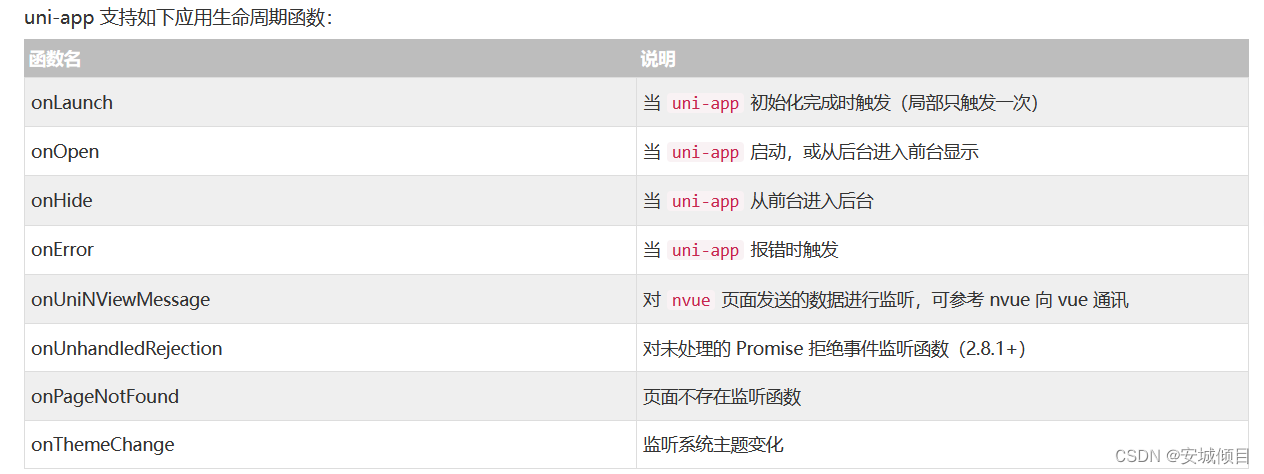
部分周期函数以及注释,以及页面跳转和信息读取在后台显示以及控制台读取
<template>
	<view>
		生命周期函数
		<view v-for="(item,index) in list" :key="index">
			{
   {item}}
		</view>
		<!-- 数据读取 -->
		<button @click="saveInfo">登录</button>
		<button @click="getInfo">取出</button>
		<button @click="delName">删除本地信息</button>
		<!-- 页面跳转 -->
		<button @click="todemo()">跳转到非tabbar页面</button>
		<button @click="toimge">跳转到上传图片页面</button>
		<button @click="toindex()">跳转到首页</button>
	</view>
</template>

<script>
	export default {
		data() {
			return {
				list:['小红','小绿','小白'],
				num:30

			}
		},
		methods: {
			saveInfo(){
		// 把一些信息存储在本地(键值对形式)
		// uni.setStorageSync(键名,具体存放的数据)
		// 键名重复会覆盖以前的
			uni.setStorageSync('name','瓜皮')
			uni.setStorageSync('list',this.list)
		},
			getInfo(){
		//取出本地数据,通过键名的方式取出相应的数据
			let name = uni.getStorageSync('name')
			console.log(name)
			console.log(uni.getStorageSync('list'))
	    },
			delName(){
		//删除本地的数据,通过键名删除相应的数据
			uni.removeStorageSync('name')
			console.log("删除了")
		},
		todemo(){   //只能用于跳转到非tabbar(非底部栏页面)页面--跳转后保存上个页面(能返回)
			uni.navigateTo({
				url:'../demo/demo' //跳转的页面的相对地址
			})
		},
		toimge(){ //只能用于跳转到非tabbar(非底部栏页面)页面--跳转后不能保存上个页面(不能返回)
			uni.redirectTo({
				url:'../text/text'
			})
		},
		toindex(){  //用于跳转到tabbar(非底部栏页面)页面--跳转后不能保存上个页面()不能返回)
			uni.switchTab({
				url:'../index/index'
			})
		}

	},
		onLoad(){ //当页面启动时 自动运行--onLoad()函数
			console.log('页面被加载了')
		},
		onShow(){ //当页面被显示时 自动运行--onShow()函数
			console.log('页面显示了')
		},
		onPullDownRefresh() {//下拉刷新时 自动运行 --onPullDownRefresh()函数
			this.list.reverse() //将list中数据逆序排列
			setTimeout(()=>{uni.stopPullDownRefresh()}, 2000);
			//停止刷新
		},
		onReachBottom(){
			this.num+=20 //侧边滚到跳到达底部执行  使页面显示信息变多
		},
		onUnload() {//当页面被关闭时 自动运行
			console.log('被卸载了!')
		}

	}
</script>

<style>

</style>
图片上传与自定义组件,子父组件相互传值
创建自定义组件(子组件)

在自定义组件里创建内容,以及传值
<template>
	<view>
		<view class="title"  :style="{color:ticolor}">列表</view>
		<view class="listcol" v-for="(item,index) in list" :key="index">
	     	{
   {item}} <!-- //打印列表list中的值 -->
		</view>
		<view class="listcol" v-for="(item,index) in studentlist" :key="index">
		 	{
   {item}} <!-- 打印从父组件接收到的studentlist的值 -->
		</view>
		<!-- 子组件向父组件传值 -->
		<button @click="sendMsg">向父组件传值</button>
	</view>
</template>

<script>
	export default {
		name:"mylist",
		//接受父组件传输过来的数据 props
		props:['studentlist','ticolor'],

		data() {
			return {
				list:['张三1','李四1','王五1']
			};
		},
		methods: {
			sendMsg(){
				//向父组件传值
				this.$emit('getms','我是子组件的数据')//可以触发父组件的事件,并进行传参
			}
		}
	}
</script>

<style>
.listcol:nth-child(2n){
	background-color: cornflowerblue;
}
.listcol{
	line-height: 40px;
	padding-left: 10px;
}
.title{
	font-size: 28px;
	font-weight: bold;
}
</style>
图片上传以及图片预览和自定义组件的配置,父组件传值
<template>
	<view>
		<button @click="chooseImg">上传图片</button>
		<image v-for="(item,index) in imglist " :key='index' :src="item" @click="read(item)"></image>
		<button @click="delectImg">图片不满意?点击删除</button>
		<!-- 条件注释 -->
		<!-- #ifdef MP-WEIXIN -->
		<view>只有在微信小程序中能看见</view>
		<!-- #endif -->
		<!-- #ifdef H5 -->
		<view>只有在H5中能看见</view>
		<!-- #endif -->
		<!-- 使用自定义组件  打印mylist中的方法的结果 -->
		<!-- <mylist></mylist> -->
		<!-- 利用自定义属性(studentlist)传值给子属性 -->
		<mylist :studentlist="studentList"  :ticolor="titleColor"  @getms="getmsg"></mylist>
	</view>
</template>

<script>
	import mylist from "../../components/mylist/mylist.vue" //引入自定义组件
	export default {
		   components:{   //注册组件
				mylist
			},
		data() {
			return {
				imglist:[],
				//传递数据给子组件
				studentList:['张三','李四','王五'],
				titleColor:'red'
			}
		},
		methods: {
			getmsg(msg){//从子组件获取值
				console.log('父组件从子组件拿到了:',msg)
			},
			chooseImg(){
				uni.chooseImage({
					count:3,
					//箭头函数 解决this指向问题
					success:(res)=> {//上传成功后执行的代码
						console.log(res.tempFilePaths)//打印图片存放的本地路径列表
						this.imglist=res.tempFilePaths
					}
				})
			},
			delectImg(){
				this.imglist="" //将图片地址之置为空  删除图片
			},
			read(img){//img为list中的每一个图片的地址
				uni.previewImage({   //预览图片
					urls:this.imglist, //图片链接列表地址
					current:img //图片的地址
				})

			}

		},
		onLoad(){
			//#ifdef MP-H5
			console.log('只有在H5中能看见我')
			//#endif
		}
	}
</script>

<style>

</style>
flex布局 ----弹性布局
定义方式
.box{
   display : flex;
}
定义盒子
<template>
	<view>
		<view class="bigbox">
			<view class="smbox smbox1"></view>
			<view class="smbox smbox2"></view>
		</view>
	</view>
</template>

<script>
	export default {
		data() {
			return {

			}
		},
		methods: {

		}
	}
</script>

<style>
.bigbox{
	width: 100%;
	height: 500px;
	border: 4px solid red;
	/* 把盒子大小设置为内减模式 即包括线的宽度后的宽度为设置的大小 */
	box-sizing: border-box;
    display: flex;//定义成弹性盒子
    /* 将主轴定义为竖轴,flex布局默认为横轴,盒子依照主轴方向依次排列 */
	flex-direction: column;
}
.smbox{
	width: 100px;
	height: 100px;
}
.smbox1{
	background-color: coral;
}
.smbox2{
	background-color: crimson;
}
</style>
边栏推荐
- NFT display guide: how to display your NFT collection
- Meeting OA my meeting
- Which securities company has the lowest commission? Is online account opening safe
- The difference between SQL join and related subinquiry
- Design of vision protector based on 51 single chip microcomputer
- 简单的SQL优化
- Share a regular expression
- 上千Tile的倾斜模型浏览提速,告别一块一块往外蹦的尴尬
- 【C语言】经典的递归问题
- [interview: concurrent Article 27: multithreading: hesitation mode]
猜你喜欢

ES6新特性
![Embedded system migration [8] - device tree and root file system migration](/img/af/5b5d38522f0cc434bdafbf892936ee.png)
Embedded system migration [8] - device tree and root file system migration

Pytorch学习记录(二):张量

【2016】【论文笔记】差频可调谐THz技术——

Baidu website Collection

Dynamic memory management

买不到的数目

文件上传到服务器

动态sql

In simple terms, cchart daily lesson - happy high school lesson 57 new starting point, the old tree and new bud of colorful interface library
随机推荐
np. transpose & np.expand_ dims
【C语言】经典的递归问题
Tensorflow2.0 深度学习运行代码简单教程
Chapter 1 develop the first restful application
第7章 课程总结
Section 6: introduction to cmake grammar
In simple terms, cchart daily lesson - happy high school lesson 57 new starting point, the old tree and new bud of colorful interface library
会议OA项目排座功能以及送审功能
The attorney general and the director of the national security service of Ukraine were dismissed
Force deduction 155 questions, minimum stack
Chapter 2 develop user traffic interceptors
MySQL数据库复杂操作:数据库约束,查询/连接表操作
Chapter 1 requirements analysis and SSM environment preparation
第二部分—C语言提高篇_12. 动/精态库的封装和使用
Familiarize you with the "phone book" of cloud network: DNS
股票开户佣金是否可以调整?手机上开户安不安全
Complete backpack and 01 Backpack
10_ Name Case - Calculation attribute
Search engine hijacking of black hat SEO
Basic operations of objects