当前位置:网站首页>OpenCL线程代数库ViennaCL的使用
OpenCL线程代数库ViennaCL的使用
2022-06-30 05:26:00 【疯狂的蕉尼基】
ViennaCL
介绍
http://viennacl.sourceforge.net/
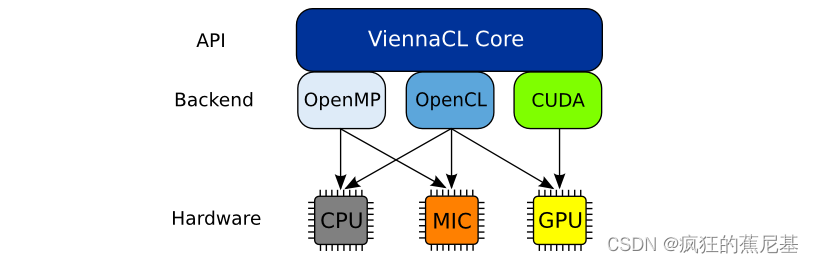
ViennaCL is a free open-source linear algebra library for computations on many-core architectures (GPUs, MIC) and multi-core CPUs. The library is written in C++ and supports CUDA, OpenCL, and OpenMP (including switches at runtime).
ViennaCL是一个免费的开源线性代数库,用于多核架构(gpu, MIC)和多核cpu的计算。该库是用c++编写的,支持CUDA、OpenCL和OpenMP(包括运行时的开关)。
最新1.7版本的亮点。X发行系列是:
- Fast sparse matrix-matrix multiplications, outperforming CUBLAS and MKL.
- 快速稀疏矩阵-矩阵乘法,优于CUBLAS和MKL。
- Fine-grained parallel algebraic multigrid preconditioners for CPUs, Xeon Phis, and GPUs.
- 细粒度并行代数多网格预处理器的cpu, Xeon phi协处理器和gpu。
- Fine-grained parallel incomplete LU factorization preconditioners for CPUs, Xeon Phis, and GPUs.
- 细粒度并行不完全LU分解预处理器,用于cpu, Xeon phi协处理器和gpu。
下载
http://viennacl.sourceforge.net/viennacl-download.html
下载连接如上,请有需要的朋友可以可以使用对应的相关的版本。ViennaCL-1.7.1.tar.gz
编译
- 将下载好的源码解压
unzip ViennaCL-1.7.1.zip
会生成如下目录,进入build
[email protected]:ViennaCL-1.7.1$ ls
build      CL     CMakeLists.txt  examples  libviennacl  README  viennacl
changelog  cmake  doc             external  LICENSE      tests
执行cmake-gui ../ 然后点击Configure。
这时候会自动的在usr目录下寻找OpenCL 编译环境所需的头文件和库文件(libOpenCL.so)。如果没有请安装对应的显卡驱动相关的SDK, 如果是嵌入式板卡,请选择交叉编译,然后指定但对于所需的opencl的头文件和库文件。
制定好头文件路径和库文件路径,点击Generate。生成Makefile,然后执行make
或者参考build/README.txt
等待编译成功,移至对应平台即可。
使用
我们看到:
在编译完的代码examples下会有很多可执行的示例,供用户使用。
benckmarks
#./dense_blas-bench-opencl
----------------------------------------------
               Device Info
----------------------------------------------

Vendor:              Vivante Corporation
Type:                GPU
Available:           1
Max Compute Units:   1
Max Work Group Size: 1024
Global Mem Size:     268435456
Local Mem Size:      32768
Local Mem Type:      2
Host Unified Memory: 1

Benchmark : BLAS
----------------
sCOPY : 2 GB/s
sAXPY : 2 GB/s
sDOT : 4 GB/s
sGEMV-N : 1.97 GB/s
sGEMV-T : 1.48 GB/s
sGEMM-NN : 0.246 GFLOPs/s
sGEMM-NT : 0.246 GFLOPs/s
sGEMM-TN : 0.246 GFLOPs/s
sGEMM-TT : 0.246 GFLOPs/s
----
Benchmark : BLAS
----------------
sCOPY : 0.195 GB/s
sAXPY : 0.196 GB/s
sDOT : 0.171 GB/s
sGEMV-N : 0.0303 GB/s
sGEMV-T : 0.0517 GB/s
sGEMM-NN : 0.00863 GFLOPs/s
sGEMM-NT : 0.234 GFLOPs/s
sGEMM-TN : 0.00868 GFLOPs/s
sGEMM-TT : 0.00863 GFLOPs/s
----
dCOPY : 0.381 GB/s
dAXPY : 0.377 GB/s
dDOT : 0.327 GB/s
dGEMV-N : 0.0596 GB/s
dGEMV-T : 0.101 GB/s
dGEMM-NN : 0.00797 GFLOPs/s
dGEMM-NT : 0.00774 GFLOPs/s
dGEMM-TN : 0.00821 GFLOPs/s
dGEMM-TT : 0.00797 GFLOPs/s
#./opencl-bench-opencl
----------------------------------------------
               Device Info
----------------------------------------------
Name:                Vivante OpenCL Device VIP8000-OI.8102.0000
Vendor:              Vivante Corporation
Type:                GPU
Available:           1
Ma[ 5243.331300] VIP8000 SetPower 0
x Compute Units:		 1
Max Work Group Size: 1024
Global Mem Size:     268435456
Local Mem Size:      32768
Local Mem Type:      2
Host Unified Memory: 1


----------------------------------------------
----------------------------------------------
## Benchmark :: OpenCL performance
----------------------------------------------

   -------------------------------
   # benchmarking single-precision
   -------------------------------
Time for building scalar kernels: 4e-06
Time for building vector kernels: 1.446
Time for building matrix kernels: 2.98157
Time for building compressed_matrix kernels: 1.88953
Time for 100000 entry accesses on host: 0.004118
Time per entry: 4.118e-08
Result of operation on host: 104839
Time for 100000 entry accesses via OpenCL: 35.0961
Time per entry: 0.000350961
Result of operation via OpenCL: 104839
bandwidth-reduction
#./bandwidth-reduction
-- Generating matrix --
 * Unknowns: 262144
 * Initial bandwidth: 8192
 * Randomly reordered bandwidth: 262051
-- Cuthill-McKee algorithm --
 * Reordered bandwidth: 6207
-- Advanced Cuthill-McKee algorithm --
 * Reordered bandwidth: 6207
-- Gibbs-Poole-Stockmeyer algorithm --
 * Reordered bandwidth: 6207
!!!! TUTORIAL COMPLETED SUCCESSFULLY !!!!
fft
Computing FFT Matrix
m: [4,8]((0,0,1,1,2,2,3,3),(0,1,1,2,2,3,3,4),(1,1,2,2,3,3,4,4),(1,2,2,3,3,4,4,5))
o: [4,8]((0,0,0,0,0,0,0,0),(0,0,0,0,0,0,0,0),(0,0,0,0,0,0,0,0),(0,0,0,0,0,0,0,0))
Done
m: [4,8]((0,0,1,1,2,2,3,3),(0,1,1,2,2,3,3,4),(1,1,2,2,3,3,4,4),(1,2,2,3,3,4,4,5))
o: [4,8]((32,40,-16,0,-8,-8,-9.53674e-07,-16),(-8,0,0,0,0,0,0,0),(0,-8,0,0,0,0,0,0),(-4.76837e-07,-8,0,0,0,0,0,0))
Transpose
m: [4,8]((0,0,1,1,2,2,3,3),(0,1,1,2,2,3,3,4),(1,1,2,2,3,3,4,4),(1,2,2,3,3,4,4,5))
o: [4,8]((0,0,0,1,1,1,1,2),(1,1,1,2,2,2,2,3),(2,2,2,3,3,3,3,4),(3,3,3,4,4,4,4,5))
---------------------
Computing FFT bluestein
input_vec: [16](0,0,1,0,2,0,3,0,4,0,5,0,6,0,7,0)
Done
input_vec: [16](0,0,1,0,2,0,3,0,4,0,5,0,6,0,7,0)
output_vec: [16](28,2.38419e-07,-4,9.65685,-4,4,-4,1.65685,-4,-3.2981e-07,-4,-1.65685,-4,-4,-4,-9.65685)
---------------------
Computing FFT
input_vec: [16](0,0,1,0,2,0,3,0,4,0,5,0,6,0,7,0)
Done
input_vec: [16](0,0,1,0,2,0,3,0,4,0,5,0,6,0,7,0)
output_vec: [16](28,0,-4,9.65685,-4,4,-4,1.65685,-4,0,-4,-1.65685,-4,-4,-4,-9.65685)
---------------------
Computing inverse FFT...
input_vec: [16](0,0,1,0,2,0,3,0,4,0,5,0,6,0,7,0)
output_vec: [16](0,0,1,4.56956e-08,2,-2.78181e-08,3,-1.64905e-07,4,0,5,-7.35137e-08,6,2.78181e-08,7,1.92723e-07)
---------------------
Computing real to complex...
input_vec: [16](0,0,1,0,2,0,3,0,4,0,5,0,6,0,7,0)
output_vec: [16](0,0,0,0,1,0,0,0,2,0,0,0,3,0,0,0)
---------------------
Computing complex to real...
input_vec: [16](0,0,1,0,2,0,3,0,4,0,5,0,6,0,7,0)
output_vec: [16](0,1,2,3,4,5,6,7,2,0,0,0,3,0,0,0)
---------------------
Computing multiply complex
input_vec: [16](0,0,1,0,2,0,3,0,4,0,5,0,6,0,7,0)
input2_vec: [16](0,0,1,0,2,0,3,0,4,0,5,0,6,0,7,0)
Done
output_vec: [16](0,0,1,0,4,0,9,0,16,0,25,0,36,0,49,0)
---------------------
!!!! TUTORIAL COMPLETED SUCCESSFULLY !!!!
还有很多示例可以编译,大家可以自行探索。
边栏推荐
- Super comprehensive summary | related improvement codes of orb-slam2 / orb-slam3!
- 遥感图像/UDA:Curriculum-Style Local-to-Global Adaptation for Cross-Domain Remote Sensing Image Segmentat
- [typescript] experimentaldecorators of vscode stepping pit
- 抓取手机端变体组合思路设想
- Unity scroll view element drag and drop to automatically adsorb centering and card effect
- Unity3d- use animator and code to control task walking
- Unit asynchronous jump progress
- Go Land no tests were Run: FMT cannot be used. Printf () & lt; BUG & gt;
- C. Divan and bitwise operations
- Bev instance prediction based on monocular camera (iccv 2021)
猜你喜欢

网络变压器怎么判断好坏?网络滤波变压器坏了一般是什么症状?

Unityshader learning notes - Basic Attributes

Super comprehensive summary | related improvement codes of orb-slam2 / orb-slam3!
The file has been downloaded incorrectly!

Intellj idea generates jar packages for projects containing external lib to other projects. The method refers to the jar package written by itself

Terminal convenient SSH connection

Responding with flow layout

Delete the repeating elements in the sorting list (simple questions)

Intellj idea jars projects containing external lib to other project reference methods - jars

Records of some problems encountered during unity development (continuously updated)
随机推荐
企事业单位源代码防泄露工作该如何进行
Remote sensing image /uda:curriculum style local to global adaptation for cross domain remote sensing image segmentation
Introduction to Redux: initial experience of Redux
Uboot reads the DDR memory size by sending 'R' characters through the terminal
Bessel curve with n control points
Intellj idea generates jar packages for projects containing external lib to other projects. The method refers to the jar package written by itself
Does the tester need to analyze the cause of the bug?
[learning notes] AssetBundle, xlua, hot update (use steps)
Operation of JSON file
Unity application class and data file path
产生 BUG 测试人员需要自己去分析原因吗?
炒股用指南针开户交易安全吗?
Chapter 12 pipeline monitoring of OpenGL super classic (version 7)
Virtual and pure virtual destructions
旋转框目标检测mmrotate v0.3.1入门
Revit secondary development - use panel function without opening the project
Redistemplate common method summary
Unity3d packaging and publishing APK process
Nestjs入门和环境搭建
Initial environment configuration of the list of OpenGL super classic (version 7) vs2019