当前位置:网站首页>XPath实现XML文档的查询
XPath实现XML文档的查询
2022-07-03 08:35:00 【緈福的街口】
一、XPath路径表达式
XPath路径表达式是XML文档中查询数据的语言
| 表达式 | 描述 |
|---|---|
| nodename | 选取此节点的所有子节点 |
| / | 从根节点选取 |
| // | 从匹配选择的当前节点选择文档的节点,不考虑其位置 |
| . | 选取当前节点 |
| … | 选取当前节点的父节点 |
| @ | 选取属性 |
二、jaxen
Jaxen是一个Java编写的XPath库,可以适应多种不同的对象模型,如:DOM,XOM,dom4j等。
Dom4j底层依赖Jaxen实现Xpath查询
三、程序实现
xml页面
<?xml version="1.0" encoding="UTF-8"?>
<!DOCTYPE hr SYSTEM "hr.dtd"><!-- 人力资源管理系统 -->
<hr>
	<employee no="3301">
		<name>张三</name>
		<age>31</age>
		<salary>3500</salary>
		<department>
			<dname>行政部</dname>
			<address>xx大厦-B103</address>
		</department>
	</employee>

	<employee no="3302">
		<name>张四</name>
		<age>32</age>
		<salary>4500</salary>
		<department>
			<dname>行政部</dname>
			<address>xx大厦-B103</address>
		</department>
	</employee>

	<employee no="3303">
		<name>张五</name>
		<age>33</age>
		<salary>5200</salary>
		<department>
			<dname>行政部</dname>
			<address>xx大厦-B103</address>
		</department>
	</employee>

	<employee no="3304">
		<name>张六</name>
		<age>34</age>
		<salary>5500</salary>
		<department>
			<dname>行政部</dname>
			<address>xx大厦-B103</address>
		</department>
	</employee>

	<employee no="3305">
		<name>李四</name>
		<age>29</age>
		<salary>8000</salary>
		<department>
			<dname>技术部</dname>
			<address>xx大厦-B104</address>
		</department>
	</employee>

	<employee no="3306">
		<name>李五</name>
		<age>26</age>
		<salary>7000</salary>
		<department>
			<dname>技术部</dname>
			<address>xx大厦-B104</address>
		</department>
	</employee>

	<employee no="3307">
		<name>王五</name>
		<age>24</age>
		<salary>3600</salary>
		<department>
			<dname>人事部</dname>
			<address>XX大厦-B205</address>
		</department>
	</employee>
</hr>
java页面
package com.imooc.dom4j;

import java.util.List;

import org.dom4j.Document;
import org.dom4j.DocumentException;
import org.dom4j.Element;
import org.dom4j.Node;
import org.dom4j.io.SAXReader;

public class XPathTester {

	public void xpath(String xpathExp) {

		String file = "d:/workplace/xml/src/hr.xml";
		SAXReader reader = new SAXReader();
		try {

			Document document = reader.read(file);
			List<Node> nodes = document.selectNodes(xpathExp);
			for(Node node :nodes) {

				Element emp = (Element)node;
				System.out.println(emp.attributeValue("no"));
				System.out.println(emp.elementText("name"));
				System.out.println(emp.elementText("age"));
				System.out.println(emp.elementText("salary"));
				System.out.println("=========================");
			}
		} catch (DocumentException e) {

			// TODO Auto-generated catch block
			e.printStackTrace();
		}
	}

	public static void main(String[] args) {

		XPathTester tester = new XPathTester();
// tester.xpath("/hr/employee");
// tester.xpath("//employee");
// tester.xpath("//employee[salary<4000]");
// tester.xpath("//employee[name='李四']");
// tester.xpath("//employee[@no=3305]");
// tester.xpath("//employee[1]");
// tester.xpath("//employee[last()]");
// tester.xpath("//employee[position()<4]");
		tester.xpath("//employee[3] | //employee[5]");
	}
}
四、查询输出
总体查询
tester.xpath("//employee");
工资小于4000的员工
tester.xpath("//employee[salary<4000]");
查找"李四"这个员工
tester.xpath("//employee[name='李四']");
编号为“3305”的员工
tester.xpath("//employee[@no=3305]");
第一个员工
tester.xpath("//employee[1]");
最后一个员工
tester.xpath("//employee[last()]");
前三个员工
tester.xpath("//employee[position()<4]");
第三个和第五个员工
tester.xpath("//employee[3] | //employee[5]");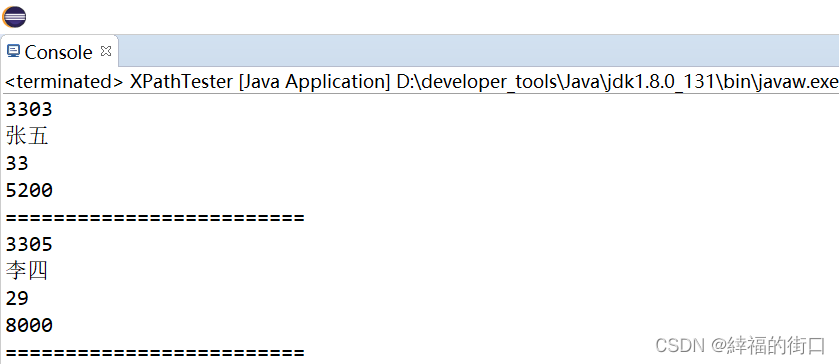
边栏推荐
- 梯度下降法求解BP神经网络的简单Demo
- Explain sizeof, strlen, pointer, array and other combination questions in detail
- Golang 时间格式整理
- Simply start with the essence and principle of SOM neural network
- [cloud native] introduction and use of feign of microservices
- Unity Editor Extension - event handling
- Unity notes 1
- 【更新中】微信小程序学习笔记_3
- [K & R] Chinese Second Edition personal questions Chapter1
- GIS实战应用案例100篇(七十八)-多规合一数据库设计及数据入库
猜你喜欢
![[RPC] RPC remote procedure call](/img/dc/872204ea47fcff04cdb72e18a2a4ef.jpg)
[RPC] RPC remote procedure call

Redis data structure
OpenGL learning notes
Explain sizeof, strlen, pointer, array and other combination questions in detail

Unity editor expansion - draw lines
UE4 source code reading_ Bone model and animation system_ Animation compression

数据分析练习题
VIM learning notes from introduction to silk skating
![[redis] redis persistent RDB vs AOF (source code)](/img/57/b6a86c49cedee31fc00dc5d1372023.jpg)
[redis] redis persistent RDB vs AOF (source code)

单调栈-84. 柱状图中最大的矩形
随机推荐
[rust notes] 05 error handling
animation
Mall management system of database application technology course design
Notes on understanding applets 2022/7/3
2021-10-19
Golang中删除字符串的最后一个字符
Simply start with the essence and principle of SOM neural network
Sequence of map implementation classes
【Rust 笔记】07-结构体
Visual Studio (VS) shortcut keys
Unity editor expansion - the design idea of imgui
【Rust 笔记】08-枚举与模式
【Rust笔记】05-错误处理
數據庫應用技術課程設計之商城管理系統
Downward compatibility and upward compatibility
图像处理8-CNN图像分类
【Rust笔记】06-包和模块
Delete the last character of the string in golang
swagger文档配置
[concurrent programming] Table hopping and blocking queue