当前位置:网站首页>DRF learning notes (I): Data Serialization
DRF learning notes (I): Data Serialization
2022-07-27 16:18:00 【fresh_ nam】
List of articles
Get ready
1. Create an
First create an application under the project root directory :
python manage.py startapp demo
stay settings.py Add created app
INSTALLED_APPS = [
    'rest_framework',
     'demo',
]
2. establish model
stay demo In the catalog models.py Add the following code :
from django.db import models

# Create your models here.
class ClassInfo(models.Model):
    number = models.IntegerField(verbose_name=' Class number ')
    grade = models.CharField(verbose_name=' grade ', max_length=3)

class StudentInfo(models.Model):
    name = models.CharField(max_length=10, verbose_name=' full name ')
    sex = models.CharField(max_length=1, verbose_name=' Gender ')
    from_class = models.ForeignKey(ClassInfo, on_delete=models.CASCADE)
Enter the following command in the project root directory to migrate :
python manage.py makemigrations
python manage.py migrate
The following results show that the data migration is successful :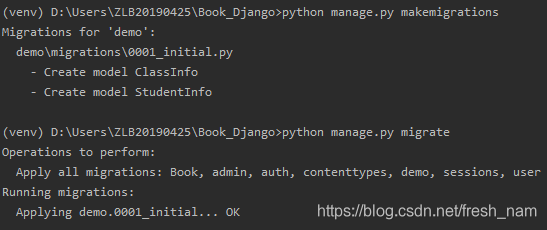
1、 Define serializer
In order to model Data is serialized and deserialized , The corresponding model Provide a serializer , stay demo Create one in the directory serializers.py, First give ClassInfo Add a serializer :
from rest_framework import serializers

class ClassInfoSerializer(serializers.Serializer):
    """ Class data serializer """
    id = serializers.IntegerField(label='ID', read_only=True)
    number = serializers.IntegerField(label=' Class number ')
    grade = serializers.CharField(label=' grade ', max_length=3)
2、 Use serializer
For convenience , We will be in django shell Use in , Enter the following command in the project root directory :
python manage.py shell
1、 First insert a piece of test data
>>> from demo.models import ClassInfo
>>> ClassInfo.objects.create(number=1, grade=" Third grade ")
2、 Get the data object
>>> class_data = ClassInfo.objects.get(id=1)
3、 Build the serializer object and get the data
>>> from demo.serializers import ClassInfoSerializer
>>> serializer = ClassInfoSerializer(class_data)
>>> serializer.data
result :
Be careful : If you want to serialize a query set that contains multiple pieces of data QuerySet, You can do it by adding many=True Supplementary description of parameters
>>> ClassInfo.objects.create(number=1, grade=" second grade ")
<ClassInfo: ClassInfo object (2)>
>>> ClassInfo.objects.create(number=1, grade=" In grade one ")
<ClassInfo: ClassInfo object (3)>
>>> class_list = ClassInfo.objects.all()
>>> serializer = ClassInfoSerializer(class_list, many=True)
>>> serializer.data
result :
3、 Associated object serialization
When the object to be serialized contains foreign keys , Need to use PrimaryKeyRelatedField Field associations are serialized as the primary key of the associated object . stay serializers.py add to StudentInfo serializers :
Student serializer :
class StudentInfoSerializer(serializers.ModelSerializer):
    """ Student data serializer """
    id = serializers.IntegerField(label='ID', read_only=True)
    name = serializers.CharField(label=' full name ', max_length=10)
    sex = serializers.CharField(label=' Gender ', max_length=1)
    from_class = serializers.PrimaryKeyRelatedField(label=' The book ', read_only=True)
Use :
>>> from demo.models import StudentInfo
>>> class_data = ClassInfo.objects.get(id=1)
>>> StudentInfo.objects.create(name=" Zhang San ", sex=" male ", from_class = class_data)
>>> from demo.serializers import StudentInfoSerializer
>>> serializer = StudentInfoSerializer(student)
>>> serializer.data
result :
Be careful : If the associated object data is not only one , It contains multiple data , If you want to serialize ClassInfo data , Every ClassInfo Object associated StudentInfo The object may have more than one , At this time, the above methods can still be used to specify the associated field type , Only when declaring associated fields , Add one more many=True Parameters can be .
class ClassInfoSerializer(serializers.Serializer):
    """ Class data serializer """
    id = serializers.IntegerField(label='ID', read_only=True)
    number = serializers.IntegerField(label=' Class number ')
    grade = serializers.CharField(label=' grade ', max_length=3)
    studentinfo_set = serializers.PrimaryKeyRelatedField(read_only=True, many=True)  #  add to
Use :
>>> from demo.models import ClassInfo
>>> from demo.serializers import ClassInfoSerializer
>>> class_data = ClassInfo.objects.get(id=1)
>>> serializer = ClassInfoSerializer(class_data)
result :
Next chapter :DRF Learning notes ( Two ): Data deserialization
边栏推荐
- flink打包程序提交任务示例
- Openwrt compilation driver module (write code at any position outside the openwrt source code, and compile independently in a modular manner.Ko)
- Your password does not satisfy the current policy requirements (modify MySQL password policy setting simple password)
- Determine the exact type of data
- Penetration test - dry goods | 80 + network security interview experience post (interview)
- 逗号操作符你有用过吗?
- Example of the task submitted by the Flink packer
- [sword finger offer] interview question 53- Ⅱ: missing numbers in 0 ~ n-1 - binary search
- profileapi.h header
- C language programming (Third Edition)
猜你喜欢

Constraints, design and joint query of data table -- 8000 word strategy + Exercise answers

无线网络分析有关的安全软件(aircrack-ng)

JWT简介

: 0xc0000005: an access conflict occurs when writing position 0x01458000 - to be solved

Text capture picture (Wallpaper of Nezha's demon child coming to the world)

测试新手学习宝典(有思路有想法)
DEX and AMMS of DFI security

新版jmeter函数助手不在选项菜单下-在工具栏中

Scratch crawler framework

Penetration test - dry goods | 80 + network security interview experience post (interview)
随机推荐
SQL multi table query
profileapi.h header
Hematemesis finishing c some commonly used help classes
传音控股披露被华为起诉一事:已立案,涉案金额2000万元
Common Oracle statements
2.2 JMeter基本元件
Nacos
DRF学习笔记(一):数据序列化
移动端h5常见问题
JWT简介
scrapy爬虫框架
DRF学习笔记(四):DRF视图
Taking advantage of 5g Dongfeng, does MediaTek want to fight the high-end market again?
Flask连接mysql数据库已有表
[sword finger offer] interview question 53-i: find the number 1 in the sorted array -- three templates for binary search
: 0xC0000005: 写入位置 0x01458000 时发生访问冲突----待解
C语言实现字节流与十六进制字符串的相互转换
Common tool classes under JUC package
DeFi安全之DEX与AMMs
Single machine high concurrency model design