当前位置:网站首页>四大组件---ContentResolver
四大组件---ContentResolver
2022-08-11 02:03:00 【高朵】
四大组件---ContentResolver
内容提供器的用法一般有两种:
(1) 使用现有的内容提供器来读取和操作相应程序的数据
(2) 创建自己的内容提供器给我们程序的数据提供外部接口。
一、 ContentResolver的基本用法
ContentResolver是通过URI来查询ContentProvider中提供的数据。
内容URI标准写法如下:
content://com.example.app.provider/table1
内容URI字符串能清楚的表达出是哪个程序的哪个表。ContentResolver中的增删改查方法接收内容URI。需要把URI字符串解析成URI对象。调用Uri.parse()方法即可解析。
Uri uri = Uri.parse("content://com.example.app.provider/table1")
用URI对象查询表table1表中数据
Cursor cursor = getContentResolver().query(
    uri,
    projection,
    selection,
    selectionArgs,
    sortOrder);
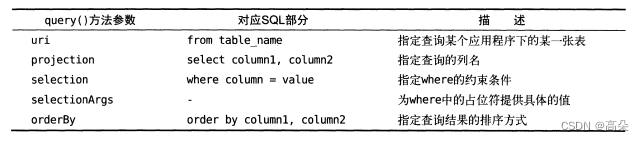
查询完成后返回的仍然是Cursor对象,将数据从crsor对象中逐个读取
if(cursor != null){

    while(cursor.moveToNext()){

        String column1 = cursor.getString(cursor.getColunmIndex("colunm1"));
        int column2 = cursor.getInt(cursor.getColumnIndex("column2");
    }
    cursor.close();
}
添加
ContentValues values = new ContentValues();
values.put("column1", "text");
valuse.put("column2", 1);
getContentResolver().insert(uri.values);
更新
ContentValues values = new ContentValues();
values.put("column1", "");
getContentResolver().update(uri, values, "column1 = ? and column2 = ?", new String[]{
    "text","1"});
删除
getContentResolver().delete(uri, "column2 = ?", new String[]{
    "1"});
二、 读取系统联系人
首先先创建三个联系人
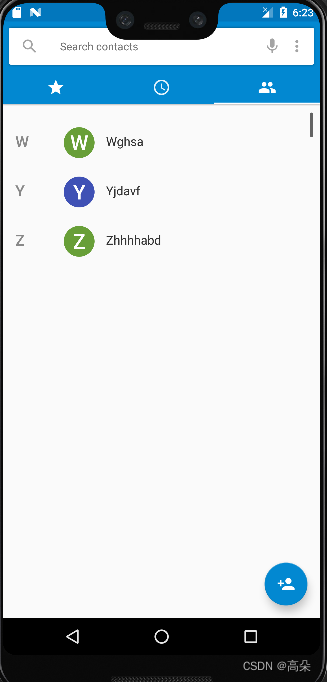
希望最终读取出的联系人信息能在ListView中显示出来。修改主活动xml文件
新建一个列表
修改主活动代码
public class MainActivity extends AppCompatActivity {


    ArrayAdapter<String> adapter;
    List<String> contactsList = new ArrayList<>();
    @Override
    protected void onCreate(Bundle savedInstanceState) {

        super.onCreate(savedInstanceState);
        setContentView(R.layout.activity_main);
        ListView contactsView = (ListView) findViewById(R.id.contacts_view);
        adapter = new ArrayAdapter<String>(this, android.R.layout.simple_list_item_1, contactsList);
        contactsView.setAdapter(adapter);
        if (ContextCompat.checkSelfPermission(this, Manifest.permission.READ_CONTACTS) != PackageManager.PERMISSION_GRANTED) {

            ActivityCompat.requestPermissions(this, new String[]{
    Manifest.permission.READ_CONTACTS}, 1);

        } else {

            readContacts();
        }
    }
    private void readContacts() {

        Cursor cursor = null;
        try {

            cursor = getContentResolver().query(ContactsContract.CommonDataKinds.Phone.CONTENT_URI, null, null, null, null);
            if (cursor != null) {

                while (cursor != null) {

                    //获取联系人姓名
                    @SuppressLint("Range") String displayName = cursor.getString(cursor.getColumnIndex(ContactsContract.CommonDataKinds.Phone.DISPLAY_NAME));
                    @SuppressLint("Range") String number = cursor.getString(cursor.getColumnIndex(ContactsContract.CommonDataKinds.Phone.NUMBER));
                    contactsList.add(displayName + "\n" + number);
                }
                adapter.notifyDataSetChanged();
            }
        } catch (Exception e) {

            e.printStackTrace();
        } finally {

            if (cursor != null) {

                cursor.close();
            }
        }
    }
    @Override
    public void onRequestPermissionsResult(int requestCode, String[] permissions, int[] grantResults) {

        super.onRequestPermissionsResult(requestCode, permissions, grantResults);
        switch (requestCode) {

            case 1:
                if (grantResults.length > 0 && grantResults[0] == PackageManager.PERMISSION_GRANTED) {

                    readContacts();
                } else {

                    Toast.makeText(this, "u denied the permission", Toast.LENGTH_SHORT).show();
                }
                break;
            default:
        }
    }
}
在AndriodMainfest.xml修改代码
<uses-permission android:name="android.permission.READ_CONTACTS"/>
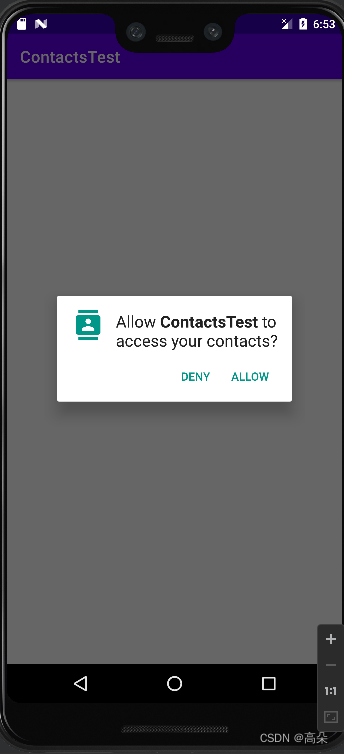
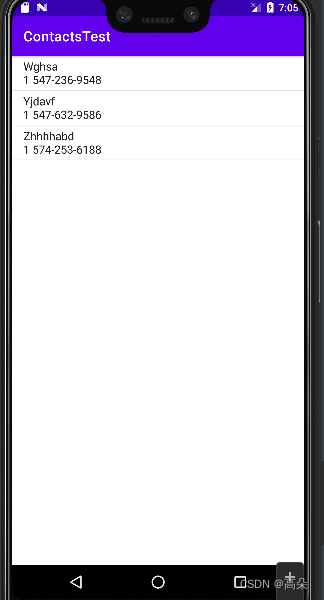
点击ALLOW,联系人的数据都成功读取出来了,说明跨程序访问数据的功能确实是实现了。
边栏推荐
猜你喜欢


![MySQL Basics [Part 1] | Database Overview and Data Preparation, Common Commands, Viewing Table Structure Steps](/img/61/bebf5661ef1013e233e8d32c79f9ae.png)


随机推荐
软件测试面试题:Web服务器指标指标?
超声三维重建总体架构
软件测试面试题:性能测试工作?
软件测试面试题:什么是α测试,β测试?
Deep Learning【第二章】
HPSO and multi-core LSSVM based network intrusion detection
leetcode 739. Daily Temperatures 每日温度(中等)
0 in the figure, etc. LeetCode565. Array nesting
winform下的富文本编辑器
软件测试面试题:谈谈你对 cmm 和 is9000 的认识?
MySQL基础篇【第一篇】| 数据库概述及数据准备、常用命令、查看表结构步骤
报错处理:org.xml.sax.SAXParseException: 不允许有匹配 “[xX][mM][lL]“ 的处理指令目标
学军中学推理社2017届招新试题
YTU 2411: 谁去参加竞赛?【简单循环】
C# WebBrower1控件可编辑模式保存时会提示“该文档已被修改,是否保存修改结果”
The classification of inter-process communication (IPC) and the development of communication methods
划分字母区间[贪心->空间换时间->数组hash优化]
nvidia-smi:控制你的 GPU
Flink二阶段提交
3342:字符串操作 题解