当前位置:网站首页>QT designer cannot modify the window size, and cannot change the size by dragging the window with the mouse
QT designer cannot modify the window size, and cannot change the size by dragging the window with the mouse
2022-06-23 06:58:00 【Shu Yang】
Problem description :
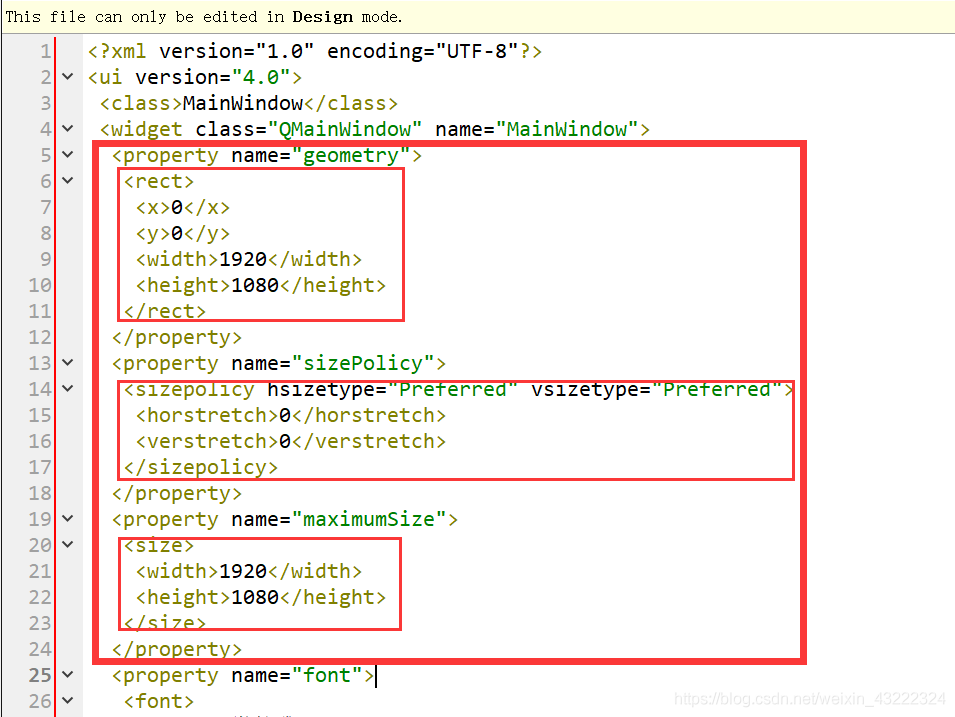
performance 1: Here's the picture , stay QT Designer interface , stay geometry Properties , After a certain point, the width and height are the original values , Cannot modify window size .

performance 2: Drag the window with the mouse , I can't drag it , Still can't change the window size .
resolvent :
1、 Right click ui file ——> choice “ use … open ”——> choice “ Normal text editor ”

2、 Take yours. ui File on the window size of this code , Amend to read as follows , Save it , Right click again ui file ——> choice “ use … open ”——> choice “ Interface editor ” Open your ui file , You can get back to normal .
 <property name="geometry">
   <rect>
    <x>0</x>
    <y>0</y>
    <width>1024</width>
    <height>1024</height>
   </rect>
  </property>
  <property name="sizePolicy">
   <sizepolicy hsizetype="Preferred" vsizetype="Preferred">
    <horstretch>0</horstretch>
    <verstretch>0</verstretch>
   </sizepolicy>
  </property>
  <property name="minimumSize">
   <size>
    <width>0</width>
    <height>0</height>
   </size>
  </property>
  <property name="maximumSize">
   <size>
    <width>5000</width>
    <height>3000</height>
   </size>
  </property>
The normal code for resizing windows is as follows , Yes, there is 4 Part of the , The data of these four parts can be modified according to your own needs .

I can not change the size of the window corresponding to ui The content of the file is as follows , You can see that a part of the code is missing .
边栏推荐
- Solve the mining virus sshd2 (redis does not set a password and clear the crontab scheduled task)
- cmder
- Idea automatically generates serialVersionUID
- Set tensorflow1 X to pytorch
- 746. 使用最小花费爬楼梯-动态规划
- 2121. sum of intervals of the same elements - hash table method
- Badly placed()'s problem
- [project training 10] drawing of arrows
- Haas506 2.0 development tutorial -sntp (only versions above 2.2 are supported)
- DQL、DML、DDL、DCL的概念与区别
猜你喜欢

Sword finger offer 42 Maximum sum of successive subarrays

Explain csma/cd, token bus and token ring clearly

xml schem 记录

Easy EDA learning notes 09 esp32-wroom-32e module esp32-devkitc-v4 development board one click download circuit

【项目实训】多段线扩充为平行线

Some difficulties in making web pages

Intentional shared lock, intentional exclusive lock and deadlock of MySQL

疫情下的传媒产业,小程序生态驱动数字化转型探索

小白投资理财必看:图解基金买入与卖出规则

【BULL中文文档】用于在 NodeJS 中处理分布式作业和消息的队列包
随机推荐
Haas506 2.0 development tutorial - Advanced Component Library -modem Net (only supports versions above 2.2)
[project training 10] drawing of arrows
Haas506 2.0 development tutorial -sntp (only versions above 2.2 are supported)
2022年养老理财产品有哪些?风险小的
mysql 函数
ssm + ftp +ueditor
总结的好处
Copy and paste of idea without escape
疫情下的传媒产业,小程序生态驱动数字化转型探索
如何迁移virtualbox 的虚拟机到hype-v
Haas506 2.0 development tutorial - Advanced Component Library -modem Voicecall (only supports versions above 2.2)
Phpstudy set 301 redirection
开源OAuth2框架 实现SSO单点登录
[saison de remise des diplômes · technologie agressive er] votre choix, agenouillez - vous et partez
Focusing on the smart city, Huawei cooperates with China Science and technology Xingtu to jointly develop a new digital blue ocean
Open source oauth2 framework for SSO single sign on
[graduation season · advanced technology Er] it's my choice. I have to walk on my knees
[STL] summary of deque usage of sequential containers
C语言运算符优先级口诀
Data indicators and data analysis models that designers need to understand