当前位置:网站首页>C# control ListView usage
C# control ListView usage
2022-07-31 13:16:00 【dusk and starry sky】
Add title
Show grid
Add data to the table
Customize other properties
End
Add Title
Add a ListView component in the Winfrom interface, then click the arrow in the upper right corner, click Edit Column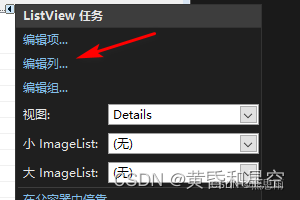
Add the title below, then click OK
At this time, the ListView is still blank, and these titles cannot be displayed. Select Details in the view here
It will be as shown in the figure below, although the title is out, the content is indeed a white version, I still think the DataGridView component is easy to use at this time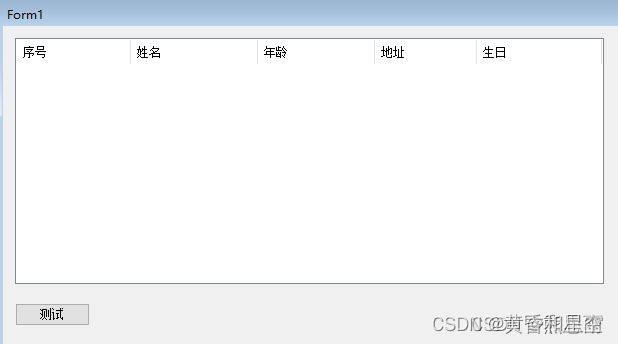
Show grid
At this point, the table is just blank, you canSet in the properties panel to display the grid, as shown below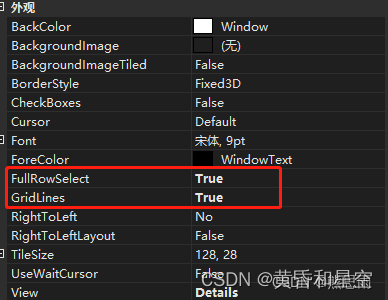
At this time, as shown in the figure below, the effect comes out, but there are still shortcomings in it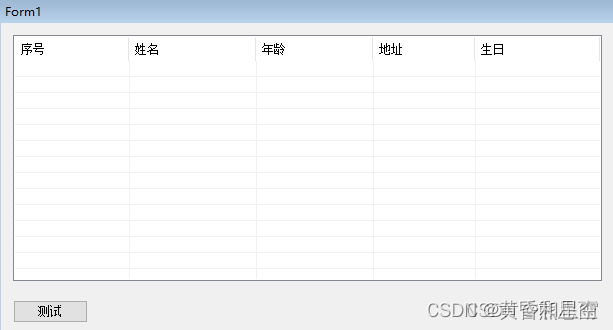
Add data to the table
What should I do if no data is added?Copied directly from the Internet, as follows:
private void Button_Test_Click(object sender, EventArgs e)
{
//Data update, UI is temporarily suspended until EndUpdate draws controls, which can effectively avoid flickering and greatly improve loading speed
this.listView1.BeginUpdate();
//Add 5 rows of data
for (int i = 0; i < 5; i++)
{
ListViewItem lvi = new ListViewItem();
lvi.SubItems.Add("column 1,th" + i + "row");
lvi.SubItems.Add("column 2, th" + i + "row");
lvi.SubItems.Add("column 3, th" + i + "row");
lvi.SubItems.Add("4th column, "+i + "row");
lvi.SubItems.Add("5th column," + i + "row");
this.listView1.Items.Add(lvi);
}
//End data processing, the UI interface is drawn at one time.
this.listView1.EndUpdate();
}
After running, let's see the effect, what? There is no data in the first line serial number, 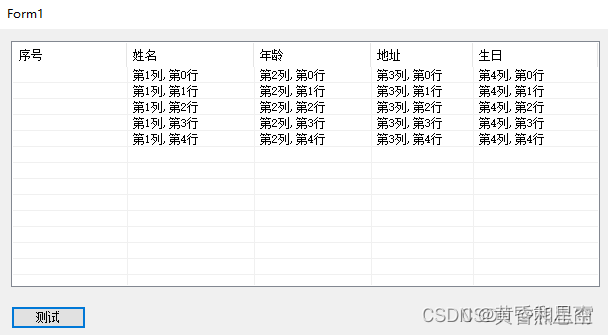
Check the breakpoint, the ListViewItem array index 0 is actually empty
I searched for information, but I still found a solution:
private void Button_Test_Click(object sender, EventArgs e)
{
//Data update, UI is temporarily suspended until EndUpdate draws controls, which can effectively avoid flickering and greatly improve loading speed
listView1.BeginUpdate();
//Add 5row data
for (int i = 0; i < 5; i++)
{
int column = i + 1;
ListViewItem lvi = listView1.Items.Add("column 1,th" + column + "row");
lvi.SubItems.Add("column 2," + column + "row");
lvi.SubItems.Add("column 3," + column + "row");
lvi.SubItems.Add("Column 4," + column + "row");
lvi.SubItems.Add("Column 5," + column + "row");
}
//EndData processing, the UI interface is drawn at one time.
listView1.EndUpdate();
}
This kind of writing looks very painful, and there is no other way for the time being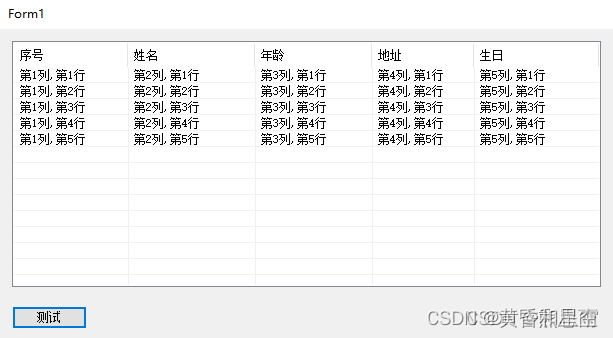
Now the effect is achieved, but what if I want to change the properties of one of the cells?
Customize other properties
Example 1: Change the background color and font color
private void Button_Test_Click(object sender, EventArgs e)
{
//Data update, UI is temporarily suspended until EndUpdate draws controls, which can effectively avoid flickering and greatly improve loading speed
listView1.BeginUpdate();
//Add 5row data
for (int i = 0; i < 5; i++)
{
int column = i + 1;
ListViewItem lvi = listView1.Items.Add("column 1,th" + column + "row");
lvi.SubItems.Add("column 2," + column + "row");
lvi.SubItems.Add("column 3," + column + "row");
lvi.SubItems.Add("column 4," + column + "row");
lvi.SubItems.Add("column 5," + column + "row");
if (column % 2 ==0)
{
lvi.BackColor = Color.Red;
lvi.ForeColor = Color.White;
}
else
{
lvi.BackColor = Color.Green;
lvi.ForeColor = Color.Black;
}
}
//End data processing, UI interface is one-timedraw.
listView1.EndUpdate();
}
Effect:
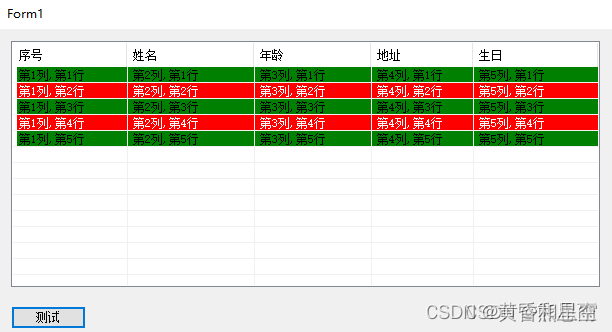
Other attributes will not be demonstrated, and the writing is similar.
End
边栏推荐
- C#控件CheckBox的使用
- [Niu Ke brush questions - SQL big factory interview questions] NO3. E-commerce scene (some east mall)
- EasyMock日记1[通俗易懂]
- [CPU Design Practice] Simple Pipeline CPU Design
- vivado里那些看不懂的原语
- 如何使用StarUML画类图[通俗易懂]
- NameNode (NN) and SecondaryNameNode (2NN) working mechanism
- 尚硅谷–MySQL–基础篇(P1~P95)
- 图像大面积缺失,也能逼真修复,新模型CM-GAN兼顾全局结构和纹理细节
- TensorRT安装及使用教程「建议收藏」
猜你喜欢
![[CPU Design Practice] Simple Pipeline CPU Design](/img/83/e1dfedfe2b2cfe83a34f86e252caa7.jpg)




随机推荐
基本语法(一)
EasyMock日记1[通俗易懂]
NameNode (NN) and SecondaryNameNode (2NN) working mechanism
FastAPI encapsulates a generic response
五种数据提交方式的优化
[CPU Design Practice] Simple Pipeline CPU Design
CentOS7 —— yum安装mysql
报错IDEA Terminated with exit code 1
Istio微服务治理网格的全方面可视化监控(微服务架构展示、资源监控、流量监控、链路监控)
golang八股文整理(持续搬运)
Flutter键盘可见性
行业案例 | 全面防护 赛宁助力能源工控安全建设
The cluster of safe mode
集群的安全模式
365天挑战LeetCode1000题——Day 044 最大层内元素和 层次遍历
战略进攻能力的重要性,要远远高于战略防守能力
ECCV 2022 | 机器人的交互感知与物体操作
vivado里那些看不懂的原语
C#控件ListView用法
Six Stones Programming: No matter which function you think is useless, people who can use it will not be able to leave, so at least 99%