当前位置:网站首页>Using unity to do simulation, I don't allow this chart plug-in, you don't know
Using unity to do simulation, I don't allow this chart plug-in, you don't know
2022-07-24 16:52:00 【InfoQ】
- CSDN Home page
- GitHub Open source address
- Unity3D Plug in sharing
- Jane book address
- My personal blog
- QQ Group :1040082875
One 、 Preface
Two 、 original text
- The plug-in Github Address :XCharts Home page
- common problem :XCharts Question and answer
- Plugin Download :unitypackage Package download
- Interface document :API manual
- Parameter configuration :Parameter configuration manual
- Novice tutorial :5 Minutes to go XCharts
3、 ... and 、 Quick start
3-1、 First download the installation package
unitypackage Package download

3-2、 Import resource packs into Unity in

3-3、Demo There are various chart effects in , As shown in the figure below :

3-4、 Build a simple scene
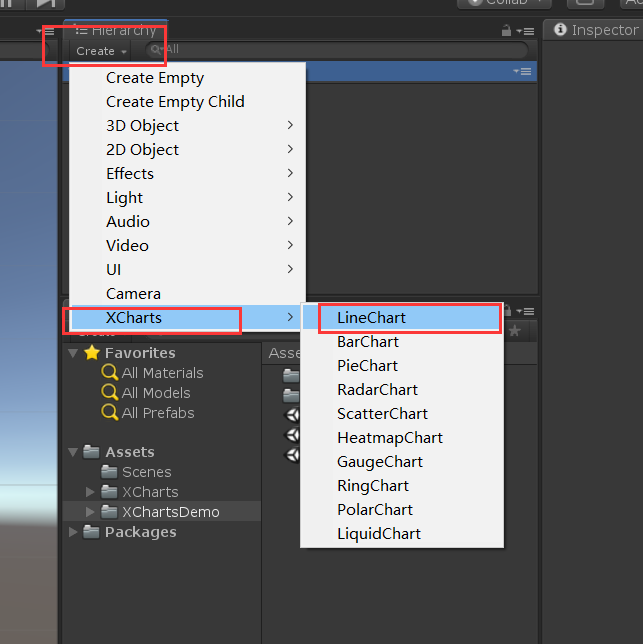
- LineChart: Broken line diagram
- BarChart: Histogram
- PieChart: The pie chart
- RadarChart: Radar map
- ScatterChart: Scatter plot
- HeatmapChart: Heat map
- GaugeChart: The dashboard
- RingChart: Trend chart
- PolarChart: Polar map
- LiquidChart: Liquid level diagram


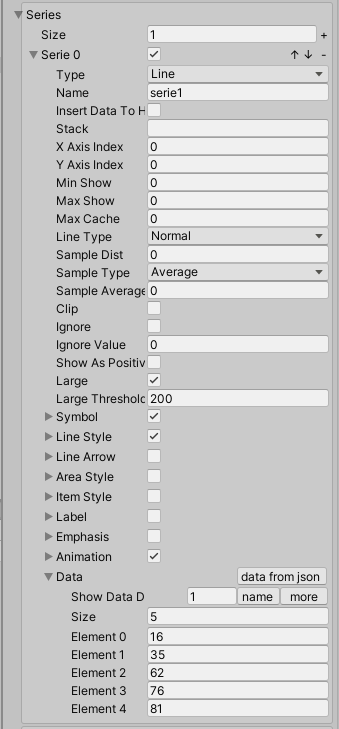
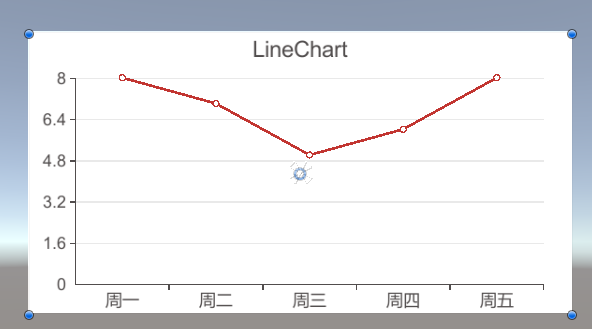
3-5、 Modify the parameters



Four 、 Use code to build diagrams
4-1、 Code
using System.Collections.Generic;
using UnityEngine;
using XCharts;
public class XchartsDemo : MonoBehaviour
{
public GameObject chart;
void Start()
{
CreateChart();
}
// Create a chart
private void CreateChart()
{
List<string> xAxisValue = new List<string>();
xAxisValue.Add(" Monday ");
xAxisValue.Add(" Tuesday ");
xAxisValue.Add(" Wednesday ");
xAxisValue.Add(" Thursday ");
xAxisValue.Add(" Friday ");
List<float> yAxisValue = new List<float>();
yAxisValue.Add(8);
yAxisValue.Add(7);
yAxisValue.Add(5);
yAxisValue.Add(7);
yAxisValue.Add(8);
CreateChart(chart, " Broken line diagram ", " Weeks ", " working hours ", SerieType.Line, LineType.Normal, xAxisValue, yAxisValue);
}
/// <summary>
/// Generate charts
/// </summary>
/// <param name="_chart"> Chart components </param>
/// <param name="_title"> Chart header </param>
/// <param name="_boundarygap"> Whether the coordinate axis is left blank </param>
/// <param name="xAxisName">x Axis name of the axis </param>
/// <param name="yAxisName">y Axis name of the axis </param>
/// <param name="_serietype"> Set what type of chart </param>
/// <param name="_linetype"> What type of line segment </param>
/// <param name="xAxisValue">x The value of the shaft </param>
/// <param name="yAxisValue">y The value of the shaft </param>
public void CreateChart(GameObject _chart, string _title, string xAxisName, string yAxisName, SerieType _serietype,
LineType _linetype, List<string> xAxisValue, List<float> yAxisValue)
{
var chart = _chart.GetComponent<LineChart>();
// Header settings
chart.title.show = true;
chart.title.text = _title;
// Background map
chart.background.gameObject.SetActive(chart.background.show);
// Prompt box
chart.tooltip.show = true;
chart.tooltip.titleFormatter = " ";
// Legend components
chart.legend.show = false;
//x Axis setting
chart.xAxis0.show = true;
chart.xAxis0.type = Axis.AxisType.Category;
chart.xAxis0.splitNumber = 11;
chart.xAxis0.boundaryGap = false;
chart.xAxis0.axisName.show = true;
chart.xAxis0.axisName.name = xAxisName;
chart.xAxis1.show = false;
//y Axis setting
chart.yAxis0.show = true;
chart.yAxis0.type = Axis.AxisType.Value;
chart.yAxis0.show = true;
chart.yAxis0.splitNumber = 10;
chart.yAxis0.interval = 1;
chart.yAxis0.axisLabel.show = true;
chart.yAxis0.axisName.show = true;
chart.yAxis0.axisName.name = yAxisName;
chart.yAxis1.show = false;
// The figure of the mark
SerieSymbol sy = new SerieSymbol();
sy.show = true;
sy.type = SerieSymbolType.Circle;
sy.gap = 2;
sy.sizeType = SerieSymbolSizeType.Custom;
sy.size = 7;
// Style settings of line segments
LineStyle ls = new LineStyle();
ls.show = true;
ls.type = LineStyle.Type.Solid;
ls.toColor = new Color32(18, 240, 111, 255);
ls.toColor2 = new Color32(244, 29, 140, 255);
ls.width = 2.5f;
// The style of the text label on the chart
SerieLabel sl = new SerieLabel();
sl.show = true;
sl.position = SerieLabel.Position.Outside;
sl.offset = new Vector3(0, 20, 0);
sl.lineWidth = 25;
// Chart animation
SerieAnimation sa = new SerieAnimation();
sa.enable = true;
//y Setting of axis value
chart.series.list[0].animation = sa;
chart.series.list[0].label = sl;
chart.series.list[0].lineStyle = ls;
chart.series.list[0].symbol = sy;
chart.series.list[0].name = "";
chart.series.list[0].lineType = _linetype;
// Empty value
chart.RemoveData();
chart.AddSerie(_serietype);
// add to x The value of the shaft
for (int i = 0; i < xAxisValue.Count; i++)
{
chart.AddXAxisData(xAxisValue[i]);
}
// add to y The value of the shaft
foreach (float item in yAxisValue)
{
chart.AddData(0, item);
}
}
}
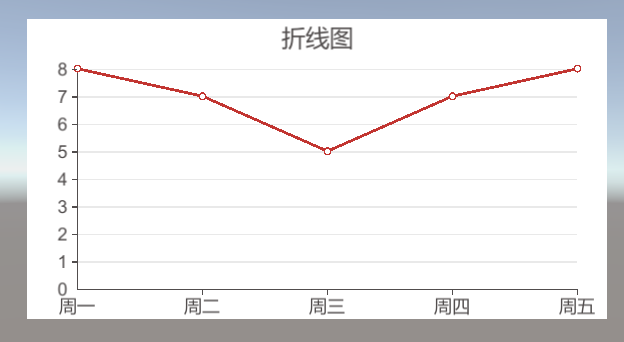
4-2、 design sketch
5、 ... and 、 an account of happenings after the event being told
边栏推荐
- 【零基础】充分理解WebGL(八)
- Meeting OA project progress (II)
- 15. ARM embedded system: how to debug single board with PC
- 709. Convert to lowercase letters
- Wechat applet list (list rendering of data rendering)
- Envi SHP to ROI and mask the grid
- 随笔记:同步、异步和微任务、宏任务的打印顺序
- EF LINQ Miscellany
- Sword finger offer 25. merge two sorted linked lists
- Notebook computer purchase guide (specific brand and model are not recommended)
猜你喜欢
Mysql增删改查、检索与约束(详细教学)

Comparison of array and object merging methods assign, merge, defaults, defaultsdeep in lodash

会议OA项目进度(一)
剑指 Offer 22. 链表中倒数第k个节点

小端格式和大端格式(Little-Endian&Big-Endian)

AXI协议(3):AXI架构的握手机制和实现细节
Custom types: Enumeration

Jing Wei PS tutorial: basic part a

AXI协议(2):AXI架构的五个通道和两种事务
Meeting OA project progress (I)
随机推荐
Sword finger offer 22. the penultimate node in the linked list
Implementation of side list menu (side menu) of wechat applet
Interview question 01.02. determine whether it is character rearrangement
[technology] chat room demo of uniapp
.NET 测试框架 xUnit,MSTest, Specflow 使用经验汇总
[redis] -1. two ways of setting up environment based on docker
How to effectively avoid memory leakage when customizing the handler?
Qsqldatabase: solution of qmmysql driver not loaded
IP day 13 notes
ArcGIS layer annotation display
Cross server, insert, search
Axi protocol (2): five channels and two transactions of Axi architecture
Jia Yueting's Faraday will receive another financing of US $225million in the future, and ff91 will be mass produced soon!
Buffer overflow vulnerability lab experiment record
Mcd12q1 data shows multiple classifications in envi
VSCode如何鼠标滚轮放大界面
GEO satellite data download
QT keyboard event (II) -- long press the key to trigger the event event repeatedly, and the problem is solved
EF miscellaneous
Sword finger offer 25. merge two sorted linked lists