当前位置:网站首页>Unity 使用宏
Unity 使用宏
2022-07-25 23:01:00 【猫不在】
可以在player setting里面定义宏

也可以通过代码定义
PlayerSettings.SetScriptingDefineSymbolsForGroup(BuildTargetGroup.Standalone, item.Symbol);//将信息保存到宏信息里. 参数1:保存到哪个平台 参数2:要保存的内容.
官方解释
- 我以前一直以为定义一个符号之后,需要进行判断是否存在这个符号什么的。但是没有必要。

C#指令详细解释
使用来多渠道打包sdk
- 这个很好用的一点是可以来多渠道打包sdk
- 给不同的渠道定义不同的symbol
- 把和这些sdk相关的接入性质代码全部带上预编译指令
- 在自动化打包的时候,定义这些symbol,输出不同的包出来
- 但是我还有个问题,就是说,怎么把不同的文件区分出来。
- 就是说oppo需要依赖oppo.dll,华为需要依赖huawei.dll
- 怎么在打不同种类包的时候把这些文件给剔除掉。
[CreateAssetMenu(order =12,menuName ="创建渠道设定")]
public class ChannelSetting : ScriptableObject
{

    public string Channel;
    public string Symbol;

}
	[MenuItem("Build/BuildAll")]
	static void BuildAllPlatform()
	{

		var settings = Resources.LoadAll<ChannelSetting>("ChannelSettings");
		foreach (var item in settings)
		{

			PlayerSettings.SetScriptingDefineSymbolsForGroup(BuildTargetGroup.Standalone, item.Symbol);//将信息保存到宏信息里. 参数1:保存到哪个平台 参数2:要保存的内容.
			var path =Path.Combine( System.Environment.CurrentDirectory, item.Channel, $"{
      item.Channel}.exe");
			BuildPlayerOptions buildPlayerOptions = new BuildPlayerOptions();
			buildPlayerOptions.locationPathName = path;
			buildPlayerOptions.target = BuildTarget.StandaloneWindows;
			buildPlayerOptions.targetGroup = BuildTargetGroup.Standalone;
			var res = BuildPipeline.BuildPlayer(buildPlayerOptions);
		}


	}
- 比较坑的一点是,打包时候需要指定输出文件夹,我一直以为是要指定文件夹,结果一直报错
UnityException: Build path contains project built with "Create Visual Studio Solution" option, which is incompatible with current build settings. Consider building your project into an empty directory. - 其实是还需要加上文件的名字
边栏推荐
- Review of static routing
- 第二周学习:卷积神经网络
- QT string operation
- The difference between "rewrite" and "overload"
- The new media operation strategy (taking xiaohongshu as an example) helps you quickly master the creative method of popular models
- Use of qvariant
- 【论文笔记】基于在线预测和规划的机器人动态跟踪抓取方法
- 单元测试,写起来到底有多痛?
- Design of Butterworth filter and drawing of amplitude frequency characteristic curve
- Qt5.12 installation error prompt: c:\qt5.12.11\vcredist\vcredist_ msvc2019_ x86.exe /norestart /q
猜你喜欢
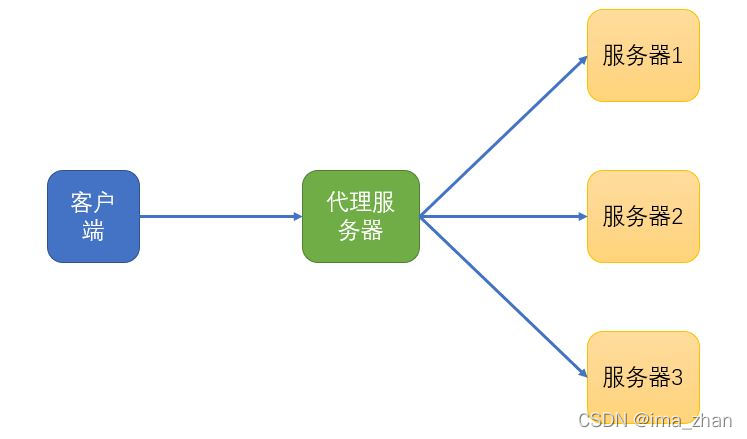
Understanding of forward proxy and reverse proxy

How to obtain the cash flow data of advertising services to help analyze the advertising effect?

Use of qvariant

向下扎根,向上生长,探寻华为云AI的“根”力量

Basic knowledge of radar

We media people must have four resource tools, each of which is very practical

CUDA environment construction

The third programming competition of Wuhan University of technology b- save the kingdom of DAG (topological properties deal with accessibility Statistics)

CMU AI PhD first year summary

The new media operation strategy (taking xiaohongshu as an example) helps you quickly master the creative method of popular models
随机推荐
recyclerview计算滑动距离之computeHorizontalScrollExtent-computeHorizontalScrollRange-computeHorizontalScrol
JD quick navigation box
Recommend short videos every week: more and more smart devices need collaboration, posing a greater challenge to the development of the Internet of things?
Notification设置的小图标显示的是小方块
What are the differences between FileInputStream and bufferedinputstream?
【论文笔记】A Meta-Reinforcement Learning Algorithm for Causal Discovery
Network Security Learning (XIV) IP protocol
The difference between abstract classes and interface interfaces
TFrecord写入与读取
Vs2019 WinForm clr20r3 error
Mysql数据类型
5 ROS仿真建模(3- rviz+gazebo+控制仿真机器人)
The difference between "rewrite" and "overload"
Structure principle of micro ball vibration switch with chip
汇编语言与微机原理实验一、实验二、实验三:分支程序设计/循环程序设计/子程序设计
【MySQL提权】UDF提权(附带大马)
Anaconda~Upload did not complete.
Design of regular expressions
721. 账户合并 ●●、并查集
Stack simulation queue