当前位置:网站首页>[connect your mobile phone wirelessly] - debug your mobile device wirelessly via LAN
[connect your mobile phone wirelessly] - debug your mobile device wirelessly via LAN
2022-07-28 22:34:00 【Burning and blowing】
##################################################
Catalog
No, root How can a used mobile phone be wireless adb Connect
With the help of USB Data line to IP Mode wireless ADB Mobile devices
Achieve LAN Wireless debugging lanboxing 3.0.2 Androcchio
Windows Use the command to check the port occupation
##################################################
No, root How can a used mobile phone be wireless adb Connect
——————————
With the help of USB Data line to IP Mode wireless ADB Mobile devices
In the front, the connection and debugging are carried out through the data cable
But once you touch the data line, it will cause disconnection or power supply disconnection ……
Now let's try the first wireless adb
This method is adopted on Android and Hongmeng
Need to use USB Listen for the port number And then through WIFI Make a wireless connection
after USB It can be disconnected Conduct wireless debugging
——————————
Achieve LAN Wireless debugging lanboxing 3.0.2 Androcchio
Mobile phones and computers are connected to the same LAN
Or connect to the same WIFI

Connect your mobile phone to your computer USB Connect

Let the device be 5555 Port listening TCP/IP Connect :
adb tcpip 5555
And forgot to set debugging on the mobile phone :

Monitor the device again 5555 port :

Check your phone IP Address :
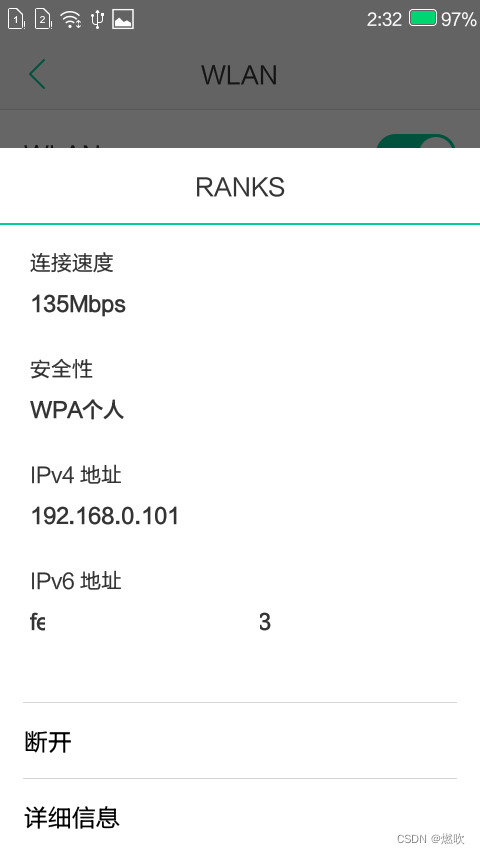
adopt ip Address connection device :
adb connect IPAt this time, the connection has been successful
Here are two devices One is USB One is WIFI

adopt IP Enter the device :
adb -s IP: Port number shell
Now pull out USB Line check the device again There are only wireless connections left :

Successfully passed USB Entry system :

Microsoft Windows [ edition  6.3.9600]
(c) 2013 Microsoft Corporation. All rights reserved .

C:\Users\byme>cd /adb    /*  Get into  adb  Catalog  */

C:\adb>adb devices    /*  Connect  USB  Check the connection after  */
* daemon not running; starting now at tcp:5037
* daemon started successfully
List of devices attached
4OOXXOOXXOOXXA5D        device


C:\adb>adb tcpip 5555    /*  Listen to the port without debugging permission  */
error: device unauthorized.
This adb server's $ADB_VENDOR_KEYS is not set
Try 'adb kill-server' if that seems wrong.
Otherwise check for a confirmation dialog on your device.

C:\adb>adb tcpip 5555    /*  Get the listening port under debugging permission  */
restarting in TCP mode port: 5555

C:\adb>adb connect 192.168.0.101    /* WIFI  Connect the phone  */
connected to 192.168.0.101:5555

C:\adb>adb devices    /*  Check the device connection again  */
List of devices attached
4OOXXOOXXOOXXA5D        device    /* USB  Connect  */
192.168.0.101:5555      device    /* WIFI  Connect  */


C:\adb>adb -s 192.168.0.101 shell    /*  Appoint  IP  Connecting device  */
[email protected]_6735m_35gc:/ $ time
    0m0.00s user     0m0.00s system
[email protected]_6735m_35gc:/ $ exit

C:\adb>adb devices    /*  Pull out  USB  Then check the connection   There's only one left  */
List of devices attached
192.168.0.101:5555      device


C:\adb>adb shell    /*  Enter the default device terminal  */
[email protected]_6735m_35gc:/ $ pwd
/
[email protected]_6735m_35gc:/ $ ls
acct
cache
charger
config
custom
d
data
debug_mode.png
default.prop
dev
disableswap.sh
enableswap.sh
etc
factory_init.project.rc
factory_init.rc
file_contexts
fstab.mt6735
init
init.aee.rc
init.environ.rc
init.modem.rc
init.mt6735.rc
init.mt6735.usb.rc
init.project.rc
init.rc
init.recovery.mt6735.rc
init.ssd_nomuser.rc
init.trace.rc
init.usb.rc
init.volte.rc
init.xlog.rc
init.yunos.rc
init.zygote32.rc
meta_init.modem.rc
meta_init.project.rc
meta_init.rc
mnt
no_alisec_mod.png
no_product.png
nvdata
persist
proc
property_contexts
protect_f
protect_s
root
sbin
sdcard
seapp_contexts
selinux_version
sepolicy
service_contexts
storage
sys
system
ueventd.rc
vendor
[email protected]_6735m_35gc:/ $ exit

C:\adb>adb disconnect 192.168.0.101    /*  To break off  IP */
disconnected 192.168.0.101

C:\adb>adb devices
List of devices attached


C:\adb>
%%%%%
Windows Use the command to check the port occupation
C:\adb>netstat -ano | findstr 5555

C:\adb>netstat -ano | findstr 8888

C:\adb>netstat -ano | findstr 80
  TCP    0.0.0.0:49156          0.0.0.0:0              LISTENING       800
/* ...  A little  ... */

C:\adb>netstat -ano | findstr 23
/* ...  A little  ... */

C:\adb>
边栏推荐
- 32. Longest valid bracket (difficult stack string)
- Tensorflow serving high performance machine learning model service system
- MySQL installation and configuration (super detailed, simple and practical)
- PaddleNLP基于ERNIR3.0文本分类以中医疗搜索检索词意图分类(KUAKE-QIC)为例【多分类(单标签)】
- tutorial/detailed_ workflow. Ipynb quantitative finance qlib Library
- LVS+KeepAlived高可用部署实战应用
- mysql8.0无法给用户授权或提示You are not allowed to create a user with GRANT的问题
- 【二叉树】二叉树中的伪回文路径
- Paddlenlp is based on ernir3.0 text classification. Take the traditional Chinese medicine search and retrieval semantic map classification (kuake-qic) as an example [multi classification (single label
- Jmeter 安装第三方插件 Plugins Manager
猜你喜欢

Att & CK preliminary understanding

98. Verify binary search tree (medium binary search tree DFS)

【CVPR 2021】Cylinder3D:用于LiDAR点云分割的圆柱体非对称3D卷积网络
Idea generate class diagram plug-in UML (super detailed)
Sword finger offer II 053. Medium order successor in binary search tree (medium binary search tree DFS)

微信小程序剪切图片的功能

105. Construct binary tree from preorder and inorder traversal sequence (medium binary tree DFS hash table binary tree)

SQL注入 Less38(堆叠注入)

MySQL installation and configuration (super detailed, simple and practical)

Research cup element recognition multi label classification task based on ernie-3.0 cail2019 method
随机推荐
Paddlenlp is based on ernir3.0 text classification. Take the traditional Chinese medicine search and retrieval semantic map classification (kuake-qic) as an example [multi classification (single label
XXX port is already in use
LVS+KeepAlived高可用部署实战应用
网易云信 2022Q2 产品补给站,快来获取你的产品补给计划吧!
gprs网络指的是什么
HCIP(13)
Establishment of Ruiji takeout development environment
Day3 classification management of Ruiji takeout project
mysql create语句能不能用来建立表结构并追加新的记录
internet的基本服务中文件传输命令是哪个
Chrome encountered a problem when debugging the code. After modifying and saving the code in vscode, chrome did not update after refreshing
示波器发展史中的变化
npm ERR code ETIMEDOUT npm ERR syscall connect npm ERR errno ETIMEDOUT npm ERR network reques...
Att & CK preliminary understanding
vuejs中如何实现动态路由切换及路由的缓存
6K6w5LiA5qyh5pS75Ye75YiG5p6Q
105. Construct binary tree from preorder and inorder traversal sequence (medium binary tree DFS hash table binary tree)
Necessary for in-depth learning: split the data set, split the labels according to the split pictures, and check the interval of all marked labels
What is time complexity
Alibaba cloud CDN practice