当前位置:网站首页>Pyqt5 rapid development and practice 6.6 qformlayout & 6.7 nested layout & 6.8 qsplitter
Pyqt5 rapid development and practice 6.6 qformlayout & 6.7 nested layout & 6.8 qsplitter
2022-07-29 10:53:00 【Ding Jiaxiong】
PyQt5 Rapid development and actual combat
List of articles
6. The first 6 Chapter PyQt5 Layout management
6.6 QFormLayout( Form layout )
QFormLayout yes label-field Form layout , seeing the name of a thing one thinks of its function , Is to implement the layout of the form . A form is a mode that prompts users to interact , It mainly consists of two columns , The first column is used to display information , Prompt the user , It's usually called label Domain ; The second column requires the user to select or enter , It's usually called field Domain .label And field Is that label relation field.
QFormLayout Class inheritance structure :
QObject → QLayout → QFormLayout
Basic form layout
import sys
from PyQt5.QtWidgets import QApplication, QWidget, QFormLayout, QLineEdit, QLabel


class Winform(QWidget):
    def __init__(self, parent=None):
        super(Winform, self).__init__(parent)
        self.setWindowTitle(" Form layout management example ")
        self.resize(400, 100)

        fromlayout = QFormLayout()
        labl1 = QLabel(" label 1")
        lineEdit1 = QLineEdit()
        labl2 = QLabel(" label 2")
        lineEdit2 = QLineEdit()
        labl3 = QLabel(" label 3")
        lineEdit3 = QLineEdit()

        fromlayout.addRow(labl1, lineEdit1)
        fromlayout.addRow(labl2, lineEdit2)
        fromlayout.addRow(labl3, lineEdit3)

        self.setLayout(fromlayout)


if __name__ == "__main__":
    from pyqt5_plugins.examples.exampleqmlitem import QtCore
    QtCore.QCoreApplication.setAttribute(QtCore.Qt.AA_EnableHighDpiScaling)
    app = QApplication(sys.argv)
    form = Winform()
    form.show()
    sys.exit(app.exec_())

6.7 Nesting layout
It is simple to make a single layout in the window , But if you want to carry out a more complex layout , Generally, it involves the nesting of layouts .
6.7.1 Add another layout to the layout
import sys
from PyQt5.QtWidgets import QApplication, QWidget, QHBoxLayout, QVBoxLayout, QGridLayout, QFormLayout, QPushButton


class MyWindow(QWidget):

    def __init__(self):
        super().__init__()
        self.setWindowTitle(' Nested layout example ')

        #  Overall layout (1 individual ): level
        wlayout = QHBoxLayout()
        #  Local layout (4 individual ): level 、 vertical 、 grid 、 Forms
        hlayout = QHBoxLayout()
        vlayout = QVBoxLayout()
        glayout = QGridLayout()
        formlayout = QFormLayout()

        #  Add part to partial layout ( for example : Button )
        hlayout.addWidget(QPushButton(str(1)))
        hlayout.addWidget(QPushButton(str(2)))
        vlayout.addWidget(QPushButton(str(3)))
        vlayout.addWidget(QPushButton(str(4)))
        glayout.addWidget(QPushButton(str(5)), 0, 0)
        glayout.addWidget(QPushButton(str(6)), 0, 1)
        glayout.addWidget(QPushButton(str(7)), 1, 0)
        glayout.addWidget(QPushButton(str(8)), 1, 1)
        formlayout.addWidget(QPushButton(str(9)))
        formlayout.addWidget(QPushButton(str(10)))
        formlayout.addWidget(QPushButton(str(11)))
        formlayout.addWidget(QPushButton(str(12)))

        #  Prepare four parts
        hwg = QWidget()
        vwg = QWidget()
        gwg = QWidget()
        fwg = QWidget()

        #  The four components set the local layout
        hwg.setLayout(hlayout)
        vwg.setLayout(vlayout)
        gwg.setLayout(glayout)
        fwg.setLayout(formlayout)

        #  Four parts are added to the global layout
        wlayout.addWidget(hwg)
        wlayout.addWidget(vwg)
        wlayout.addWidget(gwg)
        wlayout.addWidget(fwg)

        #  Set the global layout of the form body
        self.setLayout(wlayout)


if __name__ == "__main__":
    from pyqt5_plugins.examples.exampleqmlitem import QtCore
    QtCore.QCoreApplication.setAttribute(QtCore.Qt.AA_EnableHighDpiScaling)
    app = QApplication(sys.argv)
    win = MyWindow()
    win.show()
    sys.exit(app.exec_())

6.7.2 Add a layout to the control
Two level nested layout . This layout has a disadvantage :4 A local layout requires 4 A blank control , If there is 10 A local layout , Need 10 A blank control .
No matter how many local layouts there are , Just need a blank control , Then make a variety of layouts in this blank control , You can achieve the same effect .
from PyQt5.QtWidgets import *
import sys


class MyWindow(QWidget):

    def __init__(self):
        super().__init__()
        self.setWindowTitle(' Nested layout example ')
        self.resize(700, 200)

        #  Global assembly ( Pay attention to the parameters  self), be used for " bearing " Overall layout
        wwg = QWidget(self)

        #  Overall layout ( Pay attention to the parameters  wwg)
        wl = QHBoxLayout(wwg)
        hlayout = QHBoxLayout()
        vlayout = QVBoxLayout()
        glayout = QGridLayout()
        formlayout = QFormLayout()

        #  Add part to partial layout ( for example : Button )
        hlayout.addWidget(QPushButton(str(1)))
        hlayout.addWidget(QPushButton(str(2)))
        vlayout.addWidget(QPushButton(str(3)))
        vlayout.addWidget(QPushButton(str(4)))
        glayout.addWidget(QPushButton(str(5)), 0, 0)
        glayout.addWidget(QPushButton(str(6)), 0, 1)
        glayout.addWidget(QPushButton(str(7)), 1, 0)
        glayout.addWidget(QPushButton(str(8)), 1, 1)
        formlayout.addWidget(QPushButton(str(9)))
        formlayout.addWidget(QPushButton(str(10)))
        formlayout.addWidget(QPushButton(str(11)))
        formlayout.addWidget(QPushButton(str(12)))

        #  Here, add parts to the local layout , Add it to the global layout
        wl.addLayout(hlayout)
        wl.addLayout(vlayout)
        wl.addLayout(glayout)
        wl.addLayout(formlayout)


if __name__ == "__main__":
    from pyqt5_plugins.examples.exampleqmlitem import QtCore
    QtCore.QCoreApplication.setAttribute(QtCore.Qt.AA_EnableHighDpiScaling)
    app = QApplication(sys.argv)
    win = MyWindow()
    win.show()
    sys.exit(app.exec_())

6.8 QSplitter
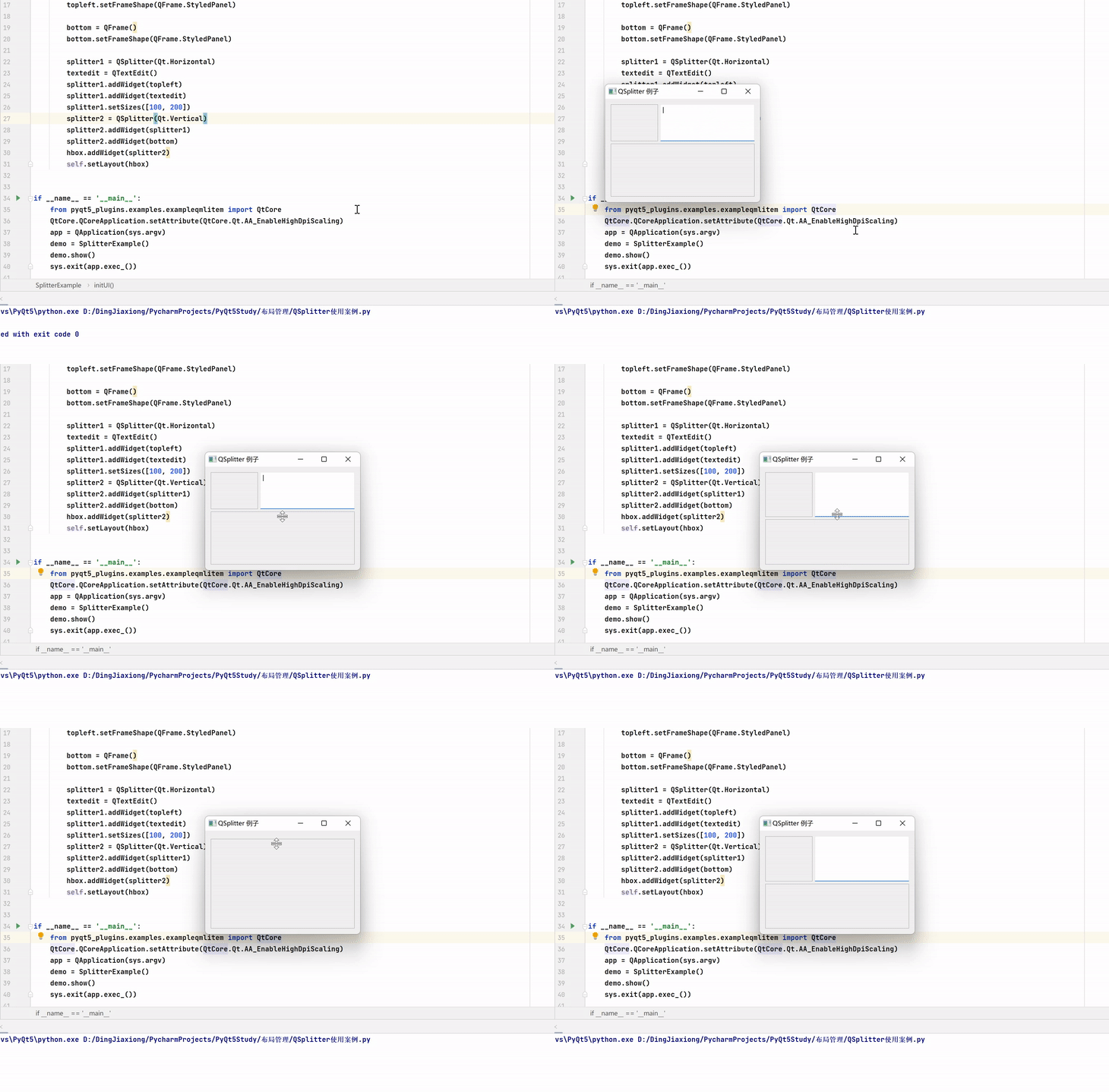
QSplitter, It can dynamically drag the boundary between child controls ,. It's a dynamic layout manager .QSplitter Allows users to control the size of child controls by dragging the boundaries of child controls , It also provides a controller to handle dragging child controls .
stay QSplitter The child controls in the object are horizontally arranged by default , have access to Qt.Vertical Make a vertical layout .
QSplitter Common methods in class :
| Method | describe |
|---|---|
| addWidget() | Add gizmos to QSplitter Manager layout |
| indexOf() | Return gizmo in QSplitter Index in manager |
| insertWidget() | Insert a control into... According to the specified index QSplitter Manager |
| setOrientation() | Set the layout direction :Qt.Horizontal, horizontal direction ;Qt.Vertical, vertical direction |
| setSizes() | Set the initialization size of the control |
| count() | Return gizmo in QSplitter Number in manager |
Use cases
import sys
from PyQt5.QtCore import *
from PyQt5.QtGui import *
from PyQt5.QtWidgets import *


class SplitterExample(QWidget):
    def __init__(self):
        super(SplitterExample, self).__init__()
        self.initUI()

    def initUI(self):
        hbox = QHBoxLayout(self)
        self.setWindowTitle('QSplitter  Example ')
        self.setGeometry(300, 300, 300, 200)
        topleft = QFrame()
        topleft.setFrameShape(QFrame.StyledPanel)

        bottom = QFrame()
        bottom.setFrameShape(QFrame.StyledPanel)

        splitter1 = QSplitter(Qt.Horizontal)
        textedit = QTextEdit()
        splitter1.addWidget(topleft)
        splitter1.addWidget(textedit)
        splitter1.setSizes([100, 200])
        splitter2 = QSplitter(Qt.Vertical)
        splitter2.addWidget(splitter1)
        splitter2.addWidget(bottom)
        hbox.addWidget(splitter2)
        self.setLayout(hbox)


if __name__ == '__main__':
    from pyqt5_plugins.examples.exampleqmlitem import QtCore
    QtCore.QCoreApplication.setAttribute(QtCore.Qt.AA_EnableHighDpiScaling)
    app = QApplication(sys.argv)
    demo = SplitterExample()
    demo.show()
    sys.exit(app.exec_())
边栏推荐
- 牛客网刷题
- DOD and Dor, two artifacts to reduce "cognitive bias"
- 2022cuda summer training camp Day1 practice
- GPO: using PowerShell scripts in start/logon
- GPO:在 Start/Logon 中使用 PowerShell 脚本
- The heavy | open atomic school source activity was officially launched
- factoextra:多元统计的可视化
- 使用R包PreMSIm根据基因表达量来预测微卫星不稳定
- Learning R language these ebooks are enough!
- 重磅 | 2022 开放原子全球开源峰会在北京开幕
猜你喜欢
How to realize the function of adding watermark

开源峰会抢先看 | 7 月 29 日分论坛 & 活动议程速览
Drunken driving alarm system based on stm32

Review of the 16th issue of HMS core discovery | play with the new "sound" state of AI with tiger pier

Kunlunbase instruction manual (I) quick installation manual

阿里架构师耗时一年整理的《Lucene高级文档》,吃透你也是大厂员工!

Leetcode bit operation

KRYSTAL:审计数据中基于知识图的战术攻击发现框架
Understand what a binary tree is (types, traversal methods, definitions of binary trees)

Why use markdown to write?
随机推荐
Detailed arrangement of JVM knowledge points (long text warning)
若依如何实现添加水印功能
Ggdag draw DAG and cause and effect diagram
Error: Protobuf syntax version should be first thing in file
GPO:在 Start/Logon 中使用 PowerShell 脚本
VMWare:使用命令更新或升级 VMWare ESXi 主机
The 2022 open atom global open source summit opened in Beijing
1. (map tools) detailed tutorial of acrgis desktop10.5 software installation
JVM知识点详细整理(长文警告)
敏捷开发如何消减协作中的认知偏差?| 敏捷之道
重磅 | 基金会为白金、黄金、白银捐赠人授牌
Watch the open source summit first | quick view of the sub Forum & Activity agenda on July 29
周鸿祎:360是世界上最大的安全大数据公司
通过tidymodels使用XGBOOST
使用tidymodels搞定二分类logistic模型
Software testing dry goods
Conference OA project - my approval
Leetcode binary tree series -- 144. Preorder traversal of binary trees
Why use markdown to write?
ADB shell WM command and usage: