当前位置:网站首页>Among US private server setup
Among US private server setup
2022-06-28 15:49:00 【It's mumuzi】
List of articles
amongus Private server setup
Project address : https://github.com/Impostor/Impostor
Im The update of is still very fast ,621 The version will be changed as soon as it comes out .
For convenience of construction , So use docker To operate . If it runs directly docker Words , There will be an anti cheating system with ventilation , It is suggested to turn off anti cheating , So the whole process is as follows ( The entire root)
First, a domestic server is required
install screen
To ensure that windows that interact with the server are still running after they are closed , So you need to install screen, Direct operation
apt install screen
Pull the image and turn off anti cheating
pull Mirror image
docker pull aeonlucid/impostor
The anti cheating configuration file is in app/config.json in , So execute
find /var/lib/docker -name "config.json"

Direct use vim modify config.json( Everyone's string id It's different )
vim /var/lib/docker/overlay2/7c6397c1e7d2fa13e0a65add69f7401576512b2a523b1a0ecaf9f61f4f970c2b/diff/app/config.json
Put two of the true Such as false, Pictured 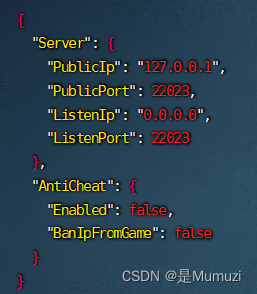
Then press esc,:wq Save and exit
function docker
First create a new window , Name it au
screen -S au
Let's take a look at what just happened pull Of docker
docker images

Then open the designated port , Execute the command
docker run -p 22023:22023/udp b96
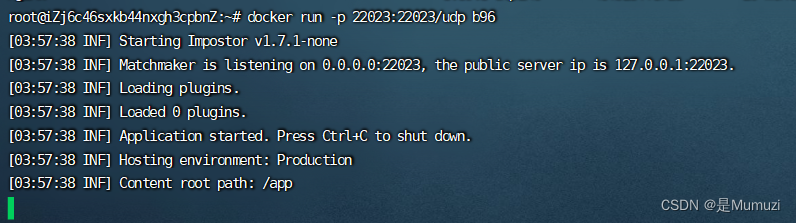
Import profile
open https://impostor.github.io/Impostor/
stay server address Enter your own server in ip, stay server name Enter the name of your life in the 
Then download the file , If the name is followed by (1) Etc , Please remove , Make sure the file name is "regionInfo.json", No misspelling Less words .
If you can't open the website above to download files , Please put the last line of xxx Change to your own IP And name , Save as regionInfo.json{"CurrentRegionIdx":3,"Regions":[{"$type":"DnsRegionInfo, Assembly-CSharp","Fqdn":"na.mm.among.us","DefaultIp":"50.116.1.42","Port":22023,"Name":"North America","TranslateName":289,"UseDtls":true},{"$type":"DnsRegionInfo, Assembly-CSharp","Fqdn":"eu.mm.among.us","DefaultIp":"172.105.251.170","Port":22023,"Name":"Europe","TranslateName":290,"UseDtls":true},{"$type":"DnsRegionInfo, Assembly-CSharp","Fqdn":"as.mm.among.us","DefaultIp":"139.162.111.196","Port":22023,"Name":"Asia","TranslateName":291,"UseDtls":true},{"$type":"DnsRegionInfo, Assembly-CSharp","Fqdn":"xxx.xxx.xxx.xxx(IP)","DefaultIp":"xxx.xxx.xxx.xxx(IP)","Port":22023,"Name":"xxxxxxx(name)","TranslateName":1003,"UseDtls":false}]}
Then press win+r, Input %APPDATA%\..\LocalLow\Innersloth\Among Us Then press enter
Replace the following directly regionInfo.json
Then you can close the window that interacts with the server , And open the game to select your own server .
If you want to go back to the previous au window , Just input
screen -R au


mod problem
Play with mod When ( Such as LMv), The following problem may occur when creating a room 
The server did not respond to the handshake .
The solution is to modify the game directory BepInEx\config\gg.reactor.api.cfg file , take Allow vanilla servers = false Change to Allow vanilla servers = ture( Allow normal servers )
If you are playing multimode , Or recommendation? GM(
边栏推荐
- PostgreSQL enables grouping statistics by year, month, day, week, hour, minute and second
- 【Spock】处理 Non-ASCII characters in an identifier
- What is the difference between treasury bonds and time deposits
- REDIS00_详解redis.conf配置文件
- Yiwen teaches you to quickly generate MySQL database diagram
- Android和eclipse和MySQL上传图片并获取
- 石油化工行业供应链系统驱动管理模式创新升级,强化企业内部管理
- R language ggplot2 visualization: the patchwork package horizontally combines a ggplot2 visualization result and a plot function visualization result to form a final result graph, aligns the two visua
- Experiment 6 8255 parallel interface experiment [microcomputer principle] [experiment]
- ROS knowledge points - ROS create workspace
猜你喜欢

Classic model transformer

论文解读(GCC)《Efficient Graph Convolution for Joint Node RepresentationLearning and Clustering》

MIPS汇编语言学习-01-两数求和以及环境配置、如何运行

隐私计算 FATE - 离线预测

Flutter简单实现多语言国际化
go-zero 微服务实战系列(七、请求量这么高该如何优化)
一文教你快速生成MySQL数据库关系图

厨卫电器行业S2B2C系统网站解决方案:打造S2B2C平台全渠道商业系统

Grand launch of qodana: your favorite CI code quality platform

Practice of curve replacing CEPH in Netease cloud music

随机推荐
Coding Devops helps Sinochem information to build a new generation of research efficiency platform and drive the new future of "online Sinochem"
Grand launch of qodana: your favorite CI code quality platform
VC2010 编绎Qt5.6.3 提示 CVTRES : fatal error CVT1107:
Opengauss kernel: analysis of SQL parsing process
Privacy computing fat - offline prediction
How can the digital intelligent supply chain management platform of the smart Park optimize process management and drive the development of the park to increase speed and quality?
MIPS assembly language learning-01-sum of two numbers, environment configuration and how to run
Deep learning convolutional neural network of machine learning to realize handwritten font recognition based on CNN network
SAP MTS/ATO/MTO/ETO专题之九:M+M模式前后台操作,策略用50,提前准备原材料和半成品
【MySQL】官网文档学习之查询语句sql注意事项
实验6 8255并行接口实验【微机原理】【实验】
ROS knowledge points - ROS create workspace
C#/VB. Net to convert PDF to excel
[leetcode] 13. Roman numeral to integer
看界面控件DevExpress WinForms如何创建一个虚拟键盘
High "green premium" of environmental protection products? How far is the low-carbon lifestyle from people
Solution to JSON parsing problem using curl for Tron API signature broadcast and json Problem record of the loads method
10年测试经验,在35岁的生理年龄面前,一文不值
Expand Disk C (allocate the memory of disk d to Disk C)
MIPS assembly language learning -02- logic judgment - foreground input