当前位置:网站首页>Maui learning road (III) -- in depth discussion of winui3
Maui learning road (III) -- in depth discussion of winui3
2022-07-02 16:02:00 【Dotnet cross platform】
Maui The way of learning --- Winui3 In-depth discussion
Study Maui It's been a while , As it goes deeper , Yes Maui Have some preliminary understanding .
We all know Maui In order to maintain the native features of the platform , So in each platform, the native development framework of the platform itself is used , If in Windows The system uses Winui3 As UI frame ,Mac The platform uses UIKit As UI frame ,( I would like to call it “ Dolls ” Or it makes a layer for different platforms “ abstract ”), So if you operate directly Maui An attribute or method of the object of is actually transferred to the platform related attribute or method behind its back .
With this understanding, we will deeply understand that if I want to change something , In fact, you can also directly operate the platform related methods , Operation is not necessary Maui object ( If Maui No such capability is provided , You can only do this ).
Doing it Windows When developing desktop programs , We often have such needs , Yours exe Only one program can be run at a time ( Single case ), You really want the program to open on the full screen , Others cannot close it easily ( Usually in the industrial field, such demand is great ).
Based on the above requirements , Let's have a deep understanding and study , How to achieve :
use first Maui Every project created by the template has a Platforms The catalog of , This is essentially a project set corresponding to multiple platforms ( stay Xamarin If you need to build a real cross platform program , In fact, it can't be done , You need to go through Xamarin.Form Templates for creating portals for different platforms , Then extract the common platform independent logic as a shared resource across platforms ), With this design Maui It really realizes the compilation and running of a code everywhere , You don't need to make any special changes to the project when compiling on other platforms ( At present, we support Mac、Windows Platform compilation )( There is no further discussion here , If you want to know Maui and Xamarin See this video for engineering differences :.NET MAUI Cross platform development collection _ Bili, Bili _bilibili[1])
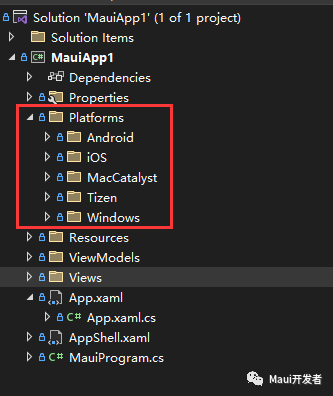
Secondly, for Maui Executable works ( Not dll) Come on , The real entry of the program corresponding to the platform is not MauiProgram or Maui Of Application, He is actually Platforms Under the corresponding platform Main Or is it App, For example, yes. Window Come on ,Maui The real entry to start the program is Platforms/Windows/App This object .

Window Single instance implementation
With the above understanding as the basis , Then implementing a singleton is very simple , stay Wpf perhaps Winform Have done the same design on , Now you just need to move it ( stay Wpf or Winform There are many ways to implement singletons , The most common is to use Mutex) Please refer to the implementation method : Snack bar - .NET MAUI Community Toolkit - .NET Community Toolkit | Microsoft Docs [2] stay Platform/Windows/App.xaml.cs Add single case examination
public partial class App : MauiWinUIApplication
{
    /// <summary>
    /// Initializes the singleton application object.  This is the first line of authored code
    /// executed, and as such is the logical equivalent of main() or WinMain().
    /// </summary>
    public App()
    {
        this.InitializeComponent();
    }

    static Mutex? __SingleMutex;
    protected override MauiApp CreateMauiApp() => MauiProgram.CreateMauiApp();
    protected override void OnLaunched(LaunchActivatedEventArgs args)
    {
        if (!IsSingleInstance())
        {
            //Process.GetCurrentProcess().Kill();
            Environment.Exit(0);
            return;
        }
        base.OnLaunched(args);
    }
    static bool IsSingleInstance()
    {
        const string applicationId = "813342EB-7796-4B13-98F1-14C99E778C6E";
        __SingleMutex = new Mutex(false, applicationId);
        GC.KeepAlive(__SingleMutex);

        try
        {
            return __SingleMutex.WaitOne(0, false);
        }
        catch (Exception)
        {
            __SingleMutex.ReleaseMutex();
            return __SingleMutex.WaitOne(0, false);
        }
    }
}
Implement a borderless form
Before that, I actually wrote an article Maui stay windows How to implement borderless on , Interested students can check it out ( link :Window Form settings ).Maui In fact, it provides a person named Window The type of , Unfortunately, there are no properties related to setting windows in this type ( such as : wide , high , Background color and so on , In addition, it cannot be modified Style To change the style ), Obviously Maui It is a cross platform design , Because there is no so-called concept of window size on the mobile end , Usually it is full screen . If we need to modify the form , Then you need to get Window Managed behind the object Native Object only
obtain Native object
Method 1: register Maui Provided lifecycle functions
Relevant program lifecycle notifications will be pushed on different platforms ( Here you can get the platform related operation objects, including the corresponding Application,Window), There are some disadvantages of using this method when using multi form scheme , You can't locate which is the main window ( Of course, the first creation must be the main form ), Details please see : Application life cycle - .NET MAUI | Microsoft Docs[3]( If you want to know the details, you can watch this video :.NET MAUI BLAZOR Life cycle _ Bili, Bili _bilibili[4])
Method 2: visit Window Under the Handler attribute
MauiWindow There is such a property in the type Handler( The type is IElementHandler, The implementation type is ElementHandler)( be-all Maui Control objects all have this property ), This attribute records the Native Mapping objects ( If you want to modify native The appearance of the object , You can access the attributes of his subordinates PlatformView( Convert it into the corresponding platform native object ))( Notice at the beginning new Window Object time Handler The object doesn't exist , You can register HandlerChanged Events capture his changes )( stay Winodw platform PlatformView The object is Microsoft.UI.Xaml.Window type )
Learning is necessary Winui3 Related knowledge
from Winui At the beginning, Microsoft brought a new design of windows , If you need to implement such as window size modification , Title bar modification , You need to learn the following knowledge to realize functions such as full screen :
Custom title bar
link : Title bar customization - Windows apps | Microsoft Docs[5]
AppWindow
This is a Win10 The window operation object introduced later , Learning links : Use AppWindow Class to display the auxiliary window of the application - Windows apps | Microsoft Docs[6] as well as AppWindow Class (Microsoft.UI.Windowing) - Windows App SDK | Microsoft Docs[7]
Be careful : There are deviations in the introduction of learning materials related to the official website in different documents , Mainly part of the design is the old design , Not updated in time , Please use Windows App SDK 1.1 The version shall prevail
By learning the above knowledge , We can customize some functions
Change the window size :
var winuiWindow = Window.Handler?.PlatformView as MicrosoftuiXaml.Window;
        if (winuiWindow is null)
            return;
        var appWindow = winuiWindow.GetAppWindow();
        if (appWindow is null)
            return;

        var displyArea = MicrosoftuiWindowing.DisplayArea.Primary;
        double scalingFactor = winuiWindow.GetDisplayDensity();
        var width = 800 * scalingFactor;
        var height = 600 * scalingFactor;
        double startX = (displyArea.WorkArea.Width - width) / 2.0;
        double startY = (displyArea.WorkArea.Height - height) / 2.0;

        appWindow.MoveAndResize(new((int)startX, (int)startY, (int)width, (int)height), displyArea);
Maximize ( Use Win32 news ):
var winuiWindow = Window.Handler?.PlatformView as MicrosoftuiXaml.Window;
        if (winuiWindow is null)
            return;

        var windowHanlde = winuiWindow.GetWindowHandle();
        User32.PostMessage(windowHanlde, WindowMessage.WM_SYSCOMMAND, new IntPtr((int)SysCommands.SC_MINIMIZE), IntPtr.Zero);
To minimize the ( Use Win32 news ):
var winuiWindow = Window.Handler?.PlatformView as MicrosoftuiXaml.Window;
        if (winuiWindow is null)
            return;

        var windowHanlde = winuiWindow.GetWindowHandle();
        User32.PostMessage(windowHanlde, WindowMessage.WM_SYSCOMMAND, new IntPtr((int)SysCommands.SC_MINIMIZE), IntPtr.Zero);
Full screen :
var winuiWindow = Window.Handler?.PlatformView as MicrosoftuiXaml.Window;
        if (winuiWindow is null)
            return;
        var appWindow = winuiWindow.GetAppWindow();
        if (appWindow is null)
            return;

        // Pay attention to Maui Extension is enabled by default TitleBar( Title bar fusion mode ?) So first remove   Otherwise, the full screen will still appear   Turn off, etc
        // Although the title bar fusion mode is turned off , But there will still be something like a title bar when the screen is full , If it needs to be processed, it needs to be deeply customized ( You can check mine github project )
        winuiWindow.ExtendsContentIntoTitleBar = false;
        appWindow.SetPresenter(MicrosoftuiWindowing.AppWindowPresenterKind.FullScreen);
modify
MauiDefault title bar color :
var winuiWindow = Window.Handler?.PlatformView as MicrosoftuiXaml.Window;
        if (winuiWindow is null)
            return;

        var application = MicrosoftuiXaml.Application.Current;
        var res = application.Resources;

        // Seeing here, you must wonder why it is like this , If you're interested , You can refer to Winui3 Source code
        res["WindowCaptionBackground"] = new MicrosoftuixmlMedia.SolidColorBrush(Microsoftui.Colors.Red);

        // After modifying the title bar, you need to actively refresh it to take effect ( Otherwise, you need to minimize it manually )
        TriggertTitleBarRepaint();
above Demo Have been uploaded Github Address :WPFDevelopersOrg/Demo[8] , Please refer to MauiApp1 This demo.
Finally, I will put one that I have achieved so far MauiWin11 The demonstration effect of :
The project has been uploaded github Address :WPFDevelopersOrg/MauiToolkit[9]
Reference material
[1]
.NET MAUI Cross platform development collection _ Bili, Bili _bilibili: https://www.bilibili.com/video/BV1VW4y1k7Bk?p=3
[2]Snack bar - .NET MAUI Community Toolkit - .NET Community Toolkit | Microsoft Docs : https://docs.microsoft.com/zh-cn/dotnet/communitytoolkit/maui/alerts/snackbar
[3]Application life cycle - .NET MAUI | Microsoft Docs: https://docs.microsoft.com/zh-cn/dotnet/maui/fundamentals/app-lifecycle
[4].NET MAUI BLAZOR Life cycle _ Bili, Bili _bilibili: https://www.bilibili.com/video/BV1vA4y1d74A?spm_id_from=333.999.0.0
[5]Title bar customization - Windows apps | Microsoft Docs: https://docs.microsoft.com/zh-cn/windows/apps/develop/title-bar?tabs=winui3
[6]Use AppWindow Class to display the auxiliary window of the application - Windows apps | Microsoft Docs: https://docs.microsoft.com/zh-cn/windows/apps/design/layout/app-window
[7]AppWindow Class (Microsoft.UI.Windowing) - Windows App SDK | Microsoft Docs: https://docs.microsoft.com/zh-CN/windows/windows-app-sdk/api/winrt/microsoft.ui.windowing.appwindow?view=windows-app-sdk-1.1
[8]WPFDevelopersOrg/Demo: https://github.com/WPFDevelopersOrg/Demo
[9]WPFDevelopersOrg/MauiToolkit: https://github.com/WPFDevelopersOrg/MauiToolkit
边栏推荐
- 使用FFmpeg命令行进行UDP、RTP推流(H264、TS),ffplay接收
- 解决** WARNING ** : Your ApplicationContext is unlikely to start due to a @ComponentScan of the defau
- Usage of group by
- Target detection - make your own deep learning target detection data set with labelimg
- Recommended practice sharing of Zhilian recruitment based on Nebula graph
- Various entanglements between qvariant and Jason -- QT
- 《大学“电路分析基础”课程实验合集.实验四》丨线性电路特性的研究
- Fiddler realizes mobile packet capturing - getting started
- Introduction to dynamic planning I, BFS of queue (70.121.279.200)
- Armv8-a programming guide MMU (4)
猜你喜欢
Why does the system convert the temp environment variable to a short file name?
Soul torture, what is AQS???

Dimension table and fact table in data warehouse
![[5g NR] RRC connection release](/img/f3/a03f5124493b1c03e7336c55871330.png)
[5g NR] RRC connection release
win10系统升级一段时间后,内存占用过高

HMS core machine learning service helps zaful users to shop conveniently

愛可可AI前沿推介(7.2)

隐藏在 Nebula Graph 背后的星辰大海

全是精华的模电专题复习资料:基本放大电路知识点

Experiment collection of University Course "Fundamentals of circuit analysis". Experiment 5 - Research on equivalent circuit of linear active two terminal network
随机推荐
/Bin/ld: cannot find -lssl
【小白聊云】中小企业容器化改造建议
Golang MD5 encryption and MD5 salt value encryption
Group by的用法
Solve the problem of base64encoder error
Flink real-time data warehouse (IX): incremental synchronization of data in MySQL
Recommended practice sharing of Zhilian recruitment based on Nebula graph
Review materials for the special topic of analog electronics with all essence: basic amplification circuit knowledge points
JS learning notes - variables
2020.4.12 byte written test questions B DP D monotone stack
Strings and arrays
Introduction to dynamic planning I, BFS of queue (70.121.279.200)
Pyobject to char* (string)
又是一年毕业季
Introduction to database system Chapter 1 short answer questions - how was the final exam?
XPT2046 四线电阻式触摸屏
Best practices for building multi architecture images
Comprehensively interpret the background and concept of service mesh
Dimension table and fact table in data warehouse
目标检测—利用labelimg制作自己的深度学习目标检测数据集