当前位置:网站首页>【精品】pinia详解
【精品】pinia详解
2022-06-29 19:31:00 【梁云亮】
简介
pinia是最新一代的轻量级状态管理插。
优点:
- 简便,存储和组件变得很类似,你可以轻松写出优雅的存储。
= 类型安全,通过类型推断,可以提供自动完成的功能。
= vue devtools 支持,可以方便进行调试。
= Pinia 支持扩展,可以非常方便地通过本地存储,事物等进行扩展。 - 模块化设计,通过构建多个存储模块,可以让程序自动拆分它们。
- 非常轻巧,只有大约 1kb 的大小。
- 服务器端渲染支持。
- 完整的 ts 的支持;
- 去除 mutations,只有 state,getters,actions;
- actions 支持同步和异步;
- 代码扁平化没有模块嵌套,只有 store 的概念,store 之间可以自由使用,每一个store都是独立的
- 无需手动添加 store,store 一旦创建便会自动添加;
- 支持Vue3 和 Vue2
安装配置
- 安装命令:
npm install pinia -S
- main.ts配置
import {createPinia} from 'pinia'

const store= createPinia()
app.use(store)
通过state修改
- 在state/index.ts文件中编写:
import {
    defineStore} from "pinia"

export const useUserStore = defineStore('user', {

    state: () => {

        return {

            name:'',
            age: 0
        }
    }
})
- Demo.vue
<template>
  {
   { user .name }}------{
   { user .age }}
  <br>
  <el-button type="primary" @click="user.age++">直接修改</el-button>
  <el-button type="primary" @click="fun1">批量修改</el-button>
  <el-button type="primary" @click="fun2">批量修改:函数式写法</el-button>
  <el-button type="primary" @click="fun3">修改所有的值</el-button>
</template>

<script setup lang="ts"> import {
      useUserStore} from "@/store"; const user = useUserStore() const fun1 = ()=>{
       //$patch方法可以批量修改多个值 user.$patch({
       name:'张三', age:1234 }) } const fun2 = ()=>{
       //此处可以编写业务逻辑(推荐使用) user.$patch((state)=>{
       if (state.name ==''){
       state.age =6666 }else {
       state.age =8888 } }) } const fun3 = ()=>{
       //$state:设置为新对象来替换store的整个状态。缺限:必须修改所有的值 user.$state = {
       name:'zhangsan', age :3333 } } </script>
- 结果

通过actions修改
在actions中可以做同步也可以做异步操作。
actions中的方法可以相互调用。
- store/index.ts
import {
    defineStore} from "pinia"

export const useCountStore = defineStore('count', {

    state: () => {

        return {

            count: 0
        }
    },
    actions: {

        increment() {

            this.count++
        },
        setCount(p: number) {

            this.count = p
        },
        //异步操作
        decrement() {

            setTimeout(() => {

                this.count--
            }, 1000)
        },
        async sth(){

            const tmp = await 1234
            this.count = tmp
            this.setCount(7878)  //调用
        }
    }
})
- Demo.vue
<template>
  {
   { counter.count }}
  <br>
  <el-button type="primary" @click="fun1">借助actions修改</el-button>
  <el-button type="primary" @click="fun2">借助actions修改</el-button>
  <el-button type="primary" @click="counter.decrement">异步操作</el-button>
  <el-button type="primary" @click="counter.sth">异步操作</el-button>
</template>

<script setup lang="ts"> import {
      useCountStore} from "@/store"; const counter = useCountStore() //借助actions修改 const fun1 = ()=>{
       counter.increment() } //借助actions修改 const fun2 = ()=>{
       counter.setCount(789) } </script>
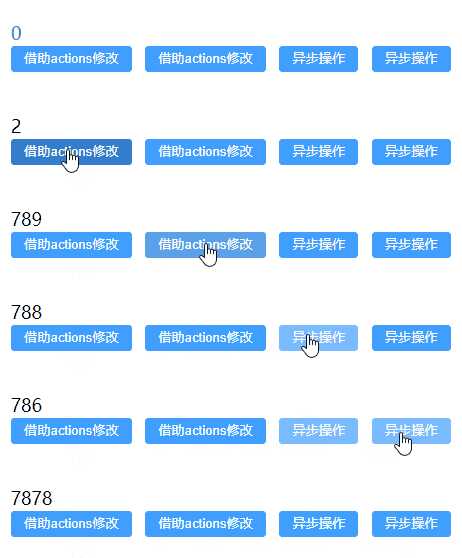
- 结果
getters
不管调用多少次,getters中的函数只会执行一次,且都会缓存
- store/index.ts
import {
    defineStore} from "pinia"

export const useCountStore = defineStore('count', {

    state: () => {

        return {

            count: 10
        }
    },
    getters: {

        //普通函数形式,可以使用this
        getCount(): number {

            return this.count
        },
        //箭头函数形式,不能使用this
        newCount: (state): number => {

            return state.count + 5
        },
        getDoubleCount(state): number {

            return state.count * 2 + this.getCount
        }
    }
})
- Demo.vue
<template>
  {
   {counter.count}} <br>
  {
   { counter.getCount }} <br>
  {
   { counter.getCount }} <br>
  {
   { counter.newCount }} <br>
  {
   { counter.getDoubleCount }} <br>
</template>

<script setup lang="ts"> import {
      useCountStore} from "@/store"; const counter = useCountStore() </script>
- 结果

解构对象
解构主要是针对Store中的state和getters.
示例一
- store/index.js
import {
    defineStore} from "pinia"

export const useCountStore = defineStore('count', {

    state: () => {

        return {

            count: 10
        }
    },
    getters: {

        //普通函数形式,可以使用this
        getCount(): number {

            console.info("getCount")
            return this.count
        }
    },
    actions: {

        increment() {

            console.info("increment")
           this.count++
        }
    },
})
- Demo.vue
<template>
  响应式:{
   {counter.count}} <br>
  属性解构后丧失响应式:{
   { count }} <br>
  getters方法解构后丧失响应式:{
   {getCount}}
  <br>
  <el-button type="primary" @click="fun">属性解构后丧失响应式</el-button>
  <el-button type="primary" @click="increment">actions方法解构后不会丧失响应式</el-button>
</template>

<script setup lang="ts"> import {
      useCountStore} from "@/store"; const counter = useCountStore() //解构 const {
      count, getCount, increment} = counter const fun = () => {
       counter.count++ //属性解构后丧失响应式 console.info(count) } </script>
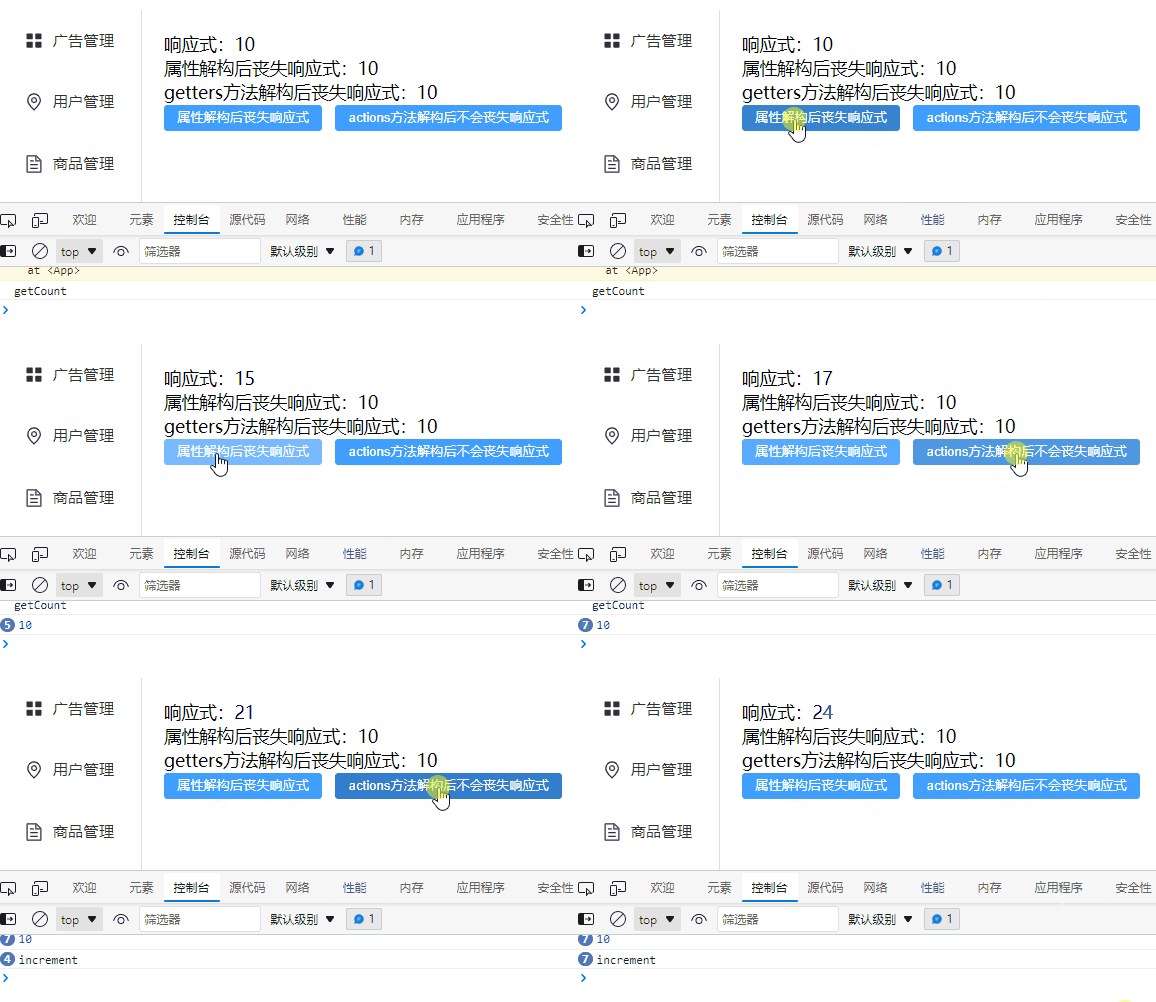
- 效果
示例二
- store/index.js
import {
    defineStore} from "pinia"

export const useCountStore = defineStore('count', {

    state: () => {

        return {

            count: 10
        }
    },
    getters: {

        //普通函数形式,可以使用this
        getCount(): number {

            console.info("getCount")
            return this.count
        }
    },
    actions: {

        increment() {

            console.info("increment")
           this.count++
        }
    },
})
- Demo.vue
<template>
  响应式:{
   {counter.count}} <br>
  属性解构后丧失响应式:{
   { count }} <br>
  getters方法解构后丧失响应式:{
   {getCount}}
  <br>
  <el-button type="primary" @click="fun">属性解构后丧失响应式</el-button>
</template>

<script setup lang="ts"> import {
      useCountStore} from "@/store"; import {
      storeToRefs} from "pinia"; const counter = useCountStore() //解构 const {
      count, getCount} = storeToRefs(counter) const fun = () => {
       counter.count++ //属性解构后丧失响应式 console.info(count) } </script>
- 效果

pinia常用API
- store/index.ts
import {
    defineStore} from "pinia"

export const useCountStore = defineStore('count', {

    state: () => {

        return {

            count: 10
        }
    },
    actions: {

        increment() {

            console.info("increment")
            this.count++
        }
    },
})
- Demo.vue
<template>
  {
   {counter.count}}
  <br>
  <el-button type="primary" @click="counter.count++">自增</el-button>
  <el-button type="primary" @click="counter.increment()">actions:自增</el-button>
  <el-button type="primary" @click="counter.$reset()">重置状态数据到最终状态</el-button>
</template>

<script setup lang="ts"> import {
      useCountStore} from "@/store"; const counter = useCountStore() //state发生改变时触发 counter.$subscribe((args,state)=>{
       console.info(args,state) }) //监听actions中的方法 counter.$onAction(args=>{
       console.info(args) args.after(()=>{
       console.info("after") }) }) </script>
- 结果
边栏推荐
- nacos 问题
- Classic illustration of K-line diagram (Collection Edition)
- Lingyun going to sea | Wenhua online &huawei cloud: creating a new solution for smart teaching in Africa
- [笔记]再笔记--边干边学Verilog HDL –008
- ovirt数据库修改删除节点
- WPS和Excele
- PHP Laravel 使用 aws 负载均衡器的 ip 错误问题
- How important is it to make a silver K-line chart?
- Technical methodology of new AI engine under the data infrastructure upgrade window
- Page object and data driven test
猜你喜欢

AI场景存储优化:云知声超算平台基于 JuiceFS 的存储实践

Win11系统频繁断网怎么办?Win11网络不稳定的解决方法

誰在抖音文玩裏趁亂打劫?

一小时构建示例场景 声网发布灵隼物联网云平台

SQL Server Backup and restore command operations
Who took advantage of the chaos and looted in Tiktok Wenwan?

Element waiting mechanism

Canonical的工程师们正努力解决Firefox Snap的性能问题

Flutter 调用百度地图APP实现位置搜索、路线规划

C#_摄像头图像转换为Bitmap格式及绘制十字线
随机推荐
Physical verification LVS process and Technology (Part I)
One hour to build a sample scenario sound network to release lingfalcon Internet of things cloud platform
【Proteus仿真】矩阵键盘中断扫描
JVM (4) bytecode technology + runtime optimization
ChainSafe跨链桥部署教程
Win11策略服务被禁用怎么办?Win11策略服务被禁用的解决方法
开发者任务中心上线!千元豪礼送不停!
3-2主机发现-三层发现
Determination of concurrent number of pressure measurement
聊聊eureka的delta配置
Where is the win11 installation permission set? Win11 installation permission setting method
云上未来,数智导航:阿里云研究院报告合集
k线图经典图解(收藏版)
DAO 中存在的不足和优化方案
Shell bash script note: there must be no other irrelevant characters after the escape character \ at the end of a single line (multi line command)
技术保证质量,软件测试的这些测试方法你都掌握了吗?
Page object and data driven test
MBA-day26 数的概念与性质
正则表达式系列之手机号码正则
Go: how to write a correct UDP server