当前位置:网站首页>Android studio mobile development creates a new database and obtains picture and text data from the database to display on the listview list
Android studio mobile development creates a new database and obtains picture and text data from the database to display on the listview list
2022-06-12 06:10:00 【Programming from 0 to 1】
Android Mobile development Create a new database and get pictures from the database , Text data is displayed in Listview On the list
Ideas :
1. New database ( There are many ways , I borrow it here SQLiteExpert Visual database is built ) And add the corresponding fields to get .db file
2. Query the data we want in the database ( Write your own class NewDao Static method query in )
3. Show in control view On ( Through the adapter listview The contents of the are displayed , Rewrite the adapter getView Method use ” tyre pump ”inflate To fill in listview.)
1.1
Build the following database as shown in the figure List And table actor
img ( I have to pay attention here. I have been doing it for a long time ) Type use blob type , Then click load Import the picture and click again ok The picture is put into the table .
Open after running the simulator Database Management view found data/data/ Project name /database adopt update Add in or replace as shown in the figure 
1.2 You can also create a new Mydatahelp To inherit SQLiteOpenHelper Create new databases and tables
package com.example.android_autolist;
import android.content.Context;
import android.database.sqlite.SQLiteDatabase;
import android.database.sqlite.SQLiteOpenHelper;
import androidx.annotation.Nullable;
public class Mydatahelp extends SQLiteOpenHelper {

    public Mydatahelp( Context context, String name,  SQLiteDatabase.CursorFactory factory, int version) {

        super(context, name, factory, version);
    }
    @Override
   // new table
    public void onCreate(SQLiteDatabase db) {

        //id,tile, text , img Corresponding to the database
        String sql =("create table actor(id integer primary key autoincrement,title varchar(20),text varchar(50),img blob )");
        db.execSQL(sql);
          }
    @Override
    public void onUpgrade(SQLiteDatabase db, int oldVersion, int newVersion) {


    }
}
2.1 In the query database, create a new class to compare with the fields in the database ( What I built is Actor) To store the data obtained from the database
package com.example.android_autolist;
/*
Create a time period type relative to the database
- */
public class Actor {

    private  Integer id;
    private  String title;
    private  String text;
    private  byte[] img;
    public byte[] getImg() {
           return img;    }
    public void setImg(byte[] img) {
            this.img = img;    }
    public Integer getId() {
            return id;    }
    public void setId(Integer id) {
            this.id = id;    }
    public String getTitle() {
            return title;    }
    public void setTitle(String title) {
            this.title = title;    }
    public String getText() {
            return text;    }
    public void setText(String text) {
            this.text = text;    }
}
2.2 Query the database , The class being written NewDao Static in getList In the method
 package com.example.android_autolist;
import android.app.blob.BlobHandle;
import android.database.Cursor;
import android.database.sqlite.SQLiteDatabase;
import java.util.ArrayList;
import java.util.List;
// Query to get database tables actor Chinese content
public class NewDao {

    public  static List<Actor> getList(SQLiteDatabase db){

        List<Actor> newActors=new ArrayList<>();
        Cursor cursor=db.query("actor",new String[]{
    "title","text","img"},null,null,null,null,null);
        if(cursor.moveToFirst()){

            Actor actor=null;
            do {

                actor=new Actor();
                String title=cursor.getString(0);
                actor.setTitle(title);
                String text=cursor.getString(cursor.getColumnIndex("text"));
                actor.setText(text);
                byte[] img = cursor.getBlob(2);
                actor.setImg(img);
                 // Add to list newActors in
                newActors.add(actor);
            }
            while (cursor.moveToNext());
        }
        return  newActors;
    }

}
Besides :
Layout There should be multiple views in the xml file activity_main.xml and layout.xml file .activity_main.xml Must have Listview Control
activity_main.xml In the code :
<?xml version="1.0" encoding="utf-8"?>
<RelativeLayout xmlns:android="http://schemas.android.com/apk/res/android" xmlns:app="http://schemas.android.com/apk/res-auto" xmlns:tools="http://schemas.android.com/tools" android:layout_width="match_parent" android:layout_height="match_parent" tools:context=".MainActivity">
    <ListView android:id="@+id/listView1" android:layout_width="match_parent" android:layout_height="wrap_content" android:layout_alignParentLeft="true" />
layout.xml In the code
<?xml version="1.0" encoding="utf-8"?>
<RelativeLayout xmlns:android="http://schemas.android.com/apk/res/android" android:layout_width="match_parent" android:layout_height="match_parent">
    <ImageView android:id="@+id/img" android:layout_width="145dp" android:layout_height="110dp" />
    <TextView android:id="@+id/title" android:layout_width="wrap_content" android:layout_height="wrap_content" android:layout_toRightOf="@+id/img" android:textSize="18dp" android:singleLine="true" android:textColor="#000000" />
    <TextView android:id="@+id/text" android:layout_width="wrap_content" android:layout_height="wrap_content" android:layout_below="@+id/title" android:layout_toRightOf="@id/img" android:textSize="14dp" />

</RelativeLayout>
3. Now the preparatory work is finished, and the rest is in MainActivity Write the main logic code to call the above classes and controls
package com.example.android_autolist;
import androidx.appcompat.app.AppCompatActivity;
import android.database.sqlite.SQLiteDatabase;
import android.graphics.Bitmap;
import android.graphics.BitmapFactory;
import android.os.Bundle;
import android.view.LayoutInflater;
import android.view.View;
import android.view.ViewGroup;
import android.widget.BaseAdapter;
import android.widget.ImageView;
import android.widget.ListView;
import android.widget.TextView;
import java.util.List;
public class MainActivity extends AppCompatActivity {

    private ListView listView;
    List <Actor> actors=null;
    @Override
    protected void onCreate(Bundle savedInstanceState) {

        super.onCreate(savedInstanceState);
        setContentView(R.layout.activity_main);
        //1. New database  2. Query the database information  3. Displayed in the view On
        Mydatahelp openHelper=new Mydatahelp(this,"List.db",null,1);
        SQLiteDatabase database=openHelper.getWritableDatabase();
        //2. adopt NewDao Static method query in
        actors=NewDao.getList(database);
         //3. Show
        listView=findViewById(R.id.listView1);
        // Through the adapter listview The contents of the are displayed
        listView.setAdapter(new MyAdapter());
}
// newly build MyAdapter  Method
    public class  MyAdapter extends BaseAdapter{

        @Override
        public int getCount() {

            //  Get the number of lists dynamically , Determine the number of displays ( When I write two pieces of information in the database, two lists will be displayed )
            return actors.size();
        }
        @Override
        public Object getItem(int position) {

            return null;
        }

        @Override
        public long getItemId(int position) {

            return 0;
        }

        @Override
        public View getView(int position, View convertView, ViewGroup parent) {

           View view;
           if (convertView==null)
           {
        // tyre pump   obtain xml  The definition of view
               LayoutInflater inflater= (LayoutInflater) getSystemService(LAYOUT_INFLATER_SERVICE);
               view =inflater.inflate(R.layout.layout,null);
           }
           else  view=convertView;
           // Find control
            TextView title=view.findViewById(R.id.title);
            TextView text=view.findViewById(R.id.text);
            ImageView imageView=view.findViewById(R.id.img);
            // important
            // Get the data of the current item
            Actor actor=actors.get(position);
            // Set text
            title.setText(actor.getTitle());
            text.setText(actor.getText());
            // Convert a byte array to bitmap Type in order to Listview It shows that
            Bitmap bitmap=stringToBitmap(actor.getImg());
            imageView.setImageBitmap(bitmap);
            return view;
        }
    }
    // Byte stream value   convert to bitmap In order to call imageView.setImageBitmap() To show pictures
    public Bitmap stringToBitmap(byte[] bytes) {

        return BitmapFactory.decodeByteArray(bytes, 0, bytes.length);
    }
}
Final effect :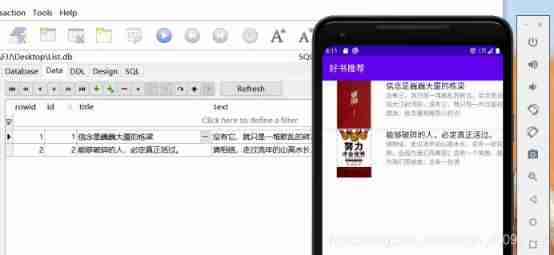
I hope this article will help you , The code may have shortcomings , I would like to discuss with you .
See the following link for the overall project package :
https://download.csdn.net/download/weixin_46097122/16138055
边栏推荐
- On the normalization of camera rotation interpolation
- Unity implements smooth interpolation
- Poisson disk sampling for procedural placement
- MySQL notes
- Summary of some problems in sensor bring up
- MySQL 主从,6 分钟带你掌握
- Book classification based on Naive Bayes
- Directx11 advanced tutorial cluster based deffered shading
- Sqlite Cross - compile Dynamic Library
- (UE4 4.27) customize globalshader
猜你喜欢

User login (medium)
Word2Vec

(UE4 4.27) add globalshder to the plug-in

MNIST handwritten data recognition by CNN

(UE4 4.27) customize globalshader

为什么数据库不使用二叉树、红黑树、B树、Hash表? 而是使用了B+树

前台展示LED数字(计算器上数字类型)

(UE4 4.27) UE4 adds a customized meshpass to realize the edge illumination of the mobile terminal
UE4 4.27 modify the mobile forward pipeline to support cluster multi light source culling

IBL of directx11 advanced tutorial PBR (3)
随机推荐
How do I get the date and time from the Internet- How to get DateTime from the internet?
Directx11 advanced tutorial PBR (1) summary of physical phenomena of light
RMB classification II
Guns框架多数据源配置,不修改配置文件
[Yu Yue education] basic reference materials of accounting of Nanjing Normal University
Types, functions and applications of intelligent sensors
Database experiment I: data definition experiment guide
SQLite cross compile dynamic library
[untitled]
单通道图片的读入
E-book analysis
Database Experiment 3: data query
Jackson - how to convert the array string with only one map object to list < map >
Open the camera in unity3d and display the contents of the camera in the scene as texture2d
Three years of sharpening a sword: insight into the R & D efficiency of ant financial services
为什么联合索引是最左匹配原则?
Leetcode-1706. Where does the club fall
zip 和.items()区别
Guns framework multi data source configuration without modifying the configuration file
IO to IO multiplexing from traditional network