当前位置:网站首页>Introduction to flask tutorial
Introduction to flask tutorial
2022-07-03 01:33:00 【Xuan Juan】
Flask Study
List of articles
Code warehouse :https://github.com/LenkyAndrews/Flask-Learning
brief introduction
Flask It is very popular at present web frame , use Python Programming language to achieve related functions . It's called a microframe (microframework),“ tiny ” Refer to Flask Designed to keep code simple and easy to extend ,Flask The main feature of the framework is that the core structure is relatively simple , But it has strong expansibility and compatibility .
Flask It mainly includes Werkzeug and Jinja2 Two core function libraries , They are respectively responsible for business processing and security functions , These basic functions are web The project development process provides a wealth of basic components .
install
Use the following instructions to install :
pip install flask
Enter instructions to view version
import flask
print(flask.__version__)
# 2.0.1
Minimal application
#  Import Flask Class library
from flask import Flask
#  Create an application instance
app = Flask(__name__)
#  The view function ( route )
@app.route("/")
def hello_world():
    return "Hello, World!"
#  Start the service
if __name__ == '__main__':
   app.run(debug = True)
First of all, I introduced Flask class .
Then create an instance of this class . The first parameter is the name of the application module or package .
__name__Is a shortcut for most situations .And then use route() Decorator to tell Flask Trigger function Of URL .
app.route(rule, options)rule The parameter represents the connection with the function URL binding
options It's going to be forwarded to the foundation Rule Object's parameter list .Function returns the information that needs to be displayed in the browser .
Save as app.py, Don't use flask.py As the application name , This will Flask Conflict in itself . Service startup defaults to 5000 port , Open it in a browser http://127.0.0.1:5000/ , You can see Hello World! word .
app.run(host, port, debug, options)
| Parameters | explain | The default value is |
|---|---|---|
| host | Host name , Set to “0.0.0.0” To make the server available externally | 127.0.0.1(localhost) |
| port | Port number | 5000 |
| debug | Debug mode , The code update will automatically restart the service , Provide a debugger to track errors in the application | False |
| options | To forward to the bottom Werkzeug Server parameters |
route
modern Web The framework uses routing technology to help users remember applications URL.Flask Medium route() A decorator is used to decorate URL Bind to function , for example :
@app.route('/hello')
def hello_world():
   return 'hello world'
URL /hello Rules are bound to hello_world() function , If you visit http://localhost:5000/hello,hello_world() The output of the function will be rendered in the browser .
Variable rule
Through the URL Part of the is marked as <variable_name> You can go to URL Add variables to , The marked part will be passed to the function as a keyword parameter .
from flask import Flask
app = Flask(__name__)

@app.route('/hello/<username>')
def hello(username):
    return f'Hello {
      username}!'

if __name__ == '__main__':
   app.run(debug = True)
In the example above , Enter... In the browser http://localhost:5000/hello/Kint, be Kint Will be provided as a parameter to hello() function , namely username The value of is Kint. The output in the browser is as follows
Hello Kint!
By using <converter:variable_name> , You can optionally add a converter , Specify rules for variables .
| converter | explain |
|---|---|
string | ( The default value ) Accept any text without slashes |
int | Accept positive integers |
float | Accept a positive floating point number |
path | similar string , But it can contain slashes |
Complete example :
from flask import Flask
from markupsafe import escape

app = Flask(__name__)

@app.route('/hello/<username>')
def hello(username):
    return f'Hello {
      username}!'

@app.route('/post/<int:post_id>')
def show_post(post_id):
    return f'Post {
      post_id}'

@app.route('/path/<path:path>')
def show_path(path):
    return f'path {
      escape(path)}'

if __name__ == '__main__':
    app.run(debug=True)
Enter... In the browser http://localhost:5000/integer/56, Output is as follows
Integer: 56
Enter... In the browser http://localhost:5000/path/templates/index.html, Output is as follows
path: templates/index.html
URL structure
url_for() Function is used to build the URL. It is the Function name As the first parameter . It can accept any keyword parameter , Each keyword parameter corresponds to URL The variables in the , Unknown variable Will be added to URL As a query parameter .
from flask import Flask, request, redirect
from flask import url_for

app = Flask(__name__)

@app.route('/')
def index():
    return 'index'

@app.route('/login')
def login():
    print(f"in login function, request.values: {
      request.values}")
    return 'login'

@app.route('/user/<username>')
def profile(username):
    return f'{
      username}\'s profile'

with app.test_request_context():
    print(url_for('index'))
    print(url_for('login'))
    print(url_for('login', next='/'))
    print(url_for('profile', username='John Doe'))
url_for('login', next='/') I'm going to generate the corresponding URL, but next Not at all login Function's key argument , Therefore, as a query parameter , And GET The data requested to be sent is similar , Can be in request.values Found in CombinedMultiDict([ImmutableMultiDict([('next', '/')])])
Output is as follows :
/
/login
/login?next=%2F
/user/John%20Doe
HTTP Method
Web Applications use different HTTP Method treatment URL ,HTTP The method is as follows ( Bold methods are common ):
| Method | explain |
|---|---|
| GET | Send data to the server in an unencrypted form , The most common method |
| HEAD | and GET In the same way , But there's no responder |
| POST | Is used to HTML The form data is sent to the server ,POST Method is not cached by the server |
| PUT | Replace all current representations of the target resource with the uploaded content |
| DELETE | Delete from URL All current representations of the given target resource |
By default ,Flask The route only responds to GET request . have access to route() Decorator methods Parameters to handle different HTTP Method .
Save the following script as welcome.html, Put it in templates In the folder .
<!DOCTYPE html>
<html lang="en">
<head>
    <meta charset="UTF-8">
    <title>HTTP Method </title>
</head>
<body>
    <form action = "http://localhost:5000/login" method = "post">
         <p>Enter Name:</p>
         <p><input type = "text" name = "username" /></p>
         <p><input type = "submit" value = "submit" /></p>
      </form>
</body>
</html>
flask The code is as follows :
from flask import Flask, redirect, url_for, request, render_template
app = Flask(__name__)

@app.route('/')
def index():
    return render_template('welcome.html')

@app.route('/welcome/<name>')
def welcome(name):
    return f'welcome {
      name}'

@app.route('/login', methods=['POST', 'GET'])
def login():
    if request.method == 'POST':
        user = request.form['username']
        return redirect(url_for('welcome', name=user))
    else:
        user = request.args.get('username')  # GET Method to get data ,args Is a dictionary object that contains a list of form parameter pairs and their corresponding value pairs .
        return redirect(url_for('welcome', name=user))

if __name__ == '__main__':
    app.run(debug=True)
If the request method is POST Method , Then get the... Obtained from the form data through the following code “username” The value of the parameter :
user = request.form['username']
If the request method is GET Method , Then get the... Obtained from the form data through the following code “username” The value of the parameter :
user = request.args.get('username')
args Is a dictionary object that contains a list of form parameter pairs and their corresponding value pairs , And ’username’ The value corresponding to the parameter will be passed to /welcome URL in , namely
/login?username=Kint
File storage
flask In the project ,static In the folder CSS and JavaScript file ,templates In the folder html file .app.py And templates and static Folder siblings .
/app.py
/templates
    /index.html
/static
    /style.css
    /jquery.js
Sure enough, you can change the path during initialization Flask Instance
app = Flask(__name__, static_folder='', template_folder='')
Apply colours to a drawing template
Use render_template() Method to render templates , Provide the template name and variables that need to be passed to the template as parameters .
stay templates Create under folder render_template.html file , The code is as follows :
<!DOCTYPE html>
<html lang="en">
<head>
    <meta charset="UTF-8">
    <title>render_template</title>
</head>
<body>
    <h2> Apply colours to a drawing template </h2>
    {
   { my_int }}
    <br>
    {
   { my_str }}
    <br>
    {
   { my_list }}
    <br>
    {
   { my_dict }}
    <hr>
    <h2> List data acquisition </h2>
    {
   { my_list[0] }}
    <br>
    {
   { my_list.1 }}
    <hr>
    <h2> Dictionary data acquisition </h2>
    {
   { my_dict['name'] }}
    <br>
    {
   { my_dict.age }}
    <hr>
    <h2> Arithmetic operations </h2>
    {
   { my_list.0 + 10 }}
    <br>
    {
   { my_list[0] + my_list.1 }}
</body>
</html>
flask The code is as follows :
from flask import Flask, render_template

app = Flask(__name__)

@app.route('/')
def index():
    int_ = 1024
    str_ = 'Hello World!'
    list_ = [1, 2, 3, 4, 5]
    dict_ = {
    'name': 'Kint', 'age': 23}
    # render_template Method : Apply colours to a drawing template
    #  Parameters 1:  Template name   Parameters n:  Data sent to the template
    return render_template('render_template.html', my_int=int_, my_str=str_, my_list=list_, my_dict=dict_)

if __name__ == '__main__':
    app.run(debug=True)
The effect is as follows :

Flask It's using Jinja2 This template engine is used to render templates , More , See official Jinja2 Template document .
Request object
Some of the attributes are as follows ( Bold ones are more common ):
| attribute | explain |
|---|---|
| method | Request method , such as GET、POST |
| data | Store the requested data as a string |
| files | Uploaded files , The type is MultiDict |
| args | analysis URL Parameters submitted in , The type is MultiDict |
| form | Uploaded form data , The type is MultiDict |
| values | contain args and form The data of , The type is CombineMultiDict |
| json | analysis JSON data , If not, return None |
| cookies | Contains all of the client transfers cookies , The type is MultiDict |
| headers | Request header information , Similar to a dictionary , The corresponding information can be obtained through keywords |
stay templates Create under folder Request.html file , The code is as follows :
<!DOCTYPE html>
<html lang="en">
<head>
    <meta charset="UTF-8">
    <title>Request</title>
</head>
<body>
    <form action="/login?a=1&b=2" method="post">
        <p> account number : <input type="text" name="username"></p>
        <p> password : <input type="password" name="password"></p>
        <input type="submit">
    </form>
</body>
</html>
flask The code is as follows :
from flask import Flask, request, render_template
import json

app = Flask(__name__)

@app.route('/')
def index():
    return render_template("Request.html")

@app.route('/login', methods=["GET", "POST"])
def login():
    print('request.method:\n', request.method)
    print('request.data:\n', request.data)
    print('request.request.args:\n', request.args)
    print("request.request.args.get('b'):\n", request.args.get('c'))
    print('request.form:\n', request.form)
    print("request.request.form.get('password'):\n", request.form.get('password'))
    print('request.values:\n', request.values)
    print('request.json:\n', request.json)
    print('request.cookies:\n', request.cookies)
    print('request.headers:\n', request.headers)
    return json.dumps(request.form) #  take MultiDict Data processing is JSON data

if __name__ == '__main__':
    app.run(debug=True)
The effect is as follows :
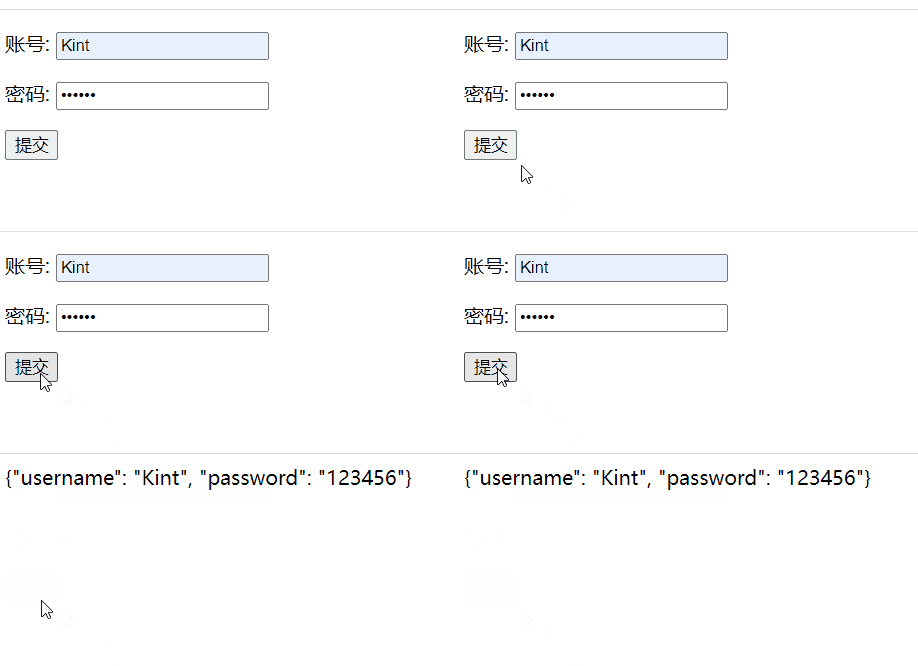
The back-end output is as follows :
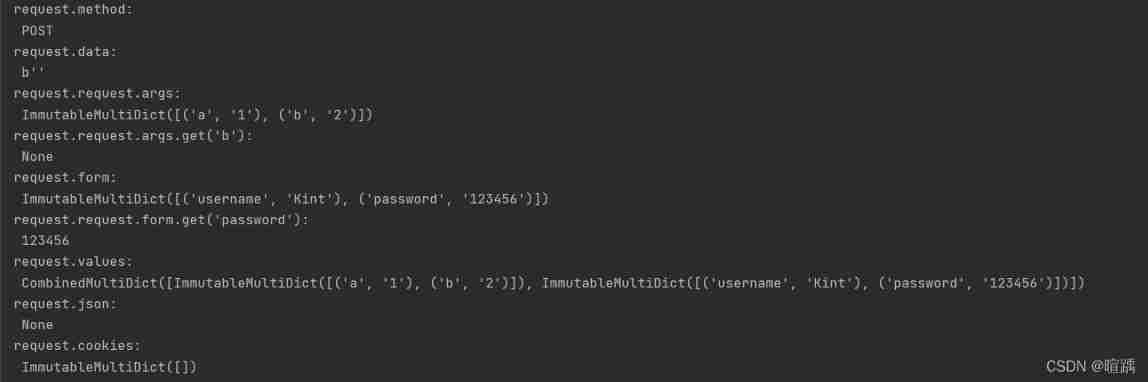
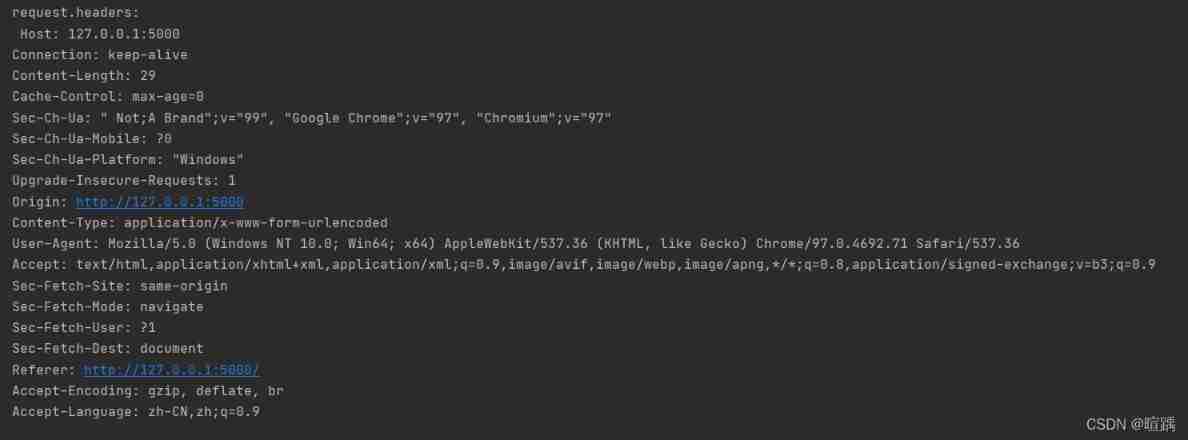
With request.form For example , In obtaining MultiDict The value of , Recommended request.form.get(key) Instead of using request.form[key], The former method can avoid keyword missing KeyError.
Get all kinds of paths , In this case URL by http://127.0.0.1:5000/login?a=1&b=2
print('url: ', request.url)
print('base_url: ', request.base_url)
print('host: ', request.host)
print('host_url: ', request.host_url)
print('path: ', request.path)
print('full_path: ', request.full_path)
Output is :
url:  http://127.0.0.1:5000/login?a=1&b=2
base_url:  http://127.0.0.1:5000/login
host:  127.0.0.1:5000
host_url:  http://127.0.0.1:5000/
path:  /login
full_path:  /login?a=1&b=2
Cookie
Cookie In the form of text files stored on the client's computer . The goal is to remember and track data related to customer use , For better visitor experience and website statistics . For example, in order to identify users 、 Session tracking requires some data ( for example : The login status 、 User name ) Stored on the user's local terminal , These data are called Cookie.
Request Object contains Cookie Properties of , It's all Cookie A dictionary object for variables and their corresponding values .
stay Flask in , Yes Cookie The processing steps are as follows :
- Use Response Object's set_cookie() Method setting cookie
- adopt request.cookies Way to obtain cookies, Back is a dictionary
- Use Response Object's delete_cookie() Method setting cookie
stay templates Create under folder get_cookie.html file , The code is as follows :
<!DOCTYPE html>
<html lang="en">
<head>
    <meta charset="UTF-8">
    <title> obtain cookie</title>
</head>
<body>
    <h2> Get... On the server side cookie: <b>{
   {cookie}}</b></h2>
</body>
</html>
stay templates Create under folder show_cookie_by_JQuery.html file , The code is as follows :
<!DOCTYPE html>
<html lang="en">
<head>
    <meta charset="UTF-8">
    <title> Set up cookie</title>
    <script src="../static/jquery-3.6.0.js" type="text/javascript" charset="utf-8"></script>
</head>
<body>
    <h2> Set... On the server cookie</h2>
    <h2> On the client side through JQuery Read cookie: <b id='cookie'></b></h2>
</body>
<script> $('#cookie').text(document.cookie); </script>
</html>
flask The code is as follows :
from flask import Flask, request, Response, render_template, make_response, redirect, url_for

app = Flask(__name__)


@app.route('/')
def index():
    return redirect(url_for('set_cookie'))  #  Redirect response URL

#  obtain cookie
@app.route('/get_cookie')
def get_cookie():
    cookie = request.cookies.get('user') #  Get keyword as user Corresponding cookie Value
    print(cookie)
    return render_template('get_cookie.html', cookie=cookie)


#  Set up cookie
@app.route('/set_cookie')
def set_cookie():
    html = render_template('show_cookie_by_JQuery.html')
    response = make_response(html)  #  Set the response body
    # response = Response(html)
    response.set_cookie('user', 'Kint')
    return response


#  Delete cookie
@app.route('/del_cookie')
def del_cookie():
    html = render_template('show_cookie_by_JQuery.html')
    response = Response(html)
    response.delete_cookie('user')
    return response


if __name__ == '__main__':
    app.run(debug=True)
stay set_cookie() Function , First render the template file show_cookie_by_JQuery.html, adopt make_response() Method to set the response body and return Response object , Then set the cookie. The following two expressions have the same function :
response = make_response(html)  #  Set the response body
response = Response(html)
Enter... In the browser http://127.0.0.1:5000/set_cookie, You can see that it has been set in the response header cookie The data of the .
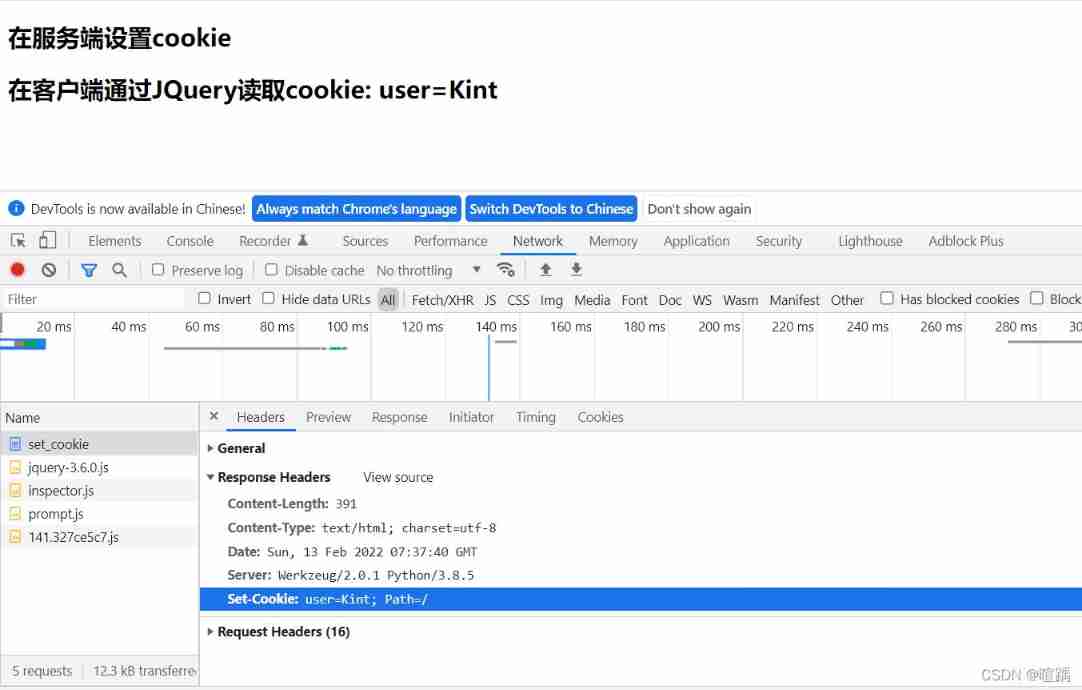
Enter... In the browser http://127.0.0.1:5000/get_cookie, You can see in the request header cookie The data of , And will cookie Transfer to the server .
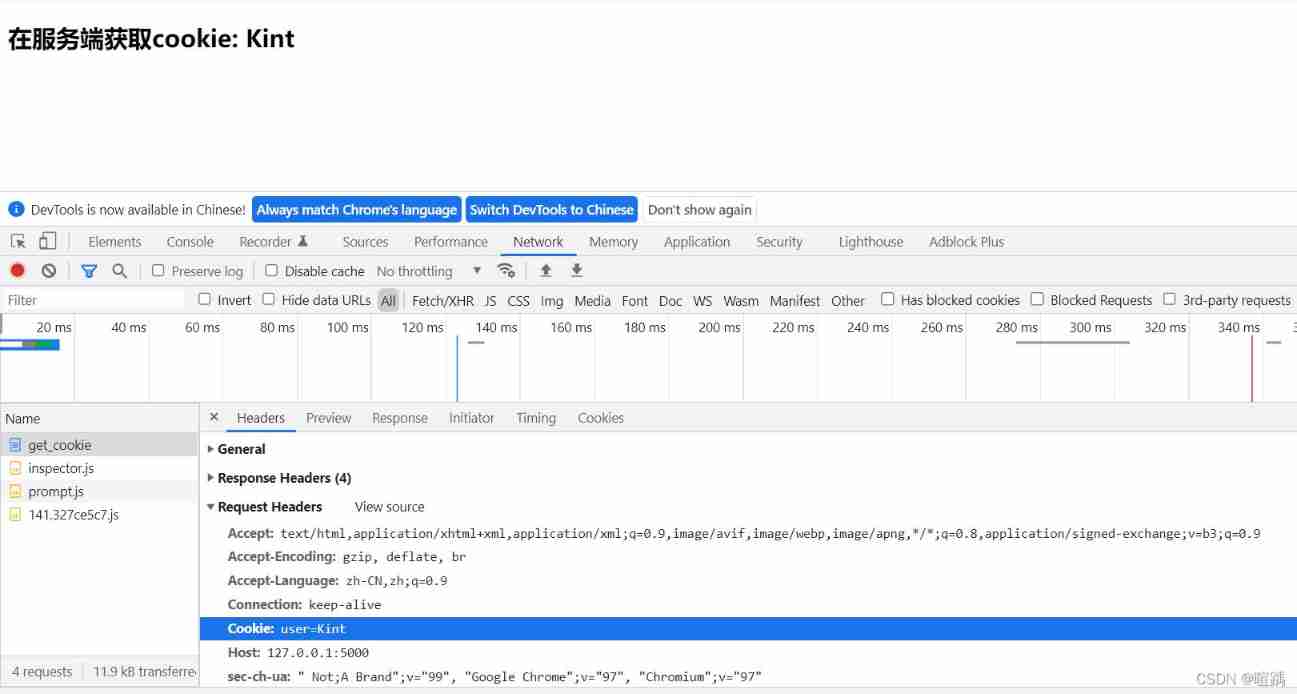
Enter... In the browser http://127.0.0.1:5000/del_cookie, At this time, there is no user Corresponding cookie The value of .

conversation Session
And Cookie Different ,Session The data is stored on the server , Used to store user information ( For example, login status 、 User name ).Session There is a unique ID ID, Corresponding to a user , Use on the server ID You can find the data of the corresponding user , so Flask The application needs a defined key SECRET_KEY.
The following code simply realizes the function of judging whether the user logs in :
from flask import Flask, redirect, url_for, request, session

app = Flask(__name__)
app.secret_key = 'abc'

@app.route('/')
def index():
    if 'user' in session:
        #  Get the user information in the session
        user = session.get('user')
        return ' The logged-in user is :' + user + '<br>' + "<b><a href = '/logout'> Click here to log out </a></b>"
    return "<h3> Not logged in </h3><br>" + "<a href = '/login'></b> Click here to log in </b></a>"

@app.route('/login', methods=['GET', 'POST'])
def login():
    if request.method == 'POST':
        #  Set the user information in the session
        session['user'] = request.form['user']
        return redirect(url_for('index'))
    return ''' <form action="" method="post"> <p><input type="text" name="user"/></p> <p><input type="submit" value=" Sign in "/></p> </form> '''

@app.route('/logout')
def logout():
    #  Delete user information in the session
    session.pop('user')
    return redirect(url_for('index'))

if __name__ == '__main__':
    app.run(debug=True)
The effect is as follows :

example 1. Upload form data
The file structure is as follows :
/app.py
/templates
    /login.html
    /result.html
app.py The code is as follows :
from flask import Flask, render_template, request
app = Flask(__name__)
@app.route('/')
def student():
   return render_template('login.html')


@app.route('/result',methods = ['POST', 'GET'])
def result():
   if request.method == 'POST':
      result = request.form # Get the form data transmitted by the front end
      return render_template("result.html",result = result)


if __name__ == '__main__':
   app.run(debug = True)
stay templates Create under folder login.html file , The code is as follows :
<!DOCTYPE html>
<html lang="en">
<head>
    <meta charset="UTF-8">
    <title> example 1. Upload form data — The login page </title>
</head>
<body>
    <form action="http://localhost:5000/result" method="POST">
         <p>Name <input type = "text" name = "Name" /></p>
         <p>Email <input type = "text" name = "Email" /></p>
         <p><input type = "submit" value = "submit" /></p>
    </form>
</body>
</html>
stay templates Create under folder result.html file , The code is as follows :
<!DOCTYPE html>
<html lang="en">
<head>
    <meta charset="UTF-8">
    <title> example 1. Upload form data - Results page </title>
</head>
<body>
    <table border = 1>
        {% for key, value in result.items() %}
        <tr>
           <th> {
   { key }} </th>
           <td> {
   { value }}</td>
        </tr>
        {% endfor %}
    </table>
</body>
</html>
example 2. Upload files
The file structure is as follows :
/app.py
/templates
    /index.html
    /upload.html
/upload
    /download_sample.txt
app.py The code is as follows :
from flask import Flask, render_template, request, send_from_directory
from werkzeug.utils import secure_filename

import os

app = Flask(__name__)
app.config['UPLOAD_FOLDER'] = 'upload/'
app.config['MAX_CONTENT_LENGTH'] = 16 * 1000 * 1000  #  Upload file size is limited to 16M, If it exceeds, an exception will be thrown

@app.route('/')
def upload_file():
    return render_template('index.html')

@app.route('/upload', methods=['GET', 'POST'])
def upload():
    if request.method == 'POST':
        f = request.files['file']
        print(request.files)
        # secure_filename Check the file name uploaded by the client , To ensure safety , Note that the file name should not be in Chinese !!!
        f.save(os.path.join(app.config['UPLOAD_FOLDER'], secure_filename(f.filename)))
        return render_template('upload.html')
    else:
        return render_template('index.html')

@app.route('/download/<filename>', methods=['GET', 'POST'])
def download(filename):
    # as_attachment=True  Indicates that the file is downloaded as an attachment
    return send_from_directory('./upload', filename, as_attachment=True)

if __name__ == '__main__':
    app.run(debug=True)
stay upload Function ,f.save The function of is to save the file to the specified path . In the use of secure_filename When verifying the name of the uploaded file , Note that the name should be in English !
stay download Function ,send_from_directory Methods will upload Send the specified file under the directory to the client ,as_attachment=True Indicates that the file is downloaded as an attachment .
stay templates Create under folder index.html file , The code is as follows :
<!DOCTYPE html>
<html lang="en">
<head>
    <meta charset="UTF-8">
    <title> example 2. Upload and download files </title>
</head>
<body>
    <h3> Upload files </h3>
    <form action="http://localhost:5000/upload" method="POST" enctype="multipart/form-data">
        <input type="file" name="file" />
        <input type="submit" value=" Submit " />
    </form>
    <h3> Download the file </h3>
    <a href="/download/download_sample.txt">download_sample.txt</a>
</body>
</html>
stay templates Create under folder upload.html file , The code is as follows :
<!DOCTYPE html>
<html lang="en">
<head>
    <meta charset="UTF-8">
    <title> example 2. File upload success page </title>
</head>
<body>
    <h3> File upload succeeded !</h3>
</body>
</html>
边栏推荐
- uniapp组件-uni-notice-bar通告栏
- Canvas drawing -- bingdd
- Give you an array numbers that may have duplicate element values. It was originally an array arranged in ascending order, and it was rotated once according to the above situation. Please return the sm
- Scheme and practice of cold and hot separation of massive data
- 数学知识:Nim游戏—博弈论
- The thread reuse problem of PageHelper using ThreadLocal, did you use it correctly?
- 看完这篇 教你玩转渗透测试靶机Vulnhub——DriftingBlues-9
- How is the mask effect achieved in the LPL ban/pick selection stage?
- Basic remote connection tool xshell
- 2022 Jiangxi Provincial Safety Officer B certificate reexamination examination and Jiangxi Provincial Safety Officer B certificate simulation examination question bank
猜你喜欢

High resolution network (Part 1): Principle Analysis
Wireshark data analysis and forensics a.pacapng

MySQL - database query - condition query

MySQL basics 03 introduction to MySQL types

C#应用程序界面开发基础——窗体控制(2)——MDI窗体
![[flutter] icons component (fluttericon Download Icon | customize SVG icon to generate TTF font file | use the downloaded TTF icon file)](/img/ca/1d2473ae51c59b84864352eb17de94.jpg)
[flutter] icons component (fluttericon Download Icon | customize SVG icon to generate TTF font file | use the downloaded TTF icon file)
Basic remote connection tool xshell
leetcode 6103 — 从树中删除边的最小分数
C#应用程序界面开发基础——窗体控制(3)——文件类控件

Machine learning terminology
随机推荐
Kivy教程大全之 创建您的第一个kivy程序 hello word(教程含源码)
C application interface development foundation - form control (3) - file control
Scheme and practice of cold and hot separation of massive data
Is there anything in common between spot gold and spot silver
GDB 在嵌入式中的相关概念
Kivy tutorial - example of using Matplotlib in Kivy app
不登陆或者登录解决oracle数据库账号被锁定。
串口抓包/截断工具的安装及使用详解
[androd] module dependency replacement of gradle's usage skills
Daily topic: movement of haystack
力扣 204. 计数质数
The industrial scope of industrial Internet is large enough. The era of consumer Internet is only a limited existence in the Internet industry
tail -f 、tail -F、tailf的区别
tp6快速安装使用MongoDB实现增删改查
[shutter] animation animation (the core class of shutter animation | animation | curvedanimation | animationcontroller | tween)
Give you an array numbers that may have duplicate element values. It was originally an array arranged in ascending order, and it was rotated once according to the above situation. Please return the sm
Key wizard play strange learning - multithreaded background coordinate recognition
【数据挖掘】任务5:K-means/DBSCAN聚类:双层正方形
数学知识:Nim游戏—博弈论
Androd gradle's substitution of its use module dependency