当前位置:网站首页>Shardingjdbc pit record
Shardingjdbc pit record
2022-07-26 07:47:00 【Oil head monster】
shardingjdbc Record on pit
Official document
https://shardingsphere.apache.org/document/legacy/4.x/document/cn/manual/sharding-jdbc/usage/sharding/#%E4%BD%BF%E7%94%A8spring
shardingjdbc There is a large gap in configuration files between different versions , Mainly record 4.0.0/4.1.1 And 5.0.0/5.1.1 disparity
4.x Corresponding pom
<dependency>
    <groupId>org.apache.shardingsphere</groupId>
    <artifactId>sharding-jdbc-spring-boot-starter</artifactId>
    <version>4.0.0-RC1</version>
</dependency>

<dependency>
    <groupId>org.apache.shardingsphere</groupId>
    <artifactId>sharding-jdbc-core</artifactId>
    <version>4.1.1</version>
</dependency>
4.x Corresponding yml To configure
# shardingjdbc Single database sub table
spring:
  main:
    #  An entity class corresponds to two tables , Cover
    allow-bean-definition-overriding: true
  shardingsphere:
    datasource:
      #  Database alias
      names: m1
      # m1 Configuration of database
      m1:
        driver-class-name: com.mysql.cj.jdbc.Driver
        username: root
        password: root
        type: com.alibaba.druid.pool.DruidDataSource
        url: jdbc:mysql://192.168.42.128:3306/test?serverTimezone=GMT%2B8
    sharding:
      #  Tabulation strategy
      tables:
        #  Table name
        detail:
          actual-data-nodes: m1.detail #  Kuga table name
          key-generator:
            column: id # id Column
            type: SNOWFLAKE  # id Generate rules
          table-strategy: #  Table fragmentation strategy
            complex: #  Composite slicing
              sharding-columns: task_id,plat_id  #  The field column of the composite fragment
              #  Specify the sharding algorithm class
              algorithm-class-name: com.example.myconvert.shardingjdbc.ShardingAlgorithm.ComplexShardingAlgorithm
    #  Turn on Printing sql
    props:
      sql:
        show: true
4.x Of ComplexShardingAlgorithm class
public class ComplexShardingAlgorithm implements ComplexKeysShardingAlgorithm {


    @Override
    public Collection<String> doSharding(Collection collection, ComplexKeysShardingValue complexKeysShardingValue) {

        Map<String, Collection<String>> columnNameAndShardingValuesMap = complexKeysShardingValue.getColumnNameAndShardingValuesMap();
        //  Logic table
        String logicTableName = complexKeysShardingValue.getLogicTableName();

        List<String> tableNames = new ArrayList<>();
        Set<String> keySet = columnNameAndShardingValuesMap.keySet();

        if(!keySet.contains("plat_id")) {

            //  It doesn't contain platid The situation of
            tableNames.add(logicTableName);
        }else {

            //  Process table name
            Collection<String> platIdVals = columnNameAndShardingValuesMap.get("plat_id");
            List<String> collect = platIdVals.stream().distinct().map(val -> logicTableName + "_" + val).collect(Collectors.toList());
            if(CollectionUtils.isNotEmpty(collect)) {

                tableNames.addAll(collect);
            }
            //  If the watch doesn't exist , You can create
			List<String> dbTableNames = DBUtils.getTableNames();
            List<String> needToCreateTables = tableNames.stream().filter(name -> !dbTableNames.contains(name))
                    .map(name -> name.split("_")[1]).collect(Collectors.toList());
            if(CollectionUtils.isNotEmpty(needToCreateTables)) {

                DBUtils.platIds.addAll(needToCreateTables);
                DBUtils.createTable();
            }
        }
        return tableNames;
    }
}
5.x Corresponding pom
<!-- <dependency>-->
<!-- <groupId>org.apache.shardingsphere</groupId>-->
<!-- <artifactId>shardingsphere-jdbc-core-spring-boot-starter</artifactId>-->
<!-- <version>5.1.1</version>-->
<!-- </dependency>-->

<!-- <dependency>-->
<!-- <groupId>org.apache.shardingsphere</groupId>-->
<!-- <artifactId>shardingsphere-jdbc-core</artifactId>-->
<!-- <version>5.1.1</version>-->
<!-- </dependency>-->

        <dependency>
            <groupId>org.apache.shardingsphere</groupId>
            <artifactId>shardingsphere-jdbc-core-spring-boot-starter</artifactId>
            <version>5.0.0</version>
        </dependency>
        <dependency>
            <groupId>org.apache.shardingsphere</groupId>
            <artifactId>shardingsphere-jdbc-core-spring-namespace</artifactId>
            <version>5.0.0</version>
        </dependency>
5.x Corresponding yml
# shardingjdbc Single database sub table
spring:
  main:
    #  An entity class corresponds to two tables , Cover
    allow-bean-definition-overriding: true
  shardingsphere:
    datasource:
      #  Database alias
      names: m1
      # m1 Configuration of database
      m1:
        driver-class-name: com.mysql.cj.jdbc.Driver
        #  Not introduced here druid, Use native hikari
        type: com.zaxxer.hikari.HikariDataSource
        jdbc-url: jdbc:mysql://192.168.42.128:3306/test?serverTimezone=GMT%2B8
        username: root
        password: root
    rules:
      #  Configure sharding rules
      sharding:
        tables:
          #  Configuration table rules
          detail:
            actualDataNodes: m1.detail
            #  Configure sub table strategy
            tableStrategy:
              complex:
                sharding-columns: task_id,plat_id
                shardingAlgorithmName: table-inline #  Customize a name
            key-generate-strategy:
              column: id
              key-generator-name: snowflake
        #  Configure the slicing algorithm
        bindingTables: detail
        sharding-algorithms:
          #  Use the name you just customized
          table-inline:
            #  Fill in here ComplexShardingAlgorithm  Class getType Method type
            type: my_complex
            props:
              strategy: complex
              algorithmClassName: com.zzvcom.cds.business.cdn.config.ComplexShardingAlgorithm
    props:
      sql-show: true
5.x Version of ComplexShardingAlgorithm class , More getType Method

use aop The way , Create a nonexistent table


The following is a public table 、 Sub database and sub table 、 Master slave copy 、 Read write separation related configurations
# sharding-jdbc  Public table
#  Configure data sources , Alias the data source , Appoint 2 Data sources
spring.shardingsphere.datasource.names=m1,m2,m3
spring.main.allow-bean-definition-overriding=true
#  To configure m1 The specific content of the data source , Contains connection pools , drive , Address , user name , password
spring.shardingsphere.datasource.m1.type=com.alibaba.druid.pool.DruidDataSource
spring.shardingsphere.datasource.m1.driver-class-name=com.mysql.cj.jdbc.Driver
spring.shardingsphere.datasource.m1.url=jdbc:mysql://192.168.42.128:3306/edu_db_1?serverTimezone=GMT%2B8
spring.shardingsphere.datasource.m1.username=root
spring.shardingsphere.datasource.m1.password=root
#  To configure m2 The specific content of the data source , Contains connection pools , drive , Address , user name , password
spring.shardingsphere.datasource.m2.type=com.alibaba.druid.pool.DruidDataSource
spring.shardingsphere.datasource.m2.driver-class-name=com.mysql.cj.jdbc.Driver
spring.shardingsphere.datasource.m2.url=jdbc:mysql://192.168.42.128:3306/edu_db_2?serverTimezone=GMT%2B8
spring.shardingsphere.datasource.m2.username=root
spring.shardingsphere.datasource.m2.password=root
#  To configure m3 The specific content of the data source , Contains connection pools , drive , Address , user name , password
spring.shardingsphere.datasource.m3.type=com.alibaba.druid.pool.DruidDataSource
spring.shardingsphere.datasource.m3.driver-class-name=com.mysql.cj.jdbc.Driver
spring.shardingsphere.datasource.m3.url=jdbc:mysql://192.168.42.128:3306/user_db?serverTimezone=GMT%2B8
spring.shardingsphere.datasource.m3.username=root
spring.shardingsphere.datasource.m3.password=root
#   True table    Appoint course Table distribution , Which database is the configuration table in , What are the names of the tables  m1.course_1,m1.course_2
spring.shardingsphere.sharding.tables.course.actual-data-nodes=m$->{1..2}.course_$->{1..2}
#  Appoint  course  The primary key in the table  cid  Generation strategy for  SNOWFLAKE
#  Patch key
spring.shardingsphere.sharding.tables.course.key-generator.column=cid
#  Fragment key generation strategy
spring.shardingsphere.sharding.tables.course.key-generator.type=SNOWFLAKE
#  Configure sub table strategy  - inline     Appointment  cid  Add even values to  course_1  surface , If  cid  Is an odd number added to  course_2  surface
spring.shardingsphere.sharding.tables.course.table-strategy.inline.sharding-column=cid
spring.shardingsphere.sharding.tables.course.table-strategy.inline.algorithm-expression=course_$->{cid % 2 + 1}
#  Sub library strategy ,user_id  Add odd numbers to m1 library , Even numbers are added to m2 library
spring.shardingsphere.sharding.tables.course.database-strategy.inline.sharding-column=user_id
spring.shardingsphere.sharding.tables.course.database-strategy.inline.algorithm-expression=m$->{user_id % 2 + 1}
#  To configure user_db In the database t_user   Special database, special watch
spring.shardingsphere.sharding.tables.t_user.actual-data-nodes=m3.t_user
#  Configure the primary key generation strategy
spring.shardingsphere.sharding.tables.t_user.key-generator.column=user_id
spring.shardingsphere.sharding.tables.t_user.key-generator.type=SNOWFLAKE
#  Specify sub table strategy
spring.shardingsphere.sharding.tables.t_user.table-strategy.inline.sharding-column=user_id
spring.shardingsphere.sharding.tables.t_user.table-strategy.inline.algorithm-expression=t_user
#  Common table configuration
spring.shardingsphere.sharding.broadcast-tables=t_dict
#  Configure the primary key generation strategy
spring.shardingsphere.sharding.tables.t_dict.key-generator.column=dict_id
spring.shardingsphere.sharding.tables.t_dict.key-generator.type=SNOWFLAKE
#  open  sql  Output log
spring.shardingsphere.props.sql.show=true
# sharding-jdbc  Vertical sub database
#  Configure data sources , Alias the data source , Appoint 2 Data sources
spring.shardingsphere.datasource.names=m3
#  To configure m3 The specific content of the data source , Contains connection pools , drive , Address , user name , password
spring.shardingsphere.datasource.m3.type=com.alibaba.druid.pool.DruidDataSource
spring.shardingsphere.datasource.m3.driver-class-name=com.mysql.cj.jdbc.Driver
spring.shardingsphere.datasource.m3.url=jdbc:mysql://192.168.42.128:3306/user_db?serverTimezone=GMT%2B8
spring.shardingsphere.datasource.m3.username=root
spring.shardingsphere.datasource.m3.password=root
#  To configure user_db In the database t_user   Special database, special watch
spring.shardingsphere.sharding.tables.t_user.actual-data-nodes=m3.t_user
#  Configure the primary key generation strategy
spring.shardingsphere.sharding.tables.t_user.key-generator.column=user_id
spring.shardingsphere.sharding.tables.t_user.key-generator.type=SNOWFLAKE
#  Specify sub table strategy
spring.shardingsphere.sharding.tables.t_user.table-strategy.inline.sharding-column=user_id
spring.shardingsphere.sharding.tables.t_user.table-strategy.inline.algorithm-expression=t_user
# sharding-jdbc  Horizontal sub database
#  Configure data sources , Alias the data source , Appoint 2 Data sources
spring.shardingsphere.datasource.names=m1,m2
#  An entity class corresponds to two tables , Cover
spring.main.allow-bean-definition-overriding=true
#  To configure m1 The specific content of the data source , Contains connection pools , drive , Address , user name , password
spring.shardingsphere.datasource.m1.type=com.alibaba.druid.pool.DruidDataSource
spring.shardingsphere.datasource.m1.driver-class-name=com.mysql.cj.jdbc.Driver
spring.shardingsphere.datasource.m1.url=jdbc:mysql://192.168.42.128:3306/edu_db_1?serverTimezone=GMT%2B8
spring.shardingsphere.datasource.m1.username=root
spring.shardingsphere.datasource.m1.password=root
#  To configure m2 The specific content of the data source , Contains connection pools , drive , Address , user name , password
spring.shardingsphere.datasource.m2.type=com.alibaba.druid.pool.DruidDataSource
spring.shardingsphere.datasource.m2.driver-class-name=com.mysql.cj.jdbc.Driver
spring.shardingsphere.datasource.m2.url=jdbc:mysql://192.168.42.128:3306/edu_db_2?serverTimezone=GMT%2B8
spring.shardingsphere.datasource.m2.username=root
spring.shardingsphere.datasource.m2.password=root
#   True table    Appoint course Table distribution , Which database is the configuration table in , What are the names of the tables  m1.course_1,m1.course_2
spring.shardingsphere.sharding.tables.course.actual-data-nodes=m$->{1..2}.course_$->{1..2}
#  Appoint  course  The primary key in the table  cid  Generation strategy for  SNOWFLAKE
#  Patch key
spring.shardingsphere.sharding.tables.course.key-generator.column=cid
#  Fragment key generation strategy
spring.shardingsphere.sharding.tables.course.key-generator.type=SNOWFLAKE
#  Configure sub table strategy  - inline     Appointment  cid  Add even values to  course_1  surface , If  cid  Is an odd number added to  course_2  surface
spring.shardingsphere.sharding.tables.course.table-strategy.inline.sharding-column=cid
spring.shardingsphere.sharding.tables.course.table-strategy.inline.algorithm-expression=course_$->{cid % 2 + 1}
#  Sub library strategy ,user_id  Add odd numbers to m1 library , Even numbers are added to m2 library
spring.shardingsphere.sharding.tables.course.database-strategy.inline.sharding-column=user_id
spring.shardingsphere.sharding.tables.course.database-strategy.inline.algorithm-expression=m$->{user_id % 2 + 1}
spring.shardingsphere.props.sql.show=true
# shardingjdbc mysql Master slave copy , Read / write separation
spring:
  main:
    allow-bean-definition-overriding: true
  shardingsphere:
    datasource:
      #  Database alias
      names: m0,s0
      #  Main library connection details
      m0:
        driver-class-name: com.mysql.cj.jdbc.Driver
        type: com.alibaba.druid.pool.DruidDataSource
        url: jdbc:mysql://192.168.42.128:3306/test_syn_db?serverTimezone=GMT%2B8
        username: root
        password: root
      #  Connection details from library
      s0:
        driver-class-name: com.mysql.cj.jdbc.Driver
        type: com.alibaba.druid.pool.DruidDataSource
        url: jdbc:mysql://192.168.42.128:3307/test_syn_db?serverTimezone=GMT%2B8
        username: root
        password: root
    sharding:
      master-slave-rules:
        #  Read write separation alias
        ds0:
          #  Declare which is the main library , Which is the slave library
          master-data-source-name: m0
          slave-data-source-names: s0
      #  Table strategy
      tables:
        #  Table name
        t_user:
          actual-data-nodes: ds0.t_user
          key-generator:
            column: user_id
            type: SNOWFLAKE
          table-strategy:
            inline:
              algorithm-expression: t_user
              sharding-column: user_id
    #  Exhibition SQL
    props:
      sql:
        show: true
Reference link
docker build mysql Master slave copy
https://www.cnblogs.com/songwenjie/p/9371422.html

docker start-up mysql  Master-slave
//  Lord
sudo docker run -p 3306:3306 --name mysql -v /root/mysql/conf:/etc/mysql/ -v /root/mysql/logs:/var/log/mysql -v /root/mysql/data:/var/lib/mysql -e MYSQL_ROOT_PASSWORD=root -d mysql:5.7
//  from
sudo docker run -p 3307:3306 --name mysqlsalve -v /root/mysqlsalve/conf:/etc/mysql/ -v /root/mysqlsalve/logs:/var/log/mysql -v /root/mysqlsalve/data:/var/lib/mysql -e MYSQL_ROOT_PASSWORD=root -d mysql:5.7

-----------------------------mysql  Main library configuration --------------------------
my.cnf
[client]
default-character-set=utf8
[mysql]
default-character-set=utf8
[mysqld]
init_connect='SET collation_connection = utf8_unicode_ci'
init_connect='SET NAMES utf8'
character-set-server=utf8
collation-server=utf8_unicode_ci
skip-character-set-client-handshake
skip-name-resolve
lower_case_table_names=1
server-id=100
log-bin=mysql-bin

CREATE USER 'slave'@'%' IDENTIFIED BY '123456';

GRANT REPLICATION SLAVE, REPLICATION CLIENT ON *.* TO 'slave'@'%';


------------------------------------------------------------------------

-----------------------------mysql  Configuration from library --------------------------
my.cnf
[client]
default-character-set=utf8
[mysql]
default-character-set=utf8
[mysqld]
init_connect='SET collation_connection = utf8_unicode_ci'
init_connect='SET NAMES utf8'
character-set-server=utf8
collation-server=utf8_unicode_ci
skip-character-set-client-handshake
skip-name-resolve
lower_case_table_names=1
server-id=101
log-bin=mysql-slave-bin
relay_log=edu-mysql-relay-bin

change master to master_host='172.17.0.5', master_user='slave', master_password='123456', master_port=3306, master_log_file='mysql-bin.000001', master_log_pos= 617, master_connect_retry=30;
--------------------------------------------------------------------------

 Pick up Master( Lord ) and Slave( from )
 stay Master Get into mysql, perform show master status;
mysql> show master status;
+------------------+----------+--------------+------------------+-------------------+
| File             | Position | Binlog_Do_DB | Binlog_Ignore_DB | Executed_Gtid_Set |
+------------------+----------+--------------+------------------+-------------------+
| mysql-bin.000001 |      617 |              |                  |                   |
+------------------+----------+--------------+------------------+-------------------+
1 row in set (0.00 sec)

mysql>
File and Position The value of the field will be followed by , Before the following operations are completed , Need assurance Master The library cannot do anything , Otherwise, the state will change ,File and Position The value of the field changes .

 stay Slave  Into  mysql, perform change master to master_host='172.17.0.2', master_user='slave', master_password='123456', master_port=3306, master_log_file='mysql-bin.000001', master_log_pos= 2830, master_connect_retry=30;

 Command specification :

master_host :Master The address of , It refers to the independence of the container ip, Can pass docker inspect --format='{
    {
    .NetworkSettings.IPAddress}}'  Container name | Containers id Querying container's ip

master_port:Master Port number , Refers to the port number of the container

master_user: Users for data synchronization

master_password: Password of the user for synchronization

master_log_file: Appoint  Slave  From which log file to start copying data , As mentioned above  File  Value of field

master_log_pos: From which  Position  Start reading , As mentioned above  Position  Value of field

master_connect_retry: If the connection fails , Retry interval , The unit is seconds , The default is 60 second

 stay Slave  Medium mysql Terminal execution show slave status \G; Used to view the master-slave synchronization status .


 Under normal circumstances ,SlaveIORunning  and  SlaveSQLRunning  All are No, Because we haven't started the master-slave replication process yet . Use start slave Start master-slave copy process , Then query the master-slave synchronization status again show slave status \G;.


SlaveIORunning  and  SlaveSQLRunning  All are Yes, Indicates that master-slave replication has been turned on . At this time, you can test whether the data synchronization is successful .


---------------------------------------------------------------------------------------------

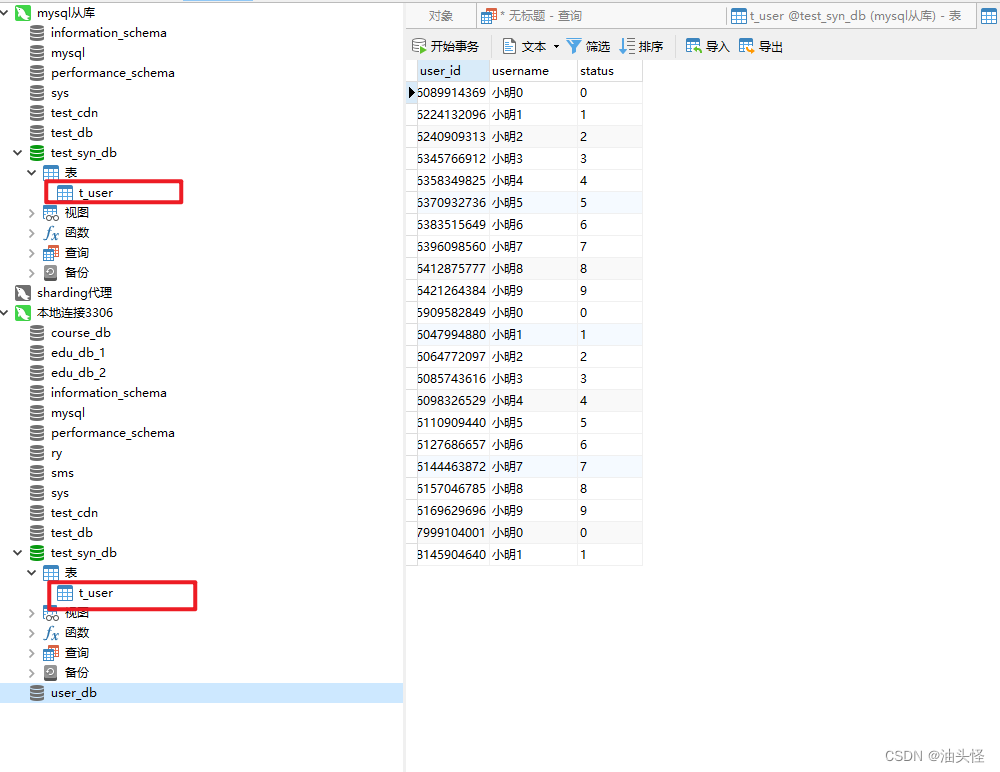
 Create databases and tables in the main library , Verify whether the slave library has been added synchronously
create database test_syn_db;

use user_db;

create table t_user(
   `user_id` bigint(20) primary key,
   `username` varchar(100) not null,
   `status` varchar(50) not null
);

边栏推荐
- 机器学习相关比赛网站
- Add traceid to the project log
- Tensorflow learning diary tflearn
- Now developers are beginning to do testing. Will there be no software testers in the future?
- OVSDB
- 元宇宙基础设施:WEB 3.0 chain33 优势分析
- JWT快速入门
- KDD2022 | 揭秘快手短视频推荐Re-ranking之谜,相关推荐新SOTA
- Deep learning model deployment
- How to close the high-level port
猜你喜欢

PyTorch

在线问题反馈模块实战(十四):实现在线答疑功能

Jmeter性能测试之命令行执行和生成测试报告

What is message subscription and publishing?
NFS service and Samba service deployment

Selenium: detailed explanation of browser crawler use (I)

Audio and video learning (10) -- PS streaming

ARIMA model for time series analysis and prediction
元宇宙基础设施:WEB 3.0 chain33 优势分析

Web page basic label
随机推荐
力扣(LeetCode)206. 反转链表(2022.07.25)
Vscode cannot start the problem solving idea
Regular expression rules and common regular expressions
程序环境和预处理
DCN (deep cross network) Trilogy
Deep learning model deployment
PHP environment deployment
爬虫->TpImgspider
Matlab-二/三维图上绘制黑点
What is bloom filter in redis series?
以太网交换安全
元宇宙基础设施:WEB 3.0 chain33 优势分析
Parameterization of JMeter performance test using CSV file
NLP natural language processing - Introduction to machine learning and natural language processing (3)
Now developers are beginning to do testing. Will there be no software testers in the future?
20220209 create a basic Servlet
Crawler data analysis
Enterprise private network construction and operation and maintenance
Common templates for web development
What is message subscription and publishing?