当前位置:网站首页>I use flask to write the website "one"
I use flask to write the website "one"
2022-07-01 09:01:00 【@Weidada (°) з °)-*】
Link to the original text
Welcome to my forum to discuss Flask Problems and experience in building Blog websites .www.ahoh.club.
All articles in this series will be synchronized here , If you don't want to follow bloggers , Come here and read !
Through this paper , You should master :
- Hello World Program building
- View function writing
- HTML Page rendering
- Front and rear end parameter transfer
- Jinja Template Foundation
Use Flask Write a blog system
Write it at the front
I am a graduate of computer science , But it is a pity that no one has entered the Internet industry . Until I left the sweatshop that millions of people despised forever , I found that I have always loved this industry . During the working time , I feel the loss of skills every day 、 The neglect of studies .
Now I just want to leave some code , Record the time of seven years , Time can take away my skills , But I can't stop my server !!
I'm also in C、C++、Java After all kinds of skills are lost , Just picked it up Python, In the learning process , I find many tutorials are very old , There are also wonderful tutorials , Since others are unreliable , Then I'll do it myself !!
I will deeply cultivate this series , Try to build it into a high-quality tutorial !
1. Hello ,Flask
In the process of programming learning , Everything begins with Hello World, I'm no exception , In the use of Flask Development Web Before application , I want to create a Hello World application .
First , Give the project an interesting name , As a good start . I now want to name my project :Ahoh, That is to say Ah! ~, Because I met BUG Yes, I can . ok , First create the project folder and enter the directory :
~$ mkdir ahoh #  Create project folder ( root directory )
~$ cd ahoh
in addition ,Python Application development is often run in a virtual environment , So I have to Ahoh Running in a virtual environment . Creating a virtual environment , And activate :
~/ahoh$ python3 -m venv venv #  Create a name called venv Virtual environment Directory
~/ahoh$ . venv/bin/activate  #  Activate the virtual environment
(venv)~/ahoh$                #  After successful activation , You can see that before the command line venv word
Since it's written Flask application , That installation Flask The bag must be indispensable :
(venv)~/ahoh$ pip install -U pip  #  to update pip
(venv)~/ahoh$ pip install flask   #  install Flask
OK, Now the environment is ready , You can start typing code happily .
First , I need a Flask Entry file , Follow the recommendations of the official documentation , Just name it app.py:
(venv)~/ahoh$ touch app.py
The simplest Flask project , Just need a file , my Hello World In the same way .
stay app.py Write the following code in the file :
# ~/ahoh/app.py
from flask import Flask

app = Flask(__name__)

@app.route('/')
def index():
	return ' Hello , Flask'
You can choose to use
Vim, You can also chooseVSCodeandPyCharmAnd other integrated development tools .
So far , Whole Hello World The project is finished , It's so easy .
I'm going to run my Hello World project , Just type... On the command line flask run:
(venv)~/ahoh$ flask run    #  start-up Flask application
 * Environment: production
   WARNING: This is a development server. Do not use it in a production deployment.
   Use a production WSGI server instead.
 * Debug mode: off
 * Running on http://127.0.0.1:5000/ (Press CTRL+C to quit)
If the output is the same as above , It's likely to be a success , This is the time , Just type in the browser 127.0.0.1:5000 You can visit the website !
Is your result the same as mine ? To write this small project , I also set up a project forum :www.ahoh.club , Welcome to !( It's not an advertisement , I'm the only one inside , Ha ha ha )
2. Hello ,HTML
In the last section , I have succeeded in making Hello World The project outputs Hello ,Flask, But this is by no means my final request .
What I want must be a fancy web page , That is to say HTML page .
Since we need to HTML, Then just write HTML Code , And pass /html Access new HTML page , stay app.py Add the following code in :
# ~/ahoh/app.py
@app.route('/html')
def html():
	html_str = """ <html> <head> <title>HTML page </title> </head> <body> <h1> My first one HTML page </h1> <hr> <p> Oh, My God , This is really a fantastic project , I promise God it's true . </p> </body> </html> """
	return html_str
then , Use flask run Command restart Ahoh project , Enter... In the browser 127.0.0.1/html, You can see a simple HTML Page !
Although we can already see HTML page , There is still a serious problem : What little fool would write in the business code HTML Well ?
Under normal circumstances ,HTML It's all stored in .html In the document , Isolated from business code , not so bad Flask I've already figured out how to deal with it .
stay Flask in , be-all HTML Files are stored by default in templates Under the folder , therefore , You need to create templates Folder , Then create... In the folder HTML file , Here I will create one hello.html file .
(venv)~/ahoh$ mkdir templates             #  establish templates Folder
(venv)~/ahoh$ touch templates/hello.html  #  establish html file
Then take the example above html_str Copy the value in to hello.html In file , And then make a little change , as follows :
<!-- ~/ahoh/templates/hello.html -->
<html>
<head>
    <title>HTML page </title>
</head>

<body>
    <h1> My second HTML page </h1>
    <hr>
    <p> How Are You, Savior </p>
</body>
</html>
First , stay app.py The header of the file is introduced render_template function :
from flask import render_template
then , stay app.py A new routing function is added to the , The access path is set as /hello:
# ~/ahoh/app.py
@app.route('/hello')
def hello():
	return render_template('hello.html')
such , It's done. hello.html Adding files , here , Use flask run Restart the service , Enter the address in the browser 127.0.0.1:5000/hello You can see the second HTML Page !

here , We used a new function render_template(), This function can render directly HTML file , We don't need to read from the file HTML Code and then return , Later we use Jinja Templates also need to be rendered through this function .
3. Hello ,Jinja
Up to subsection 2, We can already successfully use Flask Return to one HTML Page .
however , The current page is just a static HTML, The contents of the document are all dead , This is certainly not the result I want .
We're going to introduce Flask default HTML template engine Jinja.
stay templates In the folder , newly build jinja.html file , And then hello.html Copy the contents of , And make some changes .
as follows :
<!-- ~/ahoh/templates/jinja.html -->
<html>
<head>
    <title>Jinja page </title>
</head>

<body>
    <h1> My first one Jinja page </h1>
    <hr>
    <p> How Are You, {
   {name}}</p> <!-- Jinja  Use  {
    {}}  As a variable  -->
</body>
</html>
then , stay app.py Create a new routing function in ( The view function ), The following code is added :
# ~/ahoh/app.py
@app.route('/jinja')
def jinja():
    return render_template('jinja.html',name='Jinja') #  Use name='Jinja' towards HTML Pass in the value

here , We have successfully created a dynamic page , In the view function , modify name Value , front end HTML Will make corresponding changes .
and name Value , From the back end ( In the view ) To the front end (HTML On the page ) It's very simple , Only need render_templates() Just add a parameter to the function .
Is it over here ? Of course , No, , Although we have created a use Jinja Of HTML page , It also realizes the transfer of parameters from the back end to the front end , Can dynamically modify the page , however , How to pass parameters from the front end to the back end ?
stay templates Folder to create a new HTML page , Name it :para.html, And then jinja.html Copy the contents of , And make some changes , as follows :
<!-- ~/ahoh/templates/para.html -->
<html>
<head>
    <title> Parameter passing </title>
</head>

<body>
    <h1> Pass parameter page </h1>
    <hr>
    <p> How Are You, {
   {name}}</p>
</body>
</html>
And then in app.py Create a new view function in , stay app.py The following is added to the document :
# ~/ahoh/app.py
@app.route('/para')
@app.route('/para/<string:name>')
def para(name='God'):
    return render_template('para.html',name=name)
Now? , I can restart it Ahoh application , Then type... In the browser address bar 127.0.0.1:5000/para/ god , The effect is as follows :
This way of passing parameters is through URL Path passing , Perhaps most people are more familiar with using ?para_name=value The way , stay Flask It can also be used , However, it needs to be used in the view function request.args.get('para_name') To get the passed value .
Children's shoes you are interested in have a try , I can't leave a message for discussion .
4. Hello ,templates
Last , It is also the focus of this paper , Tired comrades were refreshed !Jinja Introduction of template .
After the first 3 The study of small sections , I believe children's shoes have been very clear , How to add a HTML page , And create the corresponding view function .
however , There is a question , When I create a HTML On the page , The code of a page should be completely written in the file .
And these codes , In most cases, it is repeated .
Usually , One page HTML The code is very long , If you create a new page every time, it will be a waste of time .
I want a mechanism similar to class inheritance , It can avoid repeated code , This is it. Jinja The template mechanism of .
First , I need to create a basic template first , Be similar to Python perhaps Java Base class of .
stay templates Under the folder , create a file base.html, The contents are as follows :
<!-- ~/ahoh/templates/base.html -->
<html>
<head>
	<!-- Jinja Use {% %} Define code blocks  -->
    {% block head %}
    <title>{
   {title}}</title>
    {% endblock %}
</head>
<body>
    {% block header %}
    <h1>{
   {header}}</h1>
    {% endblock %}
    <hr>
    {% block content %}
    <p> I want to be a good man. </p>
    {% endblock %}
</body>
</html>
here , The basic template file is set up .
This is the time , I just want to create a new page for displaying articles ,post.html.
First , stay template Create files under folders post.html, Then edit the file as follows :
<!-- ~/ahoh/templates/post.html -->
{% extends 'base.html' %}

<!-- head The block is not displayed on the current page , Indicates default inheritance  -->

<!-- header Block explicit reference , It means to overwrite the original code , Because nothing is written here , It's empty.  -->
{% block header %}
{% endblock %}

<!-- content It is also an explicit reference , But it did super keyword , Means to add... To the inheritance that inherits the original content . -->
{% block content %}
{
   {super()}}
<p> I became a bad guy. </p>
{% endblock %}
then , stay app.py Add /template View , The code is as follows :
@app.route('/template')
def template():
    return render_template('post.html',title="Template")
Restart the server , Then enter... In the address field 127.0.0.1:5000/template, The results are as follows :
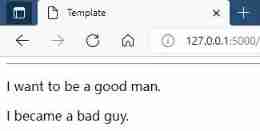
although ,base.html It's simple , But in post.html It is also shown in Jinja Three ways to use code blocks , That is, the default inheritance uses (head block )、 Cover (header block )、 Finally, add inheritance (content block ).
At the end
The main point of this article is Jinja template engine , In addition to the simple usage currently shown ,Jinja There are many other conveniences 、 Quick tips .
It will be shown one by one in the following articles .
in addition , Talk about the writing idea of this article , This series of articles will adopt the idea of not seeking to understand 、 Function implementation oriented introduction method .
And the reason for that is ,Flask The branches of full stack technology are too large , One by one interpretation is too complicated .
this paper , Including subsequent articles , Both aim to realize functions , Just introduce what you need to use , No horizontal development of the technology stack .
however , If there is something in the text that is not explained clearly , Please leave a message to correct , I will update documents in real time .
Besides , Welcome to my forum to discuss Flask Problems and experience in building Blog websites .www.ahoh.club.
All articles in this series will be synchronized here , If you don't want to follow bloggers , Come here and read !
边栏推荐
- FAQ | FAQ for building applications for large screen devices
- 软件工程师面试刷题网站、经验方法
- 19Mn6 German standard pressure vessel steel plate 19Mn6 Wugang fixed binding 19Mn6 chemical composition
- Performance improvement 2-3 times! The second generation Kunlun core server of Baidu AI Cloud was launched
- [interview brush 101] linked list
- Advanced level of C language pointer (Part 1)
- pcl_viewer命令
- ARM v7的体系结构A、R、M区别,分别应用在什么领域?
- Interrupt sharing variables with other functions and protection of critical resources
- LogBack
猜你喜欢

It is designed with high bandwidth, which is almost processed into an open circuit?

Nacos - 服务发现
Only in China! Alicloud container service enters the Forrester leader quadrant

Nacos - Configuration Management
![[interview brush 101] linked list](/img/52/d159bc66c0dbc44c1282a96cf6b2fd.png)
[interview brush 101] linked list

大型工厂设备管理痛点和解决方案

Microcomputer principle - bus and its formation

Advanced C language pointer (Part 2)

19Mn6 German standard pressure vessel steel plate 19Mn6 Wugang fixed binding 19Mn6 chemical composition

Screenshot tips
随机推荐
Shell脚本-字符串
R语言观察日志(part24)--初始化设置
LogBack
1. Connection between Jetson and camera
In the middle of the year, where should fixed asset management go?
It technology ebook collection
Ape anthropology topic 20 (the topic will be updated from time to time)
Shell script -read command: read data entered from the keyboard
Jetson Nano 安装TensorFlow GPU及问题解决
JCL and slf4j
pcl_ Viewer command
Shell script -select in loop
Embedded Engineer Interview frequently asked questions
Personal decoration notes
Flink interview questions
C语言指针的进阶(上篇)
LogBack
Redis source code learning (29), compressed list learning, ziplist C (II)
Ranking list of domestic databases in February, 2022: oceanbase regained the "three consecutive increases", and gaussdb is expected to achieve the largest increase this month
Shell脚本-case in 和正则表达式