当前位置:网站首页>Exploration of webots and ROS joint simulation (II): model import
Exploration of webots and ROS joint simulation (II): model import
2022-06-26 08:38:00 【Yu Getou】
Model import method :urdf File import
About sw How the model is generated urdf file , You can refer to another article of mine sw Model generation urdf Detailed flow of documents
1. install urdf2webots Function pack
pip install urdf2webots
2. Model transformation
Open the terminal in any path
python
from urdf2webots.importer import convert2urdf
#path finger urdf Path to file
convert2urdf('path')
#example
convert2urdf('/home/jozenlee/catkin_ws/src/xrobot_ros/xrobot/urdf/xrobot.urdf')
quit()
The corresponding file can be generated in the current terminal path 
3. Import simulation environment
 (1)Ctrl+Shift+A Add a node
(2) Place the model file in the corresponding folder according to the instructions , Specific path and world Storage path .
4. Model confirmation
This step is for some models that are initially in the down state ( That is, the coordinate system and webots The initial coordinate system does not coincide ), You can use the rotation axis to justify the model .
operation : Select the robot -> Press and hold the rotation symbol of the rotation axis with the mouse -> Drag the mouse to complete the rotation 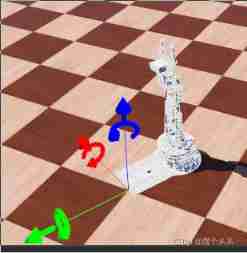
5. Parameter setting
(1) take Robot Fixed nodes , In this way, the node will be included in each open environment , And node information can be set .
Robot Right click on the node ->Convert to Base Node(s)
(2) For robotic arms , Can be base_link Physical properties of (physics) delete . It can ensure that the base of the mechanical arm will not move , Prevent dumping .
If you want to From scratch at webots Build a model , You can refer to this article
webots Robot modeling
边栏推荐
- opencv学习笔记二
- Esp8266wifi module tutorial: punctual atom atk-esp8266 for network communication, single chip microcomputer and computer, single chip microcomputer and mobile phone to send data
- Diode voltage doubling circuit
- Discrete device ~ resistance capacitance
- What are the conditions for Mitsubishi PLC to realize Ethernet wireless communication?
- leetcode2022年度刷题分类型总结(十二)并查集
- Reflection example of ads2020 simulation signal
- Leetcode22 summary of types of questions brushing in 2002 (XII) and collection search
- Jupyter的安装
- Relation extraction model -- spit model
猜你喜欢

Stream analysis of hevc learning

"System error 5 occurred when win10 started mysql. Access denied"
Transformers loading Roberta to implement sequence annotation task

(3) Dynamic digital tube

And are two numbers of S

Opencv learning notes 3

关于极客时间 | MySQL实战45讲的部分总结

鲸会务为活动现场提供数字化升级方案

opencv学习笔记二

(vs2019 MFC connects to MySQL) make a simple login interface (detailed)
随机推荐
leetcode2022年度刷题分类型总结(十二)并查集
Microcontroller from entry to advanced
Recovering the system with Clonezilla USB disk
三菱PLC若想实现以太网无线通讯,需要具备哪些条件?
Whale conference one-stop intelligent conference system helps organizers realize digital conference management
Detailed explanation of SOC multi-core startup process
Idea update
Vs2019-mfc setting edit control and static text font size
Remote centralized control of distributed sensor signals using wireless technology
KNN resolution
FFmpeg音视频播放器实现
Jupyter的安装
optee中支持的时间函数
Using transformers of hugging face to realize named entity recognition
(1) Turn on the LED
鲸会务一站式智能会议系统帮助主办方实现数字化会议管理
[已解决]setOnNavigationItemSelectedListener()被弃用
STM32 project design: smart home system design based on stm32
73b2d wireless charging and receiving chip scheme
STM32 porting mpu6050/9250 DMP official library (motion_driver_6.12) modifying and porting DMP simple tutorial