当前位置:网站首页>Wechat applet -picker component is repackaged and the disabled attribute is added -- above
Wechat applet -picker component is repackaged and the disabled attribute is added -- above
2022-06-26 13:36:00 【woowen!】
Premise : In the wechat applet , Use wechat acoustic components picker when , Only for the present picker Set up disabled Ash setting function , But it can't make picker A specific option in the component is grayed out , Sometimes this situation will not apply to some functions !!
So here is a new package custom-picker Components ---- similar picker Components , However, it has the function of graying out options
Click here : Wechat applet -picker Component reseal increase disabled attribute -- Below
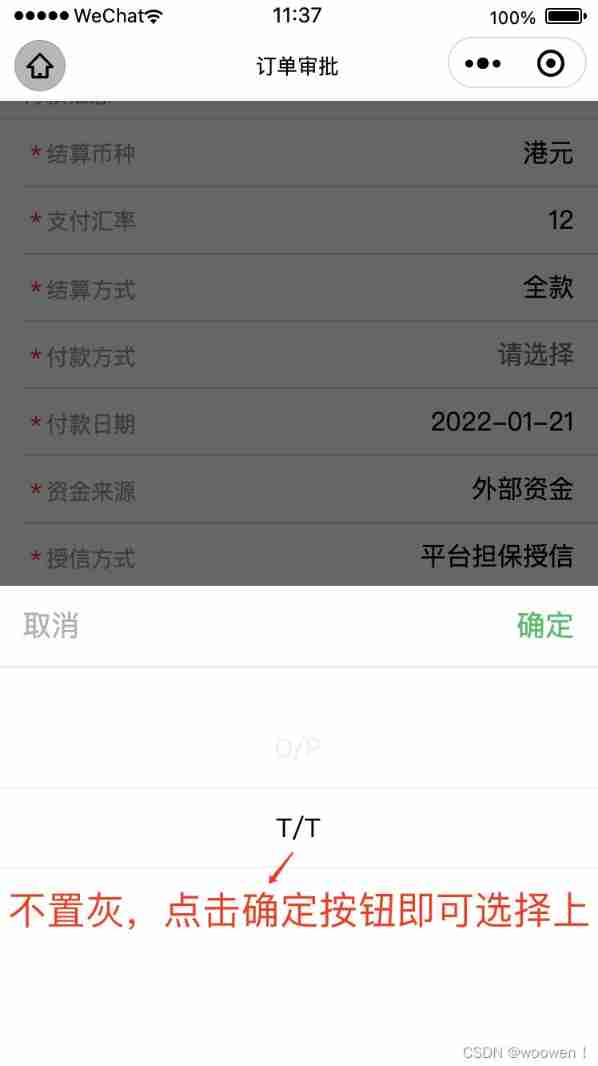
As shown in the figure :
When picker When one of the items is not selectable , It will be as shown in the figure below , The color is grey , And the user cannot click to select .

The code starts here :


The following is in the parent component orderInfo Using subcomponents in custom-picker
// orderInfo.wxml
<view class="cell-section">
    <text class="cell-title isrequired"> payment method </text>
    <view class="cell-input" bindtap="showCustomPicker" data-id="payWayList">
             <custom-picker
             id='custom-picker-payWayList'
             bindcustomEvent="bindcustomPickerChange"
             value="{
   {code}}"
             range="{
   {selectList.payWayList}}"
             range-key="nameZH"
             >
                <text class="{
   {form.paymentMethod ? '':'gray'}} weui-input">{
   {form.paymentMethod || ' Please select '}}</text>
             </custom-picker>
     </view>
</view>


<view class="cell-section">
            <text class="cell-title isrequired"> Credit granting method </text>
            <view class="cell-input" bindtap="showCustomPicker" data-id="creditMethodList">
              <custom-picker
                id='custom-picker-creditMethodList'
                bindcustomEvent="bindcustomPickerChange"
                value="{
   {code}}"
                range="{
   {selectList.creditMethodList}}"
                range-key="nameZH">
                <text class="{
   {form.creditMethod ? '':'gray'}} weui-input">{
   {form.creditMethod || ' Please select '}}</text>
              </custom-picker>
            </view>
</view>
️ Use here this.selectComponent() Method to get the instance of the sub component
Because the page uses multiple custom-picker Components , So each custom-picker Component's id Needs must be unique ! In this way, the instance objects of each sub component can be obtained separately
// orderInfo.js

Page({
    //  Trigger customPicker.showPicker event , Show the selection box
    showCustomPicker(e){
    //  Communication between components , The parent component can be this.selectComponent Method to get the child component instance object , In this way, you can directly access any data and methods of the component .
    const customPicker = this.selectComponent(`#custom-picker-${e.currentTarget.dataset.id}`) //  Get the sub component instance object
    customPicker.showPicker()
  },

    //  Here is the callback event of the custom component
    bindcustomPickerChange(e){
        //  adopt this.setData Store the data you want
        console.log(e)
        const eValue = e.detail
         By getting the lower scale value of the corresponding option , Do analysis and take value

        this.setData({
            ...
        })

    }

})
// orderInfo.wxss
.isrequired::before{
content: '*';
display: block;
color: #f00;
position: absolute;
left: 10rpx;
}
.cell-section {
position: relative;
display: flex;
border-bottom: 1rpx solid #D9D9D9;
margin-left: 15px;
}
.cell-title {
margin-top: .77em;
margin-bottom: .3em;
padding-left: 15px;
padding-right: 15px;
color: #999999;
font-size: 14px;
}
.cell-input {
flex: 2;
padding-right: 15px;
text-align: right;
}
.gray {
color: #6e6d6d;
} ---- File directory
// orderInfo.json
{
  "navigationBarTitleText": " Order details ",
  "usingComponents": {
    "custom-picker": "../components/customPicker/index"
  }
}
Here is the following :
Wechat applet -picker Component reseal increase disabled attribute -- Below :custom-picker Package of components  https://blog.csdn.net/q1ngqingsky/article/details/122621678
边栏推荐
- DataGrip配置的连接迁移
- Hdu1724[Simpson formula for integral]ellipse
- There are many contents in the widget, so it is a good scheme to support scrolling
- Calculate the distance between two points (2D, 3D)
- A collection of common tools for making we media videos
- 7-16 monetary system I
- [node.js] MySQL module
- Nexys A7开发板资源使用技巧
- MongoDB系列之Window环境部署配置
- ES基于Snapshot(快照)的数据备份和还原
猜你喜欢

ES中索引别名(alias)的到底有什么用
![[how to connect the network] Chapter 2 (middle): sending a network packet](/img/5f/602c59d3a7ee1154c7410fb2fcfc41.png)
[how to connect the network] Chapter 2 (middle): sending a network packet

Bifu divides EtherCAT module into multiple synchronization units for operation -- use of sync units

Included angle of 3D vector

Common faults of MySQL database - forgetting database password

防火墙介绍
![Hdu1724[Simpson formula for integral]ellipse](/img/57/fb5098e150b5f3d91a5d0983a336ee.png)
Hdu1724[Simpson formula for integral]ellipse

ES6 module

创建一个自己的跨域代理服务器

Prototype
随机推荐
[how to connect the network] Chapter 1: the browser generates messages
Learn how to develop owl components by hand (7): practical use of owl projects
imagecopymerge
【MySQL从入门到精通】【高级篇】(二)MySQL目录结构与表在文件系统中的表示
MediaPipe手势(Hands)
2、并行接口、协议和相关芯片介绍(8080、8060)
Map value
Mysql database explanation (V)
去某东面试遇到并发编程问题:如何安全地中断一个正在运行的线程
MySQL数据库讲解(三)
Adapter mode
【Proteus仿真】Arduino UNO按键启停 + PWM 调速控制直流电机转速
Arcpy -- use of insertlayer() function: adding layers to map documents
Applicable and inapplicable scenarios of mongodb series
Firewall introduction
嵌入式virlog代码运行流程
G - Cow Bowling
Uva11582 [fast power]colossal Fibonacci numbers!
MySQL数据库讲解(五)
Ring queue PHP