当前位置:网站首页>深度学习100例 | 第41天:语音识别 - PyTorch实现
深度学习100例 | 第41天:语音识别 - PyTorch实现
2022-06-12 00:35:00 【K同学啊】

我的环境:
- 语言环境:Python3.8
- 编译器:Jupyter Lab
- 深度学习环境:
- torch==1.10.0+cu113
- torchvision==0.11.1+cu113
- 创作平台: 极链AI云
- 创作教程: 操作手册

深度学习环境配置教程:小白入门深度学习 | 第四篇:配置PyTorch环境
往期精彩内容
- 深度学习100例 | 第1例:猫狗识别 - PyTorch实现
- 深度学习100例 | 第2例:人脸表情识别 - PyTorch实现
- 深度学习100例 | 第3天:交通标志识别 - PyTorch实现
- 深度学习100例 | 第4例:水果识别 - PyTorch实现
- 选自专栏:《深度学习100例》Pytorch版
- 镜像专栏:《深度学习100例》TensorFlow版
我们的代码流程图如下所示: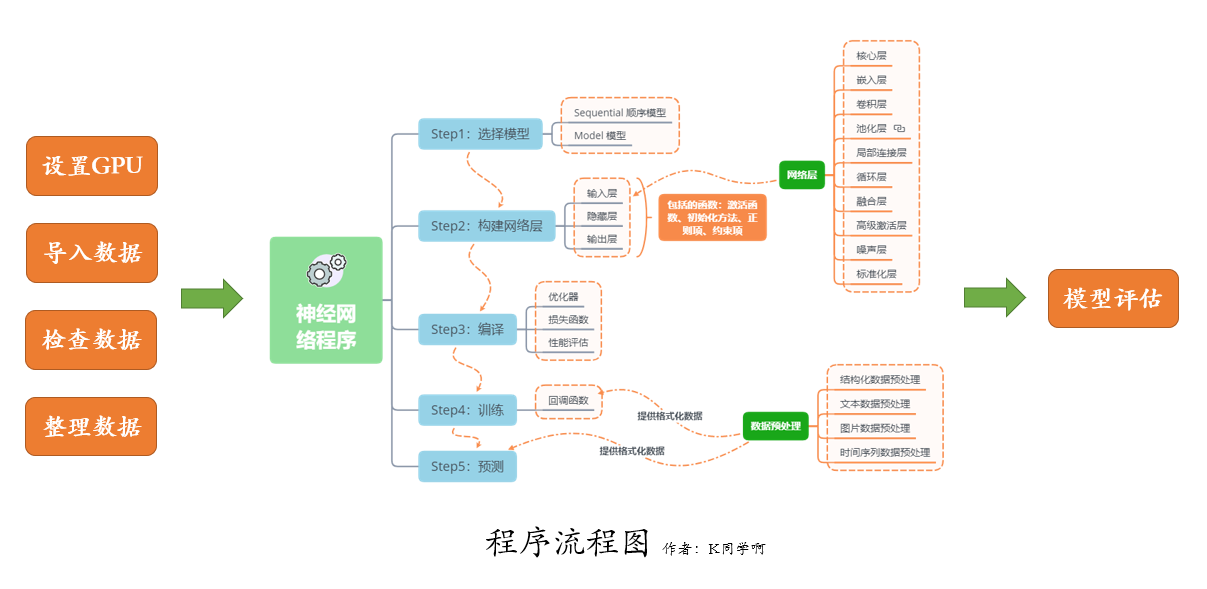

一、导入数据
我将使用 torchaudio 来下载 SpeechCommands 数据集,它是由不同人录制的 35 个命令的语音数据集。在这个数据集中,所有的音频文件都大约 1 秒长(大约 16000 个时间帧长)。
实际的加载和格式化步骤发生在访问数据点时,torchaudio 负责将音频文件转换为张量。如果想直接加载音频文件, 可以使用torchaudio.load()。它返回一个元组,其中包含新创建的张量以及音频文件的采样频率(SpeechCommands 为 16kHz)。
import torch
import torch.nn as nn
import torch.nn.functional as F
import torch.optim as optim
import torchaudio
import matplotlib.pyplot as plt
import IPython.display as ipd
from tqdm import tqdm
让我们检查一下 CUDA GPU 是否可用并选择我们的设备。在 GPU 上运行网络将大大减少训练/测试运行时间。
device = torch.device("cuda" if torch.cuda.is_available() else "cpu")
print(device)
cuda
1. 下载数据
from torchaudio.datasets import SPEECHCOMMANDS
import os

class SubsetSC(SPEECHCOMMANDS):
    def __init__(self, subset: str = None):
        super().__init__("./", download=True)

        def load_list(filename):
            filepath = os.path.join(self._path, filename)
            with open(filepath) as fileobj:
                return [os.path.normpath(os.path.join(self._path, line.strip())) for line in fileobj]

        if subset == "validation":
            self._walker = load_list("validation_list.txt")
        elif subset == "testing":
            self._walker = load_list("testing_list.txt")
        elif subset == "training":
            excludes = load_list("validation_list.txt") + load_list("testing_list.txt")
            excludes = set(excludes)
            self._walker = [w for w in self._walker if w not in excludes]

# 划分训练集与测试集
train_set = SubsetSC("training")
test_set  = SubsetSC("testing")

waveform, sample_rate, label, speaker_id, utterance_number = train_set[0]
2. 数据展示
SpeechCommands 数据集中的数据点是由波形(音频信号)、采样率、话语(标签)、说话者 ID、话语数组成的元组。
print("Shape of waveform: {}".format(waveform.size()))
print("Sample rate of waveform: {}".format(sample_rate))

plt.plot(waveform.t().numpy());
Shape of waveform: torch.Size([1, 16000])
Sample rate of waveform: 16000

labels = sorted(list(set(datapoint[2] for datapoint in train_set)))
print(labels)
['backward', 'bed', 'bird', 'cat', 'dog', 'down', 'eight', 'five', 'follow', 'forward', 'four', 'go', 'happy', 'house', 'learn', 'left', 'marvin', 'nine', 'no', 'off', 'on', 'one', 'right', 'seven', 'sheila', 'six', 'stop', 'three', 'tree', 'two', 'up', 'visual', 'wow', 'yes', 'zero']
35 个音频标签分别是用户说出的命令
waveform_first, *_ = train_set[0]
ipd.Audio(waveform_first.numpy(), rate=sample_rate)

waveform_second, *_ = train_set[1]
ipd.Audio(waveform_second.numpy(), rate=sample_rate)

waveform_last, *_ = train_set[-1]
ipd.Audio(waveform_last.numpy(), rate=sample_rate)

二、数据准备工作
1. 格式化数据
对于波形,我们对音频进行下采样以加快处理速度,而不会损失太多的分类能力。
new_sample_rate = 8000

transform   = torchaudio.transforms.Resample(orig_freq=sample_rate, new_freq=new_sample_rate)
transformed = transform(waveform)

ipd.Audio(transformed.numpy(), rate=new_sample_rate)

我们使用标签列表中的索引对每个单词进行编码。
2. 标签的编码与还原
def label_to_index(word):
    # Return the position of the word in labels
    return torch.tensor(labels.index(word))

def index_to_label(index):
    # Return the word corresponding to the index in labels
    # This is the inverse of label_to_index
    return labels[index]

word_start = "yes"
index = label_to_index(word_start)
word_recovered = index_to_label(index)

print(word_start, "-->", index, "-->", word_recovered)
yes --> tensor(33) --> yes
3. 构建数据加载器
def pad_sequence(batch):
    # Make all tensor in a batch the same length by padding with zeros
    batch = [item.t() for item in batch] # 将Tensor进行转置
    # 用0填充张量至等长度,.pad_sequence()用法可参考:https://blog.csdn.net/qq_38251616/article/details/125222012
    batch = torch.nn.utils.rnn.pad_sequence(batch, batch_first=True, padding_value=0.)
    return batch.permute(0, 2, 1)

def collate_fn(batch):
    # A data tuple has the form:
    # waveform, sample_rate, label, speaker_id, utterance_number
    tensors, targets = [], []
    # Gather in lists, and encode labels as indices
    for waveform, _, label, *_ in batch:
        tensors += [waveform]
        targets += [label_to_index(label)]

    # Group the list of tensors into a batched tensor
    tensors = pad_sequence(tensors)
    targets = torch.stack(targets)
    return tensors, targets

batch_size = 256

if device == "cuda":
    num_workers = 1
    pin_memory = True
else:
    num_workers = 0
    pin_memory = False

# 关于torch.utils.data.DataLoader()用法不清楚的同学,可以参考文章:
# https://blog.csdn.net/qq_38251616/article/details/125221503
train_loader = torch.utils.data.DataLoader(
    train_set,
    batch_size=batch_size,
    shuffle=True,
    collate_fn=collate_fn,
    num_workers=num_workers,
    pin_memory=pin_memory,
)
test_loader = torch.utils.data.DataLoader(
    test_set,
    batch_size=batch_size,
    shuffle=False,
    drop_last=False,
    collate_fn=collate_fn,
    num_workers=num_workers,
    pin_memory=pin_memory,
)
for X, y in test_loader:
    print("Shape of X [N, C, H, W]: ", X.shape)
    print("Shape of y: ", y.shape, y.dtype)
    break
Shape of X [N, C, H, W]:  torch.Size([256, 1, 16000])
Shape of y:  torch.Size([256]) torch.int64
三、构建模型
在本教程中,我们将使用卷积神经网络来处理原始音频数据。通常对音频数据应用更高级的转换,但 CNN 可用于准确处理原始数据。具体架构仿照本文描述的M5网络架构。模型处理原始音频数据的一个重要方面是其第一层过滤器的感受野。我们模型的第一个滤波器长度为 80,因此在处理以 8kHz 采样的音频时,感受野约为 10ms(在 4kHz 时约为 20ms)。这个大小类似于经常使用从 20 毫秒到 40 毫秒的感受野的语音处理应用程序。
class M5(nn.Module):
    def __init__(self, n_input=1, n_output=35, stride=16, n_channel=32):
        super().__init__()
        self.conv1 = nn.Conv1d(n_input, n_channel, kernel_size=80, stride=stride)
        self.bn1 = nn.BatchNorm1d(n_channel)
        self.pool1 = nn.MaxPool1d(4)
        self.conv2 = nn.Conv1d(n_channel, n_channel, kernel_size=3)
        self.bn2 = nn.BatchNorm1d(n_channel)
        self.pool2 = nn.MaxPool1d(4)
        self.conv3 = nn.Conv1d(n_channel, 2 * n_channel, kernel_size=3)
        self.bn3 = nn.BatchNorm1d(2 * n_channel)
        self.pool3 = nn.MaxPool1d(4)
        self.conv4 = nn.Conv1d(2 * n_channel, 2 * n_channel, kernel_size=3)
        self.bn4 = nn.BatchNorm1d(2 * n_channel)
        self.pool4 = nn.MaxPool1d(4)
        self.fc1 = nn.Linear(2 * n_channel, n_output)

    def forward(self, x):
        x = self.conv1(x)
        x = F.relu(self.bn1(x))
        x = self.pool1(x)
        x = self.conv2(x)
        x = F.relu(self.bn2(x))
        x = self.pool2(x)
        x = self.conv3(x)
        x = F.relu(self.bn3(x))
        x = self.pool3(x)
        x = self.conv4(x)
        x = F.relu(self.bn4(x))
        x = self.pool4(x)
        x = F.avg_pool1d(x, x.shape[-1])
        x = x.permute(0, 2, 1)
        x = self.fc1(x)
        return F.log_softmax(x, dim=2)

model = M5(n_input=transformed.shape[0], n_output=len(labels))
model.to(device)
print(model)

def count_parameters(model):
    return sum(p.numel() for p in model.parameters() if p.requires_grad)

n = count_parameters(model)
print("Number of parameters: %s" % n)
M5(
  (conv1): Conv1d(1, 32, kernel_size=(80,), stride=(16,))
  (bn1): BatchNorm1d(32, eps=1e-05, momentum=0.1, affine=True, track_running_stats=True)
  (pool1): MaxPool1d(kernel_size=4, stride=4, padding=0, dilation=1, ceil_mode=False)
  (conv2): Conv1d(32, 32, kernel_size=(3,), stride=(1,))
  (bn2): BatchNorm1d(32, eps=1e-05, momentum=0.1, affine=True, track_running_stats=True)
  (pool2): MaxPool1d(kernel_size=4, stride=4, padding=0, dilation=1, ceil_mode=False)
  (conv3): Conv1d(32, 64, kernel_size=(3,), stride=(1,))
  (bn3): BatchNorm1d(64, eps=1e-05, momentum=0.1, affine=True, track_running_stats=True)
  (pool3): MaxPool1d(kernel_size=4, stride=4, padding=0, dilation=1, ceil_mode=False)
  (conv4): Conv1d(64, 64, kernel_size=(3,), stride=(1,))
  (bn4): BatchNorm1d(64, eps=1e-05, momentum=0.1, affine=True, track_running_stats=True)
  (pool4): MaxPool1d(kernel_size=4, stride=4, padding=0, dilation=1, ceil_mode=False)
  (fc1): Linear(in_features=64, out_features=35, bias=True)
)
Number of parameters: 26915
我们将使用本文中使用的相同优化技术,即权重衰减设置为 0.0001 的 Adam 优化器。起初,我们将以 0.01 的学习率进行训练,但scheduler在 20 个 epoch 之后的训练期间,我们将使用 a 将其降低到 0.001。
optimizer = optim.Adam(model.parameters(), lr=0.01, weight_decay=0.0001)
scheduler = optim.lr_scheduler.StepLR(optimizer, step_size=20, gamma=0.1)  # reduce the learning after 20 epochs by a factor of 10
四、训练模型
现在让我们定义一个训练函数,它将我们的训练数据输入模型并执行反向传递和优化步骤。对于训练,我们将使用的损失是负对数似然。然后将在每个 epoch 之后对网络进行测试,以查看在训练期间准确性如何变化。
# 为加速代码运行,训练过程中不计算准确率。
def train(model, epoch, log_interval):
    model.train()
    for batch_idx, (data, target) in enumerate(train_loader):

        data   = data.to(device)
        target = target.to(device)

        # apply transform and model on whole batch directly on device
        data   = transform(data)
        output = model(data)

        # 计算 loss
        loss = F.nll_loss(output.squeeze(), target)

        optimizer.zero_grad()
        loss.backward()
        optimizer.step()

        # 打印训练进度
        if batch_idx % log_interval == 0:
            print(f"Train Epoch: {
      epoch} [{
      batch_idx * len(data)}/{
      len(train_loader.dataset)} ({
      100. * batch_idx / len(train_loader):.0f}%)]\tLoss: {
      loss.item():.6f}")

        # 记录 loss
        losses.append(loss.item())
# 计算预测正确的数目
def number_of_correct(pred, target):
    return pred.squeeze().eq(target).sum().item()

# 找到最有可能的标签
def get_likely_index(tensor):
    return tensor.argmax(dim=-1)

def test(model, epoch):
    model.eval()
    correct = 0
    for data, target in test_loader:

        data = data.to(device)
        target = target.to(device)

        # apply transform and model on whole batch directly on device
        data = transform(data)
        output = model(data)

        pred = get_likely_index(output)
        correct += number_of_correct(pred, target)

    print(f"\nTest Epoch: {
      epoch}\tAccuracy: {
      correct}/{
      len(test_loader.dataset)} ({
      100. * correct / len(test_loader.dataset):.0f}%)\n")
最后,我们可以训练和测试网络。我们将网络训练 10 个 epoch,然后降低学习率并再训练 10 个 epoch。网络将在每个 epoch 之后进行测试,以查看在训练期间准确度如何变化。
log_interval = 100  # 每100个batch打印一次训练结果
n_epoch = 2

losses = []

# The transform needs to live on the same device as the model and the data.
transform = transform.to(device)

for epoch in range(1, n_epoch + 1):
    train(model, epoch, log_interval)
    test(model, epoch)
    scheduler.step()
Train Epoch: 1 [0/84843 (0%)]	Loss: 3.655148
Train Epoch: 1 [25600/84843 (30%)]	Loss: 2.012523
Train Epoch: 1 [51200/84843 (60%)]	Loss: 1.584120
Train Epoch: 1 [76800/84843 (90%)]	Loss: 1.249869

Test Epoch: 1	Accuracy: 6962/11005 (63%)

Train Epoch: 2 [0/84843 (0%)]	Loss: 0.964569
Train Epoch: 2 [25600/84843 (30%)]	Loss: 1.161757
Train Epoch: 2 [51200/84843 (60%)]	Loss: 1.007113
Train Epoch: 2 [76800/84843 (90%)]	Loss: 0.843660

Test Epoch: 2	Accuracy: 7219/11005 (66%)
1. 训练过程中的loss
plt.plot(losses)
plt.xlabel("Step", fontsize=12)
plt.ylabel("Loss", fontsize=12)
plt.title("Training Loss")
plt.show()

五、测试模型
def predict(tensor):
    tensor = tensor.to(device)
    tensor = transform(tensor)
    tensor = model(tensor.unsqueeze(0))
    tensor = get_likely_index(tensor)
    tensor = index_to_label(tensor.squeeze())
    return tensor

waveform, sample_rate, utterance, *_ = train_set[-1]
ipd.Audio(waveform.numpy(), rate=sample_rate)

print(f"真实值: {
      utterance}. 预测值: {
      predict(waveform)}.")
真实值: zero. 预测值: zero.
for i, (waveform, sample_rate, utterance, *_) in enumerate(test_set):
    output = predict(waveform)
    if output != utterance:
        ipd.Audio(waveform.numpy(), rate=sample_rate)
        print(f"Data point #{
      i}. 真实值: {
      utterance}. 预测值: {
      output}.")
        break
else:
    print("All examples in this dataset were correctly classified!")
    print("In this case, let's just look at the last data point")
    ipd.Audio(waveform.numpy(), rate=sample_rate)
    print(f"Data point #{
      i}. 真实值: {
      utterance}. 预测值: {
      output}.")
Data point #1. 真实值: right. 预测值: no.

边栏推荐
- IP编址概述
- LabVIEW Arduino电子称重系统(项目篇—1)
- 关于接口测试的那些“难言之隐”
- 【juc学习之路第7天】ReentrantLock与ReentrantReadWriteLock
- Share an open source, free and powerful video player library
- 926. Flip String to Monotone Increasing
- leetcodeSQL:614. Secondary followers
- 设计消息队列存储消息数据的 MySQL 表格
- repeat_ L2-007 family property_ set
- [flume] notes
猜你喜欢

What are the software development processes of the visitor push mall?
![Divide the array into three equal parts [problem analysis]](/img/0b/856fcceb0373baa8acb46e9ae2c861.png)
Divide the array into three equal parts [problem analysis]

Unified certification center oauth2 high availability pit

Anfulai embedded weekly report (issue 254): February 21, 2022 to February 27, 2022
Jeecgboot 3.1.0 release, enterprise low code platform based on code generator

点云库pcl从入门到精通学习记录 第八章

Cube technology interpretation | detailed explanation of cube applet Technology
愉快无负担的跨进程通信方式

DPT-FSNET: DUAL-PATH TRANSFORMER BASED FULL-BAND AND SUB-BAND FUSION NETWORK FOR SPEECH ENHANCEMENT

Seven trends in test automation that need attention
随机推荐
The road of global evolution of vivo global mall -- multilingual solution
Optimization method of win7 FPS
Flink CDC + Hudi 海量数据入湖在顺丰的实践
Zhangxiaobai takes you to install MySQL 5.7 on Huawei cloud ECS server
Mingdeyang FPGA development board xilinx-k7 core board kinex7k325 410t industrial grade
Exploration of qunar risk control safety products
Experiment 6 constructor + copy construction
C语言练习:ESP32 BLE低功耗蓝牙服务端数据打包和客户端数据解析
win7 fps优化的方法
【juc学习之路第5天】引用原子类和属性修改器
Industrial control system ICs
DPT-FSNET: DUAL-PATH TRANSFORMER BASED FULL-BAND AND SUB-BAND FUSION NETWORK FOR SPEECH ENHANCEMENT
Month selector disable data after the current month to include the current month
ironSource  New functions are released, and developers can adjust advertising strategies in real time in the same session
730.Count Different Palindromic Subsequences
干货|一次完整的性能测试,测试人员需要做什么?
Design principle [Demeter's Law]
Collation of common array functions
组态王如何利用无线Host-Link通信模块远程采集PLC数据?
Web keyboard input method application development guide (2) -- keyboard events