当前位置:网站首页>如何理解 SAP UI5 的 sap.ui.define 函数
如何理解 SAP UI5 的 sap.ui.define 函数
2022-08-04 18:41:00 【华为云】
随着 1.28 版本中 sap.ui.define 函数的引入,SAPUI5 引入了对异步模块定义 (AMD) 的支持。AMD 是 Asynchronous Module Definition 的缩写。
所谓模块(Module),即是可以在浏览器中加载和执行的 JavaScript 文件。
异步模块定义 (AMD) 是一种 JavaScript API,它指定了一种定义模块及其依赖项的方式,以便它们可以异步加载而无需担心加载顺序。
下面我们通过一个具体的例子来讲解 sap.ui.define 的工作原理。
Create an Application Project for SAPUI5
打开 Eclipse 并转到菜单选项,文件 -> 新建 -> 其他…。 在 New 窗口中,打开节点 SAPUI5 Application Development 并选择 Application Project 选项。 单击下一步按钮。
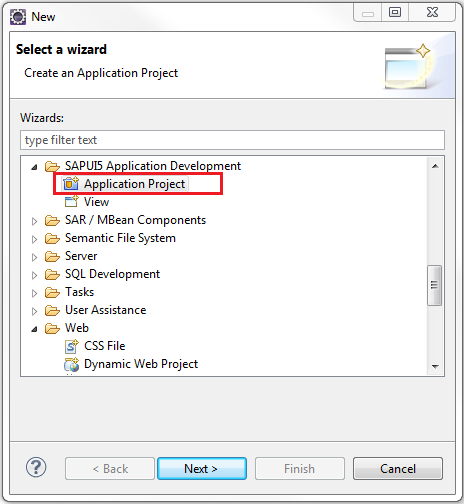
为项目提供一个名称。 我们称之为 sapui5.amd.demo。 选择库 sap.m 并选中 Create an Initial View 选项。 单击下一步按钮。

在下一个窗口中,为视图提供一个名称。 我们称其为主要的。 选择 Development Paradigm 作为 XML。 这将创建一个 XML 视图。 单击完成按钮。
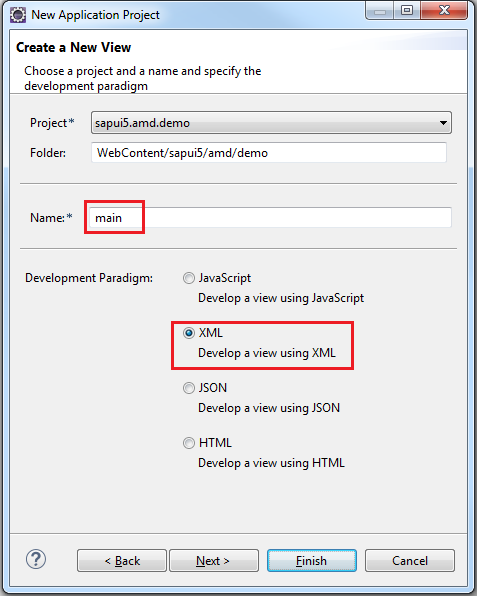
创建好的项目具有如下的层级结构: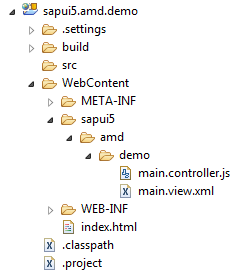
Modify index.html
打开 index.html 文件并使用以下代码更新它。 Bootstrap 脚本部分已被修改,以防止过早加载 sap.m 库。 此外,出于类似原因,创建 sap.m.App 实例的自动生成代码已被注释掉。 当 index.html 在浏览器中运行时,for 循环会打印出加载库模块的初始列表。
<!DOCTYPE HTML><html><head><meta http-equiv="X-UA-Compatible" content="IE=edge"><meta http-equiv='Content-Type' content='text/html;charset=UTF-8' /><!-- Replace this with the modified bootstrap section below <script src="resources/sap-ui-core.js" id="sap-ui-bootstrap" data-sap-ui-libs="sap.m" data-sap-ui-theme="sap_bluecrystal"></script>--><!-- Do not load the sap.m library right now. We'll do it asynchronously in sap.ui.define --><script src="resources/sap-ui-core.js" id="sap-ui-bootstrap" data-sap-ui-theme="sap_bluecrystal"> </script><script> sap.ui.localResources("sapui5.amd.demo"); /* * Since we are not creating an instance of sap.m.App to * avoid the loading of sap.m at this stage, comment this out. */ /* var app = new sap.m.App({initialPage:"idmain1"}); var page = sap.ui.view({id:"idmain1", viewName:"sapui5.amd.demo.main", type:sap.ui.core.mvc.ViewType.XML}); app.addPage(page); app.placeAt("content"); */ // Get reference to the Core object var oCore = sap.ui.getCore(); // Place the XML view in the body of this page oCore.attachInit(function() { sap.ui.core.mvc.XMLView({ viewName : "sapui5.amd.demo.main", }).placeAt("content"); }); // Set the log level to INFO jQuery.sap.log.setLevel(jQuery.sap.log.Level.INFO); // Print out the list of all currently loaded libraries jQuery.sap.log.info("--- Loaded Libraries in INDEX.HTML ---"); var oLibMap = oCore.getLoadedLibraries(); for ( var key in oLibMap) { jQuery.sap.log.info("Library name", key); }</script></head><body class="sapUiBody" role="application"> <div id="content"></div></body></html>Modify main.view.xml
打开 main.view.xml 文件并使用以下代码更新它。 它几乎与 Eclipse 中自动生成的代码相同,只是添加了标题。
<core:View xmlns:core="sap.ui.core" xmlns:mvc="sap.ui.core.mvc" xmlns="sap.m" controllerName="sapui5.amd.demo.main" xmlns:html="http://www.w3.org/1999/xhtml"> <Page title="Asynchronous Module Definition Demo"> <content> </content> </Page> </core:View>Modify main.controller.js
控制器是 AMD 相关操作发生的地方。 打开 main.controller.js 文件并使用下面给出的代码更新它。 这里要注意的重要变化是在第一行中,函数调用 sap.ui.controller () 已被注释掉,以便为 AMD 函数 sap.ui.define () 让路,它具有以下语法:
sap.ui.define(sModuleName?, aDependencies?, vFactory, bExport?)
(1) sModuleName 是一个可选参数,它是正在定义的模块的名称。 如果省略,它将替换为用于请求模块的名称。 所以,如果一个模块的名字比如说“LoginModule”没有作为参数传递,它可以被请求为“sap/login/LoginMudule”,因为它存储在一个文件“sap/login/LoginModule.js”中。
(2) aDependencies 是作为依赖项的模块名称的字符串数组。
这个数组包含了在确定当前定义的模块的值之前需要加载的依赖模块。
(3) vFactory 是一个强制性的工厂函数,用于计算模块的值。
每个依赖模块名称都作为参数传递给这个工厂函数,其顺序与它们在字符串数组中指定的顺序相同。
(4) bExport 是一个布尔变量,保留供 SAP 使用。
在下面的示例中,没有传递模块名称。 并且依赖字符串数组 包含模块名称 [“sap / ui / core / mvc / Controller”, “sap / m / MessageToast”]。 然后将这些名称作为参数(以相同的顺序,即Controller、MessageToast)传递给工厂函数。
控制器的 onInit 生命周期方法中的代码打印出所有已加载库的列表。
最后 onAfterRendering 函数使用 sap.m.MessageToast.show () 在屏幕上显示一个简短的 Hello World 消息。
//sap.ui.controller("sapui5.amd.demo.main", {sap.ui.define([ "sap/ui/core/mvc/Controller", "sap/m/MessageToast" ], function(Controller, MessageToast) { "use strict"; return Controller.extend("sapui5.amd.demo.main", { /*** Called when a controller is instantiated and its View controls (if available) are already created.* Can be used to modify the View before it is displayed, to bind event handlers and do other one-time initialization.* @memberOf sapui5.amd.demo.main*/ onInit: function() { // Get reference to the Core object var oCore = sap.ui.getCore(); // Print out the list of all currently loaded libraries jQuery.sap.log.info("--- Loaded Libraries in INIT of controller ---"); var oLibMap = oCore.getLoadedLibraries(); for (var key in oLibMap) { jQuery.sap.log.info("Library name", key); } },/*** Similar to onAfterRendering, but this hook is invoked before the controller's View is re-rendered* (NOT before the first rendering! onInit() is used for that one!).* @memberOf sapui5.amd.demo.main*/// onBeforeRendering: function() {//// },/*** Called when the View has been rendered (so its HTML is part of the document). Post-rendering manipulations of the HTML could be done here.* This hook is the same one that SAPUI5 controls get after being rendered.* @memberOf sapui5.amd.demo.main*/ onAfterRendering: function() { MessageToast.show("Hello World!"); },/*** Called when the Controller is destroyed. Use this one to free resources and finalize activities.* @memberOf sapui5.amd.demo.main* */// onExit: function() {//// } });});注意:“use strict”这个文字表达式是由 JavaScript 1.8.5 (ECMAScript 5) 引入的。 它告诉浏览器以所谓的“严格模式”执行代码。 严格模式有助于在开发时的早期状态检测潜在的编码问题,这意味着,例如,它确保在使用变量之前声明变量。 因此,它有助于防止常见的 JavaScript 陷阱,因此使用严格模式是一个很好的做法。
Deploy and Run Application
启动服务器并部署应用程序。 打开一个新的浏览器窗口(此示例使用 Chrome 浏览器)并打开 Chrome 开发者工具。
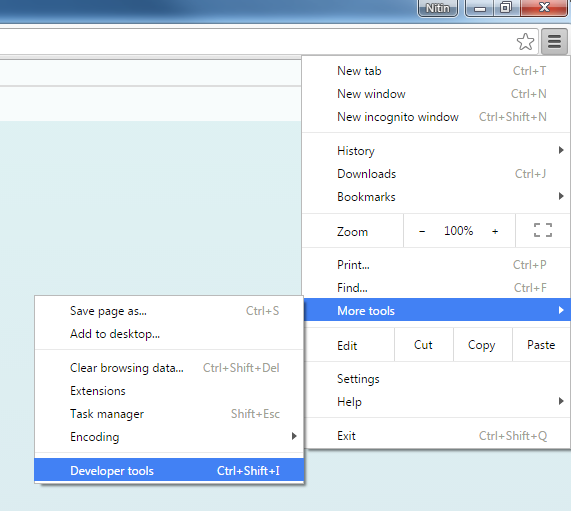
在浏览器中打开如下网址 http://localhost:8180/sapui5.amd.demo/
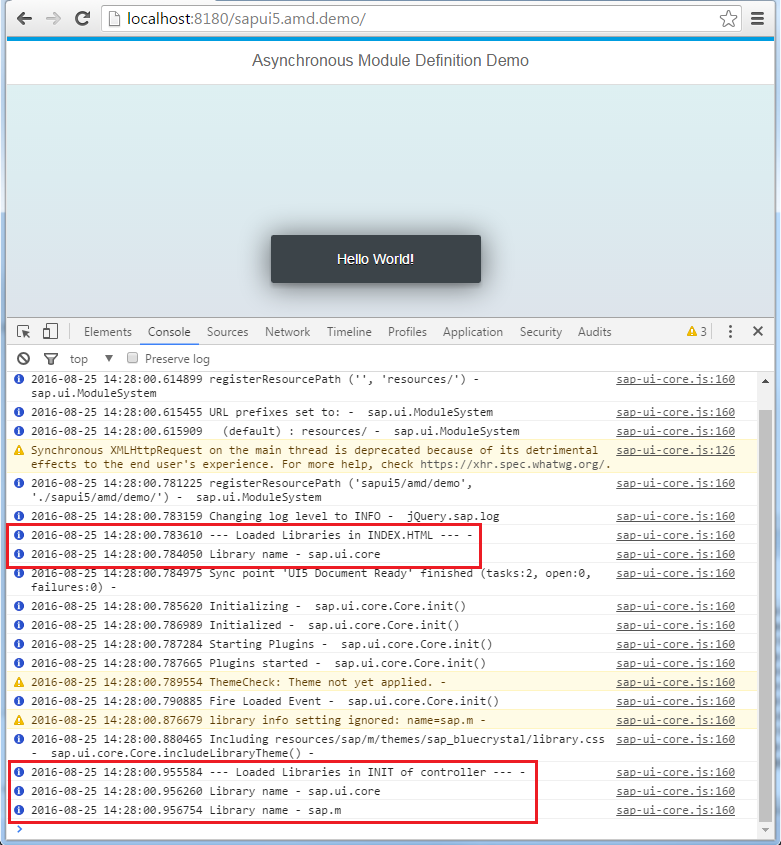
请根据您的服务器配置使用端口号。 加载 index.html 会简要显示 Hello World 消息,并将在开发人员工具控制台中打印日志。
从打印的 log 信息可以看到: sap.m 模块直到将模块依赖列表传递给 sap.ui.define之后才加载。
边栏推荐
- 在表格数据集上训练变分自编码器 (VAE)示例
- 开发那些事儿:如何通过EasyCVR平台获取监控现场的人流量统计数据?
- Alibaba Cloud International Edition uses ROS to build WordPress tutorial
- DOM Clobbering的原理及应用
- ACP-Cloud Computing By Wakin自用笔记(1)云计算基础、虚拟化技术
- JS 问号?妙用
- HCIP-R&S By Wakin自用笔记(1)企业网络高级解决方案
- The upgrade of capacity helps the flow of computing power, the acceleration moment of China's digital economy
- CIFAR发布《AI伦理的文化:研讨会报告》【附下载】
- Literature Review on Involution of College Students
猜你喜欢
在线生成接口文档
EasyCVR calls the cloud recording API and returns an error and no recording file is generated. What is the reason?

Homework 8.3 Thread Synchronization Mutex Condition Variables
EuROC dataset format and related codes
DOM Clobbering的原理及应用
通配符SSL证书不支持多域名吗?
老电脑怎么重装系统win10
浅谈web网站架构演变过程
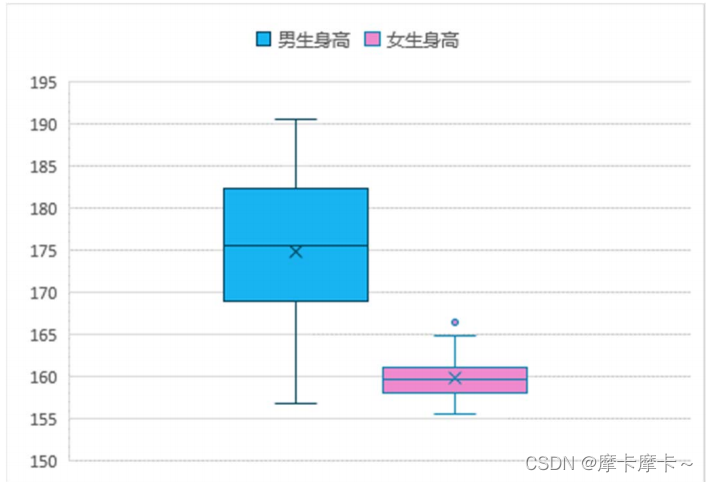
用Excel绘制统计图

八一建军节 | 致敬中国人民解放军
随机推荐
EuROC dataset format and related codes
LVS+Keepalived群集
智能视频监控平台EasyCVR如何使用接口批量导出iframe地址?
unity中实现ue眼球的渲染
测试工程师如何突破职业瓶颈?
Flink/Scala - Storing data with RedisSink
Flask框架实现注册加密功能详解【Flask企业课学习】
C#爬虫之通过Selenium获取浏览器请求响应结果
ACP-Cloud Computing By Wakin自用笔记(1)云计算基础、虚拟化技术
Usage of collect_list in Scala105-Spark.sql
Develop those things: How to obtain the traffic statistics of the monitoring site through the EasyCVR platform?
【CCIG 2022】视觉大模型论坛
DHCP&OSPF组合实验演示(Huawei路由交换设备配置)
报道称任天堂在2023年3月前不会推出任何新硬件产品
网站设计师:Nicepage 4.15 Crack By Xacker
BigDecimal 使用注意!!“别踩坑”
server
【web自动化测试】Playwright快速入门,5分钟上手
Go 言 Go 语,一文看懂 Go 语言文件操作
2019 Haidian District Youth Programming Challenge Activity Elementary Group Rematch Test Questions Detailed Answers