当前位置:网站首页>Wechat applet guides users to add applet animation page
Wechat applet guides users to add applet animation page
2022-06-23 15:22:00 【Susu is little Susu】
1、 Realization effect
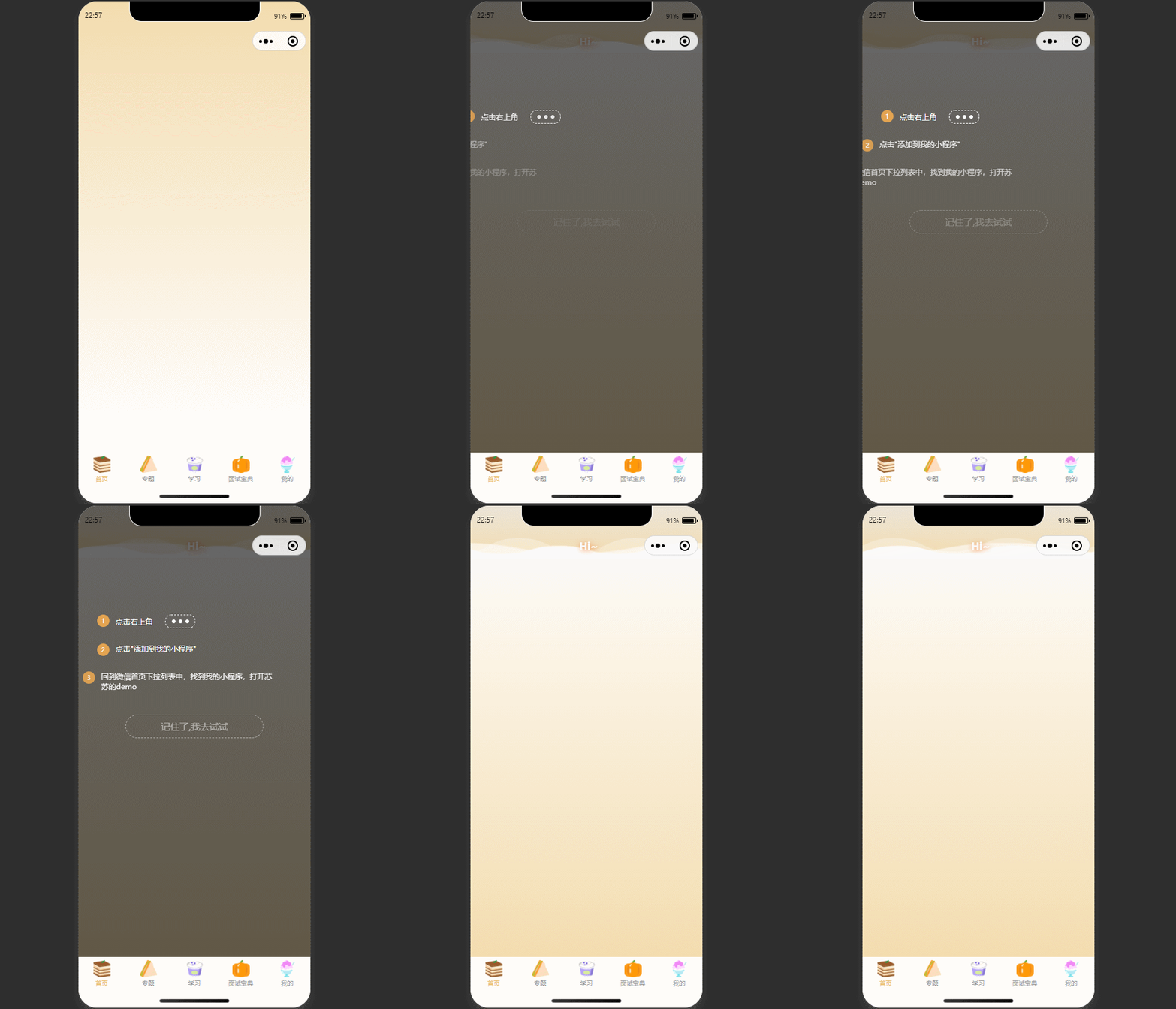
2. Realization principle
2.1 Animation effect
css Animation :animation
animation: name duration timing-function delay iteration-count direction fill-mode play-state;
Set the animation duration of the above three paragraphs , The last paragraph of text animation lasts the longest .
.show_box .show_item:nth-child(1) {

  animation: fadeIn-left 1s;
}

.show_box .show_item:nth-child(2) {

  animation: fadeIn-left 2s;
}

.show_box .show_item:nth-child(3) {

  animation: fadeIn-left 3s;
}
The animation effect is , from 0 To 100 The process of , Visibility by 0 To 1(opacity),translate3d Of x The direction is determined by -100% To 0(transform).
from {

    opacity          : 0;
    -webkit-transform: translate3d(-100%, 0, 0);
    transform        : translate3d(-100%, 0, 0);
  }

  to {

    opacity          : 1;
    -webkit-transform: translate3d(0, 0, 0);
    transform        : translate3d(0, 0, 0);
  }
2.2 Determine whether to pop-up the frame
wx.getStorageSync(‘key’)
wx.setStorageSync(“key”, value); What needs to be stored . Only native types are supported 、Date、 And be able to pass JSON.stringify Serialized objects
When the user first enters the applet page , Pop up boot add applet , When the user clicks ‘ Keep sth. in mind , I'll try ’ Button , In an key Value to the page cache , When the user next enters , First, determine whether there is this in the cache key, If you have any key Value does not show the boot popup , Otherwise, the user will be prompted .
3. Implementation code
<view hidden="{
    {isShow}}">
  <view class="mask"></view>
  <view class="show_box">
    <view class="flex show_item">
      <view class="box_index">1</view>
      <view class="flex-row"> Click on the top right corner
        <view class="show_jiao flex-row">
          <view></view>
        </view>
      </view>
    </view>
    <view class="flex show_item">
      <view class="box_index">2</view>
      <view> Click on " Add to my applet "</view>
    </view>
    <view class="flex show_item">
      <view class="box_index">3</view>
      <view> Go back to the drop-down list on the wechat homepage , Find my applet , Open Susu's demo</view>
    </view>
    <view class="show_btn" catchtap="setEnter"> Keep sth. in mind , I'll try </view>
  </view>
</view>
.show_box {

  top       : 20%;
  position  : fixed;
  width     : 100%;
  z-index   : 1111;
  box-sizing: border-box;
  padding   : 30px;
  color     : #fff;
  font-size : 25rpx;
}

.show_box .show_item {

  margin-bottom: 50rpx;
}

.show_box .show_item:nth-child(1) {

  animation: fadeIn-left 1s;
}

.show_box .show_item:nth-child(2) {

  animation: fadeIn-left 2s;
}

.show_box .show_item:nth-child(3) {

  animation: fadeIn-left 3s;
}

.show_box .show_jiao {

  border        : 1px dashed #fff;
  width         : 95rpx;
  height        : 40rpx;
  margin-left   : 20px;
  text-align    : center;
  vertical-align: top;
  border-radius : 20rpx;
  font-size     : 30px;
}

.show_box .show_jiao view {

  width        : 13rpx;
  height       : 13rpx;
  background   : #fff;
  border-radius: 50%;
  box-shadow   : 22rpx 0rpx #fff, -22rpx 0 #fff;
  margin       : 0 auto;
}

.show_box .box_index {

  font-size    : 20rpx;
  flex-shrink  : 0;
  color        : #fff;
  line-height  : 40rpx;
  width        : 40rpx;
  height       : 40rpx;
  text-align   : center;
  border-radius: 50%;
  background   : #e4a451;
  margin-right : 20rpx;
}

.show_box .show_btn {

  border       : 1px dashed #fff;
  width        : 70%;
  animation    : fadeIn 7s;
  font-size    : 30rpx;
  line-height  : 72rpx;
  text-align   : center;
  border-radius: 44rpx;
  margin       : 12% auto 0 auto;
  color        : #fff;
}

/*  Animation  */


@-webkit-keyframes fadeIn-left {

  from {

    opacity          : 0;
    -webkit-transform: translate3d(-100%, 0, 0);
    transform        : translate3d(-100%, 0, 0);
  }

  to {

    opacity          : 1;
    -webkit-transform: none;
    transform        : none;
  }
}

@keyframes fadeIn-left {

  from {

    opacity          : 0;
    -webkit-transform: translate3d(-100%, 0, 0);
    transform        : translate3d(-100%, 0, 0);
  }

  to {

    opacity          : 1;
    -webkit-transform: translate3d(0, 0, 0);
    transform        : translate3d(0, 0, 0);
  }
}

@-webkit-keyframes fadeIn {

  from {

    opacity: 0;
  }

  to {

    opacity: 1;
  }
}

@keyframes fadeIn {

  from {

    opacity: 0;
  }

  to {

    opacity: 1;
  }
}

/*  Mask  */
.mask {

  position                   : fixed;
  z-index                    : 1000;
  top                        : 0;
  right                      : 0;
  left                       : 0;
  bottom                     : 0;
  background                 : rgba(0, 0, 0, .6);
  -webkit-transition-duration: .3s;
  transition-duration        : .3s;
}
Page({


  /** *  Initial data of the page  */
  data: {

    isShow: false
  },

  /** *  Life cycle function -- Monitor page loading  */
  onLoad(options) {

    let flag = wx.getStorageSync("hasEnter");
    if (flag) {

      this.setData({

        isShow: true
      })
    }
  },
  setEnter() {

    this.setData({

      isShow: true
    })
    wx.setStorageSync("hasEnter", true);
  },
})
4. More applet related , Official account Su Su bug, More applets demo, All in Su Su's code cloud If it helps you , Welcome to star+ subscribe !
边栏推荐
- MySQL高级语句一
- 如何解决 Iterative 半监督训练 在 ASR 训练中难以落地的问题丨RTC Dev Meetup
- MySQL advanced statement I
- k8s--部署单机版MySQL,并持久化
- JS垃圾回收
- Analysis of graphical level-1 programming problem of Electronic Society: cat and mouse
- 力扣解法匯總513-找樹左下角的值
- Print memory station information
- The new version of Alibaba Seata finally solves the idempotence, suspension and empty rollback problems of the TCC mode
- Logistics trade related
猜你喜欢

Tencent ECS failed to send email

2021-06-07

Gartner's latest report: development of low code application development platform in China

volatile~多线程下变量不可见

WebService接口发布和调用

如何解决 Iterative 半监督训练 在 ASR 训练中难以落地的问题丨RTC Dev Meetup
![[datahub] LinkedIn datahub learning notes](/img/ca/9c4a87d38155edd093cbb81d81ee81.png)
[datahub] LinkedIn datahub learning notes
General sequence representation learning in kdd'22 "Ali" recommendation system

labelme的JSON文件转成COCO数据集格式

2021-06-03
随机推荐
Volatile~ variables are not visible under multithreading
乐高宣布涨价,炒家更嗨皮了
Ie mode of selenium edge
2021-05-08
2021-05-08
WebService interface publishing and calling
Convert JSON file of labelme to coco dataset format
【DataHub】LinkedIn DataHub学习笔记
golang--判断字符串是否相等
Golang-- judge whether the strings are equal
2021-04-15
The principle of redis cache consistency deep analysis
【云驻共创】制造业企业如何建设“条码工厂”
力扣解法匯總513-找樹左下角的值
golang 重要知识:sync.Cond 机制
RF Analyzer Demo搭建
js的slice()和splice()
Analysis and solution of connection failure caused by MySQL using replicationconnection
Simple understanding of quick sort
这届文娱人,将副业做成了主业