当前位置:网站首页>Less than 40 lines of code to create a blocprovider
Less than 40 lines of code to create a blocprovider
2022-06-26 12:43:00 【Island manong @ official account with the same name】
Preface
We were right in the last one BLoC Made an overall introduction , I understand BLoC After the use of , I can't help feeling a little itchy , I have written several state management plug-ins , Can we use it BLoC I'll have one myself Flutter State management component , Used to build based on BLoC In response Flutter page . Do as you say , We name this state management component SimpleBlocProvider.
SimpleBlocProvider Definition
For this simple state management component SimpleBlocProvider, Because it needs to be placed in the component tree , So it must be a Widget, Because the data needs to be maintained internally , So we use StatefulWidget. wait ! It's not that it's not recommended to use StatefulWidget Do you ? We need to pay attention to , If the component maintains its own state , It doesn't affect external components, that's no problem . for instance , When a button is clicked, it will have a click effect , This actually needs to be used StatefulWidget Realization , But this behavior will only cause self refresh , That's no problem .  secondly , We're going to put the original UI Component construction
 SimpleBlocProvider In the to , Then you need to define a Build components builder Parameters , All original UI Components are built by this builder To complete , At the same time the builder It should carry the latest status data , To update UI Components . and , The type of status data cannot be determined , So the builder It should be back Widget Generic functions of , The definition is as follows .
typedef StateBuilder<T> = Widget Function(T state);
For example, display counter Text, We could write it this way :
SimpleBlocProvider<int> (
  builder: (count) => Text('$count'),
)
Only have builder Is not enough , We need to Bloc Logical components , In order to obtain the latest status data from the logical component , Therefore, it is necessary to Bloc Logical components are also given as parameters SimpleBlocProvider. So we got it SimpleBlocProvider The basic definition of .
class SimpleBlocProvider<T> extends StatefulWidget {
  final StateBuilder<T> builder;
  final BlocBase<T> bloc;
  const SimpleBlocProvider(
      {Key? key, required this.builder, required this.bloc})
      : super(key: key);

  @override
  _SimpleBlocProviderState<T> createState() => _SimpleBlocProviderState<T>();
}
BLoC Refresh
To achieve BLoC Refresh , We need to monitor BLoC Changes in status data , We know from the last article that BLoC Is based on Stream Realized , about Stream, You can use it listen Method to monitor Stream Changes in stream data .listen The method is defined as follows :
 StreamSubscription<T> listen(void onData(T event)?,
      {Function? onError, void onDone()?, bool? cancelOnError});
therefore , We can do it in listen Of onData Call in setState You can refresh the interface . We need to cancel listening when the component is destroyed , So we have _SimpleBlocProviderState Define a property in _streamSubscription Storage listen Return value of method , And in dispose Cancel monitoring .
_streamSubscription = widget.bloc.stream.listen((data) {
  setState(() {
    _state = data;
  });
});

//

@override
void dispose() {
  _streamSubscription.cancel();
  super.dispose();
}
Next, it's easier , stay _SimpleBlocProviderState Of build Method to return builder Carry status data _state Build components .
@override
Widget build(BuildContext context) {
  return widget.builder(_state);
}
such , as long as BLoC The status data of has changed , Would pass listen Listen for updates SimpleBlocProvider Of _state, And refresh SimpleBlocProvider Components , So it updates builder Built components . The complete code is as follows :
typedef StateBuilder<T> = Widget Function(T state);

class SimpleBlocProvider<T> extends StatefulWidget {
  final StateBuilder<T> builder;
  final BlocBase<T> bloc;
  const SimpleBlocProvider(
      {Key? key, required this.builder, required this.bloc})
      : super(key: key);

  @override
  _SimpleBlocProviderState<T> createState() => _SimpleBlocProviderState<T>();
}

class _SimpleBlocProviderState<T> extends State<SimpleBlocProvider<T>> {
  late T _state;
  late StreamSubscription<T> _streamSubscription;

  @override
  void initState() {
    _state = widget.bloc.state;
    super.initState();
    _streamSubscription = widget.bloc.stream.listen((data) {
      setState(() {
        _state = data;
      });
    });
  }

  @override
  Widget build(BuildContext context) {
    return widget.builder(_state);
  }

  @override
  void dispose() {
    _streamSubscription.cancel();
    super.dispose();
  }
}
Less than in all 40 A line of code is done !
SimpleBlocProvider application
Now let's see how to use , Let's start with a counter .
class CounterCubit extends Cubit<int> {
  CounterCubit({initial = 0}) : super(initial);

  void increment() => emit(state + 1);
  void decrement() => emit(state - 1);

  @override
  void onChange(Change<int> change) {
    super.onChange(change);
  }
}

class SimpleBlocCounterPage extends StatelessWidget {
  final counter = CounterCubit();
  @override
  Widget build(BuildContext context) {
    return Scaffold(
      appBar: AppBar(
        title: Text('Bloc  Counter '),
      ),
      body: Center(
        child: SimpleBlocProvider<int>(
          builder: (count) => Text(
            '$count',
            style: TextStyle(
              fontSize: 32,
              color: Colors.blue,
            ),
          ),
          bloc: counter,
        ),
      ),
      floatingActionButton: FloatingActionButton(
        onPressed: () {
          counter.increment();
        },
        tooltip: ' Click to increase ',
        child: Icon(Icons.add),
      ),
    );
  }
}
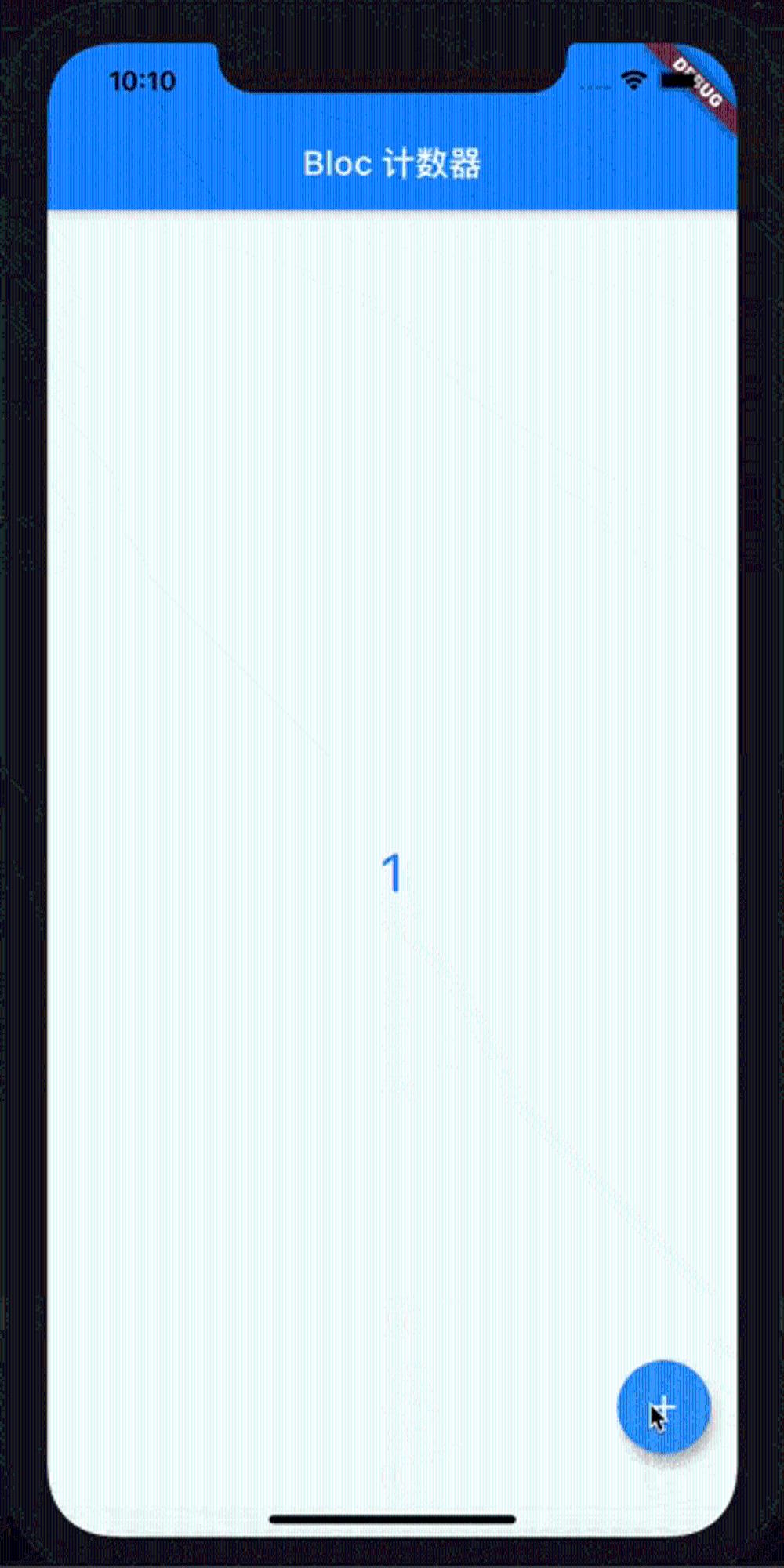
Is it the same as what we used before MobX,GetX Of GetBuilder Is very similar ? Let's look at custom classes , Let's have a simple one Person class , And then use Bloc Of event Try mode .
class Person {
  final String name;
  final String gender;

  const Person({required this.name, required this.gender});
}

abstract class PersonEvent {}

class UsingCnNameEvent extends PersonEvent {}

class UsingEnNameEvent extends PersonEvent {}

class PersonBloc extends Bloc<PersonEvent, Person> {
  PersonBloc(Person person) : super(person) {
    on<UsingCnNameEvent>(
        (event, emit) => emit(Person(name: ' Ma Nong on the island ', gender: ' male ')));
    on<UsingEnNameEvent>(
        (event, emit) => emit(Person(name: 'island-coder', gender: 'male')));
  }
}

class SimpleBlocCounterPage extends StatelessWidget {
  final personBloc = PersonBloc(Person(name: ' Ma Nong on the island ', gender: ' male '));
  @override
  Widget build(BuildContext context) {
    return Scaffold(
      appBar: AppBar(
        title: Text('Bloc  event '),
      ),
      body: Center(
        child: SimpleBlocProvider<Person>(
          builder: (person) => Text(
            ' full name :${person.name}, Gender :${person.gender}',
            style: TextStyle(
              fontSize: 22,
              color: Colors.blue,
            ),
          ),
          bloc: personBloc,
        ),
      ),
      floatingActionButton: FloatingActionButton(
        onPressed: () {
          personBloc.add(UsingEnNameEvent());
        },
        tooltip: ' Click to increase ',
        child: Icon(Icons.add),
      ),
    );
  }
}
It's OK to run .
summary
This article introduces the use of BLoC Implement simple state management SimpleBLocProvider, This custom BlocProvider Less than 40 That's ok , Of course, there is still a gap between this code and actual use , However, it is helpful to understand the implementation mechanism of these third-party state management plug-ins . Next we will use the official flutter_bloc In terms of plug-ins, specific application examples . 
边栏推荐
- imagecopymerge
- JS get the current screen height method and listen for DOM elements to enter the viewport
- UDP protocol details [easy to understand]
- Spark-day02-core programming-rdd
- Laravel+gatewayworker completes the im instant messaging and file transfer functions (Chapter 4: server debugging errors)
- [graduation season · advanced technology Er] I remember the year after graduation
- 2022 edition of China's cotton chemical fiber printing and dyeing Market Status Investigation and Prospect Forecast Analysis Report
- PHP generate order number
- Comparison of latest mobile phone processors in 2020 (with mobile phone CPU ladder diagram)
- VMware virtual machine bridging mode can not access the campus network "suggestions collection"
猜你喜欢

Spark-day02-core programming-rdd

Several rare but useful JS techniques

老司机总结的12条 SQL 优化方案(非常实用)

Scala-day06- pattern matching - Generic

dried food! Yiwen will show you SD card, TF card and SIM card!

TSMC Samsung will mass produce 3nm chips in 2022: will the iPhone be the first?

"Pinduoduo and short video speed version", how can I roast!

快手实时数仓保障体系研发实践

深入解析 MySQL binlog

Tiger DAO VC产品正式上线,Seektiger生态的有力补充
随机推荐
Question B of 2016 Sichuan Ti Cup Electronic Design Competition
Is it safe to open a securities account
Comparison of latest mobile phone processors in 2020 (with mobile phone CPU ladder diagram)
Assembly language (7) operation instruction
Build Pikachu shooting range and introduction
[probability theory] conditional probability, Bayesian formula, correlation coefficient, central limit theorem, parameter estimation, hypothesis test
Learning directory
PHP calculates excel coordinate values, starting with subscript 0
[graduation season · advanced technology Er] I remember the year after graduation
JS how to judge when data contains integer and floating-point types. Floating-point decimals retain two digits after the decimal point
MySQL optimization - index (what is an index?)
2022 edition of investment analysis and "fourteenth five year plan" development prospect forecast report of China's switchgear industry
Laravel uses find_ IN_ The set() native MySQL statement accurately queries whether a special string exists in the specified string to solve the problem that like cannot be accurately matched. (resolve
由错误<note: candidate expects 1 argument, 0 provided>引发的思考
The transformation of enterprise customers' digital assets needs to suit the case
Microservice governance (nocas)
PHP unit conversion
JS get the current screen height method and listen for DOM elements to enter the viewport
2022 edition of China's medical robot industry investment status investigation and prospect dynamic analysis report
On the use of protostaff [easy to understand]