当前位置:网站首页>Transmission and response of events and use cases
Transmission and response of events and use cases
2022-06-12 13:40:00 【Li. CQ】
Where response chains are used in a project
1. stay scrollView Add slider
// -  Scheme 1
-(BOOL)pointInside:(CGPoint)point withEvent:(UIEvent *)event{

    if (CGRectContainsPoint(self.subView.frame, point)) {
        self.scrollEnabled = NO;
        return YES;
    }
    self.scrollEnabled = YES;
    return YES;
}

// -  Option two
-(UIView *)hitTest:(CGPoint)point withEvent:(UIEvent *)event{
    if (CGRectContainsPoint(self.subView.frame, point)) {
        self.scrollEnabled = NO;
        return [super hitTest:point withEvent:event];
    }
    self.scrollEnabled = YES;
    return [super hitTest:point withEvent:event];
}

// -  Option three
- (UIView *)hitTest:(CGPoint)point withEvent:(UIEvent *)event {
   UIView *view = [super hitTest:point withEvent:event];
   if([view isKindOfClass:[UISlider class]]) {
       self.scrollEnabled = NO;
   } else {
      self.scrollEnabled = YES;
   }
   return view;
}
2. Set up scrollview Do the tab view On the first option, you can slide back to the left
// -  Set up  scrollview  Do the tab  view  On the first option, you can slide back to the left

-(UIView *)hitTest:(CGPoint)point withEvent:(UIEvent *)event{

    if ([[super hitTest:point withEvent:event] isKindOfClass:[UIControl class]]) {
        return [super hitTest:point withEvent:event];
    }else{
        if ((self.contentOffset.x == 0) && (point.x < 30)) {
            return nil;
        }
         return [super hitTest:point withEvent:event];
    }

}
3. Let events penetrate view
// -  Set events to penetrate  view
@implementation DYContainerBgView
/**  Through events  */
- (UIView *)hitTest:(CGPoint)point withEvent:(UIEvent *)event{
    if ([super hitTest:point withEvent:event] == self) return nil;
    return [super hitTest:point withEvent:event];
}

@end
4. Resolution of event transmission
- A term is used to explain
- events : The order from top to bottom (UIApplication–>UIWindow–> Recursively find the most suitable View), That is, the search process from parent control to child control ( The most important thing in event transmission is to find the right View To receive events , Find from parent view to child view , Same parent view , Add to parent view from behind To First add to view The order of traversal );
- Event response : The order from bottom to top ( Realization View Of touchesBegan Method , If it's time to View Unable to handle event , Is passed up to its parent control ), Pass from child control to parent control ( Find the right View This... Will then be called View Of touches Method to handle specific events , If the current view Do not respond to touch Method , Just find the last responder (superviwe, perhaps view The controller ) To respond to events );
// -  Sample code  :
- (void)viewDidLoad {
    [super viewDidLoad];

    QGView *v1 = [[QGView alloc]initWithFrame:CGRectMake(90, 90, 200, 200)];
    v1.backgroundColor = [UIColor redColor];
    v1.testStr = @"v1";
    [self.view addSubview:v1];

    QGView *v2 = [[QGView alloc]initWithFrame:CGRectMake(90, 90, 180, 180)];
    v2.backgroundColor = [UIColor greenColor];
    v2.testStr = @"v2";
    [self.view addSubview:v2];

    QGView *v3 = [[QGView alloc]initWithFrame:CGRectMake(90, 90, 160, 160)];
    v3.testStr = @"v3";
    v3.backgroundColor = [UIColor redColor];
    [self.view addSubview:v3];

    QGView *v31 = [[QGView alloc]initWithFrame:CGRectMake(0, 0, 120, 120)];
    v31.backgroundColor = [UIColor greenColor];
    v31.testStr = @"v31";
    [v3 addSubview:v31];

    QGView *v32 = [[QGView alloc]initWithFrame:CGRectMake(0, 0, 100, 100)];
    v32.testStr = @"v32";
    v32.backgroundColor = [UIColor redColor];
    [v3 addSubview:v32];

    QGView *v33 = [[QGView alloc]initWithFrame:CGRectMake(0, 0, 80, 80)];
    v33.backgroundColor = [UIColor greenColor];
    v33.testStr = @"v33";
    [v3 addSubview:v33];
}
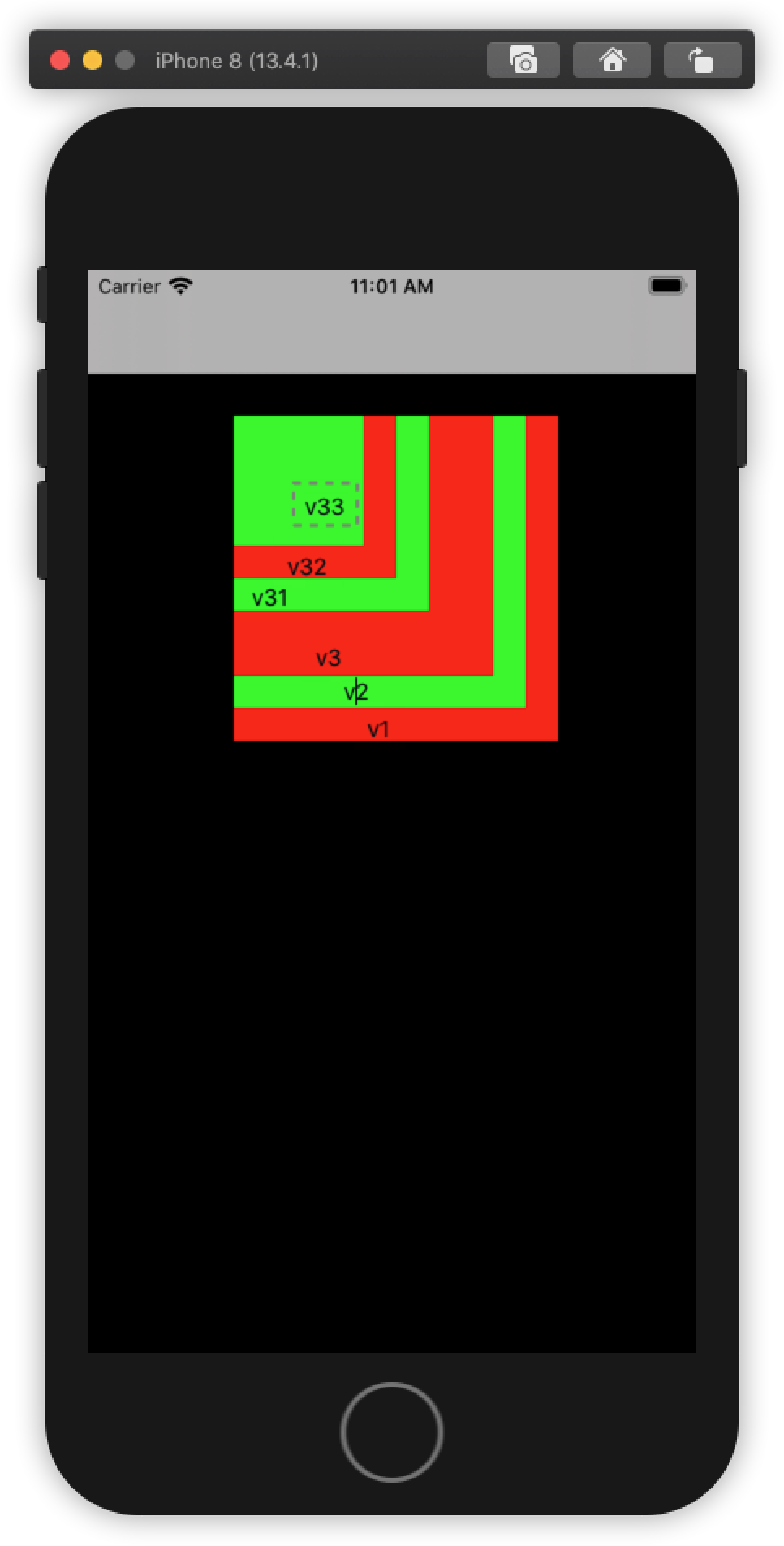
stay self.view.subView Array , Added after view, The more the element next to the array , stay view The higher the level in , The closer to the user
// -  test  :
1.  Click on v3
2020-05-11 11:12:54.027766+0800 Demo_001[2008:56637] pointInside v3, ruturn : 1
2020-05-11 11:12:54.027995+0800 Demo_001[2008:56637] pointInside v33, ruturn : 0
2020-05-11 11:12:54.028168+0800 Demo_001[2008:56637] hitTest v33, ruturn : (null)
2020-05-11 11:12:54.028309+0800 Demo_001[2008:56637] pointInside v32, ruturn : 0
2020-05-11 11:12:54.028438+0800 Demo_001[2008:56637] hitTest v32, ruturn : (null)
2020-05-11 11:12:54.028569+0800 Demo_001[2008:56637] pointInside v31, ruturn : 0
2020-05-11 11:12:54.028674+0800 Demo_001[2008:56637] hitTest v31, ruturn : (null)
2020-05-11 11:12:54.029436+0800 Demo_001[2008:56637] hitTest v3, ruturn : <QGView: 0x7f9bede05ad0; frame = (90 90; 160 160); layer = <CALayer: 0x600003ec0780>>

2.  Click on v33
2020-05-11 11:13:54.777979+0800 Demo_001[2008:56637] pointInside v3, ruturn : 1
2020-05-11 11:13:54.778181+0800 Demo_001[2008:56637] pointInside v33, ruturn : 1
2020-05-11 11:13:54.778399+0800 Demo_001[2008:56637] hitTest v33, ruturn : <QGView: 0x7f9bede0ca40; frame = (0 0; 80 80); layer = <CALayer: 0x600003ec0aa0>>
2020-05-11 11:13:54.778587+0800 Demo_001[2008:56637] hitTest v3, ruturn : <QGView: 0x7f9bede0ca40; frame = (0 0; 80 80); layer = <CALayer: 0x600003ec0aa0>>

3.  Click on v31
2020-05-11 11:15:13.166848+0800 Demo_001[2008:56637] pointInside v3, ruturn : 1
2020-05-11 11:15:13.167039+0800 Demo_001[2008:56637] pointInside v33, ruturn : 0
2020-05-11 11:15:13.167145+0800 Demo_001[2008:56637] hitTest v33, ruturn : (null)
2020-05-11 11:15:13.167275+0800 Demo_001[2008:56637] pointInside v32, ruturn : 0
2020-05-11 11:15:13.167396+0800 Demo_001[2008:56637] hitTest v32, ruturn : (null)
2020-05-11 11:15:13.167503+0800 Demo_001[2008:56637] pointInside v31, ruturn : 1
2020-05-11 11:15:13.167669+0800 Demo_001[2008:56637] hitTest v31, ruturn : <QGView: 0x7f9bede08420; frame = (0 0; 120 120); layer = <CALayer: 0x600003ec0a40>>
2020-05-11 11:15:13.167813+0800 Demo_001[2008:56637] hitTest v3, ruturn : <QGView: 0x7f9bede08420; frame = (0 0; 120 120); layer = <CALayer: 0x600003ec0a40>>

4.  Click on v1
2020-05-11 11:16:01.172527+0800 Demo_001[2008:56637] pointInside v3, ruturn : 0
2020-05-11 11:16:01.172711+0800 Demo_001[2008:56637] hitTest v3, ruturn : (null)
2020-05-11 11:16:01.172835+0800 Demo_001[2008:56637] pointInside v2, ruturn : 0
2020-05-11 11:16:01.172931+0800 Demo_001[2008:56637] hitTest v2, ruturn : (null)
2020-05-11 11:16:01.173068+0800 Demo_001[2008:56637] pointInside v1, ruturn : 1
2020-05-11 11:16:01.173249+0800 Demo_001[2008:56637] hitTest v1, ruturn : <QGView: 0x7f9bede06520; frame = (90 90; 200 200); layer = <CALayer: 0x600003ec01e0>>
Conclusion : Current vc All of the subView, Call from outside to inside ; Find it from view Of subView in , Call from outside to inside
边栏推荐
- torch_ About the geometric Mini batch
- Successfully rated Tencent t3-2, 10000 word parsing
- view的子视图的递归
- 播放器屏幕方向方案
- [brush title] probability of winning a draw
- Codeforces 1637 F. Towers - thinking, DFS
- AWLive 结构体的使用
- Symbolic constant, const qualifier
- Octopus network progress monthly report | may 1-May 31, 2022
- Codeforces 1629 A. download more RAM - simple greed
猜你喜欢

Resume NFT platform trustrecruit joined Octopus network as a candidate application chain

Qt5 plug-in production

Implementing pytorch style deep learning framework similartorch with numpy

torch_ About the geometric Mini batch

Codeforces 1637 D. yet another minimization problem - Mathematics, DP
![[wustctf2020] selfie score query -1](/img/dc/47626011333a0e853be87e492d8528.png)
[wustctf2020] selfie score query -1

Pytoch official fast r-cnn source code analysis (I) -- feature extraction

Actual combat | realizing monocular camera ranging by skillfully using pose solution

Cocoapods的相关知识点

Innovation training (XI) summary of some bugs in the development process
随机推荐
D1 Nezha Development Board understands the basic startup and loading process
1005: estimation of the earth's population carrying capacity
Codeforces 1637 D. yet another minimization problem - Mathematics, DP
简历 NFT 平台 TrustRecruit 加入章鱼网络成为候选应用链
Django note 21: querying databases using native SQL
Symbolic constant, const qualifier
看完这一篇就够了,web中文开发
Does jupyternotebook have a Chinese character database. Can you recognize handwritten Chinese in deep learning
Implementing pytorch style deep learning framework similartorch with numpy
Experience and learning path of introductory deep learning and machine learning
Application of short circuit expression (||) in C language
2068: [example 2.6] chicken and rabbit in the same cage
Codeforces 1637 B. mex and array - reading, violence
C#DBHelper_ FactoryDB_ GetConn
2064: [example 2.1] exchange value
Stm32f1 and stm32cubeide programming examples - device driver -eeprom-at24c256 driver
1001:Hello,World
view的子视图的递归
Innovation training (XII) project summary
1003: align output