当前位置:网站首页>D2DEngine食用教程(4)———绘制文本
D2DEngine食用教程(4)———绘制文本
2022-07-28 03:06:00 【dgaf】
D2DEngine库链接:Direct2D的C++自制辅助库———D2DEngine (持续更新)
目标:绘制文本
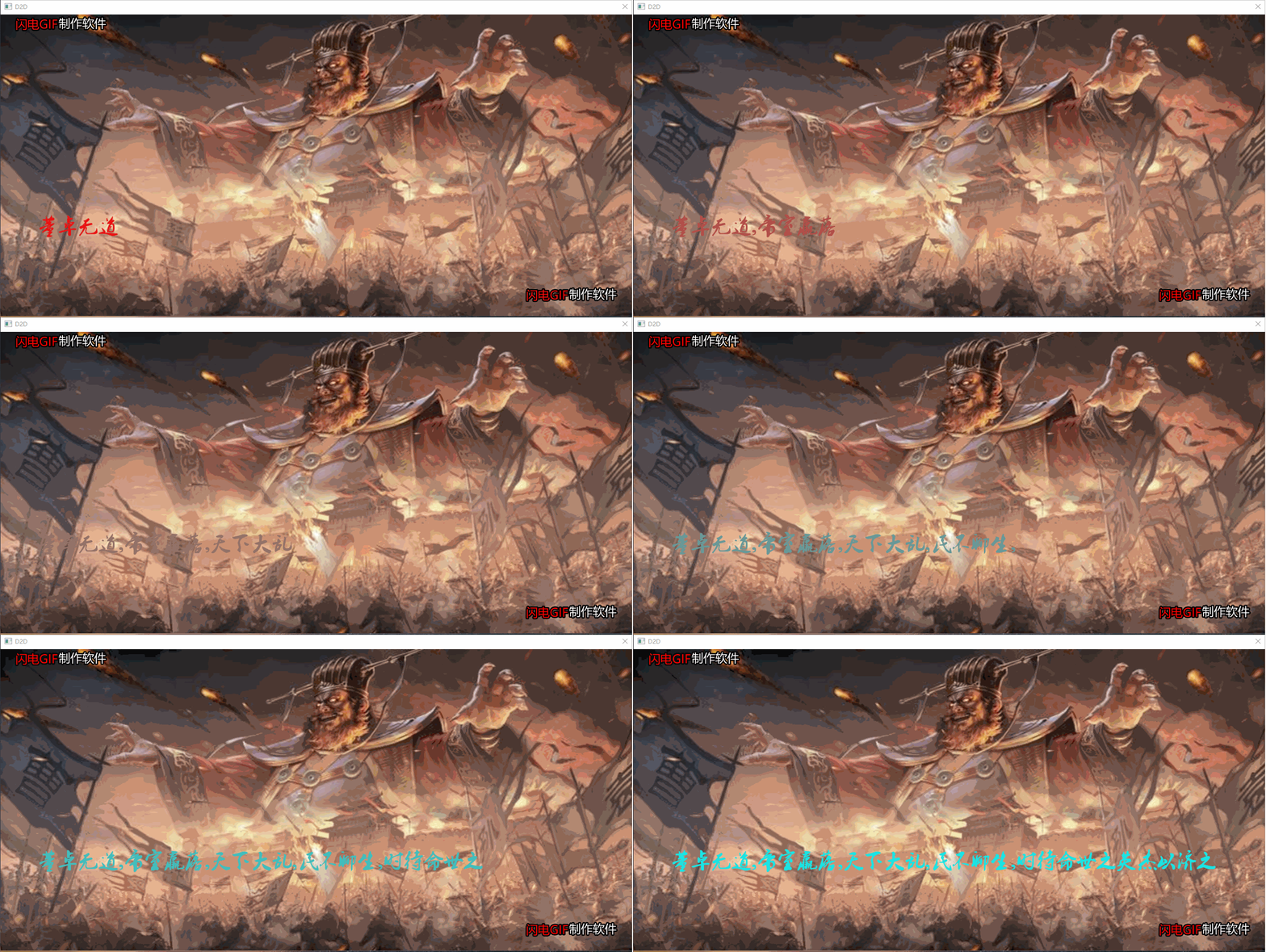
因为没有实现GIF动图导出所以只能用别家的软件…
不多说,上代码
—————————————————————————————————————————————————————
| D2DEngine成员函数 | 作用 |
|---|---|
| bool ChangeTextFormat(FontSize,TextColor,FontFamilyName); | 改变文本样式,设置单色文本,参数:FontSize字体大小,TextColor字体颜色,FontFamilyName字体簇,如"微软雅黑"“宋体"等,默认"新宋体”。如果字体簇找不到会使用系统默认字体 (不会发生COM错误) |
| void DrawText(text,x,y,width,height); | (渲染) 绘制单色文本,参数:text文本,x,y 相对于渲染目标的开始坐标,width文本绘制区域的的宽,height文本绘制区域的高,如果文本超过绘制区域,会向下或向右开辟空间绘制 |
D2DDrawText.CPP
#include<windows.h>

#include"D2D_DRAW.h"

using namespace D2D1;


LRESULT CALLBACK CallBackFunc(HWND hwnd, UINT message, WPARAM wParam, LPARAM lParam)
{

	switch (message)
	{


	case WM_DESTROY:
		PostQuitMessage(0);
		break;

	default:
		return DefWindowProc(hwnd, message, wParam, lParam);
	}

	return 0;
}


int WINAPI WinMain(HINSTANCE hin, HINSTANCE, LPSTR, int CmdShow)
{


	MSG msg = {
    };
	WNDCLASSEX wcex = {
    };

	memset(&wcex, 0, sizeof(wcex));
	wcex.cbSize = sizeof(WNDCLASSEX);
	wcex.lpfnWndProc = CallBackFunc;
	wcex.lpszClassName = L"D2D";
	wcex.hInstance = hin;
	wcex.style = CS_GLOBALCLASS;
	wcex.hbrBackground = (HBRUSH)GetStockObject(NULL_BRUSH);

	RegisterClassEx(&wcex);

	HWND hwnd = CreateWindowW(wcex.lpszClassName, L"D2D",
		WS_OVERLAPPED | WS_SYSMENU,
		0, 0, 900, 554,
		nullptr,
		nullptr,
		hin,
		nullptr
	);


	ShowWindow(hwnd, CmdShow);


	D2DEngine* Engine = new D2DEngine; //创建D2DEngine对象

	Picture Pic(L"率土之滨.jpeg"); //创建图片对象

	Engine->Initialize(hwnd); //用句柄初始化D2DEngine

	Engine->TransformPictureIntoBitmap(Pic);  //转换图片

	Engine->BeginDraw(); //开始渲染

	Engine->DrawPicture(Pic, 0, 0, 900, 554); //先绘制图片

	Engine->ChangeTextFormat(40, ColorF::White,L"叶根友毛笔行书2.0版");
	//改变文本样式,字体大小为40,颜色为白色,字体簇(家族)为"叶根友毛笔行书2.0版"

	Engine->Drawtext(L"率土之滨,莫非王臣", 400, 100, 400, 100);
	//在 (400,100,800,200) 的区域绘制文字,使文字不被图片覆盖

	Engine->EndDraw(); //停止渲染


	while (GetMessage(&msg, NULL, 0, 0) > 0)
	{

		TranslateMessage(&msg);
		DispatchMessage(&msg);
	}

	return msg.wParam;
}

D2DDrawText2.CPP
#include<windows.h>
#include<string>
#include<thread> //线程库

#include"D2D_DRAW.h"

using namespace std;
using namespace D2D1;


D2DEngine* Engine;  //全局D2DEngine,以便子线程能使用
Picture Pic(L"太师乱汉.jpeg");  //创建图片对象

void D2DThread();  //提供子线程运行的函数


LRESULT CALLBACK CallBackFunc(HWND hwnd, UINT message, WPARAM wParam, LPARAM lParam)
{

	switch (message)
	{


	case WM_DESTROY:
		PostQuitMessage(0);
		break;

	default:
		return DefWindowProc(hwnd, message, wParam, lParam);
	}

	return 0;
}


int WINAPI WinMain(HINSTANCE hin, HINSTANCE, LPSTR, int CmdShow)
{


	MSG msg = {
    };
	WNDCLASSEX wcex = {
    };

	memset(&wcex, 0, sizeof(wcex));
	wcex.cbSize = sizeof(WNDCLASSEX);
	wcex.lpfnWndProc = CallBackFunc;
	wcex.lpszClassName = L"D2D";
	wcex.hInstance = hin;
	wcex.style = CS_GLOBALCLASS;
	wcex.hbrBackground = (HBRUSH)GetStockObject(NULL_BRUSH);

	RegisterClassEx(&wcex);

	HWND hwnd = CreateWindowW(wcex.lpszClassName, L"D2D",
		WS_OVERLAPPED | WS_SYSMENU,
		0, 0, 1280, 642,
		nullptr,
		nullptr,
		hin,
		nullptr
	);


	ShowWindow(hwnd, CmdShow);


	Engine = new D2DEngine; //创建D2DEngine对象

	Engine->Initialize(hwnd); //用句柄初始化D2DEngine

	Engine->TransformPictureIntoBitmap(Pic);  //转换图片

	thread thread1(D2DThread); //创建子线程

	thread1.detach();  //不阻塞主线程,让子线程单独运行


	while (GetMessage(&msg, NULL, 0, 0) > 0)
	{

		TranslateMessage(&msg);
		DispatchMessage(&msg);
	}

	return msg.wParam;
}


void D2DThread()
{

	wstring text(L"董卓无道,帝室羸落,天下大乱,民不聊生,时待命世之英杰以济之");

	float color[3] = {
     1.0f,0.0f,0.0f }; //字体颜色


	for(size_t i = 0 ; i < text.size(); i++)
	{

		color[0] -= 0.03f;
		color[1] += 0.03f;
		color[2] += 0.03f;

		Engine->BeginDraw(); //开始渲染

		Engine->DrawPicture(Pic, 0, 0, 1280, 642); //先绘制图片

		Engine->ChangeTextFormat(40, color, L"叶根友毛笔行书2.0版");
		//改变文本样式,字体大小为40,颜色为白色,字体簇(家族)为"叶根友毛笔行书2.0版"

		Engine->Drawtext(&text.substr(0,i+1)[0],
		75, 400, 1200, 100);
		//在 (75,400,1200,100) 的区域绘制文字,使文字不被图片覆盖

		Engine->EndDraw(); //停止渲染

		Sleep(200);  //停止200毫秒
	}
}

注意:由于我们使用了多线程,当我们在程序运行时单击窗口,窗口不会卡住无响应,这是因为绘制过程放到了另一个单独运行的线程中,使得应用程序仍有空间处理窗口消息。不过你会发现,多次编译这段代码会报错,这是因为C++的标准线程库与Direct2D不兼容,导致临界区资源冲突,之后我们会用微软的线程库为D2DEngine增加支持多线程的特性,使其渲染过程能完美兼容。
喜欢的点下赞吧
边栏推荐
- 颜色的识别方法和探索 基于matlab
- Blue Bridge Cup: the ninth - "lantern controller"
- 什么是虚函数?
- ThreadLocal usage scenario
- Unity简单实现对话功能
- C#中关闭窗体的四种方法
- CF 7月25日-7月31日做题记录
- [uni app advanced practice] take you hand-in-hand to learn the development of a purely practical complex project 2/100
- Alibaba cloud international email service package purchase process
- 【R语言】环境指定删除 rm函数
猜你喜欢

Color recognition method and exploration based on MATLAB

机器人开发--丝杠与导轨

"Introduction to engineering electromagnetic field" after class exercises with answers

Exness: Japanese prices rose and incomes fell, with the pound / yen breaking 165
![[2022 Niuke Game 2 J question link with arithmetic progress] three part set three part / three part extreme value / linear equation fitting least square method](/img/4f/56033956739971d821637ae54be1bd.png)
[2022 Niuke Game 2 J question link with arithmetic progress] three part set three part / three part extreme value / linear equation fitting least square method

「运维有小邓」网络设备监控

超好看的Nteam官网PHP程序源码

Acid characteristics of MySQL transactions and example analysis of concurrency problems

Win11如何重命名音频设备

响应式高端网站模板源码图库素材资源下载平台源码
随机推荐
光年(Light Year Admin)后台管理系统模板
Shell: resource monitoring script and high load alarm
max_ pool2d(): argument ‘input‘ (position 1) must be Tensor, not NoneType
C#中关闭窗体的四种方法
每日练习------实现双色球的彩票功能。规则:从36个红球中随机选择不重复的6个数,从15个篮球中随机选择1个组成一注彩票。可以选择买多注。
ssm整合(整合配置)
静态博客搭建工具汇总
数字孪生技术驱动智能工厂减负赋能提升运维效益
How does win11 display fixed applications?
Shell: one click deployment PXE
《工程电磁场导论》课后习题附答案
力扣(LeetCode)208. 实现 Trie (前缀树)(2022.07.27)
在线问题反馈模块实战(十六):实现查详情功能
mysql存储过程 使用游标实现两张表数据同步数据
max_pool2d(): argument ‘input‘ (position 1) must be Tensor, not NoneType
什么是虚函数?
Win11输入法的选字框不见了怎么办?
C语言实现动态版本的通讯录
QML使用Layout布局时出现大量<Unknown File>: QML QQuickLayoutAttached: Binding loop detected for property循环绑定警告
整合SSM实现增删改查搜索